Adobe Commerce Optimizer Connector
The Adobe Commerce Optimizer Connector is a native, first-party integration between Adobe Commerce (cloud or on-premises) and Adobe Commerce Optimizer. It synchronizes catalog and pricing data from your Adobe Commerce stores into Adobe Commerce Optimizer so you can:
- Power AI-driven product discovery and recommendations
- Run high-performance headless storefronts (including Commerce storefronts powered by Edge Delivery Services)
- Analyze before and after KPIs and data-sync health in a single place
Adobe Commerce remains your system of record for products, prices, and catalog structure. Adobe Commerce Optimizer becomes your experience and merchandising layer, serving fast, relevant results to any connected storefront or channel.
Key benefits key-benefits
Connector architecture connector-architecture
The following diagram illustrates the end-to-end architecture for the connector, from Adobe Commerce through Adobe Commerce Optimizer and out to storefronts and checkout systems.
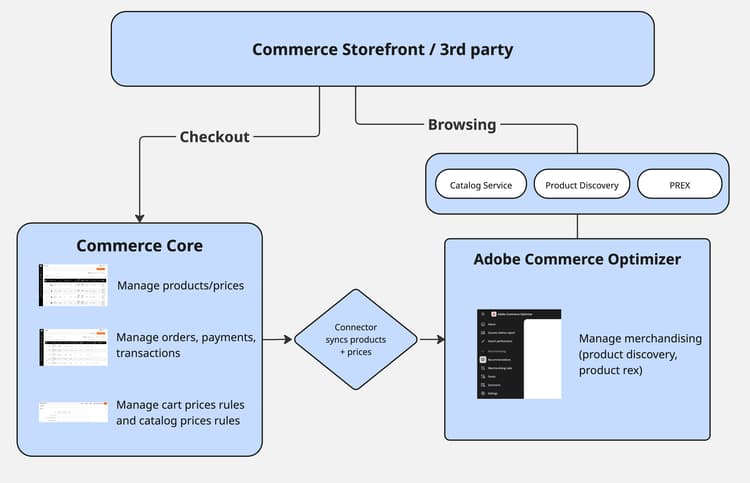
In this architecture:
- Adobe Commerce (on cloud or on-premises) is the system of record and feed producer
- The connector exports catalog, price, and category feeds
- Adobe Commerce Optimizer ingests and normalizes the feed data into catalog sources, price books, and catalog views
- Storefronts (Commerce storefront on Edge Delivery Services or custom headless builds) call Adobe Commerce Optimizer GraphQL APIs for discovery and recommendations and call Adobe Commerce or another connected third-party platform for cart and checkout operations
Built on SaaS Data Export, the connector maps collected feeds to the Catalog Data Ingestion API format and handles authentication and submission. See Connector sync pipeline for synchronization behavior, scope control, and error handling.
How the connector works with Adobe Commerce how-the-connector-works-with-adobe-commerce
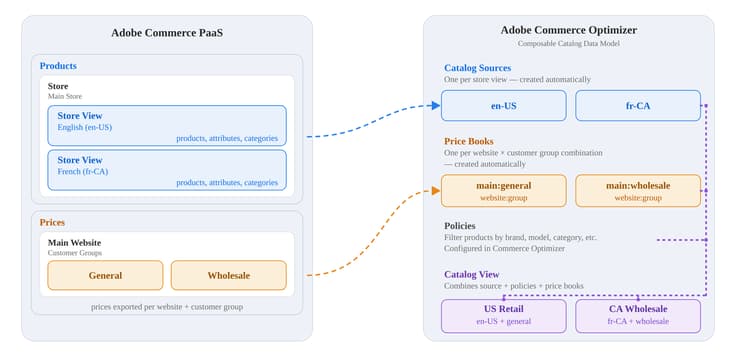
The Adobe Commerce Optimizer Connector supports B2C catalog synchronization. It syncs catalog and pricing feeds from an Adobe Commerce instance and maps store views, websites, and customer groups to catalog sources and price books in Adobe Commerce Optimizer. It does not sync B2B shared catalog or company-assignment configuration. After the sync, configure catalog views and policies in Adobe Commerce Optimizer Studio.
Base catalog mapping
The connector maps Adobe Commerce catalog data to the Adobe Commerce Optimizer catalog model:
- Store view → Catalog Sources — Each store view becomes a separate catalog source in Adobe Commerce Optimizer. That source includes localized product attributes and any store-view-specific data.
- Website → Price Books — Each Adobe Commerce website maps to one or more price books in Adobe Commerce Optimizer. Website pricing and customer group pricing export as price books and price entries.
- Customer group → Price book entries — Adobe Commerce customer group pricing appears as additional entries in the relevant price books.
After the connector syncs the catalog data, configure the merchandising model in Adobe Commerce Optimizer Studio. For example, configure:
- Catalog Views and Policies for region-, brand-, or customer-specific subsets
- Product Discovery for search, facets, and merchandising rules
- Product Recommendations
B2B connector behavior b2b-shared-catalog-projection-specification
The Adobe Commerce Optimizer Connector for B2B extends the base connector with a one-way projection of B2B shared catalog and company-assignment configuration into protected catalog experiences. Adobe Commerce remains the source of truth for catalog and pricing data; the B2B connector builds on the base catalog and pricing sync and manages its connector-generated projections.
For the projection mapping, runtime authorization flow, and protection boundary, see B2B shared catalog projection. For setup instructions, see Get started with the B2B connector.
Typical workflows typical-workflows
These workflows describe how teams set up and use the Adobe Commerce Optimizer Connector. For details on how to set up the integration and enable these workflows, see Get Started.
Initial setup and configuration initial-setup
See Configuration steps in the Get Started guide.
Ongoing data synchronization ongoing-sync
After the initial configuration, the connector supports:
- Full catalog sync for initial migration or large structural changes
- Delta syncs for ongoing updates when products or prices change
- Resync commands for synchronizing targeted feeds
For automated sync behavior, cron schedules, and error handling, see Connector sync pipeline. Before a full catalog sync or large update, use Estimate data volume and sync time to plan timing and avoid site disruption.
The following feeds are available for the Adobe Commerce Optimizer Connector:
products- products dataproductAttributes- metadata for product attributespriceBooks- price booksprices- product pricescategories- categories data
For additional details, see the following topics:
- Verify catalog data sync and manually resync connector feeds: Manage synchronization
- For Adobe Commerce CLI resync operations, see Sync feeds using the Commerce CLI
- Adobe Commerce Optimizer Connector modules and feed endpoints
- Field mapping for connector feeds
Configure merchandising and storefronts merchandising-storefronts
Once Adobe Commerce data is available in Adobe Commerce Optimizer, use Adobe Commerce Optimizer Studio to connect merchandising and storefront experiences to your synced catalog. Typical next steps include:
- Catalog views and policies — For the base connector, define region-, brand-, or customer-specific subsets and access rules from the Store setup menu. To restrict who can query a catalog view, see Private catalog views
- Product discovery and recommendations — Configure search, facets, merchandising rules, synonyms, and recommendation units in the Merchandising menu. Search and recommendation behavior is managed in Adobe Commerce Optimizer; Live Search and Product Recommendations settings in the Adobe Commerce Admin no longer apply to these flows
- Storefront connections — Point Commerce storefronts on Edge Delivery Services or third-party headless builds at the correct Adobe Commerce Optimizer tenant, catalog view, and Merchandising API endpoints. For custom headless integrations, see Headless storefront integration. For an example third-party integration, see the Salesforce Commerce Connector for Adobe Commerce Optimizer
- Checkout — Keep cart, checkout, order management, and customer accounts on Adobe Commerce or a connected third-party platform. Use App Builder and API Mesh for cart handoff when needed
For step-by-step configuration guidance, see Get Started and the Adobe Commerce Optimizer Merchandising tools.
Supported scenarios supported-scenarios
The base Adobe Commerce Optimizer Connector supports B2C merchants with Adobe Commerce on cloud and on-premises deployments who want to adopt Adobe Commerce Optimizer without rebuilding their backend.
The separate Adobe Commerce Optimizer Connector for B2B extends the base connector to synchronize shared catalog configuration and automatically project custom shared catalogs as private catalog views. For details, see B2B catalog projection.
Common use cases:
-
Storefront migration to Edge Delivery
Keep your existing Adobe Commerce backend, move PLP/Search/PDP to Edge Delivery Services storefronts powered by Adobe Commerce Optimizer. -
Scaling catalog and search performance
Offload heavy catalog indexing and search to Adobe Commerce Optimizer SaaS (Software as a Service) services while maintaining product and price ownership in Adobe Commerce.
Responsibilities and implementation prerequisites responsibilities-prerequisites
Adobe Commerce is the system of record for products, pricing, and customer groups. Make changes in Adobe Commerce, and the connector syncs them to Adobe Commerce Optimizer.
Adobe Commerce Optimizer is responsible for:
- Catalog modeling (catalog sources, price books, catalog views, policies)
- Product discovery and recommendations
- Storefront metrics, data-sync dashboards, and success metrics reports
The connector does not:
- Modify Adobe Commerce cart, checkout, or order flows
- Automatically provision storefront projects (Commerce Storefront / Edge Delivery Services tooling handles that)
Before you begin:
- Verify that Adobe Commerce meets the minimum version and Adobe Commerce Optimizer Connector requirements. See Get Started for details.
- Ensure that you have IMS org access, an Adobe Commerce Optimizer instance, and the necessary credentials and region details.