Connector sync pipeline
Built on SaaS Data Export, the Adobe Commerce Optimizer Connector maps data collected by SaaS Data Export indexers to the format required by the Adobe Commerce Optimizer Catalog Data Ingestion API and handles authentication, batched submission, and scope-based sync control. The sections below describe how that synchronization works.
Related context:
-
Learn about the integration’s business value, key features, and architecture in the Commerce Optimizer Connector overview topic.
-
For module package names, feed API endpoints, and configuration key paths, see the Connector reference
How the sync works
The following diagram shows data synchronization from Adobe Commerce to Commerce Optimizer through the Adobe I/O Gateway.
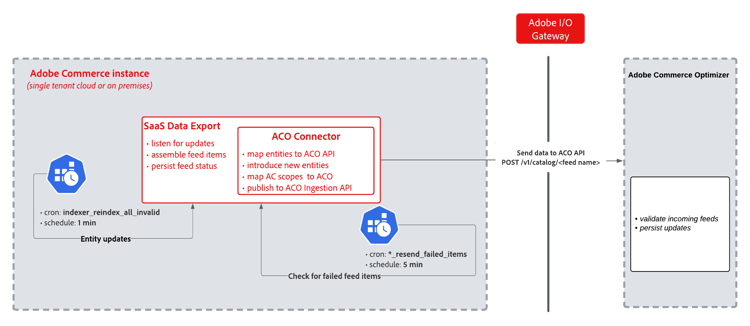
When catalog data changes in Adobe Commerce, synchronization moves through these stages.
- Entity Change Detection — (every 1 min) A cron job (
indexer_reindex_all_invalid) detects Adobe Commerce entity changes and triggers the SaaS Data Export, which assembles feed items. - Transformation — The Commerce Optimizer Connector picks up the assembled feeds, maps Adobe Commerce entities and scopes to formats required by the Commerce Optimizer API, and prepares the payload for transmission.
- Transmission — The transformed data is sent via HTTP POST (
/v1/catalog/<feed name>) through the Adobe I/O Gateway to Commerce Optimizer, which validates and persists the incoming feeds. - Persist results — Persist API response status into the feed tables.
- Failure Retry (every 5 min) — A separate cron job (
*_resend_failed_items) detects any failed feed items and re-submits them through the same pipeline.
Scheduled cron jobs
The following cron jobs automate the pipeline on a fixed schedule.
indexindexer_update_all_viewsindexindexer_reindex_all_invalidresync_failed_feeds_data_exporter*_resend_failed_itemscommerce_data_exportcleanup_deleted_feed_itemsThe SaaS Data Export extension handles feed collection and status tracking. The connector layer maps entities and scopes to the format required by the Commerce Optimizer API and submits them via POST /v1/catalog/<feed name>.
Requirements
- Commerce cron must be running.
- Feed indexers must use Update by Schedule mode. See Partial sync.
Scope-based sync control
The CommerceOptimizerScopeMapper module reads per-website and per-store-view export settings and enforces them during feed collection and submission.
- Enabled scopes export data on the normal delta schedule.
- Disabled scopes are excluded from the pipeline.
Previously synced entities are removed from Commerce Optimizer on the next cron run.
If sync issues affect only one catalog source or price book, see Data not syncing.
For details on customizing the synchronization scope, see Customize the Commerce scopes export configuration.
Timing and monitoring
Monitor per-feed status from the Data Feed Sync Status page in the Commerce Admin. See Verify that the data sync is working.
Feed submission and error handling
The FeedSubmitter process handles Catalog Data Ingestion API calls.
- Separates update items from delete items (different API endpoints).
- Calls update and delete endpoints independently.
- Merges per-item status results back into a single response.
HTTP status code merging
When update and delete calls return different status codes, FeedSubmitter combines the results as follows.
errors field appear in the Admin and require attention. Other items in the batch are retried.*_feed_resend_failed_items cron jobs in the resync_failed_feeds_data_exporter group.