
Adobe Commerce as a Cloud Service overview
Adobe Commerce as a Cloud Service offers flexibility, scalability, and efficiency by enabling businesses to deliver and rapidly scale digital operations while accelerating innovation. Adobe’s cloud-native infrastructure automatically adjusts resources to meet peak demands for traffic, orders, and catalog management.
The following table highlights the products that power Adobe Commerce as a Cloud Service:

| Customer-facing interface where shoppers browse and purchase products |
|
| Backend services that manage product catalogs and pricing. By default, new organizations use the composable catalog data model (CCDM). |
|
| Digital asset management for product images and media |
|
| Core development tools and APIs for building custom functionality |
Architecture
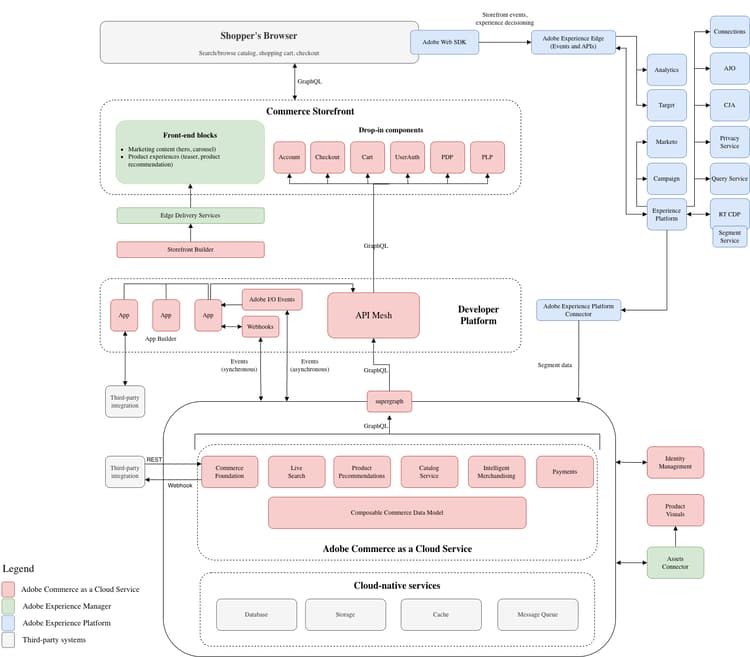
See the following video for a brief introduction to the Adobe Commerce as a Cloud Service architecture. Diagrams that illustrate the architecture are provided below the video.
This diagram illustrates the data flow between Adobe Commerce as a Cloud Service and all Adobe Experience Cloud solutions.
Commerce Storefront
To create rich experiences in minutes with simple document-based authoring or visual editing with Storefront Builder, use Adobe’s Commerce Storefront powered by Edge Delivery Services.
Commerce Storefront is fully headless with a decoupled architecture that provides merchandising services and data through a GraphQL API layer. This architecture allows teams to develop their frontends independently from the Commerce Foundation, providing the agility to build and test new touchpoints with emerging technologies.
 NOTE
Merchandising and payment services
Merchandising Services supports two catalog data models in Adobe Commerce as a Cloud Service:
- Catalog-services model—Uses Catalog Service with Live Search and Product Recommendations to provide catalog data, search, and recommendations to storefronts.
- Composable catalog data model (CCDM)—Uses catalog views, policies, catalog sources, and price books to define the products and prices available to storefronts. CCDM is also the catalog foundation for Adobe Commerce Optimizer.
Payment Services supports payment methods and provides a view of payment processing, orders, and invoices. For configuration instructions, see Payment Services Home.
Product Visuals powered by AEM Assets
Product Visuals supports Commerce-focused digital asset management (DAM), including managing product assets, Commerce metadata, and asset delivery, powered by Adobe Experience Manager Assets.
The integration ensures that digital assets, such as product images or marketing content, dynamically link to the appropriate merchandising entities, including products and categories in Adobe Commerce, based on SKU or other key attributes.
Product Visuals is included with Adobe Commerce as a Cloud Service. It bundles AEM Assets Prime, a lightweight DAM, with Dynamic Media with OpenAPI capabilities for asset delivery.
Alternatively, the native capabilities within Adobe Commerce as a Cloud Service provide basic asset management tools for storing and managing digital assets.
Check the AEM Assets integration guide to learn more about how to integrate Product Visuals powered by AEM Assets with Adobe Commerce as a Cloud Service.
Product Visuals or AEM Assets Ultimate
The following comparison helps you select the best option for your content supply chain needs. Product Visuals supports Commerce-focused asset management. AEM Assets Ultimate supports broader enterprise DAM and complex content supply chains, including UI extensibility, API-driven automation, and custom code deployment.
 IMPORTANT
|
Product Visuals powered by AEM Assets
|
 |
AEM Assets Ultimate
|
| Adobe-branded integration is available for easy migration between offerings. | ||
NOTEDeveloper Platform
Adobe provides developers with comprehensive extension points and tools to build applications that extend Commerce Foundation capabilities and integrate with third-party systems (such as CRMs, ERPs, and PIMs). These tools reduce your total cost of ownership of the platform in the following ways:
- Scalability—Applications can be scaled separately from the core software, allowing for greater efficiency and simplified upgrades.
- Isolation—An isolated environment means that developers can upgrade or modify their extensions at their discretion without relying on a core release.
- Technological independence–Developers can choose whichever technology stacks and coding languages that fit their needs.
TIPAdobe provides the following developer tools for building integrations and customizations:
- API Mesh for Adobe Developer App Builder—Coordinate and combine multiple API, GraphQL, REST, and other sources into a single, queryable GraphQL endpoint.
- App Builder—Build and deploy secure and scalable web applications that extend Commerce functionality and integrate with third-party solutions.
- Events—Use custom event triggers to interact with other extensible development tools.
- Webhooks—Use webhooks to trigger interactions between Commerce and third-party systems automatically.
- Admin UI SDK—Customize and enhance the Commerce Admin with new pages and features for your merchants.
- Integration Starter Kit—Accelerate your back-office integrations with reference integrations, onboarding scripts, and a standardized architecture.
Commerce Foundation
Commerce Foundation provides a secure automated hosting platform and self-service features for managing your Commerce application in a cloud-native environment.
Key features include:
- Simplified onboarding
- Seamless upgrades
- Third-party integrations
Simplified onboarding
Launch sandbox and production instances in minutes with the Commerce Cloud Manager self-service provisioning portal. The infrastructure that you need, including merchandising services, a headless Commerce instance, and App Builder, is automatically configured and integrated with your instances.
See Getting started to learn how to create and manage Commerce instances.
Seamless upgrades
Access the latest features and enhancements without the need for manual upgrades. The continuous delivery of new features and updates eliminates the need for manual patching, ensuring that you always have access to the latest capabilities with a low total cost of ownership.
The typical upgrade process for Adobe Commerce on Cloud involved creating backups, cloning instances, running compatibility tools, and fixing code conflicts. That’s no longer necessary with Adobe Commerce as a Cloud Service. Adobe sends you in-app notifications when new feature and security updates have been released. You have a 30-day period to evaluate the new capabilities in your sandbox instances before the updates are automatically applied to your production environments.
NOTEThird-party integrations
Developers can use comprehensive GraphQL and REST APIs to integrate Commerce Foundation with third-party systems and extend Commerce capabilities.
Benefits
The following sections provide information about the benefits that Adobe Commerce as a Cloud Service provides to business and IT leaders.
Business leaders
- Grow revenue: Drive organic traffic with a high-performance storefront that boosts SEO. Create personalized experiences that drive conversion using rich data.
- Scale operations: Auto-scaling services meet the peak demands of your business with 99.9% availability. Roll out multiple brands and regions and support B2B and B2C from a single instance. Support large and complex product catalogs with flexible data modeling.
- Boost merchandiser productivity: Use AI powered merchandising services to improve conversion. Experiment natively, directly in the storefront. Manage the storefront experience to create rich experiences in minutes with simple document-based authoring or a visual editor.
- Lower total cost of ownership (TCO) and accelerate innovation: Always up-to-date services give you access to new features immediately. Activate new capabilities by easily installing apps from the marketplace. Reallocate resources from routine maintenance to focus on building new capabilities.
Information technology (IT) leaders
- Fast provisioning: Get started fast with self-service provisioning in minutes. All services are pre-configured to work seamlessly together to get started faster. Provision sandboxes for developer experimentation as needed.
- Low cost of ownership: No more upgrades with always up-to-date services. Stay secure and compliant with the latest security patches automatically applied for you. Scale automatically to meet the most demanding workloads.
- High-performance storefront: Create rich experiences in minutes with simple document-based authoring or a visual editor. Use AI-powered merchandising services to improve conversion. Native experimentation built into the storefront.
- Faster innovation: Reallocate resources from routine maintenance to focus on building new capabilities that deliver business value. Use comprehensive extensibility and standards-based technologies (JavaScript, HTML, CSS, and low-code tools) to build differentiated experiences. Install third-party apps with a click to add new capabilities to your commerce platform.
Was this content helpful?

Announcements
Get hands-on with agentic AI.
Explore how AI agents work together through real examples and hands-on practice. Join your local User Group to design an agent workflow with your peers and leave with a practical framework you can apply to your own work.
Find an event