Release notes
The following release notes contain updates to Adobe Commerce Optimizer, including:
-
New features and improvements to Adobe Commerce Optimizer Studio.
-
Updates to the data ingestion REST API and GraphQL API for storefront catalog data retrieval.
note NOTE Drop-in components for Commerce Storefront on Edge Delivery Services pick up the latest GraphQL changes automatically (new fields, limits, and query behavior).
September 2026
September 3, 2026
Attribute ranking (beta)
Adobe Commerce Optimizer merchandising rules now support attribute ranking for the Default search rule, Category rule, and Search rule. Automatically apply a Boost, Bury, or Hide action to every product that matches one or more attribute conditions, such as brand or category, without selecting individual SKUs. Attribute ranking is in beta. Learn more.
Additional release notes
Adobe Commerce Optimizer works with the latest releases of AEM Assets integration, the Commerce Optimizer connector, and Adobe Commerce Storefront. Use the following links to view release notes for each area:
August 2026
September 9, 2026

HTTP_HEADER transport type can now receive multiple comma-separated values in a single header (for example, AC-Policy-Vehicle: UNIVERSAL,veh-bolt-mammoth-limited-2025). Policy filters using IN evaluate the values with OR semantics. Filters using EQUALS, GREATER_THAN_EQUAL, or LESS_THAN_EQUAL reject the request with a validation error if the header contains multiple values. This behavior applies only to trigger policies using the HTTP_HEADER transport. Learn more.
August 7, 2026
externalIds field—Added externalIds to Catalog Service GraphQL, exposing the external data source associated with a product so storefront and integration consumers can identify the originating data source. See Return externalIds for a product

refineProduct response for configurable products—Fixed an issue where the refineProduct query returned priceRange: null and roles: ["hidden"] for specific configurable products, ensuring accurate pricing and visibility information for storefront consumers.
Additional release notes
Adobe Commerce Optimizer works with the latest releases of AEM Assets integration, the Commerce Optimizer connector, and Adobe Commerce Storefront. Use the following links to view release notes for each area:
July 2026
July 20, 2026
CategoryNavigation query, improving service responsiveness and overall user experience under high load.
Additional release notes
Adobe Commerce Optimizer works with the latest releases of AEM Assets integration, the Commerce Optimizer connector, and Adobe Commerce Storefront. Use the following links to view release notes for each area:
June 2026
June 24, 2026
canEditQuantity field—Added canEditQuantity to ProductViewOptionValueProduct in Catalog Service GraphQL. It exposes the optional User Defined quantity setting for bundle selections from the Commerce Admin, so storefront consumers can determine whether a bundle selection’s quantity is editable.
Semantic search
Adobe Commerce Optimizer now supports [semantic search] on the Advanced search tab in Settings. Semantic search uses AI to match products by meaning and context alongside keyword search, reducing empty search pages for natural-language queries. It is enabled by default for eligible English catalogs. You can optionally tune Semantic boost, Similarity threshold, and Fuzzy search on the same tab. No attribute setup or storefront changes are required. Learn more.
Recommendation price filters (beta)
Product recommendation units now support price filters on the Filter products step. Include or exclude candidates using static minimum and maximum ranges or dynamic rules on the product detail page that compare recommended products to the currently viewed product’s final computed price from the storefront’s active price book. Price rules filter the candidate set. They do not re-rank products. Learn more.
Additional release notes
Adobe Commerce Optimizer works with the latest releases of AEM Assets integration, the Commerce Optimizer connector, and Adobe Commerce Storefront. Use the following links to view release notes for each area:
May 2026
Intelligent Ranking Boost
Merchandising rules for search, default product listings, and category pages now include Intelligent Ranking Boost. You can adjust how strongly strategies such as Most viewed or Trending influence product order relative to textual relevance on search and behavioral signals on category listings. The rule preview reflects your setting. The boost is applied at query time, so you do not need a catalog resync when you change it.
API updates
May 28, 2026
navigation trees when an untagged intermediate node exists in the path. This fix ensures that shoppers see all relevant categories in the navigation, making it easier to browse and discover items.
categoryTree requests—Fixed an issue where the categoryTree query returned an internal server error when the slugs argument included an empty string. Empty slug values are now ignored, so storefronts and integrations continue to resolve category data without failed requests.
searchCategory requests return case-insensitive, alphabetized results—The searchCategory query now sorts search results alphabetically without case sensitivity, ensuring consistent and predictable ordering. Categories with shorter prefixes appear first when names are otherwise identical.
May 4, 2026
Correct currency display—Storefront product prices now display the correct currency code (for example, USD) for all product types. Previously, some products showed NONE instead of the expected currency, resulting in missing prices.
Additional release notes
Adobe Commerce Optimizer works with the latest releases of AEM Assets integration, the Commerce Optimizer connector, and Adobe Commerce Storefront. Use the following links to view release notes for each area:
April 2026
Release date: April 7, 2026
Catalog rules
Category rules extend merchandising rules so you can target categories and control product order on category pages with the same ranking and actions (pin, boost, bury) as search.
Price filter (beta)
Recommendation filters now include a price range filter (minimum and maximum).
API updates
April 29, 2026
Request batching required — The GraphQL API now enforces a maximum of 100 SKUs per request when you retrieve catalog data. See documented limits and boundaries.
April 17, 2026
Find categories by name with GraphQL — The new searchCategory query returns matching categories with pagination for storefronts and integrations. See the API reference for parameters and response fields.
April 7, 2026
Simpler category lookups — The categoryTree query treats family as optional, so you can resolve categories by slug without supplying a family.
Additional release notes
Adobe Commerce Optimizer works with the latest releases of AEM Assets integration, the Commerce Optimizer connector, and Adobe Commerce Storefront. Use the following links to view release notes for each area:
March 2026
There were no Adobe Commerce Optimizer Studio releases this month. See API updates below.
API updates
March 24, 2026
Dynamic bundles now return a computed price range.
Additional release notes
Adobe Commerce Optimizer works with the latest releases of AEM Assets integration, the Commerce Optimizer connector, and Adobe Commerce Storefront. Use the following links to view release notes for each area:
February 2026
Release date: February 19, 2026
Catalog view for merchandising rules and recommendations
You can now specify a catalog view when you create recommendation units or merchandising rules.
API updates
February 19, 2026
Richer category content for storefronts — The categoryTree query now returns descriptions, images, and SEO meta tags so storefronts can render richer category pages.
February 12, 2026
Enhanced product data by category — The GraphQL API adds the CategoryProductView type so you can query and filter products by category with fewer round trips.
Additional release notes
Adobe Commerce Optimizer works with the latest releases of AEM Assets integration, the Commerce Optimizer connector, and Adobe Commerce Storefront. Use the following links to view release notes for each area:
January 2026
There were no Adobe Commerce Optimizer Studio releases this month. See API updates below.
API updates
January 19, 2026
- Richer categories support with the REST API — Categories API operations now accept optional
metaTags,images, anddescriptionvalues in addition tofamilies, so you can provide richer merchandising and SEO detail for categories.
Additional release notes
Adobe Commerce Optimizer works with the latest releases of AEM Assets integration, the Commerce Optimizer connector, and Adobe Commerce Storefront. Use the following links to view release notes for each area:
December 2025
Release date: December 10, 2025
Opportunities
Merchandisers can now get AI-powered recommendations through Adobe Sites Optimizer to detect site issues and suggest performance fixes.
Catalog layers
Merchandisers can now use Catalog layers to overlay product data without editing the source catalog, manage layer priority, and use Adobe Sites Optimizer auto-fix.
Additional release notes
Adobe Commerce Optimizer works with the latest releases of AEM Assets integration, the Commerce Optimizer connector, and Adobe Commerce Storefront. Use the following links to view release notes for each area:
November 2025
There were no Adobe Commerce Optimizer Studio releases this month. See API updates below.
API updates
November 21, 2025
Updated authentication instructions for the data ingestion REST API — The instructions now reference OAuth access tokens and the correct Developer Console credential scopes for the data ingestion service. If your credential scopes are outdated, regenerate them to keep access.
November 3, 2025
Layered, localized product content in GraphQL — You can now deliver channel-specific, locale-aware product content from Adobe Commerce Optimizer.
- Tailor product content by customer segment
- Apply locale-specific overrides without duplicating base catalog data
- Control field-level overrides with Layer Masks
- Use premium, seasonal, and mobile-optimized content layers
No GraphQL API schema change: layers apply through the existing products query and request headers. See Catalog layer.
Additional release notes
Adobe Commerce Optimizer works with the latest releases of AEM Assets integration, the Commerce Optimizer connector, and Adobe Commerce Storefront. Use the following links to view release notes for each area:
October 2025
Release date: October 14, 2025
Commerce Optimizer Salesforce Commerce Connector
The Commerce Optimizer Salesforce Commerce Connector is a new App Builder starter kit that syncs Salesforce B2C Commerce catalog data into Commerce Optimizer.
For Admins:
- Salesforce catalog changes (products, prices, metadata, price books) sync to Commerce Optimizer automatically.
- Runs outside Adobe Commerce for fewer integration touch points.
- Scheduled updates keep Commerce Optimizer data current for merchandising and recommendations.
For Developers:
- Extensible framework for ingesting Salesforce catalog into SaaS Merchandising Services.
- Reference implementations, design docs, and code samples for faster builds and troubleshooting.
Layered search
- Layered search (GA) — Product search now supports
startsWithandcontainsmatching. See Layered search and expanded search types.
API updates
-
October 17, 2025
Add REST API support to ingest product layers — Use the Catalog layers API to customize and override base product data for specific contexts, locales, or business requirements. After you create layers, you can apply and manage them from Adobe Commerce Optimizer Studio.
-
October 14, 2025
Programmatic category trees — Create, update, and manage category trees for navigation and grouping via REST (global or channel-specific), at scale—up to 10,000 trees and 500 categories per tree. See Categories in the Catalog data ingestion REST API Reference.
-
October 8, 2025
Clearer category mapping for data ingestion — New guidelines explain category slug format and hierarchy rules, and clarify that product
routes.pathvalues must match an existing category slug (for example,men/clothing).
Additional release notes
Adobe Commerce Optimizer works with the latest releases of AEM Assets integration, the Commerce Optimizer connector, and Adobe Commerce Storefront. Use the following links to view release notes for each area:
September 2025
There were no Adobe Commerce Optimizer Studio releases this month. See API updates below.
API updates
September 23, 2025
- Manage categories using the REST API — Use the Categories API to create and manage categories. Categories organize products into logical groups and support nested hierarchies through slug-based paths. After you assign categories to products, retrieve them with the GraphQL
[navigation](https://developer.adobe.com/commerce/services/reference/graphql/#navigation)and[categoryTree](https://developer.adobe.com/commerce/services/reference/graphql/#categorytree)queries to render storefront menus and category trees.
Additional release notes
Adobe Commerce Optimizer works with the latest releases of AEM Assets integration, the Commerce Optimizer connector, and Adobe Commerce Storefront. Use the following links to view release notes for each area:
August 2025
Release date: August 28, 2025
EU region now available
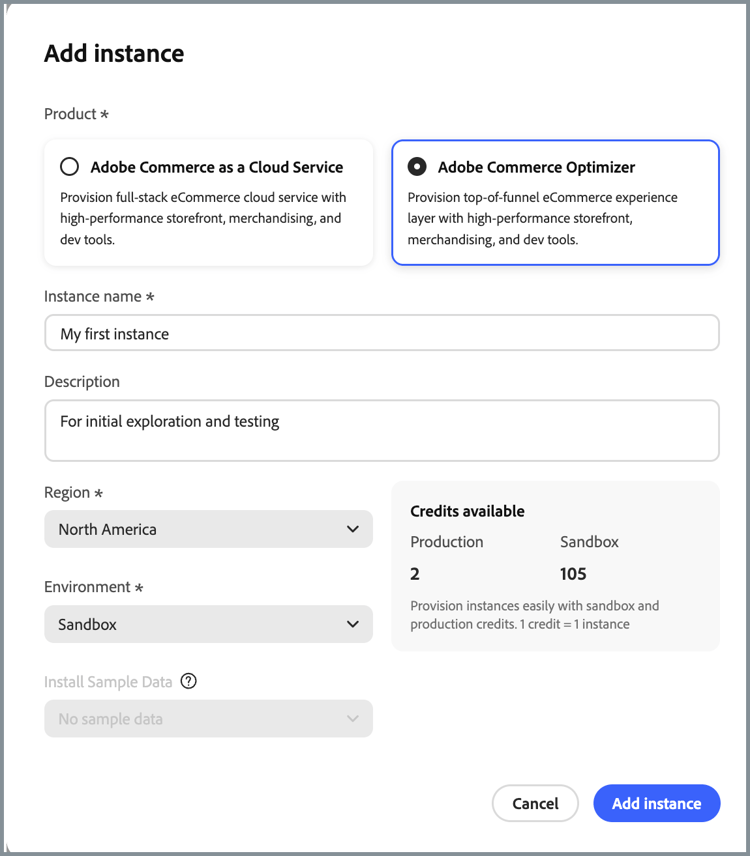
EU production region (eu1) is available for IMS organizations. When you add a Commerce Optimizer instance in Cloud Manager, choose European Union as the Region (production only).
The base production URLs for the European Union region are:
- Admin:
https://eu1.admin.commerce.adobe.com - REST and GraphQL:
https://eu1.api.commerce.adobe.com
Additional release notes
Adobe Commerce Optimizer works with the latest releases of AEM Assets integration, the Commerce Optimizer connector, and Adobe Commerce Storefront. Use the following links to view release notes for each area: