App Management overview
App Management in Adobe Commerce simplifies how applications are discovered, installed, configured, and operated across the commerce environment. It provides a unified framework that enables organizations to adopt extensibility safely and efficiently while reducing operational friction.
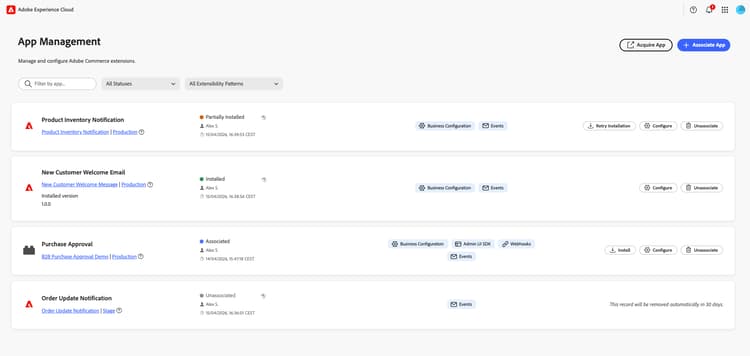
For App Managers, App Management delivers a centralized view of all installed applications, enabling easier governance, lifecycle management, and operational oversight. Through simplified installation flows, automated configuration steps, and clear visibility into app status and permissions, business and technical operators can manage integrations with confidence—without requiring deep engineering involvement.
For App Developers, App Management introduces a standardized way to package and distribute applications using a declarative app manifest. Developers can define configuration, event subscriptions, permissions, and post-installation steps in a single place, allowing applications to install and configure automatically within a merchant environment. This reduces integration effort, improves deployment reliability, and enables developers to focus on delivering business value rather than managing installation complexity.
Together, these capabilities create a scalable extensibility model that empowers merchants to adopt new functionality more quickly while providing developers with a predictable, streamlined application lifecycle.
What App Management delivers
- One place for all your apps. Associate, configure, and manage apps from Apps > App Management. Search, filter, and acquire apps from the same view.
- Settings that match your business. Apply different configurations per website, store, or store view for multi-region or multi-brand setups.
- Automatic store sync. Websites, stores, and store views from Commerce are imported when you associate an app.
- Native Admin experience. Work with apps from Adobe Exchange or custom deployments without leaving Commerce.
Who uses App Management?
What you can do
- Associate an app. Link an App Builder application to your Commerce instance by selecting the project and workspace.
- Configure settings. Adjust app settings through the auto-generated form; override values per store or region when needed.
- Manage scopes. Keep your store hierarchy in sync with your apps and apply settings at the right level.
- Unassociate an app. Remove an app when retiring an integration or cleaning up test configurations.
Next steps
- Install. Ensure prerequisites are met and access App Management.
- Manage your app. Associate, configure, and unassociate apps.
For developers
If you are building App Builder applications for Adobe Commerce, see the Commerce Extensibility App Management documentation for configuration schema, runtime actions, and developer setup.