このページ: Adobe Journey Optimizer と Adobe Experience Platform の連携の仕組みを参照してください。これにより、パーソナライズされたジャーニーの背後にあるデータからエクスペリエンスへのサイクル、機能領域、アーキテクチャを理解できます。
このページでは、データからエクスペリエンスへの継続的なサイクル、主要な機能領域、アーキテクチャの詳細、統合ポイントを対象とした、Adobe Experience Platform と Journey Optimizer の連携の仕組みについて説明します。
Adobe Journey Optimizer と Adobe Experience Platform は連携して、データ駆動型の大規模なパーソナライゼーションを実現します。 このページでは、これらのシステムが動作する仕組みと、主要な機能領域を組み合わせて優れたカスタマーエクスペリエンスを実現する仕組みについて説明します。 主要な機能について学ぶ | 5つのコアコンセプトに移動 | 主要な用語を調べる
Journey Optimizer の仕組み how-it-works
統合されたデータ基盤がなければ、ブランドは複数のチャネル固有のツールに依存せざるを得ません。そのため、各顧客の一貫性のあるビューを維持したり、顧客の行動に対してリアルタイムで対応したりすることが困難になります。 Journey Optimizer は、お客様データ、コンテンツ制作、ジャーニーオーケストレーションを単一の継続的なシステムで接続する Adobe Experience Platform を基盤として、これを解決します。 その結果、顧客の忠誠度とライフタイム値を推進する、有意義なブランドエクスペリエンスが実現します。
Adobe Journey Optimizer は、データを収集、分析および適用する継続的なフローとして機能し、パーソナライズされたカスタマージャーニーを作成します。
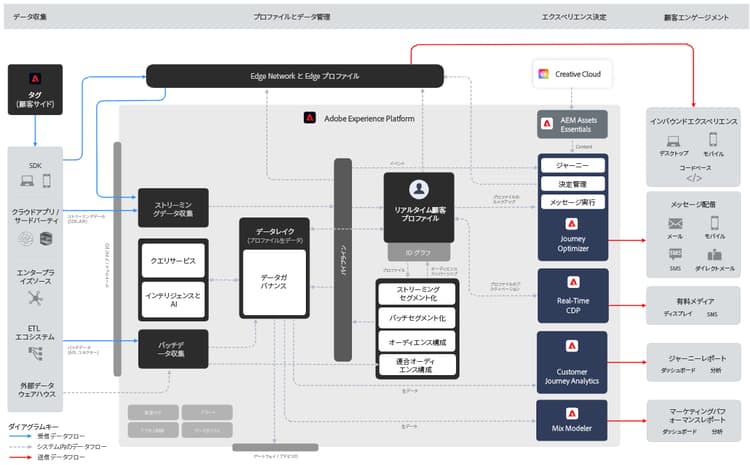
Adobe Experience Platform:基盤 aep-foundation
Adobe Experience Platform はバックボーンとして機能し、ブランドが顧客データを一元化し、パーソナライズされたエクスペリエンスのためにアクティブ化できるようにします。
- データプラットフォーム - 顧客データを収集、管理、構造化し、システム間の一貫性を確保する一元的なハブ。 スキーマとデータセットの詳細情報
- データ取り込み(ソース) - 事前定義済みのコネクタを使用して、CRM プラットフォーム、web サイト、モバイルアプリ、クラウドストレージからデータをインポートします。 データソースを確認
- リアルタイム顧客プロファイル – 複数のソース(メールでのやり取り、実店舗での購入、web行動)からのデータを統合して、統合プロファイルを作成します。 プロファイルの詳細情報
- ガバナンスレイヤー - 規制に準拠しながら、データアクセス、プライバシーコンプライアンスおよびセキュリティを管理します。 プライバシードキュメントの表示
Adobe Journey Optimizer:オーケストレーションエンジン ajo-orchestration
Adobe Journey Optimizer は、Adobe Experience Platform からのデータとインサイトを適用し、インテリジェントでパーソナライズされたカスタマーエクスペリエンスを提供します。
- 顧客理解 - リアルタイムの顧客プロファイルにより、ターゲットを絞ったメッセージのオーディエンスへのセグメンテーションが可能になります。 オーディエンスの作成
- コンテンツとオファー - ビルトインのビジュアルデザイナー、再利用可能なテンプレート、一元管理されたアセットライブラリにより、チームはプラットフォームを離れることなく、任意のチャネル向けメッセージを作成およびパーソナライズできます。 動的パーソナライゼーションは、顧客の属性、行動、コンテキストに基づいてコンテンツを適応させます。 その後、リアルタイムの決定ロジックによって、各個人に最適なオファーが選択されます。 コンテンツのデザイン | アセットの管理 | オファーの管理
- ジャーニーとキャンペーン管理 - リアルタイムのマルチステップのインタラクションのシーケンス(ジャーニー)を自動化するか、スケジュール済みまたはAPI トリガーのメッセージをオーディエンス(キャンペーン)に送信します。 オーケストレーションされたキャンペーンは、3つ目のキャンペーンタイプで、関係データに対してマルチステップのマルチチャネルのバッチワークフローを実行します。 ジャーニーの作成 | キャンペーンの作成
- 配信(接続) – 電子メール、モバイルメッセージ、プッシュ通知、ダイレクトメールなどのチャネルを通じてメッセージを配信し、データを外部システムに書き出します。 これらのチャネル接続と外部システム接続は、Connections機能領域で設定されます。 チャネルの設定
- 測定と分析 - 継続的な改善のためにレポートで顧客エンゲージメントとキャンペーンのパフォーマンスを追跡します。 レポートの表示
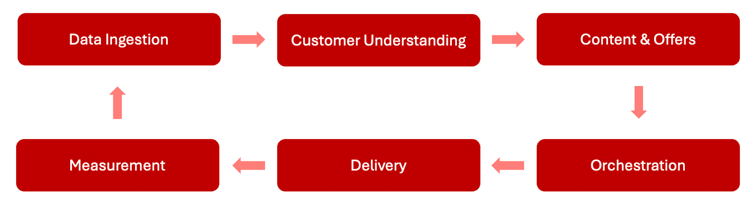
連続最適化サイクル optimization-cycle
このエコシステムは、継続的な最適化サイクルとして機能します。 データは、パーソナライズされたコンテンツと決定を提供する、お客様の理解を推進します。 これらはジャーニーに調整され、チャネルをまたいで配信され、有効性を測定し、時間の経過と共に調整されます。
構築する前に把握しておくべき5つの概念 five-concepts
Journey Optimizerの動作の大部分を説明する5つのアイデア。 最初にこれらを読み、次に詳細が必要な場合はリンクに従ってください。
-
プロファイルとデータ。 すべての顧客には、属性(名前、環境設定)、イベント(購入、アプリのオープン)、ID (電子メール、デバイス)など、自分について把握していることを統合する プロファイル が用意されています。 このデータはAdobe Experience Platformに保存され、ターゲティングとパーソナライゼーションに活用されます。 プロファイルの基本を学ぶ
-
オーディエンス。 オーディエンスは、特性または行動を共有するプロファイルのグループです。 プロファイルが変更されるとオーディエンスが更新されるため、送信の際に適切なオーディエンスがターゲットになります。 オーディエンスについて
-
キャンペーンとジャーニー。 メッセージをどのように顧客に体験してもらいたいのか、適切なアプローチを選択しましょう。
table 0-row-2 1-row-2 2-row-2 3-row-2 を使用… いつ… キャンペーン スケジュール済みまたはAPI トリガーのメッセージをオーディエンスに送信します。 ジャーニー 顧客は、リアルタイムのマルチステップの行動主導のフローを通じて、自分のペースで移動します。 キャンペーンのオーケストレーション 複数のエンティティのデータを使用して、複雑なバッチワークフローを実行します。 オーケストレーションされたキャンペーンは、1つのビジュアルキャンバス(製品の発売や季節のプロモーションなど)から、チャネルをまたいでデザイン、自動化、配信するマルチステップのバッチキャンペーンです。 リレーショナルで複数のエンティティを含むデータ(購入、予約、場所など)からのプロファイル属性とビジネスコンテキストを利用して、コンテンツ、チャネル、タイミングをパーソナライズし、マーケティングやトランザクションメッセージを送信する前に、正確な数のオーディエンスを構築できます。
-
チャネル設定。 チャネル設定は、チャネルの送信IDです。メールの場合は、サブドメインと送信者の詳細、プッシュの場合はアプリの資格情報です。 メッセージは、管理者が設定するまで送信できません。 チャネル設定の設定
-
サンドボックス。 サンドボックスは独立した環境です。 データ、オーディエンス、ジャーニー、設定は、サンドボックスをまたいで引き継がれません。 サンドボックスには2つのタイプがあります。開発用サンドボックスは実稼動以外のプロファイルを使用したビルドとテスト用で、実稼動用サンドボックスは実際の顧客に送信する場所です。 開発用サンドボックスを作成してテストし、本番環境から顧客に送信します。 管理者は、サンドボックスを作成を選択し、開発または実稼動 タイプを選択して、Adobe Experience Platformでサンドボックスを作成します。 新しいサンドボックスを、誰でも使用できる前に権限の役割に追加します。 サンドボックスを作成 | サンドボックスを使用して割り当て
誰が何を設定したかわからない場合は、 役割と責任を参照してください。
主要な機能領域 functional-areas
Journey Optimizerには、シームレスに連携する7つの主要な機能領域が含まれています。
オーケストレーションエンジンのステージ は、次の領域にマップされます。顧客理解は顧客管理、コンテンツとオファーはコンテンツ管理と意思決定管理、ジャーニーとキャンペーン管理はジャーニー管理、配信(接続)は接続です。 測定と分析は、個別の機能領域ではなく、 レポート でカバーされています。
これらの領域の連携 working-together
これらの機能領域は、継続的なサイクルで動作します。
- データインジェストサービス - データは Adobe Experience Platform に取り込まれ、データ管理によって構造化されます
- 顧客理解 - リアルタイム顧客プロファイルはデータを統合します。顧客管理はオーディエンスを作成します
- コンテンツとオファー戦略 - コンテンツ管理では、メッセージを作成し、意思決定管理では、オファーロジックを定義します
- オーケストレーション - ジャーニー管理では、お客様データ、コンテンツ、決定を使用してチャネル間でインタラクションをマッピングします
- 配信 - 接続により、チャネル経由でのメッセージ配信や外部システムとのデータの共有が容易になります
- 測定 - パフォーマンスデータでは、インサイトがフィードバックされ、オーディエンス、コンテンツ、決定、ジャーニーが絞り込まれます
- ガバナンス - 管理とプライバシーの制御により、全体を通じてコンプライアンスが確保されます
アーキテクチャの詳細 architecture-details
Journey Optimizer は、Real-Time CDP、Customer Journey Analytics、Adobe Mix Modeler と共に、Adobe Experience Platform でネイティブに構築されている 4 つのアプリケーションの 1 つです。 AEP のコアサービス(リアルタイム顧客プロファイル、ID グラフ、データガバナンス、クエリサービス)を共有しているので、個別の統合を必要とせずに、統合されたお客様データ基盤にアクセスできます。 Journey Optimizer は、スタンドアロンアプリケーションとして運用したり、他の AEP ネイティブアプリケーションと相互運用したりできます。
統合パターン、前提条件、システムデータフローなど、技術的なアーキテクチャについて詳しくは、Adobe Journey Optimizer ブループリントを参照してください。 実装に関する考慮事項について詳しくは、ガードレールと制限を参照してください。
プライバシーとセキュリティ privacy-security
Adobe CX Enterprise のプライバシーとセキュリティのプラクティスは、Adobe Journey Optimizer に適用されます。 これらの対策により、GDPR などのプライバシー規制への準拠が確保され、顧客の信頼を維持しながら、パーソナライズされたエクスペリエンスを提供できます。 Journey Optimizer でのプライバシーの詳細情報
This section contains structured knowledge intended to support interpretation, retrieval, and question answering related to this topic.
For complete understanding, this information should be combined with the documentation on this page. Neither source is intended to stand alone; the page describes the feature, while this section provides additional context that helps disambiguate terminology, intent, applicability, and constraints.
- TL;DR: This page explains how Adobe Journey Optimizer and Adobe Experience Platform work together as a continuous data-to-experience cycle, covering the platform foundation, the orchestration engine, seven key functional areas, and the underlying architecture.
Intents:
- Understand how Journey Optimizer builds on Adobe Experience Platform to connect data, content, and journey orchestration
- Identify the Adobe Experience Platform foundation components and the Journey Optimizer orchestration components
- Learn the seven key functional areas, how they map to the orchestration engine stages, and how they operate as a continuous cycle
- Choose between a campaign, a journey, and an Orchestrated campaign
- Understand the sandbox types and how to create a sandbox
- Understand the architecture and the core Adobe Experience Platform services that Journey Optimizer shares
- Locate related privacy and security information
Glossary:
- Continuous optimization cycle: The flow where data drives customer understanding, which informs personalized content and decisions, orchestrated into journeys, delivered across channels, measured for effectiveness, and refined over time (product-specific)
- Functional area: One of the seven areas that work together in Journey Optimizer — Data Management, Customer Management, Content Management, Decision Management, Journey Management, Connections, and Administration & Privacy (product-specific)
- Real-Time Customer Profile: An Adobe Experience Platform core service that creates unified profiles by merging data from multiple sources (product-specific)
- Connections: The functional area and delivery capability that connects data sources, channels, and external systems (product-specific)
- Orchestrated campaign: A multi-step batch campaign designed, automated, and delivered across channels from one visual canvas. It personalizes content, channel, and timing using profile attributes and business context from relational, multi-entity data, and builds audiences with exact counts before sending marketing or transactional messages (product-specific)
- Development sandbox / production sandbox: The two sandbox types. A development sandbox is for building and testing with non-production profiles; a production sandbox is where you send to your real customers. An administrator creates either type in Adobe Experience Platform by selecting Create sandbox and choosing the type (product-specific)
Guardrails:
- Journey Optimizer is one of four applications natively built on Adobe Experience Platform, alongside Real-Time CDP, Customer Journey Analytics, and Adobe Mix Modeler.
- Because it shares Adobe Experience Platform core services (Real-Time Customer Profile, Identity Graph, data governance, and query services), Journey Optimizer accesses a unified customer data foundation without requiring separate integrations.
- Journey Optimizer can operate as a standalone application or interoperate with other Adobe Experience Platform-native applications.
- Adobe CX Enterprise privacy and security practices apply to Journey Optimizer, supporting compliance with regulations such as GDPR.
Terminology:
- Canonical name: Adobe Journey Optimizer — Acronym: AJO — variants: Journey Optimizer
- Canonical name: Adobe Experience Platform — Acronym: AEP — variants: Experience Platform, Platform
- Synonyms: “orchestration engine” = “Adobe Journey Optimizer” (as described on this page)
- Do not confuse: “Data Management” (functional area for organizing customer data) ≠ “Decision Management” (functional area for selecting the best offer in real time)
- Synonyms: “Delivery (Connections)” in the orchestration engine list = “Connections” functional area
- Do not confuse: “development sandbox” (non-production profiles, for building and testing) ≠ “production sandbox” (real customers); “training sandbox” is a development sandbox configured with sample data for the tutorials
FAQ:
- Q: How do Journey Optimizer and Adobe Experience Platform relate? — Adobe Experience Platform is the foundational data layer, and Journey Optimizer is the orchestration engine built on top of it, applying platform data and insights to deliver personalized experiences.
- Q: How many functional areas does Journey Optimizer include? — Seven: Data Management, Customer Management, Content Management, Decision Management, Journey Management, Connections, and Administration & Privacy.
- Q: Which approach should I use: a campaign, a journey, or an Orchestrated campaign? — Use a campaign to send a scheduled or API-triggered message to an audience, a journey when customers move at their own pace through a real-time, multi-step, behavior-driven flow, and an Orchestrated campaign to run a complex batch workflow with multi-entity data.
- Q: What types of sandbox exist, and how do I create one? — Development and production. An administrator creates a sandbox in Adobe Experience Platform by selecting Create sandbox and choosing the Development or Production type, then adds the new sandbox to a role in Permissions before anyone can use it.
- Q: Can Journey Optimizer be used on its own? — Yes, it can operate as a standalone application or interoperate with other Adobe Experience Platform-native applications.
- Q: What core services does Journey Optimizer share with Adobe Experience Platform? — Real-Time Customer Profile, Identity Graph, data governance, and query services.
Personas:
- admin: Can manage users, configure sandboxes, set up channels, and handle privacy requests. The page states that Administration and Privacy controls ensure compliance throughout the continuous cycle. Where: “Key functional areas”.
- developer: Can structure customer data into schemas and datasets within the Data Platform. Can import data from CRM platforms, websites, mobile apps, and cloud storage using pre-built connectors. Can merge data from multiple sources, such as email interactions, in-store purchases, and web behavior, into unified profiles. Where: “Adobe Experience Platform: the foundation”.
- marketer: Can author and personalize messages for any channel using a built-in visual designer, reusable templates, and a centralized asset library. Can automate real-time, multi-step sequences of interactions as journeys or send a scheduled or API-triggered message to an audience as campaigns. The page states that real-time decisioning logic selects the best offer for each individual. Where: “Adobe Journey Optimizer: the orchestration engine”.
Onboarding:
- Level: Beginner
- First minimal step: Use the free Journey Optimizer tutorials and a training sandbox to practice the five concepts.
- Success check: You can practice the five concepts without touching production data.
- Previous: You want to learn about Journey Optimizer’s key capabilities first: Journey Optimizer (start/get-started.md); You need definitions of the key terms used on this page: Key terminology (start/terminology.md)
- Next: You are not sure who sets up what in Journey Optimizer: Roles and responsibilities | Adobe Journey Optimizer (start/quick-start.md); You need implementation considerations before you build: Journey Optimizer guardrails and limitations (start/guardrails.md)