On this page: Build the schemas, datasets, identities, and data sources that power Adobe Journey Optimizer so your teams can deliver real-time, personalized customer experiences.
As a Data Architect or Data Engineer, you set up and maintain the customer profile data and other data sources that power the experiences orchestrated by Journey Optimizer. This includes integrating all your customer and business data—whether from web, CRM, or offline sources—into a unified 360-degree view of the customer. You model customer profile data and business data into schemas, configure source connectors for ingesting data, and ensure data flows smoothly to enable real-time customer insights and engagement. You can start working with Adobe Journey Optimizer once the System Administrator granted you access and prepared your environment.
Essential data configuration steps
Follow these steps to set up the data foundation for Journey Optimizer:
-
Create identity namespaces. In Adobe Journey Optimizer, Identities link consumers across devices and channels, the result is an identity graph. The linked identity graph is used to personalize experiences based on interactions across all of your business touchpoints. Learn more about identities and identity namespaces on this page.
In addition, configure supplemental identifiers to enable the same profile to enter multiple journey instances based on secondary identifiers like order IDs or booking IDs. Learn about supplemental identifiers.
-
Create schemas and enable them for profiles. A schema is a set of rules that represent and validate the structure and format of data. At a high-level, schemas provide an abstract definition of a real-world object (such as a person) and outline what data should be included in each instance of that object (such as first name, last name, birthday, and so on).
- For standard journeys and campaigns: Use XDM schemas
- For Orchestrated campaigns: Create relational schemas to enable multi-entity segmentation
-
Create datasets and enable them for profiles. A dataset is a storage and management construct for a collection of data, typically a table, that contains a schema (columns) and fields (rows). Datasets also contain metadata that describes various aspects of the data they store. Once a dataset is created, you can map it to an existing schema and add data into it. Learn more about datasets on this page.
For advanced scenarios, prepare datasets for runtime lookups to enrich journey execution with real-time data from record datasets. Learn about dataset lookup.
-
Configure source connectors. Adobe Journey Optimizer allows data to be ingested from external sources while providing you with the ability to structure, label, and enhance incoming data using Platform services. You can ingest data from a variety of sources such as Adobe applications, cloud-based storages, databases, and many others. Learn more about Source connectors on this page.
-
Create test profiles. Test profiles are required when using the test mode in a journey, and to preview and test your messages before sending. Steps to create test profiles are detailed on this page.
-
Configure computed attributes (optional). Create derived attributes from profile data to simplify segmentation and personalization. Computed attributes automatically calculate complex metrics like “total purchases in last 90 days” or “average order value”. Learn about computed attributes.
-
Message export datasets (optional). When message export is enabled at the channel configuration level, sent email and mobile content is automatically exported to a dedicated Experience Platform dataset for compliance, archiving, or downstream analysis. Learn about message export.
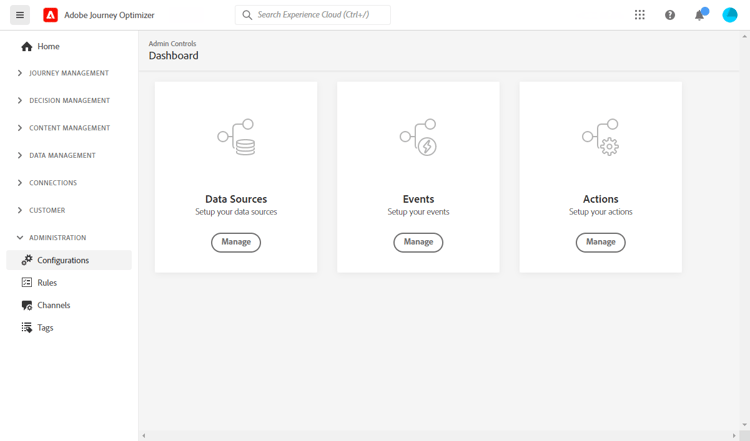
In addition, to be able to send messages in journeys, you must configure Data Sources, Events and Actions. Learn more in this section.
-
The Data Source configuration allows you to define a connection to a system to retrieve additional information that will be used in your journeys. Learn more about Data Sources in this section.
-
Events allow you to trigger your journeys unitarily to send messages, in real-time, to the individual flowing into the journey. In the event configuration, you configure the events expected in the journeys. The incoming events’ data is normalized following the Adobe Experience Data Model (XDM). Events come from Streaming Ingestion APIs for authenticated and unauthenticated events (such as Adobe Mobile SDK events). Learn more about events in this section.
-
Journey Optimizer comes with built-in message capabilities: you can create your messages within a journey and design your content. If you are using a third-party system to send your messages, for example Adobe Campaign, create a custom action. Learn more about actions in this section.
Monitor and analyze journey data
Once journeys are running, you can query journey step events in the Data Lake to monitor performance, troubleshoot issues, and analyze customer behavior. Use SQL queries to analyze:
- Profile entry and exit patterns
- Error rates and discard reasons
- Read Audience export job performance
- Custom action performance metrics
- Journey instance states and bottlenecks
Explore ready-to-use query examples for journey analysis to get started with data analysis and troubleshooting.
Collaborate across roles
Your data configuration work is essential for other teams:
Collaborate with Administrators on access and governance:
- Request necessary permissions for data management and schema creation
- Coordinate on sandbox access for development and testing
- Align on data governance policies and consent management
- Discuss data retention policies and storage requirements
Collaborate with Developers on data structure and events:
- Provide XDM schemas and event structures they need to implement
- Define which events need to be sent and their required payload format
- Align on data collection requirements and data quality standards
- Test event delivery and data ingestion together
Collaborate with Marketers on audiences and data:
- Create computed attributes for personalization and segmentation
- Build audiences based on their campaign and journey requirements
- Configure relational schemas for Orchestrated campaigns
- Support multi-entity segmentation for advanced use cases
- When marketers are choosing between journeys and campaigns, share Journeys vs Campaigns and Journey types: choose the right one to help them pick the right data architecture for their use case
Other role guides other-role-guides
Back to Roles and responsibilities overview · Back to Get started
This section contains structured knowledge intended to support interpretation, retrieval, and question answering related to this topic.
For complete understanding, this information should be combined with the documentation on this page. Neither source is intended to stand alone; the page describes the feature, while this section provides additional context that helps disambiguate terminology, intent, applicability, and constraints.
- TL;DR: This page is the Data Engineer getting-started path, covering the essential data configuration steps — identities, schemas, datasets, source connectors, test profiles, and event and action setup — that power the experiences orchestrated by Journey Optimizer.
Intents:
- Create identity namespaces and configure supplemental identifiers
- Create schemas and datasets and enable them for profiles
- Configure source connectors to ingest data from external sources
- Create test profiles for test mode and message preview and testing
- Configure Data Sources, Events, and Actions to send messages in journeys
- Query journey step events in the Data Lake to monitor and analyze journey data
Glossary:
- Identity namespace: A construct that links consumers across devices and channels, producing an identity graph used to personalize experiences (product-specific)
- Supplemental identifier: A secondary identifier, such as an order ID or booking ID, that enables the same profile to enter multiple journey instances (product-specific)
- Schema: A set of rules that represent and validate the structure and format of data, providing an abstract definition of a real-world object (product-specific)
- Dataset: A storage and management construct for a collection of data, typically a table containing a schema (columns) and fields (rows) (product-specific)
- Dataset lookup: Preparing datasets for runtime lookups to enrich journey execution with real-time data from record datasets (product-specific)
- Test profile: A profile required when using test mode in a journey and to preview and test messages before sending (product-specific)
Guardrails:
- Test profiles are required when using test mode in a journey and to preview and test messages before sending.
- For standard journeys and campaigns, use XDM schemas; for Orchestrated campaigns, create relational schemas to enable multi-entity segmentation.
- Message export datasets apply only when message export is enabled at the channel configuration level, after which sent email and Mobile message content is automatically exported to a dedicated Experience Platform dataset.
- You can start working once the System Administrator has granted you access and prepared your environment.
- To send messages in journeys, you must configure Data Sources, Events, and Actions.
Terminology:
- Canonical name: Data Engineer — variants: Data Architect
- Acronym: XDM = Adobe Experience Data Model
- Implementation order: Administrator → Data Engineer → Developer → Marketer
- Do not confuse: “XDM schemas” (for standard journeys and campaigns) ≠ “relational schemas” (for Orchestrated campaigns and multi-entity segmentation)
FAQ:
- Q: When are test profiles needed? — They are required when using test mode in a journey and to preview and test messages before sending.
- Q: Which schema type should I create? — XDM schemas for standard journeys and campaigns, and relational schemas for Orchestrated campaigns to enable multi-entity segmentation.
- Q: What do I need to configure so messages can be sent in journeys? — Data Sources, Events, and Actions.
- Q: Where do incoming events come from and how is their data structured? — Events come from Streaming Ingestion APIs for authenticated and unauthenticated events, and the incoming data is normalized following the Adobe Experience Data Model (XDM).
- Q: How can I monitor and troubleshoot running journeys? — Query journey step events in the Data Lake using SQL to analyze entry and exit patterns, error rates and discard reasons, and journey instance states and bottlenecks.