On this page: Understand what source connectors are and how they bring data from your CRM, cloud storage, and databases into Adobe Journey Optimizer, so you can power personalized, data-driven customer journeys.
What is a source? what-is-source
A source is a connector that brings external data into Adobe Journey Optimizer. Sources allow you to import customer information from systems you already use, such as CRM platforms, cloud storage, or databases, and make that data available for creating personalized customer journeys.
Think of sources as bridges between Journey Optimizer and your external data systems. They automatically sync data so you always have up-to-date customer information to power your marketing campaigns.
Why sources matter why-sources-matter
Sources are essential for creating personalized, data-driven customer experiences in Journey Optimizer. Here’s why:
- Unified customer view - Combine data from multiple systems to see the complete picture of each customer
- Real-time personalization - Use fresh data to deliver timely, relevant messages in your journeys
- Automated data sync - Keep customer information current without manual data imports
- Efficient workflows - Connect once, then data flows automatically into your journeys
For example, you can use sources to import purchase history from your ecommerce platform, then create journeys that send personalized product recommendations based on what customers have bought.
What you can do with sources sources-use-cases
Common use cases for sources in Journey Optimizer include:
- Import customer data from CRM systems - Sync contact information, preferences, and engagement history from platforms like Salesforce or Microsoft Dynamics
- Connect purchase data - Bring in order history and product preferences from ecommerce platforms to personalize offers
- Integrate loyalty program data - Access points balances and tier information to reward your most engaged customers
- Sync behavioral data - Import website interactions and app usage patterns to trigger relevant journeys
- Update profile attributes - Keep customer profiles current with data from cloud storage or databases
Common source types source-types
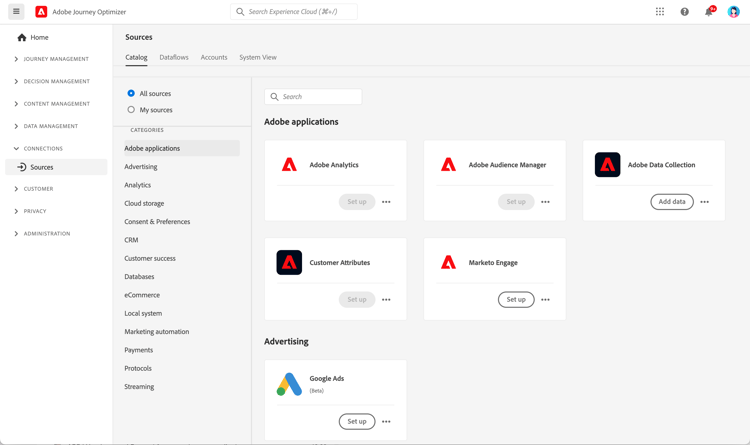
Journey Optimizer supports various types of sources to connect with your existing systems:
Adobe applications:
- Adobe Analytics
- Adobe Audience Manager
- Adobe Campaign
- Adobe Commerce
Cloud storage:
- Amazon S3
- Azure Blob Storage
- Google Cloud Storage
- SFTP
Databases:
- Amazon Redshift
- Google BigQuery
- Microsoft SQL Server
- MySQL
- PostgreSQL
CRM and marketing automation:
- Microsoft Dynamics
- Salesforce
- Salesforce Marketing Cloud
Loyalty and rewards:
- Talon.One
- Capillary
- Kobie
- LAVA
➡️ See the complete list in the Experience Platform sources catalog
Before you begin prerequisites
Before configuring sources, ensure you have:
- Appropriate permissions - Access to manage sources in Adobe Experience Platform
- Source system credentials - Authentication details for the external system you want to connect
- Understanding of your data - Know which data fields you need and how they map to Journey Optimizer profiles
➡️ Learn about access control and permissions
How sources work how-sources-work
Adobe Journey Optimizer uses the sources framework from Adobe Experience Platform. Here’s the basic workflow:
- Connect - Set up authentication to your external data system
- Select data - Choose which data to import and how often to sync
- Map fields - Define how external data fields correspond to Journey Optimizer profile attributes
- Schedule - Set up automatic data refresh intervals
- Monitor - Track data flow and resolve any sync issues
Once configured, sources run automatically in the background, keeping your customer data fresh and ready for use in journeys.
_change_request_type field is required. Supported values are u (upsert) or d (delete). These values must be lowercase u and d, not uppercase U and D. Learn more on Orchestrated campaigns guardrails & limitationsLearn more learn-more
Watch this video to understand source connectors and how to configure them in Journey Optimizer:
For detailed information about configuring and managing sources, refer to the Adobe Experience Platform sources documentation.
Next steps next-steps
Now that you understand what sources are and why they’re important:
- Explore the sources catalog to find connectors for your systems
- Learn how to create a source connection
- Understand data mapping and transformation
- See how to use imported data in journeys
- Review the Get started with data management overview to understand how sources fit into the full data setup for Journey Optimizer
This section contains structured knowledge intended to support interpretation, retrieval, and question answering related to this topic.
For complete understanding, this information should be combined with the documentation on this page. Neither source is intended to stand alone; the page describes the feature, while this section provides additional context that helps disambiguate terminology, intent, applicability, and constraints.
- TL;DR: This page explains what source connectors are, why they matter, the common source types, and how sources bring external data from CRM, cloud storage, and databases into Journey Optimizer for personalized journeys.
Intents:
- Understand what a source is and how it brings external data into Journey Optimizer
- Identify the common source types available for Adobe applications, cloud storage, databases, CRM and marketing automation, and loyalty and rewards
- Confirm the prerequisites needed before configuring sources
- Understand the basic sources workflow from connection through monitoring
- Configure file-based Change Data Capture sources for Orchestrated campaigns correctly
Glossary:
- Source: A connector that brings external data into Adobe Journey Optimizer from systems such as CRM platforms, cloud storage, or databases (product-specific)
- Sources framework: The Adobe Experience Platform framework that Journey Optimizer uses to power sources (product-specific)
_change_request_type: A field required for file-based Change Data Capture sources used with Orchestrated campaigns, indicating the change operation (product-specific)
Guardrails:
- Before configuring sources, you need appropriate permissions to manage sources in Adobe Experience Platform, source system credentials, and an understanding of which data fields you need and how they map to Journey Optimizer profiles.
- For file-based Change Data Capture sources used with Orchestrated campaigns, the
_change_request_typefield is required, and its supported values must be lowercaseu(upsert) ord(delete), not uppercaseUandD. - Once configured, sources run automatically in the background to keep customer data fresh.
Terminology:
- Canonical name: Source — variants: source connector, sources
- Synonyms: “source” = “source connector”
- Do not confuse: “
u(upsert)” ≠ “d(delete)” — both must be lowercase
FAQ:
- Q: What is a source in Journey Optimizer? — A connector that brings external data from systems such as CRM platforms, cloud storage, or databases into Journey Optimizer and makes that data available for personalized journeys.
- Q: Do I have to import data manually? — No; once configured, sources sync data automatically in the background so customer information stays current.
- Q: What do I need before I configure a source? — Appropriate permissions to manage sources in Adobe Experience Platform, source system credentials, and an understanding of your data fields and how they map to profiles.
- Q: What values does the
_change_request_typefield accept for Orchestrated campaign Change Data Capture sources? — Lowercaseufor upsert ordfor delete; uppercaseUandDare not supported.