在此页面上:了解如何在Adobe Journey Optimizer中将自定义渠道添加到历程或营销活动,并使用表达式编辑器创作个性化的消息负载。
在Journey Optimizer中,您可以使用营销活动和历程中的自定义渠道投放消息。 请按照以下步骤设置您的自定义渠道体验。
通过历程或营销活动添加一个自定义操作 create-custom-channel-experience
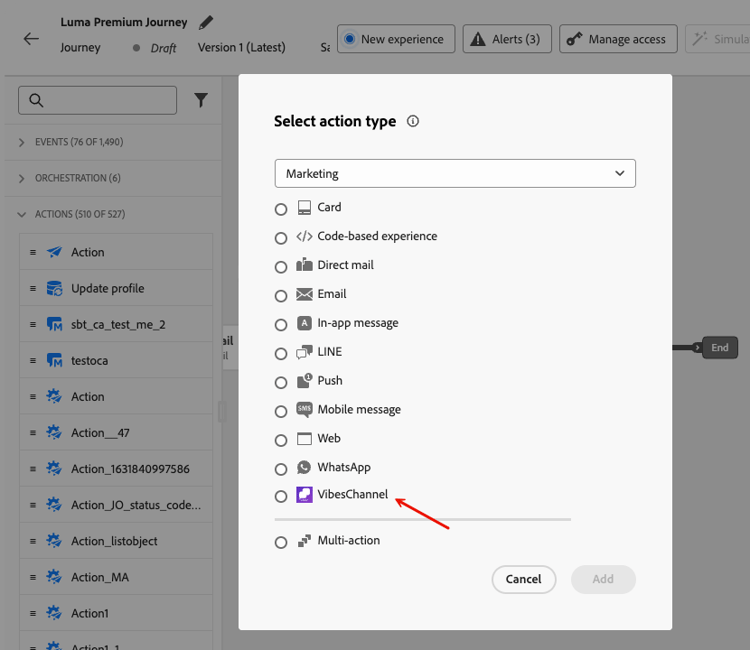
自定义渠道显示在历程画布调色板的 操作 部分中,按其显示名称和自定义图标列出,如渠道生成器中所定义。
要向历程添加自定义渠道操作,请执行以下操作:
要在营销活动中使用自定义渠道,请执行以下操作:
-
选择营销活动类型:
- 已计划 — 营销 — 立即执行或在指定日期执行。 为营销消息而设计,通过UI进行配置。
- API触发 — 营销 — 通过API调用执行。 专为事件触发消息传送而设计。 了解详情
note availability AVAILABILITY 自定义渠道在历程、编排的营销活动和营销(操作和API触发)营销活动中可用。 它们在事务型营销活动类型中不可用。 -
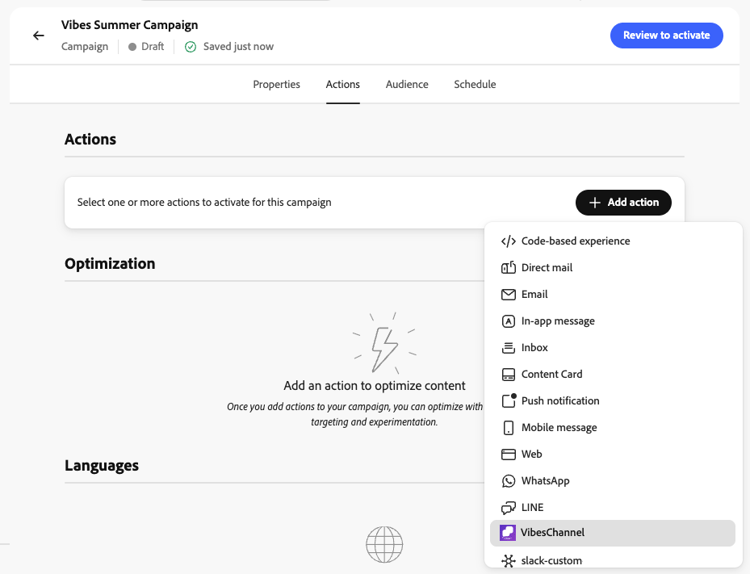
在 操作 部分中,从渠道选择器中选择自定义渠道。 在您的沙盒上配置的所有自定义渠道均与本机渠道一起显示。
-
选择或创建要使用的渠道配置。 了解如何创建渠道配置

-
(可选)启用 操作跟踪 以自动跟踪消息有效负载中包含的链接(需要为自定义渠道配置子域)。 了解如何委派自定义渠道的子域
-
在 优化 部分中,您可以:
-
单击 编辑内容 以打开有效负荷编辑器并创作消息。 了解如何创作内容
-
查看并激活营销活动。 了解详情
创作自定义渠道内容 author-content
内容编辑器可反映您在配置自定义渠道时定义的有效负载结构。 单击 编辑代码 以打开有效负载编辑器并输入消息内容。
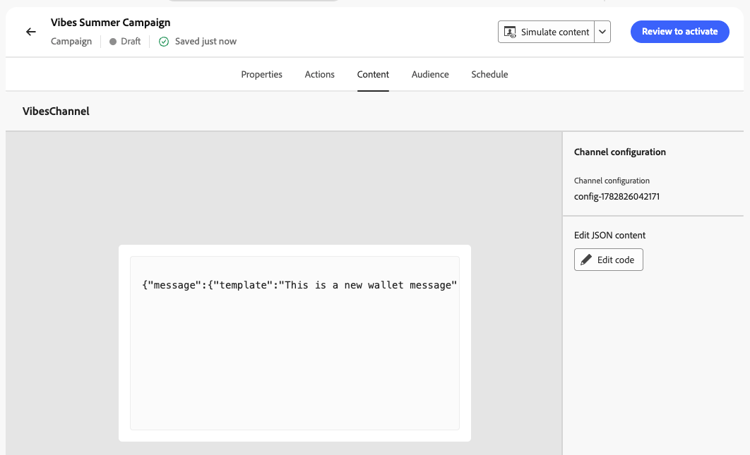
此时会显示可创作和个性化的字段。 您可以利用Journey Optimizer个性化编辑器及其所有个性化和创作功能。 了解详情
| code language-json |
|---|
|
将有效负载个性化 personalize
Journey Optimizer的完整个性化功能在有效负载编辑器中可用:
以下示例显示了具有配置文件个性化的JSON负载:
{
  "message": {
    "template": "Limited offer just for you, {{profile.person.name.firstName}}!",
    "header": "You have a FREE drink when you buy a King menu!"
  },
  "campaign_ref": {
    "id": "2grjya",
    "type": "loyalty",
    "url": "/companies/wNmRsLbu/campaigns/wallet/2grjya"
  }
}
{
  "messaging_product": "mess",
  "recipient_type": "individual",
  "to": "{{profile.mobilePhone.number}}",
  "zipCode": 4001,
  "type": "image",
  "image": {
    "id": "1479537139650973",
    "caption": "The best succulent ever?"
  }
}
在自定义渠道有效负荷中使用决策内容 use-decisioning
Journey Optimizer允许您通过个性化编辑器在自定义渠道负载中包含决策内容。 您可以插入决策策略并使用返回的决策项属性动态地个性化您的有效负载。
此部分中介绍了决策策略插入工作流。
跟踪有效负载中的链接 track-links
要在自定义渠道有效载荷中包含跟踪链接,以便自动在渠道的报表功能板中跟踪和显示点击,请使用以下手柄栏语法来换行URL:
{{url trackedUrl='' originalUrl='https://example.com/' type='TRACKED'}}
originalUrl— 要将收件人重定向到的目标URL。trackedUrl— 将此留空;Journey Optimizer在发送时自动使用启用跟踪的重定向URL填充它。type— 必须设置为TRACKED。
示例 — 有效负载中的跟踪链接:
{
  "receiver": "{{profile.mobilePhone.number}}",
  "min_api_version": 1,
  "sender": {
    "name": "Luma Rewards",
    "avatar": "https://avatar.example.com"
  },
  "tracking_data": "{{profile.person.name.firstName}}",
  "type": "text",
  "text": "Hello {{profile.person.name.firstName}}! Discover our new collection: {{url trackedUrl='' originalUrl='https://luma.com/collection' type='TRACKED'}}"
}
激活您的自定义渠道体验 activate
This section contains structured knowledge intended to support interpretation, retrieval, and question answering related to this topic.
For complete understanding, this information should be combined with the documentation on this page. Neither source is intended to stand alone; the page describes the feature, while this section provides additional context that helps disambiguate terminology, intent, applicability, and constraints.
- TL;DR: This page explains how to deliver messages through a custom channel by adding it to a journey or a campaign, authoring and personalizing the JSON payload, optionally tracking links, and then activating the experience.
Intents:
- Add a custom channel to a journey using an Action activity with the custom channel selected
- Use a custom channel in a Scheduled or API-triggered campaign
- Select a channel configuration for the custom channel
- Author and personalize the JSON message payload in the payload editor
- Track links included in the payload
- Activate the custom channel experience from a journey or a campaign
Glossary:
- Custom channel (in a journey): A channel selected in the drop-down of an Action activity; custom channels are listed by the name and icon assigned in the Channel Builder (product-specific)
- Channel configuration: The configuration selected for the custom channel, in a journey after clicking Configure action and in a campaign in the Actions section; the page links to custom-channel-configuration for how to create one (product-specific)
- Payload editor: The content editor, opened with Edit content or Edit code, that reflects the payload structure defined for the custom channel (product-specific)
- Simulate content: The feature used to validate that the payload is well-formed JSON and that all personalization expressions resolve correctly for your test profiles (product-specific)
- Action tracking: A campaign option that automatically tracks links included in the message payload and requires a subdomain configured for custom channels (product-specific)
- Expression fragments: Shared personalization logic that can be reused across multiple channels and campaigns (product-specific)
Guardrails:
- A custom channel must be configured by your administrator before you create a custom channel experience.
- Only JSON payloads are supported; non-JSON content such as XML can be wrapped in a JSON object.
- There is currently no validation of the payload at authoring time; use Simulate content to validate that the payload is well-formed JSON and that personalization expressions resolve correctly for your test profiles.
- Action tracking and link tracking require a subdomain configured for custom channels.
- For a tracked link, leave trackedUrl empty and set type to TRACKED; Journey Optimizer populates trackedUrl at send time.
- Custom channels are available in journeys, orchestrated campaigns and Marketing (action and API-triggered) campaigns. They are not available in transactional campaign types.
- If your campaign or journey is subject to an approval policy, you must request approval before activation.
Terminology:
- Canonical name: custom channel experience — Acronym: n/a
- Both “Edit content” and “Edit code” are named on this page as the button that opens the payload editor
- Do not confuse: “Scheduled - Marketing” ≠ “API-triggered - Marketing” (the two campaign types listed on this page)
- Do not confuse: “Publish” (journey activation) ≠ “Review to activate” and “Activate” (campaign activation)
- Do not confuse: “Live” ≠ “Scheduled” (campaign statuses after activation)
FAQ:
- Q: What payload format can I author? — Only JSON; wrap non-JSON content such as XML in a JSON object.
- Q: How do I check my payload before activating? — Use Simulate content to confirm the payload is well-formed JSON and that all personalization expressions resolve correctly for your test profiles.
- Q: How do I track links in the payload? — Wrap the URL with the handlebar syntax, leaving trackedUrl empty and setting type to TRACKED; link tracking requires a delegated subdomain.
- Q: How do I activate the experience? — From a journey, click Publish; from a campaign, click Review to activate and then Activate.
- Q: Can I run A/B tests on custom channel messages in a campaign? — Yes, in the Optimization section of the campaign, click Create experiment.