在此页面上:了解如何在Adobe Journey Optimizer中为自定义渠道创建渠道配置,并将其链接到API凭据、可选子域和有效负载默认值,以便营销人员在构建营销活动和历程时可以选择它。
渠道配置将您的自定义渠道链接到营销人员在构建营销活动和历程时选择的已命名的可重用预设。
要为自定义渠道创建渠道配置,请执行以下步骤。
-
转到管理 > 渠道 > 渠道配置,然后单击创建渠道配置。 了解有关创建渠道配置的更多信息。
-
从 选择渠道 下拉列表中,选择一个已激活的自定义渠道。
-
如果所选渠道使用身份验证(类型不是无),则显示 API凭据 字段。 选择要用于此配置的凭据。 了解有关API凭据的更多信息
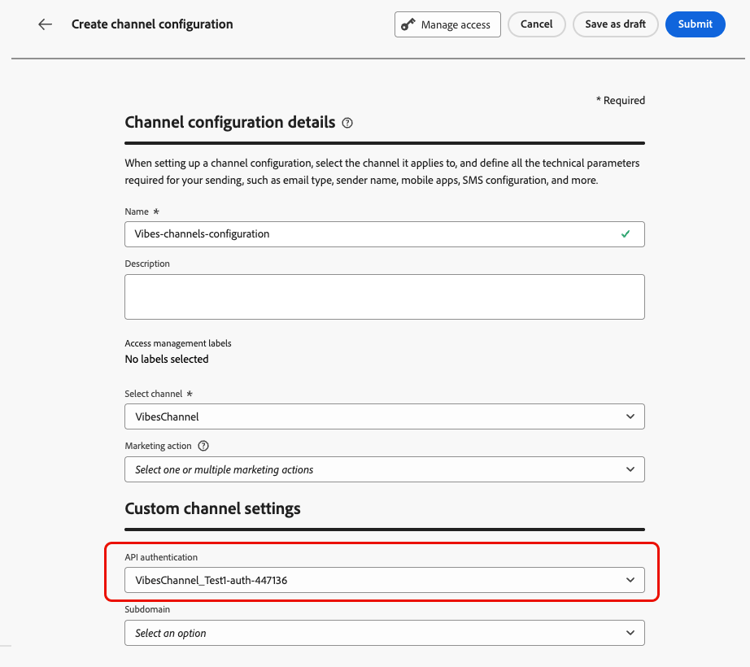
-
如果您在Journey Optimizer中为自定义渠道设置了子域,则可以选择一个已委派的子域,以用于跟踪此配置的有效负载中存在的链接。 了解如何委派子域
-
如果所选渠道具有定义为端点URL的变量🔗的标头或查询参数,则会显示 动态参数 部分。
输入每个参数的值。 您可以使用个性化编辑器插入动态值(例如,从用户档案解析的用户标识符)。 这样,您就可以根据每个收件人的配置文件数据为其自定义请求。

-
如果自定义渠道的有效负载字段启用了 渠道配置 复选框,则这些字段会显示在 有效负载配置 部分。 了解详情

为此配置相应地为每个字段配置一个值。 这对于那些可能因营销活动或历程的上下文而不同的字段非常有用,例如发件人信息或消息模板。
- 单击 提交 保存并激活渠道配置。
后续步骤 next-steps
您的自定义渠道现已完全配置。 营销人员可以开始使用此插件构建客户体验:
This section contains structured knowledge intended to support interpretation, retrieval, and question answering related to this topic.
For complete understanding, this information should be combined with the documentation on this page. Neither source is intended to stand alone; the page describes the feature, while this section provides additional context that helps disambiguate terminology, intent, applicability, and constraints.
- TL;DR: This page explains how to create a channel configuration that links a custom channel to a named, reusable preset, including API credentials, an optional subdomain, dynamic parameters, and payload defaults, so that marketers can select it when building campaigns and journeys.
Intents:
- Create a channel configuration for an activated custom channel
- Select the API credentials to use for the configuration
- Select a delegated subdomain for tracking links in the payload
- Provide values for dynamic parameters and payload fields
- Save and activate the channel configuration for marketers to select
Glossary:
- Channel configuration: A named, reusable preset that links a custom channel to credentials, a subdomain, and payload defaults, which marketers select when building campaigns and journeys (product-specific)
- Dynamic parameters: The section that appears when the channel has headers or query parameters defined as variable, where a value is entered for each parameter (product-specific)
- Payload configuration: The section that displays payload fields whose Channel config checkbox is enabled, where a value is configured for each field (product-specific)
- Delegated subdomain: A subdomain that can be selected to track links present in the payload for this configuration (product-specific)
Guardrails:
- Only activated custom channels can be selected in the Select channel drop-down.
- The API credentials field appears only if the selected channel uses an authentication type other than None.
- The Dynamic parameters section appears only if the channel has headers or query parameters defined as variable.
- The Payload configuration section appears only for payload fields that have the Channel config checkbox enabled.
- In custom channel configurations, you cannot select a message type, so all messages sent through custom channels are treated as Marketing messages at send time; custom channels are not supported in Transactional campaigns (action or API-triggered).
- Selecting a delegated subdomain is possible only if you have set up subdomains for custom channels in Journey Optimizer.
- Clicking Submit saves and activates the channel configuration.
Terminology:
- Canonical name: channel configuration — Acronym: n/a — variants: custom channel configuration, named preset
- Do not confuse: “channel configuration” (the reusable preset) ≠ “custom channel” (the activated custom channel selected from the Select channel drop-down)
- Do not confuse: “Dynamic parameters” (values for variable headers or query parameters) ≠ “Payload configuration” (values for payload fields enabled for the channel config)
FAQ:
- Q: What does a channel configuration do? — It links a custom channel to a named, reusable preset that marketers select when building campaigns and journeys.
- Q: When does the API credentials field appear? — When the selected channel uses an authentication type other than None.
- Q: When does the Dynamic parameters section appear? — When the channel has headers or query parameters defined as variable.
- Q: Which channels can I select? — Only your activated custom channels.
- Q: How do I save a channel configuration? — Click Submit to save and activate it.