在此页面上:了解如何使用渠道生成器在Adobe Journey Optimizer中创建自定义渠道,方法是定义端点URL、标头、身份验证、限制策略和消息有效负载结构。
要在营销活动和历程中使用自定义渠道,管理员必须首先创建渠道。 这涉及定义端点、身份验证、限制策略和消息有效负载结构。 您可以在Channel Builder中手动创建渠道(如下所述),或使用Co-worker 🔗中的Channel Builder技能创建渠道。
渠道生成器部分是定义新自定义渠道的中心界面。 它使您能够创建和配置自定义渠道,还可以管理API凭据和委派子域。
访问和管理自定义渠道 access-channel-builder
要访问 渠道生成器 并管理您的自定义渠道,请执行以下步骤。
-
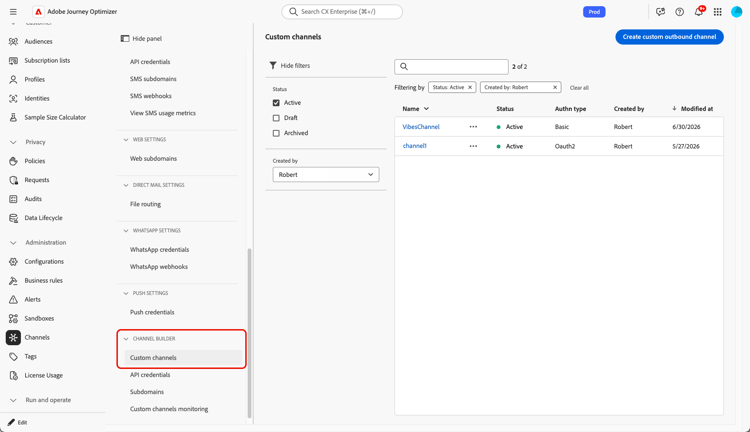
在左侧导航边栏中转到管理 > 渠道。
-
在 渠道生成器 部分中选择自定义渠道。
-
清单列出沙盒中的所有自定义渠道,包括其当前状态和用于连接到外部端点的身份验证类型。
-
您可以按创建自定义渠道的状态(草稿、活动或已存档)筛选自定义渠道,并按名称搜索。
-
要编辑渠道,请在清单中单击渠道名称,进行更改并保存。 对于活动渠道,您只能编辑某些字段 — 了解更多。
note caution CAUTION 修改活动渠道上的限制或重试设置会立即对所有正在进行的和未来的执行生效。 -
若要存档渠道,请从清单中打开它,然后单击存档。
存档活动渠道会将其从所有选择下拉列表(营销活动操作选择器、历程操作调色板、渠道配置和内容模板)中删除。 已使用该渠道的现有历程和营销活动继续正常运行。
创建自定义渠道 create-channel
要创建新的自定义渠道,请执行以下步骤。
-
单击 创建自定义渠道 按钮以打开渠道创建表单。 首先定义自定义渠道的常规设置。

-
在 属性 部分中,为您的自定义渠道输入名称。 此名称将显示在历程画布、营销活动操作选择器和编排的营销活动渠道列表中。
note NOTE 名称必须是唯一的,以字母(A-Z)开头,仅包含字母数字字符或特殊字符( _, ., -),并且应大于1个字符。 -
您可以从默认图标库中选择图标,或从计算机中选择SVG文件。
note NOTE 文件不能大于150KB。 此图标将显示在历程画布中的渠道名称旁边。 如果未上传图标,则使用默认图标。
-
输入可选的描述。
设置端点配置 endpoint-configuration
您必须配置端点,它是外部消息传递系统的HTTP URL。 当某个用户档案在营销活动或历程中符合条件时,Journey Optimizer使用个性化有效负载向此端点发送POST请求。

-
在 终结点配置 部分中,输入外部消息传递系统的主机URL。 例如:
https://api.my-messaging-provider.com/v1/messages。note important IMPORTANT 您的外部消息传递系统必须公开Journey Optimizer可以通过HTTP POST调用的HTTPS端点。 端点必须: - 接受您的渠道定义的有效负载格式(JSON)。
- 支持Channel Builder中提供的身份验证方法之一。 了解详情
- 返回HTTP 2xx响应以确认成功收到请求。
-
根据需要添加标头。 标头是在HTTP请求级别传输的键值对。 它们与发送到端点的每个请求一起发送,通常用于身份验证令牌、内容类型规范或外部系统所需的任何其他元数据。
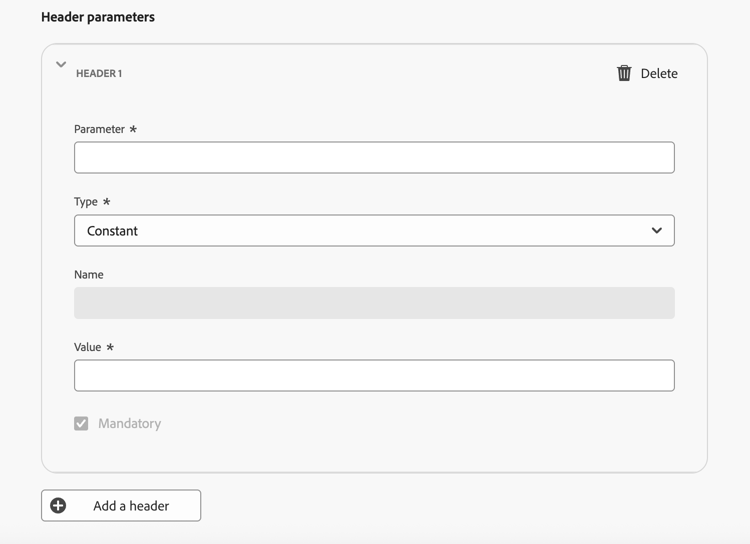
对于每个标头,您可以定义其值是否为:
- 常量 — 一个静态值,设置一次并包含在每个请求中。 例如,您可以定义值为
application/json的Content-Type参数或值为UTF-8的Charset参数。 - 变量 — 如果在此处输入了默认值,则除非在渠道配置中覆盖该默认值,否则将使用该默认值。 例如,您可以为在运行时解析的用户ID定义一个变量。 了解详情
- 常量 — 一个静态值,设置一次并包含在每个请求中。 例如,您可以定义值为
-
(可选)使用相同的常量/变量模式添加查询参数。 查询参数在投放时附加到端点URL。 常量参数始终使用相同的值添加;变量参数在发送时解析,例如,从用户档案传递用户标识符。

-
在 策略配置 部分中,定义Journey Optimizer如何处理请求吞吐量和失败。 这对于确保外部系统能够处理大量请求并避免其过多非常重要。
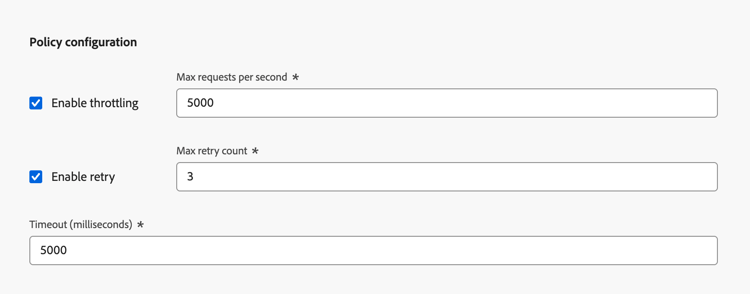
- 启用节流 — 默认情况下处于禁用状态。 设置每秒的最大请求数(默认值: 5,000c)。 一旦达到限制,请求就会排队并尽快发送。
- 启用重试 — 默认启用。 为失败的请求设置最大重试计数(默认值: 3,可配置的范围: 0-10)。 这有助于避免在瞬态失败期间使端点不堪重负。
- 超时 — 默认值: 5,000毫秒。 设置考虑请求失败之前等待端点响应的最长时间。
身份验证设置 authentication-settings
选择您需要用于此渠道的身份验证类型。 可用的选项取决于外部消息传递系统支持的身份验证方法。

提供端点所需的身份验证详细信息。
- 无 — 发送请求时没有凭据。
- API密钥 — 提供密钥名称、值和位置(查询参数或标头)。
- 基本身份验证 — 提供用户名和密码。
- OAuth 2.0 — 为OAuth 2.0身份验证配置有效负载。 了解更多
当身份验证类型不是 None 时,Journey Optimizer会在激活此渠道时自动为其生成初始API凭据集。 您可以在API凭据清单中更改这些凭据并创建新凭据。 了解详情
但是,在激活渠道之前,需要此处提供身份验证详细信息以测试与端点的连接。 测试连接按钮可用于验证身份验证设置。 了解详情
负载配置 payload-configuration
当配置文件在营销活动或历程中符合条件时,有效负载会被发送到端点。
在有效负载配置中,定义消息有效负载的结构以及营销人员可以创作和个性化的字段。
-
单击定义有效负载,然后选择如何定义有效负载:

-
粘贴示例JSON有效负载 — 粘贴一个具有代表性的JSON对象,然后Journey Optimizer自动推断该对象中的架构。 例如:
code language-json { "channelId": "KakaoTalk08", "title": "Flash Sale: 48 Hours Only", "body": "New arrivals just dropped. Shop now before they're gone!", "image": "https://demo-system-next.s3.amazonaws.com/assets/luma/luma-flash-sale-banner.jpg" } -
导入JSON有效负载 — 上载完整的JSON有效负载文件。
-
导入JSON架构 — 上载完整的JSON架构文件。
-
-
生成架构后,Journey Optimizer在表单视图中显示所有检测到的字段。

-
对于每个字段,请配置以下设置:
table 0-row-2 1-row-2 2-row-2 3-row-2 4-row-2 设置 说明 默认值 可选。 如果在创作时未提供个性化值,则使用。 类型 只读,从有效负载派生。 支持的类型: string、integer、decimal、boolean、dateTime、dateTimeOnly、dateOnly、listObject、listString、listInteger、listDecimal、listBoolean、listDateTime、listDateTimeOnly、listDateOnly。必需 如果启用,则在营销活动或历程中使用渠道时,字段必须具有值。 缺少必填字段会触发阻止激活的验证错误。 频道配置 如果启用,该字段将显示在渠道配置中,允许管理员为每个配置设置不同的值(例如,为每个品牌或区域设置不同的发件人ID)。 了解如何操作 嵌套字段使用点表示法表示(例如,
image.id)。
测试和激活 test-activate
当渠道处于 草稿 状态时,使用屏幕顶部的 测试连接 按钮向您的端点发送测试请求并验证端到端连接。

检查外部系统的日志,确认已收到具有预期身份验证和有效负载的请求。
测试成功后,您可以保存或激活渠道。
- 单击 另存为草稿 以保存您的进度,而不使该渠道可用。
- 单击 激活 使该渠道可用于渠道配置、营销活动和历程。
后续步骤 next-steps
您的自定义渠道现已创建。 按照以下剩余步骤完成配置:
This section contains structured knowledge intended to support interpretation, retrieval, and question answering related to this topic.
For complete understanding, this information should be combined with the documentation on this page. Neither source is intended to stand alone; the page describes the feature, while this section provides additional context that helps disambiguate terminology, intent, applicability, and constraints.
- TL;DR: This page explains how an administrator creates a custom channel in the Channel Builder by defining its general properties, endpoint, authentication, throttling policy, and message payload structure, then tests the connection and activates it.
Intents:
- Access and manage custom channels in the Channel Builder
- Define general properties such as name and icon for a custom channel
- Configure the endpoint URL, headers, query parameters, and policy settings
- Choose an authentication type and provide the authentication details
- Define the message payload structure and which fields marketers can author
- Test the connection and activate the channel
Glossary:
- Channel Builder: The central interface for defining new custom channels and for managing API credentials and subdomains (product-specific)
- Endpoint configuration: The HTTP URL of your external messaging system that Journey Optimizer calls with a POST request when a profile qualifies (product-specific)
- Constant header value: A static value set once and included in every request (product-specific)
- Variable header value: A value with an optional default that can be overridden in the channel configuration and resolved at runtime (product-specific)
- Policy configuration: The section defining how Journey Optimizer handles request throughput and failures through throttling, retry, and timeout settings (product-specific)
- Test connection: A button that sends a test request to your endpoint while the channel is in Draft status to validate the end-to-end connection (product-specific)
Guardrails:
- This capability requires the View custom channels and Manage custom channels permissions.
- The channel name must be unique, begin with a letter (A-Z), include only alphanumeric characters or the special characters _, ., -, and be greater than 1 character.
- An uploaded icon SVG file must be no larger than 150KB.
- The external endpoint must be HTTPS, accept the JSON payload the channel defines, support one of the Channel Builder authentication methods, and return an HTTP 2xx response.
- Throttling is disabled by default; the maximum number of requests per second default is 5,000, and once the limit is reached requests are queued and sent as soon as possible.
- Retry is enabled by default with a maximum retry count default of 3 (configurable range 0-10).
- The endpoint timeout default is 5,000 milliseconds.
- Modifying throttling or retry settings on an active channel takes effect immediately for all in-flight and future executions.
- When the authentication type is anything other than None, an initial set of API credentials is generated automatically when the channel is activated.
- After a channel is activated, only name, description, icon, throttling, and retry configuration remain editable; endpoint URL, headers, query parameters, authentication, and payload structure are locked.
- A required payload field that has no value triggers a validation error that prevents activation.
Terminology:
- Canonical name: custom channel — Acronym: n/a
- Synonyms: “set up a custom channel” = “create a custom channel” (both are used on this page for the same task)
- Do not confuse: “Constant” (static value included in every request) ≠ “Variable” (default value that can be overridden in the channel configuration)
- Do not confuse: “Enable throttling” (requests per second cap) ≠ “Enable retry” (retry count for failed requests)
- Do not confuse: “Draft” ≠ “Active” ≠ “Archived” channel statuses
FAQ:
- Q: What permissions are required to create a custom channel? — The View custom channels and Manage custom channels permissions.
- Q: What statuses can a custom channel have? — Draft, Active, or Archived.
- Q: Which fields remain editable after activation? — Only name, description, icon, throttling, and retry configuration; endpoint URL, headers, query parameters, authentication, and payload structure are locked.
- Q: How do I validate the connection before activating? — Use the Test connection button while the channel is in Draft status to send a test request to your endpoint, then check your external system’s logs.
- Q: What payload format is supported? — The endpoint must accept the payload format your channel defines (JSON). You define the payload by pasting a sample JSON payload, importing a JSON payload file, or importing a JSON schema file.
- Q: What happens when I archive an active channel? — It is removed from all selection drop-downs, while existing journeys and campaigns that already use it continue to function normally.