Auf dieser Seite: Entwerfen und testen Sie den Inhalt Ihrer Aktionskampagne für den ausgewählten Kanal, sodass jede Nachricht bereit ist, bevor Sie die Kampagne aktivieren.
Um den Nachrichteninhalt zu konfigurieren, navigieren Sie zur Registerkarte Inhalt oder klicken Sie auf die Schaltfläche Inhalt bearbeiten.
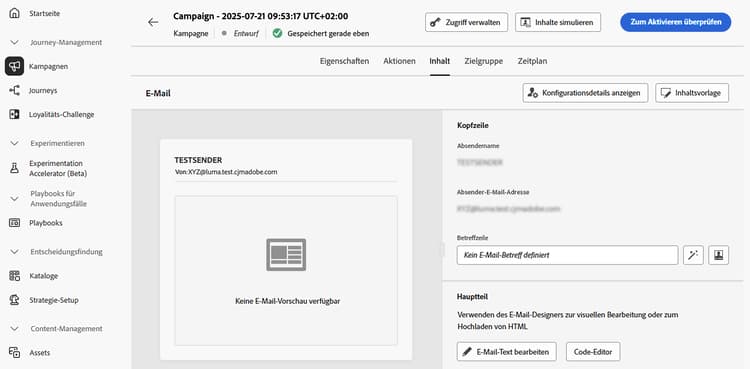
Entwerfen des Inhalts action-campaign-channels
Der Prozess der Inhaltserstellung hängt vom ausgewählten Kanal ab. Auf den folgenden Seiten erfahren Sie, wie Sie Ihren Nachrichteninhalt erstellen:





Testen und Überprüfen Ihres Inhalts
Sobald der Inhalt definiert ist, verwenden Sie die Schaltfläche Inhalte simulieren, um den Inhalt in der Vorschau anzuzeigen und zu testen. Sie können eine der beiden Simulationsmethoden verwenden:
- Klicken Sie auf Inhalte simulieren, um Inhaltsvarianten mit Beispieleingabedaten oder automatischer KI-Generierung zu testen.
- Klicken Sie auf Inhalte simulieren und wählen Sie dann Inhalte simulieren (AEP-Profile) aus der Dropdown-Liste aus, um eine Vorschau mit Testprofilen anzuzeigen.
Erfahren Sie, wie Sie Inhalte in der Vorschau anzeigen und testen
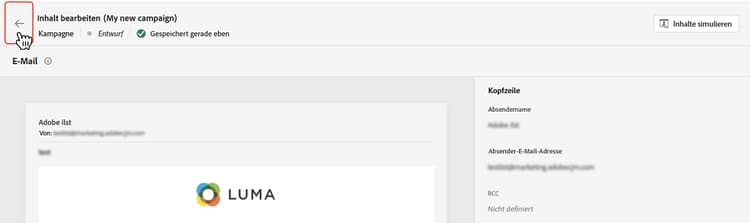
Klicken Sie auf den Linkspfeil, um zum Bildschirm der Kampagnenerstellung zurückzukehren.
Nächste Schritte next
Sobald der Inhalt Ihrer Aktionskampagne fertiggestellt ist, können Sie die Zielgruppe der Kampagne definieren. Weitere Informationen
This section contains structured knowledge intended to support interpretation, retrieval, and question answering related to this topic.
For complete understanding, this information should be combined with the documentation on this page. Neither source is intended to stand alone; the page describes the feature, while this section provides additional context that helps disambiguate terminology, intent, applicability, and constraints.
- TL;DR: This page explains how to open the content of an Action campaign for the channel selected, find the channel-specific content creation pages, and preview and test the content with Simulate content.
Intents:
- Open the content of the campaign from the Content tab or the Edit content button
- Find the page that explains content creation for each channel
- Preview and test content with Simulate content
- Preview content with test profiles using Simulate content (AEP profiles)
- Go back to the campaign creation screen
Glossary:
- Simulate content: Button used to preview and test content; tests content variations with sample input data or AI auto-generation. (product-specific)
- Simulate content (AEP profiles): Option selected from the Simulate content dropdown; previews the content with test profiles. (product-specific)
Terminology:
- Canonical name: Action campaign content — variants: message content
- Acronym: AEP — Adobe Experience Platform
- Do not confuse: “Simulate content” (sample input data or AI auto-generation) ≠ “Simulate content (AEP profiles)” (test profiles)
FAQ:
- Q: How do I open the content of my Action campaign? — Navigate to the Content tab or click the Edit content button.
- Q: Where do I find how to create content for my channel? — The content creation process depends on the channel you selected; the page lists Email, Mobile message, Push notification, Direct mail, In-app, Web, Code-based experience, Content cards, LINE, and WhatsApp, each linking to its page.
- Q: How do I preview and test my content? — Use Simulate content to test content variations with sample input data or AI auto-generation, or select Simulate content (AEP profiles) from the dropdown to preview with test profiles.
- Q: How do I go back to the campaign creation screen? — Click the left arrow.
Related pages:
- Email content: Email (email/create-email.md)
- Mobile message content: Mobile message (mobile/create-mobile-message.md)
- Push content: Push notification (push/create-push.md)
- Direct mail content: Direct mail (direct-mail/create-direct-mail.md)
- In-app content: In-app (in-app/create-in-app.md)
- Web content: Web (web/create-web.md)
- Code-based content: Code-based experience (code-based/create-code-based.md)
- Content cards content: Content cards (content-card/create-content-card.md)
- LINE content: LINE (line/get-started-line.md)
- WhatsApp content: WhatsApp (whatsapp/get-started-whatsapp.md)
- Previewing and testing content: Learn how to preview and test content (content-management/preview-test.md)
- Next step, audience: Define the Action campaign audience (campaigns/campaign-audience.md)