Auf dieser Seite: Wählen Sie auf der Registerkarte „Zielgruppe“ die Zielgruppe und den Identitätstyp aus, damit Ihre Aktionskampagne die richtigen Personen anspricht.
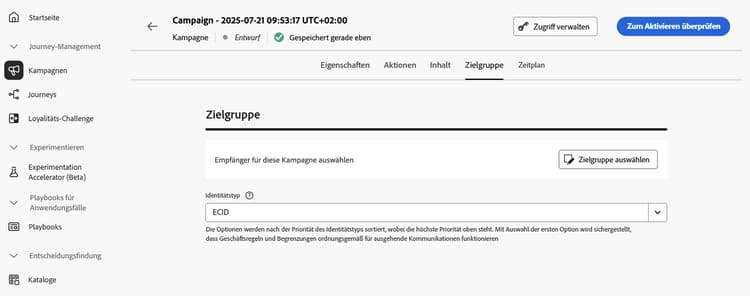
Definieren Sie auf der Registerkarte Zielgruppe die Zielgruppe der Kampagne.
-
Zielgruppe auswählen
Klicken Sie für Marketing-Kampagnen auf die Schaltfläche Zielgruppe auswählen, um die Liste der verfügbaren Adobe Experience Platform-Zielgruppen anzuzeigen. Weitere Informationen zu Zielgruppen.
note important IMPORTANT Zielgruppen und Attribute aus der Zielgruppenkomposition stehen derzeit nicht zur Verwendung mit Healthcare Shield oder Privacy and Security Shield zur Verfügung. -
Auswählen des Identitätstyps
Wählen Sie im Feld Identitätstyp den Schlüsseltyp aus, der zur Identifizierung der Kontakte in der ausgewählten Zielgruppe verwendet werden soll. Sie können entweder einen vorhandenen Identitätstyp verwenden oder mit dem Identity Service einen neuen erstellen. Standardmäßige Identity-Namespaces werden auf dieser Seite aufgeführt.
Pro Kampagne ist nur ein Identitätstyp zulässig. Kontakte, die zu einem Segment gehören, in dem der ausgewählte Identitätstyp nicht unter den verschiedenen Identitäten vorkommt, können von der Kampagne nicht angesprochen werden. Weitere Informationen zu Identitätstypen und Namespaces sind in der Dokumentation zu Adobe Experience Platform verfügbar.
Nächste Schritte next
Sobald die Zielgruppe Ihrer Aktionskampagne fertiggestellt ist, können Sie die Kampagne planen. Weitere Informationen
This section contains structured knowledge intended to support interpretation, retrieval, and question answering related to this topic.
For complete understanding, this information should be combined with the documentation on this page. Neither source is intended to stand alone; the page describes the feature, while this section provides additional context that helps disambiguate terminology, intent, applicability, and constraints.
- TL;DR: This page explains how to define the audience of an Action campaign in the Audience tab by selecting an audience and an identity type.
Intents:
- Select the audience of a Marketing campaign with the Select audience button, which displays the list of available Adobe Experience Platform audiences
- Choose the identity type used to identify the individuals of the audience
- Know that only one identity type is allowed per campaign
- Know that audiences and attributes from audience composition are unavailable with Healthcare Shield or Privacy and Security Shield
Glossary:
- Identity type: The type of key used to identify the individuals from the selected audience. It can be an existing identity type or a new one created using the Adobe Experience Platform Identity Service. (product-specific)
- Identity namespaces: Standard Identity namespaces are listed in the Adobe Experience Platform documentation. (product-specific)
Guardrails:
- Only one identity type is allowed per campaign.
- Individuals belonging to a segment that does not have the selected identity type among their different identities cannot be targeted by the campaign.
- The use of audiences and attributes from audience composition is currently unavailable for use with Healthcare Shield or Privacy and Security Shield.
Terminology:
- Canonical name: Action campaign audience — variants: campaign audience
FAQ:
- Q: How many identity types can a campaign use? — Only one identity type is allowed per campaign.
- Q: Why can an individual of my audience not be targeted? — Individuals belonging to a segment that does not have the selected identity type among their different identities cannot be targeted by the campaign.
- Q: Can I create a new identity type? — Yes, in the Identity type field you can either use an existing identity type or create a new one using the Adobe Experience Platform Identity Service.
- Q: Can I use audiences from audience composition with Healthcare Shield or Privacy and Security Shield? — No, audiences and attributes from audience composition are currently unavailable for use with them.
Related pages:
- Audiences: Learn more about audiences (audience/about-audiences.md)
- Audience composition: audience composition (audience/get-started-audience-orchestration.md)
- Next step, schedule: Schedule the Action campaign (campaigns/campaign-schedule.md)
Personas:
- marketer: Can select the audience of a Marketing campaign using the Select audience button, which lists available Adobe Experience Platform audiences. Can choose the identity type in the Identity type field, using an existing type or creating one with the Identity Service. The page states that only one identity type is allowed per campaign. Where: “Define the Action campaign audience”.
Onboarding:
- Level: Beginner
- First minimal step: Select Select audience to display the list of available Adobe Experience Platform audiences.
- Success check: The audience of the Action campaign is ready, so you can schedule the campaign.
- Previous: Learning about Adobe Experience Platform audiences before selecting one for the campaign: About Adobe Experience Platform audiences (audience/about-audiences.md); Using audiences and attributes from audience composition: Get started with audience composition (audience/get-started-audience-orchestration.md)
- Next: Scheduling the Action campaign once the audience is ready: Schedule the Action campaign (campaigns/campaign-schedule.md)