在此頁面上:瞭解如何在單一歷程動作或動作行銷活動中定義數個輸入動作,以同時傳送多個體驗至不同位置。
若要簡化協調流程,您可以在單一歷程動作或單一行銷活動中定義數個傳入動作,每個動作都會包含特定內容。
此功能可讓您同時將各種程式碼型體驗、應用程式內訊息、內容卡片或網頁動作傳送至不同位置,而不需要建立多個歷程動作或行銷活動。 所有資料都整合至單一歷程或行銷活動中,可讓部署更輕鬆,並提供更流暢的報表。
例如,您可以將程式碼型體驗傳送至內容稍有不同的多個端點。 若要這麼做,請在相同的歷程動作或促銷活動內建立多個程式碼型動作,每個動作都具有不同的端點設定。
您最多可以在歷程動作或行銷活動中新增10個傳入動作。
開啟動作設定 open-actions
第一步取決於您在歷程還是行銷活動中工作。
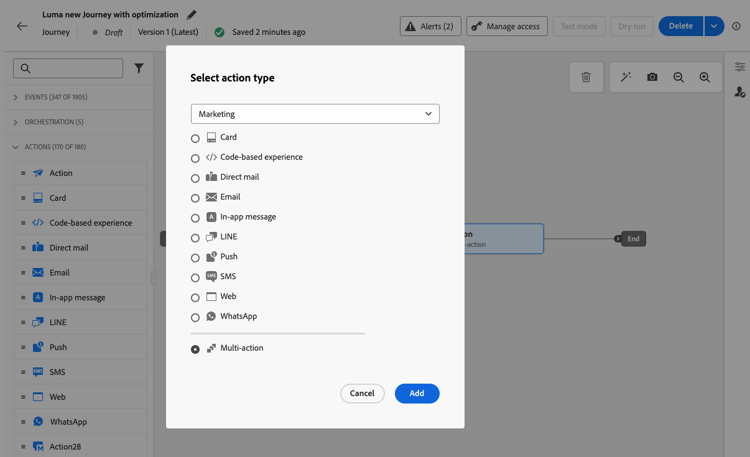
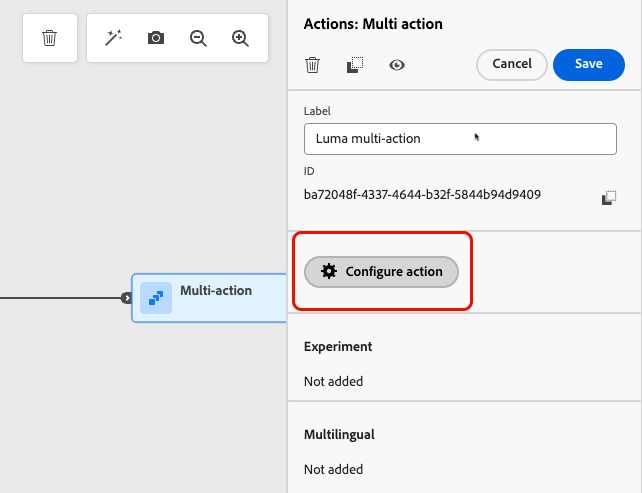
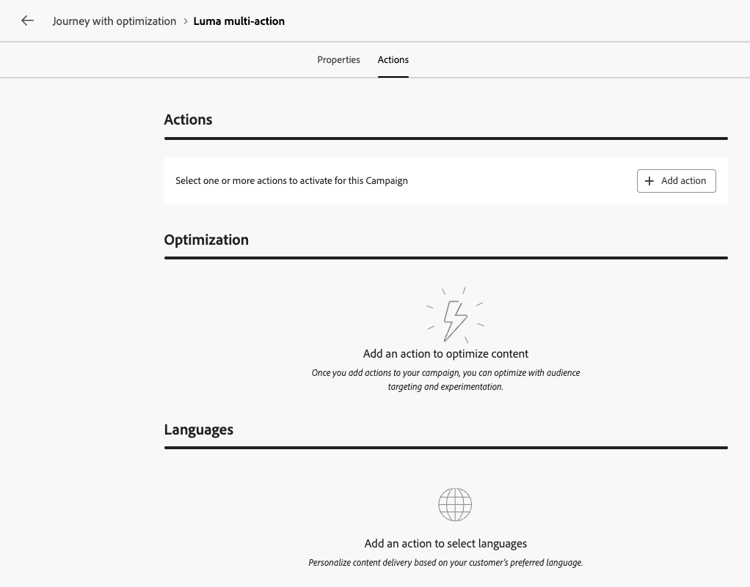
新增傳入動作 add-actions
下列步驟在歷程和行動行銷活動中相同。
-
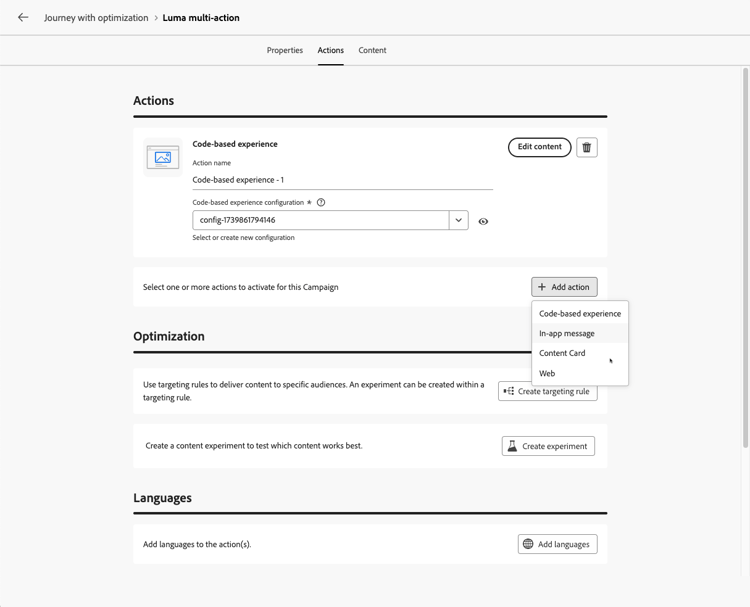
從 動作 區段選取輸入動作(程式碼型體驗、應用程式內訊息、內容卡或網頁)。
-
選取管道設定,並定義該動作的特定內容。
-
使用 新增動作 按鈕,從下拉式清單中選取其他輸入動作。
-
以類似方式繼續以新增更多動作。 您最多可以在歷程動作群組或行銷活動中新增10個傳入動作。
使用最佳化處理多個傳入動作 optimization
如果歷程動作或行銷活動包含多個傳入動作,您設定的目標定位規則和內容實驗會套用至所有這些動作。 進一步瞭解內容最佳化
客戶會在這些動作中被指派給相同的變體,但您必須為每個動作的每個變體定義內容。
另請參閱 see-also
This section contains structured knowledge intended to support interpretation, retrieval, and question answering related to this topic.
For complete understanding, this information should be combined with the documentation on this page. Neither source is intended to stand alone; the page describes the feature, while this section provides additional context that helps disambiguate terminology, intent, applicability, and constraints.
- TL;DR: This page explains how to define several inbound actions (Code-based experience, In-app message, Content Card, or Web) inside a single journey action or action campaign in Adobe Journey Optimizer, to deliver multiple experiences to different locations at the same time while keeping all reporting in one journey or campaign.
Intents:
- Deliver several inbound experiences from a single journey Action activity by using the Multi action type
- Deliver several inbound experiences from a single action campaign
- Send a code-based experience to multiple endpoints with slightly different contents
- Consolidate reporting for several inbound actions in one journey or campaign
- Apply targeting rules, a content experiment, or both across the inbound actions of a journey action or campaign
Glossary:
- Inbound action: An action that delivers a Code-based experience, In-app message, Content Card, or Web experience (product-specific)
- Multi action: The action type of a journey Action activity that groups several inbound actions in a single node (product-specific)
- Multi-action group: The set of inbound actions defined inside one journey Action activity (product-specific)
Contexts where multiple inbound actions are available:
- Journeys, in an Action activity with the Multi action type, started with an Event or Read Audience activity
- Action campaigns, in the Actions tab of the campaign, after creating the campaign and defining its properties
Guardrails:
- Available for inbound channels only; outbound channels (Email, Push, Mobile message) are not supported
- Maximum 10 inbound actions in a journey action group or in a campaign
- Each action has its own channel configuration and its own content
- All actions are activated simultaneously once the journey or campaign is live
- The targeting rules and content experiment configured in a journey action or campaign apply to all its inbound actions, not to a single action
- Customers are assigned to the same variant across all the inbound actions
- The content must be defined for each variant of each action
FAQ:
- Q: Can I add several Email or Push actions to the same journey action or campaign? — No; this capability is for inbound channels only. For outbound channels, use channel optimization to add multiple channels and automatically select the best channel per customer.
- Q: How many inbound actions can I add? — Up to 10 in a journey action group or in a campaign.
- Q: When are the actions activated? — All actions are activated simultaneously once the journey or campaign is live.
- Q: Which inbound actions can I combine? — Code-based experience, In-app message, Content Card, and Web.
- Q: Do targeting rules and experiments apply to a single inbound action? — No; the targeting rules and content experiment you configure apply to all the inbound actions of the campaign or of the journey Action activity. Customers are assigned to the same variant across those actions.
- Q: Do I need to define content for each variant of each inbound action? — Yes; the targeting rules and content experiment apply to all the actions, but you must define the content for each variant of each action.
- Q: Do I need to create one journey action or campaign per endpoint? — No; create multiple actions within the same journey action or campaign, each with a different configuration.
Personas:
- marketer: Can select Multi action as the action type of a journey Action activity, or open the Actions tab of an action campaign after creating it and defining its properties, then select an inbound action. Can use the Add action button to add up to 10 inbound actions, each with its own channel configuration and content. Where: “Open the actions configuration” and “Add the inbound actions”.
Onboarding:
- Level: Intermediate
- First minimal step: Select an inbound action in the Actions tab of your campaign, or add an Action activity with the Multi action type to your journey, then use the Add action button to add another inbound action.
- Success check: The configuration lists several inbound actions, each with its own content, and all of them are activated simultaneously when the journey or campaign goes live.
- Previous: Create a journey or an action campaign before adding inbound actions: Use the Action activity (building-journeys/journey-action.md); Create an action campaign (campaigns/create-campaign.md); Define the campaign properties (campaigns/campaign-properties.md); Configure the campaign action (campaigns/campaign-action.md)
- Next: Publish the journey or activate the campaign: Publish your journey (building-journeys/publish-journey.md); Review and activate an Action campaign (campaigns/review-activate-campaign.md)