在此頁面上:瞭解什麼是決策,並遵循關鍵設定步驟,以便您將最相關的決策專案傳送給管道中的每個人。
建立您的專案。 定義專案的資格及排名方式。 讓決策引擎為每個設定檔挑選最佳設定檔。
什麼是決策 about
決策會透過提供集中行銷產品建議目錄 (又稱為「決策項目」) 以及複雜的決策引擎,來簡化個人化。 此引擎運用規則與排名標準來選取並呈現最相關的決策項目給每個人。
這些決定專案會順暢地整合至Adobe Journey Optimizer通道的訊息和體驗:程式碼型體驗、網頁、電子郵件、行動裝置訊息、推播通知、自訂通道以及直接郵件,以便批次決定和個人化的直接郵件匯出。 直接郵件的Experience Decisioning支援是一項新功能;之前,直接郵件擷取檔案不提供該Decisioning引擎。
➡️ 在影片中探索此功能
➡️在本節中呈現了一個端對端使用案例,說明如何透過程式碼型體驗管道建立決定並用於內容實驗。
決策程式 process
下圖顯示設定決策的五個階段,從定義元件到在內容中插入決定原則。 請檢查下列必要條件,然後依照關鍵步驟處理這些階段。
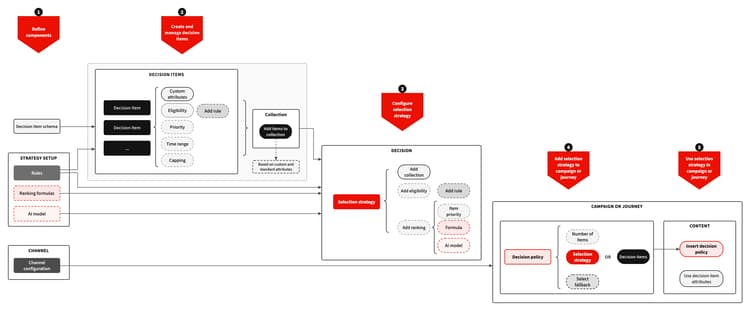
➡️已經感覺迷失了嗎? 請前往決策如何運作,瞭解各片段如何結合在一起。
先決條件 prerequisites
決策僅適用於具有決策相關 角色 存取權的使用者,例如決策管理員。 如果您無法存取決策,則必須擴充您的許可權。
-
若要在Permissions產品中將角色指派給使用者,請瀏覽至 角色 標籤,並選取決策管理員。
許可權產品的

-
在 使用者 標籤中,按一下新增使用者。

-
輸入您的使用者名稱或電子郵件地址,或從清單中選擇使用者,然後按一下儲存。
如果之前未建立使用者,請參閱新增使用者文件。

接著,使用者應會收到一封電子郵件,並重新導向至您的執行個體。
決策關鍵步驟 steps
使用決策的主要步驟如下:
-
設定自訂屬性:將自訂屬性設定到目錄的結構描述中,根據您的特定需求量身打造專案目錄。
➡️ 瞭解如何設定專案目錄
-
建立決策專案以向您的目標對象顯示。
-
使用集合組織:使用集合根據屬性型規則將決定專案分類。 將集合併入您的選擇策略,以決定應考慮的決定專案集合。
-
建立決定規則:決定專案和/或選擇策略中會使用決定規則來決定決定可以向誰顯示決定專案。
➡️ 瞭解如何建立決定規則
-
實作排名方法:建立排名方法,並在選取策略中套用這些方法,以決定選取決定專案的優先順序。
➡️ 瞭解如何建立排名方法
-
建立選擇策略:建置使用集合、決定規則和排名方法的選擇策略,以識別適合顯示給設定檔的決定專案。
-
建立決定原則並將其內嵌至您的歷程或行銷活動 (程式碼型體驗、網頁、電子郵件、行動訊息、推播、自訂頻道或直接郵件):決定原則會結合多個選取策略,以決定要顯示給目標對象的合格決定專案。
➡️ 瞭解如何使用決定原則
進一步決策 go-further
當您準備好時,請探索這些主題。






其他資源 additional-resources
- 決策共同背景工作 — 詢問共同背景工作為何未向設定檔或區段顯示優惠(決策說明器),或以對話方式建立、解釋、模擬及最佳化規則和排名公式(決策規則工作流程)。
- 建立決定原則 — 瞭解如何建立結合策略和限制的決定原則。
- 使用Adobe Experience Platform資料 — 使用內容資料和Adobe Experience Platform資料集擴充決定規則和排名公式。
- 從決定管理移轉 — 瞭解移轉至決定的好處,並使用移轉工具API。
- 決策教學課程 — 探索有關決策功能和最佳實務的逐步教學課程影片。
作法影片 video
瞭解Adobe Journey Optimizer中的決策功能。
This section contains structured knowledge intended to support interpretation, retrieval, and question answering related to this topic.
For complete understanding, this information should be combined with the documentation on this page. Neither source is intended to stand alone; the page describes the feature, while this section provides additional context that helps disambiguate terminology, intent, applicability, and constraints.
- TL;DR: Explains what Decisioning is and the key steps to work with it, so that you can deliver the most relevant decision items to each individual across your channels.
Intents:
- Understand what Decisioning is and how it simplifies personalization.
- Learn how to assign the Decision managers role to a user in the Permissions product.
- Follow the key steps to work through the five phases of the Decisioning process.
- Find the topics to explore when you are ready to go further with Decisioning.
- Watch the how-to video about Decisioning capabilities in Adobe Journey Optimizer.
Glossary:
- Decisioning (product-specific): offers a centralized catalog of marketing offers known as decision items and a sophisticated decision engine, which simplifies personalization.
- Decision item (product-specific): a marketing offer in the centralized catalog.
- Decision engine: leverages rules and ranking criteria to select and present the most relevant decision items to each individual.
- Item catalog: the catalog you tailor to your specific requirements by setting up custom attributes into the catalog’s schema.
- Collection: used to categorize decision items based on attribute-based rules. You incorporate collections into your selection strategies to determine which collection of decision items should be considered.
- Decision rule: used in decision items and/or selection strategies to determine to whom a decision item can be shown.
- Ranking method: created and applied within selection strategies to determine the priority order for selecting decision items.
- Selection strategy (product-specific): leverages collections, decision rules, and ranking methods to identify the decision items suitable for displaying to profiles.
- Decision policy (product-specific): combines multiple selection strategies to determine the eligible decision items to display to the intended audience. You embed it into your journey or campaign.
- Decisioning process: the five phases of setting up Decisioning, from defining your components to inserting a decision policy in your content. You follow the key steps to work through these phases.
- Engageable Profiles: a license metric of your organization. Profiles that receive a decision through a journey or campaign count toward it, along with profiles engaged through other Journey Optimizer capabilities.
Prerequisites and permissions:
- Decisioning is only available to users with access to a Decisioning related role such as Decision managers.
- If you cannot access Decisioning, your permissions must be extended.
Applicability:
- Decision items are integrated into messages and experiences across Adobe Journey Optimizer channels: code-based experience, web, email, mobile messages, push notifications, custom channels, and direct mail for batch decisioning and personalized direct mail exports.
- Decision policies are available to all customers for the Code-based Experience, Web, Email, Push notification, Mobile message, Custom channels, and Direct mail channels.
- Experience Decisioning support for direct mail is a new capability. Previously, the Decisioning engine was not available for direct mail extraction files.
Terminology:
- Canonical name: Adobe Journey Optimizer — Acronym: AJO
- Canonical name: Adobe Experience Platform — Acronym: AEP
FAQ:
- What is Decisioning? It simplifies personalization by offering a centralized catalog of marketing offers known as decision items and a decision engine that leverages rules and ranking criteria to select and present the most relevant decision items to each individual.
- Who can access Decisioning? Decisioning is only available to users with access to a Decisioning related role such as Decision managers. If you cannot access Decisioning, your permissions must be extended.
- How do I assign the Decision managers role to a user? You assign the Decision managers role in the Permissions product, from the Roles tab and the Users tab. The user should then receive an email redirecting to your instance.
- Which channels are decision policies available for? Decision policies are available to all customers for the Code-based Experience, Web, Email, Push notification, Mobile message, Custom channels, and Direct mail channels.
- Do profiles that receive a decision count toward a license metric? Yes. Profiles that receive a decision through a journey or campaign count toward your organization’s Engageable Profiles license metric, along with profiles engaged through other Journey Optimizer capabilities.
- Where do I see how the pieces fit together? Go to How Decisioning works to see how the pieces fit together.
Related pages:
- Feeling lost already, to see how the pieces fit together: How Decisioning works (experience-decisioning/how-decisioning-works.md)
- An end-to-end use case showing how to create decisions and use them in content experiments with the code-based experience channel: Decisioning use case (experience-decisioning/experience-decisioning-uc.md)
- Batch decisioning and personalized direct mail exports: direct mail (experience-decisioning/batch-decisioning-direct-mail.md)
- Tailor the item catalog by setting up custom attributes into the catalog’s schema: Learn how to configure the item catalog (experience-decisioning/catalogs.md)
- Create decision items to show to your targeted audience: Learn how to create decision items (experience-decisioning/items.md)
- Organize decision items with collections: Learn how to manage item collections (experience-decisioning/collections.md)
- Determine to whom a decision item can be shown: Learn how to create decision rules (experience-decisioning/rules.md)
- Determine the priority order for selecting decision items: Learn how to create ranking methods (experience-decisioning/ranking/ranking.md)
- Identify the decision items suitable for displaying to profiles: Learn how to create selection strategies (experience-decisioning/selection-strategies.md)
- Combine selection strategies into a decision policy and embed it into your journey or campaign: Learn how to work with decision policies (experience-decisioning/create-decision.md)
- Monitor the Engageable Profiles count of your organization: Monitor your Engageable Profiles count (audience/license-usage.md)
- Go further with Decisioning, guardrails and limitations: Guardrails and limitations (experience-decisioning/decisioning-guardrails.md)
- Go further with Decisioning, frequently asked questions: Frequently asked questions (experience-decisioning/decisioning-faq.md)
- Go further with Decisioning, email placements: Email placements (experience-decisioning/placements.md)
- Go further with Decisioning, reporting: Reporting (experience-decisioning/cja-reporting.md)
- Go further with Decisioning, troubleshooting: Troubleshooting (experience-decisioning/decisioning-troubleshooting.md)
- Go further with Decisioning, API reference: API reference (experience-decisioning/api-reference/getting-started.md)
- Ask Coworker why an offer was or was not shown to a profile or segment (Decisioning Explainer), or create, explain, simulate, and optimize rules and ranking formulas conversationally (Decisioning Rule Workflow): Coworker for Decisioning (experience-decisioning/experience-decisioning-coworker-skills.md)
- Build decision policies combining strategies and constraints: Create decision policies (experience-decisioning/create-decision-policy.md)
- Understand the benefits of migrating to Decisioning and use migration tooling APIs: Migrate from Decision management (experience-decisioning/migrate-to-decisioning.md)
Personas:
- marketer: Can create decision items, decision rules, ranking methods and selection strategies, organize decision items with collections, and embed a decision policy into a journey or campaign. The page states that Decisioning is only available to users with access to a Decisioning related role such as Decision managers. Where: “Decisioning key steps”.
Onboarding:
- Level: Intermediate
- First minimal step: Assign the Decision managers role to a user: in the Permissions product, go to the Roles tab and select Decision managers.
- Success check: The user should then receive an email redirecting to your instance.
- Previous: To see how the pieces fit together: How Decisioning works (experience-decisioning/how-decisioning-works.md)
- Next: When you are ready to go further with Decisioning, to explore guardrails and limitations: Guardrails and limitations (experience-decisioning/decisioning-guardrails.md); When you are ready to go further with Decisioning, to explore troubleshooting: Troubleshooting (experience-decisioning/decisioning-troubleshooting.md)