在此頁面上:了解決定專案、集合、規則、排名方法、選取策略和決定原則如何結合在一起,以及每次設定檔需要內容時,Decisioning會做什麼,讓您能夠放心設定決定。
在所有決策條款中感覺迷茫? 本頁在此提供說明。 您不需要記住任何東西:將其想像成一張決策地圖,顯示每個片段的用途以及片段如何連線,以便在您開始構建之前找到您的方式。
決策會為每個設定檔選擇最佳決策專案。 您可以在優惠方案目錄中建立決定專案,然後定義誰可以接收每個專案以及專案的排名方式。 當設定檔需要包含決定原則的訊息或體驗中的內容時,決定引擎會評估該原則並傳回要使用的專案。
每個決定背後都有五個問題。 以下是回答這些問題的物件:
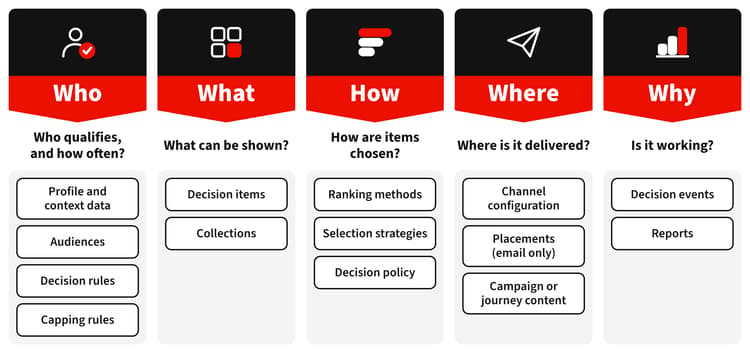
本頁為概念指南。 它說明決定引擎使用的每個物件都用於什麼目的、物件如何連線,以及引擎在設定檔需要內容時做什麼。 它不會說明如何在介面中建立物件。 若要瞭解專案為何選取或未選取,請參閱疑難排解決策。
若要設定Decisioning,請使用開始使用Decisioning。 它是工作手冊,列出您需要的許可權以及建立物件的順序,並連結到每個物件的程式。
建置區塊 building-blocks
決定引擎不會自行選擇內容:會套用您預先設定的物件。 這些物件是決策機制的建置組塊。 每個專案都會回答引擎選取設定檔專案時所必須解決的問題:哪些專案是候選專案、符合其資格者、專案顯示順序以及傳回的專案數。
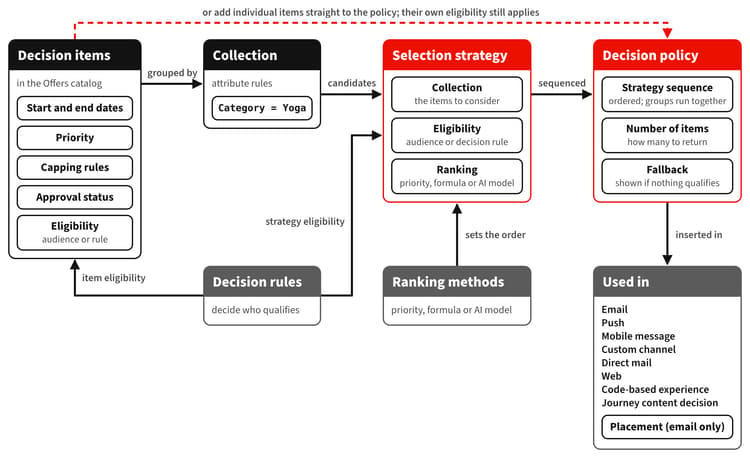
簡而言之:決定專案會分組在集合中。 選擇策略結合了集合與資格限制與排名方法。 決策原則會依照順序排列一或多個選擇策略,並將最佳專案傳回至您的內容。
下表列出這些物件,依它們彼此建置的順序,以及任務檔案的連結。 第一欄顯示每個物件回答的五個問題中的哪一個。
決定原則也可以包含個別決定專案,您一次新增一個專案。 個別料號會略過收集與選取策略,但料號上設定的適用性限制仍適用。 瞭解如何新增專案與策略至原則
您可以在程式碼型體驗、網頁、電子郵件、推播通知、行動訊息、自訂頻道和直接郵件中使用決定原則。 在歷程中,內容決定活動會傳回您可以在最佳化活動或自訂動作中使用的專案。 其輸出無法用於原生通道活動。
請求決策時會發生什麼情況 decision-process
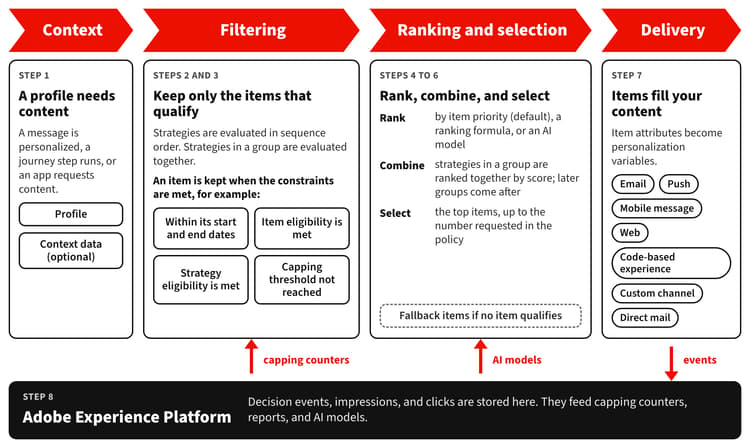
每次設定檔需要包含決定原則的訊息或體驗中的內容時,「決定」都會評估該設定檔的原則。 圖表將下列步驟分組為四個階段: 內容 (步驟1)、篩選 (步驟2和3)、排名和選擇 (步驟4到6)以及傳遞 (步驟7)。 步驟8會將結果傳回Adobe Experience Platform。
-
要求到達。 Decisioning會接收設定檔,而如果您使用它,還會接收內容資料。 內容資料在請求時傳入中,不包含歷史資料。 進一步瞭解內容資料
-
決策會依序執行策略序列。 序列中第一個選擇策略或決定專案具有最高優先順序。 您在群組中組合的選取策略具有相同的優先順序,而且會一起評估。
-
每個選取策略只會保留符合條件的專案。 決策會從策略集合中的專案開始。 當輪廓符合您設定的限制時,會保留專案,例如:
- 目前日期在專案的開始與結束日期之間。
- 設定檔符合專案的資格限制(對象或決定規則)。
- 設定檔符合選擇策略(對象或決定規則)的資格限制。
- 沒有專案的上限規則達到其臨界值。
-
合格專案已排名。 選擇策略的排名方法會設定順序:專案優先順序(預設)、排名公式或AI模型。 進一步瞭解排名
-
選取策略已合併。 群組中策略的合格專案會根據其分數排名在一起。 符合數個策略的專案會保持其最高分數。 後續群組的專案會放在先前群組的專案之後,而且不會再次評估已排名的專案。 請參閱下列範例。
-
已選取最佳專案。 決策功能會傳回排名清單的第一個專案,最多可傳回原則中要求的專案數。 推播通知和行動訊息會傳回一個專案。 如果沒有符合的專案,Decisioning會傳回您定義的遞補專案。 如果沒有遞補專案,將不會顯示任何內容。 進一步瞭解遞補專案
-
專案已在您的內容中使用。 傳回專案的屬性可做為個人化變數使用。 在電子郵件中,專案不會跨相同訊息的決定原則重複。 沒有其他專案可顯示的原則會顯示其遞補專案或空格。 若要在數個位置顯示相同的專案,請重複使用現有決定原則的輸出。 使用決策專案屬性個人化
-
事件回饋至Decisioning。 有關每個決定的資訊都會自動傳送到Adobe Experience Platform作為決定事件。 在Journey Optimizer中編寫的電子郵件中會自動追蹤曝光次數和點按次數,但大多數其他管道需要您的實作,才能將曝光次數和點按次數當作體驗事件傳送至Experience Platform。 上限計數器、報表和AI模型皆以這些事件為基礎。 進一步瞭解資料彙集
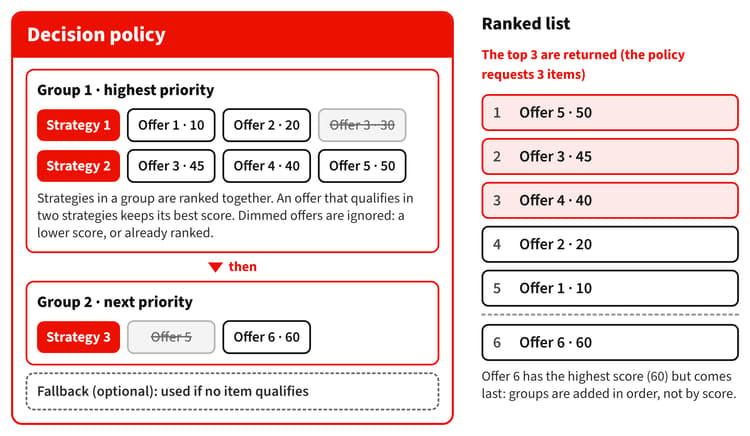
在下列範例中,決定原則有三個選擇策略。 策略1和策略2合併到群組1中。 策略3是群組2中唯一的。
| table 0-row-3 1-row-3 2-row-3 3-row-3 | ||
|---|---|---|
| 群組 | 選擇策略 | 符合優惠資格和分數 |
| 群組1 | 策略1 | 選件1 (10)、選件2 (20)、選件3 (30) |
| 群組1 | 策略2 | 選件3 (45)、選件4 (40)、選件5 (50) |
| 群組2 | 策略3 | 選件5 (已排名,因此已略過)、選件6 (60) |
-
決策會將群組1視為一個整體。 選件3在兩個策略中都符合資格,因此會保持其最高分數(45)。 排名清單為選件5 (50)、選件3 (45)、選件4 (40)、選件2 (20)和選件1 (10)。
-
然後進行決策,新增群組2。 選件5已在清單中,因此僅會在清單結尾新增選件6。
最終排名清單為選件5、選件3、選件4、選件2、選件1和選件6。 如果原則要求三個專案,Decisioning會傳回Offer 5、Offer 3和Offer 4。 選件6分數最高(60),但排名最後,因為其屬於優先順序較低的群組。
來自決定管理? compare
決定管理是Journey Optimizer中的舊版決定架構。 兩個架構的物件不一定會彼此對應。 此表格顯示移轉工具如何將決定管理物件對應至決定物件。
若要了解決策與移轉工具的好處,請參閱移轉至Decisioning的好處。
了解更多 learn-more
This section contains structured knowledge intended to support interpretation, retrieval, and question answering related to this topic.
For complete understanding, this information should be combined with the documentation on this page. Neither source is intended to stand alone; the page describes the feature, while this section provides additional context that helps disambiguate terminology, intent, applicability, and constraints.
- TL;DR: This concept guide explains what each object that the decision engine works with is for, how decision items, collections, decision rules, ranking methods, selection strategies, and decision policies connect, and what Decisioning does each time a profile needs content, without describing how to create the objects in the interface.
Intents:
- Identify which Decisioning objects answer the five questions behind every decision.
- Explain how decision items, collections, selection strategies, ranking methods, and decision policies fit together.
- Describe what Decisioning does each time a profile needs content in a message or experience that contains a decision policy.
- Work out how groups of selection strategies and scores produce the ranked list that a decision policy returns.
- Find the page that documents each object: catalog, decision item, collection, decision rule, ranking method, selection strategy, decision policy, and placement.
- Match the Decision management objects with their Decisioning objects.
Glossary:
- Decisioning (product-specific): Chooses the best decision items for each profile. You create decision items in the Offers catalog, then define who can receive each item and how the items are ranked.
- Decision engine (product-specific): Evaluates the decision policy and returns the items to use when a profile needs content in a message or experience that contains a decision policy. It does not choose content on its own: it applies the objects that you configure in advance.
- Catalog (product-specific): The container of your decision items. A catalog is linked to a schema that defines all the attributes you can assign to an item, and you can add custom attributes to it. Where to configure it: Decisioning > Catalogs, then Edit schema in the items list.
- Decision item (product-specific): An offer or piece of content in the Offers catalog. Each item has its own start and end dates, priority, eligibility (audiences or a decision rule), and capping rules. You approve an item when it is ready to be presented to profiles. Where to configure it: Decisioning > Catalogs.
- Collection (product-specific): Groups items with attribute rules. Where to configure it: Catalogs > Collections.
- Decision rule (product-specific): A reusable condition that determines who qualifies. You can apply a rule to a decision item or to a selection strategy. Where to configure it: Decisioning > Strategy setup > Rules.
- Eligibility constraint (product-specific): The eligibility of a decision item or of a selection strategy: an audience or a decision rule.
- Ranking method (product-specific): Sets the order of the qualifying items: the item priority (default), a ranking formula, or an AI model. Where to configure it: Decisioning > Strategy setup > Formulas or AI models.
- Selection strategy (product-specific): A reusable object that combines a collection, an eligibility constraint (an audience or a decision rule), and a ranking method. Where to configure it: Decisioning > Strategy setup > Selection strategies.
- Decision policy (product-specific): Puts selection strategies in order, sets how many items to return, and defines optional fallback items. It is added to the content of a campaign or journey. A decision policy can also include individual decision items, which you add one at a time: an individual item skips the collection and the selection strategy, but the eligibility constraints set on the item still apply.
- Strategy sequence (product-specific): The sequence of selection strategies or decision items of a decision policy, which Decisioning goes through in order. The first selection strategy or decision item in the sequence has the highest priority. Selection strategies that you combine in a group have the same priority and are evaluated together.
- Qualifying item (product-specific): An item that a selection strategy keeps because the profile meets the constraints you set. For example: the current date is within the start and end dates of the item; the profile meets the eligibility constraint of the item; the profile meets the eligibility constraint of the selection strategy; no capping rule of the item has reached its threshold.
- Fallback items (product-specific): Items that you define in the decision policy. If no item qualifies, Decisioning returns the fallback items. Without fallback items, nothing is displayed.
- Placement (email only) (product-specific): A container for the items displayed in an email. When you create a placement, you associate it with a channel configuration. Placements also let you track how items perform in each location. Decisioning placements are currently available for email only. Where to configure it: Decisioning > Strategy setup.
- Context data (product-specific): Data that Decisioning receives with the profile, if you use it. Context data is sent in at the time of the request and does not include historical data.
- Decision event (product-specific): Information about each decision, sent automatically to Adobe Experience Platform. Capping counters, reports, and AI models are based on these events.
- Stages of a decision request: Context (step 1), Filtering (steps 2 and 3), Ranking and selection (steps 4 to 6), and Delivery (step 7). Step 8 sends the results back to Adobe Experience Platform.
Guardrails:
- Push notifications and mobile messages return one item.
- In an email, an item is not repeated across the decision policies of the same message. A policy that has no other item to show displays its fallback item or a blank space.
Applicability:
- Applies: a decision policy can be used in code-based experiences, web, email, push notifications, mobile messages, custom channels, and direct mail.
- Applies: in journeys, the output of the Content decision activity can be used in an Optimize activity or in a custom action.
- Does not apply: in journeys, the output of the Content decision activity cannot be used in native channel activities.
- Applies: automatic tracking of impressions and clicks in emails authored in Journey Optimizer.
- Does not apply: automatic tracking of impressions and clicks in most other channels. Most other channels require your implementation to send them to Experience Platform as experience events.
Terminology:
-
Canonical name: Adobe Experience Platform — Acronym: AEP — variants: Experience Platform
-
Canonical name: Adobe Journey Optimizer — Acronym: AJO — variants: Journey Optimizer
-
Canonical name: decision item — variants: item
-
Canonical name: decision policy — variants: policy
-
Canonical name: selection strategy — variants: strategy (as in “Strategy 1”)
-
Canonical name: Decision management — the legacy decisioning framework in Journey Optimizer. The objects of the two frameworks do not always map one to one.
-
Mapping of Decision management objects to Decisioning objects, as shown by the migration tooling:
- Offer maps to Decision item.
- Collection maps to Collection (collection qualifiers are migrated as tags).
- Rule maps to Decision rule.
- Ranking formula maps to Ranking formula.
- Decision maps to Selection strategy, decision policy, and code-based experience campaign. For each migrated decision scope, the migration tooling creates one selection strategy (a collection, an eligibility rule, and a ranking formula), one decision policy (the number of items, the selection strategy, and a fallback item), and one code-based experience campaign.
- Placement maps to Channel configuration. The migration tooling creates a channel configuration for each Decision management placement. It does not create Decisioning placements: you create them manually.
-
Do not confuse:
- “Decisioning” ≠ “Decision management” (the legacy decisioning framework).
- Decision management “Placement” ≠ Decisioning “placement”: see the mapping above.
- Decision management “Decision” ≠ “decision policy”: see the mapping above.
FAQ:
- What does Decisioning do each time a profile needs content? In a message or experience that contains a decision policy, Decisioning evaluates the policy for that profile and returns the items to use. This happens in eight steps, from the arrival of the request to the decision events sent to Adobe Experience Platform.
- What happens if no item qualifies? Decisioning returns the fallback items you defined. Without fallback items, nothing is displayed.
- Which selection strategy or decision item has the highest priority? Decisioning goes through the strategy sequence in order. The first selection strategy or decision item in the sequence has the highest priority. Selection strategies that you combine in a group have the same priority and are evaluated together.
- What happens when an item qualifies in several selection strategies? The qualifying items of the strategies in a group are ranked together according to their scores, and an item that qualifies in several strategies keeps its highest score. The items of a later group are placed after the items of the earlier groups, and an item that is already ranked is not evaluated again.
- How can I show the same item in several places of an email? In an email, an item is not repeated across the decision policies of the same message. To show the same item in several places, reuse the output of an existing decision policy.
- Where can I use the output of the Content decision activity in a journey? In an Optimize activity or in a custom action. Its output cannot be used in native channel activities.
Examples:
- Collection (Decisioning): a collection can group all the items where the
Categoryattribute isYoga. - Groups and scores (decision policy): a decision policy has three selection strategies. Strategy 1 and Strategy 2 are combined in Group 1, and Strategy 3 is alone in Group 2. Strategy 1 qualifies Offer 1 (10), Offer 2 (20), and Offer 3 (30). Strategy 2 qualifies Offer 3 (45), Offer 4 (40), and Offer 5 (50). Strategy 3 qualifies Offer 5 (already ranked, so it is skipped) and Offer 6 (60). Offer 3 keeps its highest score (45). The final ranked list is Offer 5, Offer 3, Offer 4, Offer 2, Offer 1, and Offer 6. If the policy requests three items, Decisioning returns Offer 5, Offer 3, and Offer 4. Offer 6 has the highest score (60) but comes last, because it belongs to the group with the lower priority.
Related pages:
- To set up Decisioning (a task guide that lists the permissions you need and the order in which to create the objects, and links to the procedure for each one): Get started with Decisioning (experience-decisioning/gs-experience-decisioning.md)
- To find out why an item was or was not selected: Troubleshoot Decisioning (experience-decisioning/decisioning-troubleshooting.md)
- To configure the item catalog: Configure the item catalog (experience-decisioning/catalogs.md)
- To create decision items: Create decision items (experience-decisioning/items.md)
- To manage item collections: Manage item collections (experience-decisioning/collections.md)
- To create decision rules: Create decision rules (experience-decisioning/rules.md)
- For ranking methods: Ranking methods (experience-decisioning/ranking/ranking.md)
- To create selection strategies: Create selection strategies (experience-decisioning/selection-strategies.md)
- To create decision policies: Create decision policies (experience-decisioning/create-decision-policy.md)
- To work with placements: Work with placements (experience-decisioning/placements.md)
- To add items and strategies to a policy: Learn how to add items and strategies to a policy (experience-decisioning/create-decision-policy.md)
- For the activity that returns items in journeys: Content decision activity (building-journeys/content-decision.md)
- For the activity in which the returned items can be used in journeys: Optimize activity (building-journeys/content-decision.md)
- At the step where the request arrives: Learn more about context data (experience-decisioning/context-data.md)
- At the step where each selection strategy keeps only the items that qualify: Learn more about eligibility (experience-decisioning/decisioning-troubleshooting.md)
- At the step where the qualifying items are ranked: Learn more about ranking (experience-decisioning/decisioning-troubleshooting.md)
- At the step where the best items are selected, including fallback items: Learn more about fallback items (experience-decisioning/decisioning-troubleshooting.md)
- To use the attributes of the returned items as personalization variables: Personalize with decision item attributes (experience-decisioning/use-decision-policy.md)
- At the step where events feed back into Decisioning: Learn more about data collection (experience-decisioning/data-collection/data-collection.md)
- After the example of groups and scores: Learn more about strategy sequences (experience-decisioning/create-decision-policy.md)
- For how the migration tooling maps Decision management objects to Decisioning objects: migration tooling (experience-decisioning/decisioning-migration-api.md)
- For the benefits of Decisioning and the migration tooling: Benefits of migrating to Decisioning (experience-decisioning/migrate-to-decisioning.md)
- Listed under Learn more: Decisioning FAQ (experience-decisioning/decisioning-faq.md)
- Listed under Learn more: Decisioning guardrails & limitations (experience-decisioning/decisioning-guardrails.md)
- Listed under Learn more: Coworker for Decisioning (experience-decisioning/experience-decisioning-coworker-skills.md)
- Listed under Learn more: Report on Decisioning (experience-decisioning/cja-reporting.md)
Personas:
- marketer: Can create decision items in the Offers catalog and approve an item when it is ready to be presented to profiles. Can set the eligibility of a decision item or of a selection strategy with an audience or a decision rule. Can choose the ranking method: the item priority (default), a ranking formula, or an AI model. Can add a decision policy to the content of a campaign or journey. Can put selection strategies in order in the policy, set how many items to return, and define optional fallback items. Can use a decision policy in code-based experiences, web, email, push notifications, mobile messages, custom channels, and direct mail. Can use the attributes of the returned items as personalization variables. The page states that push notifications and mobile messages return one item. Where: “The building blocks”.
Onboarding:
- Level: Beginner, Intermediate
- First minimal step: Use Get started with Decisioning to see the permissions you need and the order in which to create the objects.
- Success check: Decisioning returns the first items of the ranked list, up to the number of items requested in the policy. The attributes of the returned items are available as personalization variables.
- Next: To set up Decisioning, with a task guide that lists the permissions you need and the order in which to create the objects: Get started with Decisioning (experience-decisioning/gs-experience-decisioning.md); To find out why an item was or was not selected: Troubleshoot Decisioning (experience-decisioning/decisioning-troubleshooting.md)