在此页面上:通过设置自定义操作的端点、身份验证、安全性和有效负载参数,将第三方REST API连接到您的历程,以便历程可以调用该服务。
如果您要使用第三方系统发送消息,或者如果希望历程将 API 调用发送到第三方系统,请使用自定义操作配置第三方系统与历程的连接。 例如,可以通过自定义操作连接到以下系统:Epsilon、Slack、Adobe Developer、Firebase 等。
自定义操作是由技术用户定义并提供给营销人员的附加操作。 配置完毕后,它们会显示在历程的左侧面板的 操作 类别中。 请参阅此页面以了解详情。
配置步骤 configuration-steps
以下是配置自定义操作所需的主要步骤:
-
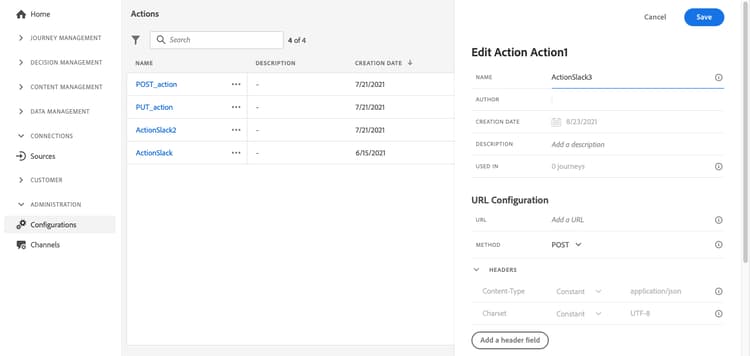
在“管理”菜单部分中,选择配置。 在 操作 部分中,单击管理。 单击 创建操作 以创建新操作。 操作配置窗格将在屏幕右侧打开。
-
输入操作的名称。
note NOTE 只允许使用字母数字字符和下划线。 最大长度为30个字符。 -
向操作添加描述。 此步骤是可选的。
-
使用此操作的历程数显示在 在 中使用字段中。 您可以单击 查看历程 按钮以显示使用此操作的历程列表。
-
定义不同的 URL配置 参数。 请参阅此页。
-
配置 身份验证 部分。 此配置与数据源的配置相同。 请参阅此小节。
note NOTE 如果您的端点同时返回 access_token和id_token,请使用tokenInResponse字段指定Journey Optimizer应将哪个令牌用作身份验证凭据:"tokenInResponse": "json://access_token"— 使用访问令牌(OAuth 2.0的默认设置)"tokenInResponse": "json://id_token"— 使用ID令牌(在OpenID Connect流中通用)
了解有关自定义身份验证的更多信息 -
定义操作参数。 请参阅此页。
-
单击保存。
自定义操作现已配置完毕,可随时用于您的历程。 请参阅此页。
note NOTE 在历程中使用自定义操作时,大多数参数均为只读。 您只能修改Name、Description、URL字段和 身份验证 部分。
限制 custom-actions-limitations
自定义操作在此页面上列出了一些限制。
在自定义操作参数中,您可以传递简单的集合以及对象集合。 在此页面上了解有关收藏集限制的更多信息。
另请注意,自定义操作参数具有预期格式(例如:字符串、小数等)。 必须注意遵守这些预期格式。 在此用例中了解详情。
最佳实践 custom-action-enhancements-best-practices
在使用自定义操作选择目标端点时,请确保:
为所有自定义操作定义了1分钟内300,000次调用的上限。 此外,默认上限按主机和沙盒执行。 例如,在沙盒上,如果您有两个具有相同主机的端点(例如,https://www.adobe.com/endpoint1和https://www.adobe.com/endpoint2),则上限将应用于adobe.com主机下的所有端点。 “endpoint1”和“endpoint2”将共享相同的上限配置,并且如果一个端点达到限制,将对另一个端点产生影响。
默认每分钟300,000次调用限制适用于域级别(即example.com)。 如果需要更高的限制,请咨询Adobe支持并提供使用证据,并确认端点的吞吐量。 要请求增加上限,请提供您预期呼叫量和端点容量的详细信息。 如果容量测试表明端点可以处理更高的吞吐量,则Adobe可以自定义上限。 要获得最佳实践,请考虑重组历程或实施等待活动以错开出站调用并避免设置错误上限。
此限制是根据客户使用情况设置的,用于保护自定义操作所定位的外部端点。 如果需要,您可以通过我们的“上限/节流 API”定义更高的上限或节流限制来覆盖此设置。 请参阅此页。
出于以下各种原因,您不应使用自定义操作定位公共端点:
- 如果没有适当的上限或限制,则可能会向可能不支持此类卷的公共端点发送过多调用。
- 配置文件数据可以通过自定义操作发送,因此,定位公共端点可能会导致无意间在外部共享个人信息。
- 您对公共端点返回的数据没有控制权。 如果端点更改其API或开始发送错误信息,则这些信息将在发送的通信中可用,并可能产生负面影响。
同意和数据治理 privacy
在Journey Optimizer中,您可以将数据治理和同意策略应用于自定义操作,以防止将特定字段导出到第三方系统,或排除未同意接收电子邮件、推送或移动通信的客户。 有关更多信息,请参阅以下页面:
端点配置 url-configuration
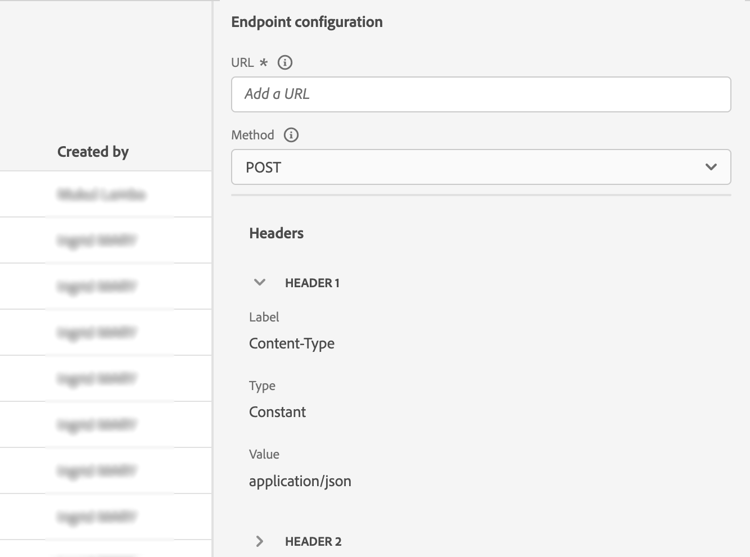
配置自定义操作时,您需要定义以下 终结点配置 参数:
-
在 URL 字段中,指定外部服务的URL:
-
如果URL是静态的,请在此字段中输入URL。
-
如果URL包含动态路径,则仅输入URL的静态部分,即方案、主机、端口,以及(可选)路径的静态部分。
示例:
https://xxx.yyy.com/somethingstatic/将自定义操作添加到历程时,您将指定URL的动态路径。 了解详情。
note NOTE 出于安全原因,我们强烈建议您对URL使用HTTPS方案。 我们不允许使用非公共的Adobe地址和IP地址。 定义自定义操作时只允许使用默认端口:80用于http,443用于https。 -
-
选择调用方法:它可以是POST、GET或PUT。
note NOTE 不支持 DELETE 方法。 如果需要更新现有资源,请选择 PUT 方法。 -
处理潜在的重定向(302个响应)。 自定义操作会根据每个请求自动遵循HTTP 302重定向。
-
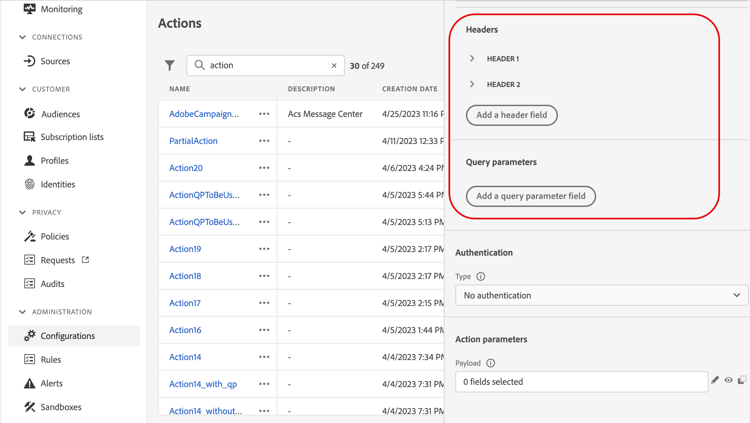
定义标头和查询参数:
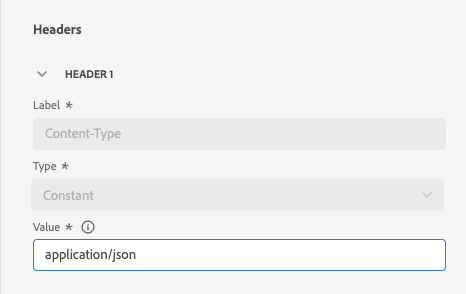
- 在 标头 部分中,单击 添加标头字段 以定义要发送到外部服务的请求消息的HTTP标头。 默认情况下,Content-Type和 Charset 标头字段已设置。 您无法删除这些字段。 只能修改 Content-Type 标头。 其值应遵循JSON格式。 以下是默认值:
- 在 查询参数 部分中,单击 添加查询参数字段 以定义要在URL中添加的参数。
-
输入字段的标签或名称。
-
选择类型: 常量或变量。 如果已选择常量,请在 值 字段中输入该常量值。 如果已选择变量,则在将自定义操作添加到历程时,将指定此变量。 了解详情。
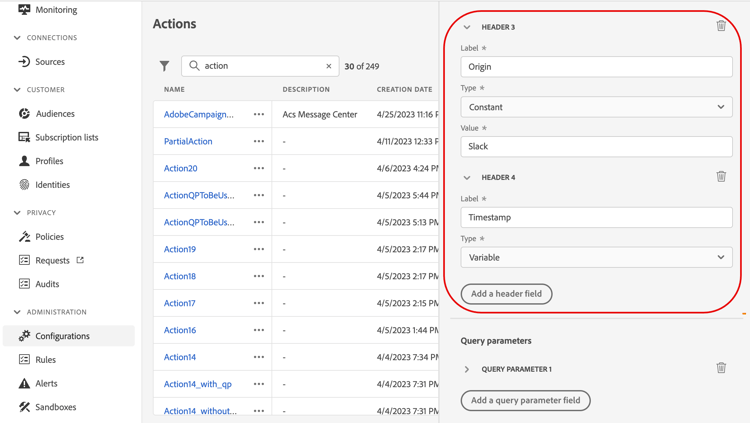
note NOTE 将自定义操作添加到历程后,如果历程处于草稿状态,您仍然可以向历程添加标题或查询参数字段。 如果您不希望配置更改影响历程,请复制自定义操作并将字段添加到新的自定义操作。 将根据字段解析规则验证标头。 请参阅此文档以了解详情。
传输安全层 tls
TLS协议支持 tls-protocol-support
默认情况下,Adobe Journey Optimizer支持对自定义操作使用TLS 1.3。 如果客户端也支持TLS 1.3,则通过TLS 1.3进行通信。 否则,TLS协商过程可能会回退到TLS 1.2。
mTLS协议支持 mtls-protocol-support
您可以使用相互传输层安全性(mTLS)来确保与Adobe Journey Optimizer自定义操作的出站连接中的增强安全性。 mTLS是一种用于相互身份验证的端到端安全方法,可确保共享信息的双方在数据共享之前都是声称的身份。 与TLS相比,mTLS还包括一个附加步骤,在该步骤中,服务器还会请求客户端的证书并在其末尾验证它。
自定义操作支持双向TLS (mTLS)身份验证。 无需在自定义操作或历程中执行额外配置即可激活 mTLS;当检测到启用了 mTLS 的端点时,会自动执行配置。 了解详情。
- 请定期检查Adobe公共证书API,了解与您的服务关联的更新证书。
- 将您的端点配置为接受重叠的证书(同时接受旧证书和新证书),因此在轮换期间没有连接间隙。
- 当证书轮换时,Adobe当前不会发送主动通知。 您有责任监控证书更新,并保持信任存储区为最新状态。
- 信任验证应该基于证书链到根CA (DigiCert),而不是固定到特定的叶证书指纹。
基于证书的自定义身份验证 certificate-based-auth
对于强制实施基于证书的身份验证的企业API(如Microsoft Entra ID),自定义操作支持基于证书的自定义身份验证。 要启用它,请在 身份验证 部分中配置的自定义授权有效负载中设置"subType": "certificateCredential"。
默认情况下,Journey Optimizer使用Adobe的托管证书与RS256签署JWT客户端断言,并自动将其交换为访问令牌。 此默认选项不需要客户端密钥。 省略alg或将其设置为RS256将保留现有RSA流。
对于接受client_secret_jwt的身份提供程序,请设置可选的alg有效负载字段(HS256、HS384或HS512),并将您的OAuth client_secret添加到body.bodyParams。 Journey Optimizer使用密码对声明进行签名,而不在令牌请求中发送。 无需注册Adobe证书。 测试或执行身份验证时,任何其他值(包括小写)都会被拒绝。 请参阅HMAC配置要求。
有关完整的有效负荷结构、字段描述和配置护栏,请参阅基于证书的自定义身份验证。
定义有效负载参数 define-the-message-parameters
您可以定义有效负载参数,如下所示:
-
在 请求 部分中,粘贴要发送到外部服务的JSON有效负载示例。 此字段是可选的,仅适用于POST和PUT调用方法。
启用 允许NULL值 选项以在外部调用中保留Null值。 请注意,不完全支持在中发送值为Null的int、string等数组。 例如,即使选中了此选项,以下整数数组
[1, null, 2, 3]也会作为[1, 2, 3]发送。 此外,如果此类数组为null,则会作为空数组发送。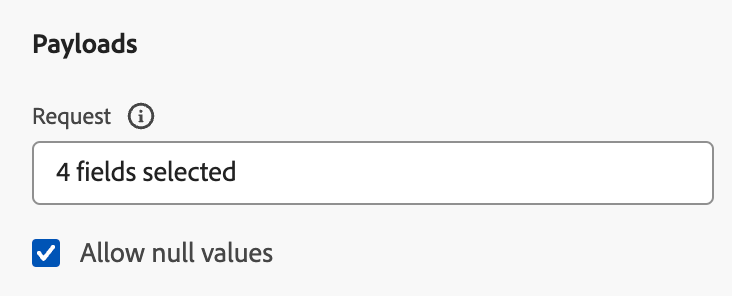
-
在 响应 部分中,粘贴调用成功时返回的有效负载示例。 此字段是可选字段,可用于所有调用方法。 有关如何在自定义操作中利用API调用响应的详细信息,请参阅此页面。
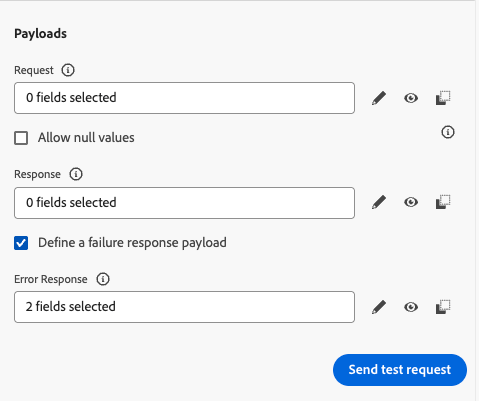
-
(可选)选择 定义失败响应有效负载 以启用错误响应有效负载字段。 启用后,使用 错误响应 部分粘贴调用失败时返回的有效负载示例。 与响应有效负载(字段类型和格式)的要求相同。 了解如何在此处的历程中利用失败响应有效负载。
.字符,也不能以$字符开头。
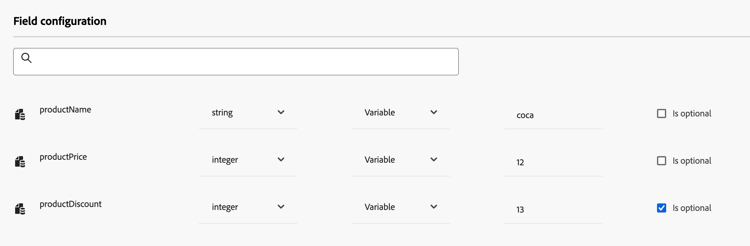
在这些字段配置中,您必须:
-
选择参数类型,例如:字符串、整数等。
-
定义常量或变量参数:
-
常量表示参数的值由技术角色在操作配置窗格中定义。 值将在各个历程中始终相同。 此操作不会发生改变,且营销人员在历程中使用自定义操作时无法看到它。 例如,它可能是第三方系统期望的ID。 在这种情况下,常量值将设置为切换常量/变量右侧的字段。
-
变量表示参数的值可以改变。 在历程中使用此自定义操作的营销人员可以自由传递他们想要的值,或指定从何处检索此参数的值(例如,从事件、Adobe Experience Platform等)。 在这种情况下,切换常量/变量右侧的字段是营销人员将在历程中看到的用于命名此参数的标签。
对于可选参数,启用行末的 Is optional 选项。 通过选中此选项,您可以将参数标记为非必需,并让历程参与者在历程中创作该自定义操作时选择是否填写参数。
-
其他资源
浏览以下部分,了解有关配置、使用和排除自定义操作的更多信息:
- 自定义操作入门 — 了解什么是自定义操作以及它们如何帮助您连接到第三方系统
- 使用自定义操作 — 了解如何在历程中使用自定义操作
- 自定义操作疑难解答 — 了解自定义操作疑难解答
- 将集合传递到自定义操作参数 — 了解如何在运行时动态填充的自定义操作参数中传递集合
This section contains structured knowledge intended to support interpretation, retrieval, and question answering related to this topic.
For complete understanding, this information should be combined with the documentation on this page. Neither source is intended to stand alone; the page describes the feature, while this section provides additional context that helps disambiguate terminology, intent, applicability, and constraints.
- TL;DR: This page explains how to configure a custom action that connects a third-party REST API to your journeys by defining its endpoint, authentication, transport security, and payload parameters.
Intents:
- Create and name a custom action from the Configurations > Actions area
- Define the endpoint URL, Method, Headers, and Query parameters
- Configure authentication, including default RS256 or optional HMAC JWT signing, and understand automatic mutual TLS activation
- Define request, response, and failure response payload parameters as constants or variables
- Understand the capping, throughput, and endpoint constraints that apply to custom actions
Glossary:
- Custom action: An additional action defined by technical users and made available to marketers to send messages or API calls to a third-party system (product-specific)
- Endpoint Configuration: The section where you define the external service URL, Method, Headers, and Query parameters (product-specific)
- Constant parameter: A parameter whose value is set in the action configuration by a technical persona and is always the same across journeys; the marketer cannot see it (product-specific)
- Variable parameter: A parameter whose value can vary and that marketers fill or map when using the custom action in a journey (product-specific)
- Allow NULL values: An option that keeps Null values in the external call, with limitations for arrays of int, string, and similar values (product-specific)
- Certificate-Based Custom Authentication: An authentication type enabled by setting “subType”: “certificateCredential” in the custom authorization payload, where Journey Optimizer signs a JWT client assertion and exchanges it for an access token; by default, RS256 signing uses Adobe’s managed certificate and requires no client secret (product-specific)
- HMAC signing: JWT assertion signing selected through the optional
algfield, using the OAuthclient_secretinbody.bodyParamswithout Adobe certificate registration (product-specific) - Slow custom action service: A dedicated service through which calls are routed when an endpoint has a response time greater than 0.75 seconds (product-specific)
Guardrails:
- The action name allows only alphanumeric characters and underscores, with a maximum length of 30 characters (hard limit).
- Custom actions support JSON format only when using request or response payloads.
- Custom actions cannot use the DELETE method; only POST, GET, or PUT are supported. To update an existing resource, use PUT.
- Only the default ports are allowed: 80 for http and 443 for https. Adobe addresses that are not public and IP addresses are not allowed.
- A capping limit of 300,000 calls over one minute (default) is defined for all custom actions and can be raised via the Capping or Throttling APIs; the default capping is performed per host and per sandbox and applies at the domain level.
- The 300,000 calls per minute cap is enforced as a sliding window per sandbox and per endpoint for endpoints with response times less than 0.75 seconds; for endpoints with response times greater than 0.75 seconds, a separate limit of 150,000 calls per 30 seconds (also a sliding window) applies.
- For a targeted endpoint, a throttling configuration cannot go below 200 TPS (hard limit), so the endpoint must support at least 200 TPS.
- When an endpoint has a response time greater than 0.75 seconds, its custom action calls are routed through a dedicated slow custom action service instead of the default service.
- Field names in the payload cannot contain a dot
.character, nor start with a `—
title: AI Knowledge Reference
AI Knowledge Reference
| accordion |
|---|
| AI Knowledge Reference |
|
This section contains structured knowledge intended to support interpretation, retrieval, and question answering related to this topic. For complete understanding, this information should be combined with the documentation on this page. Neither source is intended to stand alone; the page describes the feature, while this section provides additional context that helps disambiguate terminology, intent, applicability, and constraints.
Intents:
Glossary:
Guardrails:
Terminology:
FAQ:
Personas:
Onboarding:
|