在此页面上:了解如何在应用数据治理和同意策略时,使用自定义操作,通过带有JSON有效负载的REST API调用将历程连接到第三方系统。
使用自定义操作启用与第三方系统的连接,以发送消息或API调用。 可以使用任何提供商的任何服务配置操作,这些服务可以通过具有 JSON 格式负载的 REST API 调用。
在此部分中了解自定义操作的详细信息。
了解如何在此页面上创建和配置自定义操作。
了解如何在此页面上使用自定义操作的API调用响应进行个性化。
同意和数据治理 privacy
在Journey Optimizer中,您可以将数据治理和同意策略应用于自定义操作,以防止将特定字段导出到第三方系统,或排除未同意接收电子邮件、推送或移动通信的客户。 有关更多信息,请参阅以下页面:
URL 配置
自定义操作活动的配置窗格显示针对自定义操作配置的URL配置参数和身份验证参数。 您无法在历程中设置URL的静态部分,但可以在自定义操作的全局配置中设置。 了解详情。
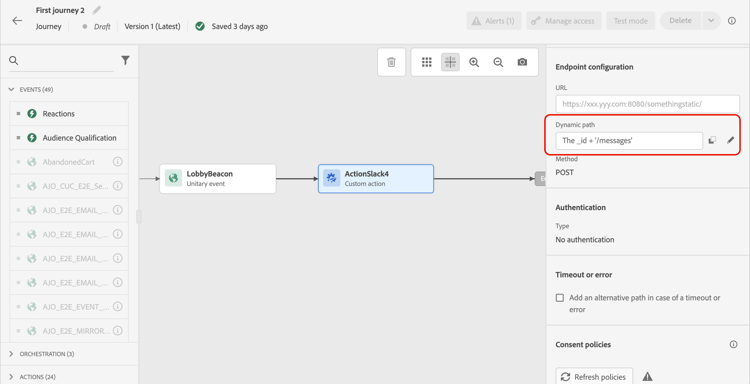
动态路径
如果URL包含动态路径,请在 路径 字段中指定路径。
要连接字段和纯文本字符串,请使用高级表达式编辑器中的字符串函数或加号(+)。 将纯文本字符串用单引号(‘)或双引号(’')括起来。 了解详情。
下表显示了一个配置示例:
https://xxx.yyy.com:8080/somethingstatic/The _id + '/messages'连接的URL具有以下形式:
https://xxx.yyy.com:8080/somethingstatic/<ID>/messages
标头和查询参数 headers
URL配置部分显示动态标头和查询参数字段,但不显示常量字段。 在操作配置屏幕中,动态标头和查询参数字段被定义为变量。 了解详情
要指定动态标题和查询参数字段的值,请在字段内或铅笔图标上单击,然后选择所需字段。
自定义操作中的

操作参数
在 操作参数 部分中,您将看到定义为 "变量" 的消息参数。 对于这些参数,您可以定义从何处获取此信息(例如:事件、数据源)、手动传递值或针对高级用例使用高级表达式编辑器。 高级用例可以是数据操作和其他功能使用。 请参见此页面。
This section contains structured knowledge intended to support interpretation, retrieval, and question answering related to this topic.
For complete understanding, this information should be combined with the documentation on this page. Neither source is intended to stand alone; the page describes the feature, while this section provides additional context that helps disambiguate terminology, intent, applicability, and constraints.
- TL;DR: This page explains how to add and configure a custom action activity in a journey to call a third-party REST API with a JSON payload, including URL configuration, header/query parameter mapping, action parameter mapping, and applying data governance and consent policies.
Intents:
- Add a custom action activity to a journey to send data to a third-party system via REST API
- Configure a dynamic URL path by concatenating fields and static text in the expression editor
- Map dynamic header and query parameter values from journey events or datasources
- Map action parameters (defined as Variable) to event fields, datasource fields, or static values
- Apply data governance and consent policies to control what data is exported via custom actions
Glossary:
- Custom action: A journey action activity that calls an external REST API endpoint with a JSON-formatted payload to integrate third-party systems (product-specific)
- Dynamic path: The variable portion of the custom action URL that is defined per-execution using fields from the journey context (product-specific)
- Action parameters: Message payload fields defined as “Variable” in the custom action configuration, mapped to journey data at the journey level (product-specific)
Guardrails:
- The static part of the URL cannot be modified in the journey; it must be set in the global custom action configuration.
- Dynamic header and query parameter fields are defined as variable in the action configuration screen, not in the journey.
- Data governance and consent policies can be applied to prevent specific fields from being exported or to exclude non-consented customers.
Terminology:
- Canonical name: Custom action — Acronym: none — variants: custom actions, third-party action
- Synonyms: “action parameters” = “message parameters defined as Variable”
- Do not confuse: “static URL part” (set in global action config, not editable in journey) ≠ “dynamic path” (set in the journey per-execution)
FAQ:
- Q: Can I change the base URL of a custom action inside the journey? — No, only the dynamic path portion can be set in the journey; the static part of the URL is configured in the global custom action configuration.
- Q: How do I build a dynamic URL path that includes a profile ID? — Use the Path field with the advanced expression editor to concatenate the ID field with static strings, for example:
_id + '/messages'. - Q: How do I apply consent rules to a custom action? — Configure consent policies on the custom action to exclude customers who have not consented to receive the relevant communication; refer to the Consent page for details.
- Q: Where do I map the values for dynamic headers? — In the URL Configuration section of the activity pane, click inside the dynamic header field or use the pencil icon to select the desired field from events or datasources.
- Q: What types of values can I assign to action parameters? — You can map parameters to event fields, datasource fields, pass values manually, or use the advanced expression editor for data manipulation.