在此页面上:捕获自定义操作返回的JSON响应,并使用其字段指导历程决策、个性化消息并处理错误。
响应有效负载要求 custom-action-enhancements-notes
-
完整响应必须为JSON对象。 不支持作为响应的裸数组。
-
数组可以包含在对象中。 支持标量数组;不支持异构数组。
支持:
{
  "body": ["val1", "val2"],
  "points": 1290
}
不支持(裸阵列):
["val1", "val2"]
不支持(异构阵列):
{
  "values": [20, "aafw", false]
}
配置自定义操作 config-response
要捕获自定义操作的响应,请定义端点返回的有效负载示例。
-
创建或打开自定义操作。 请参阅配置自定义操作。
-
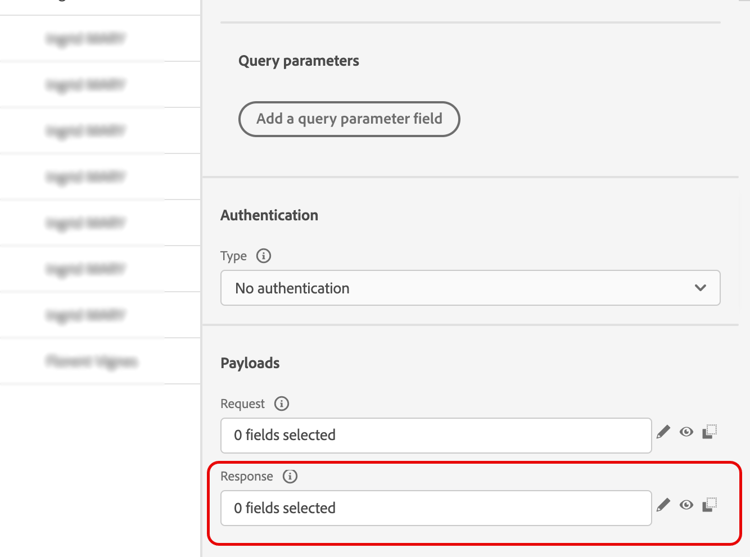
在响应(成功响应)字段中单击。
-
粘贴您的端点返回的成功响应示例。 验证示例的字段类型是否与实际响应匹配。 在本例中,本地端点发送会员积分数和用户档案的状态。
code language-json { "customerID": "xY12hye", "status": "gold", "points": 1290 }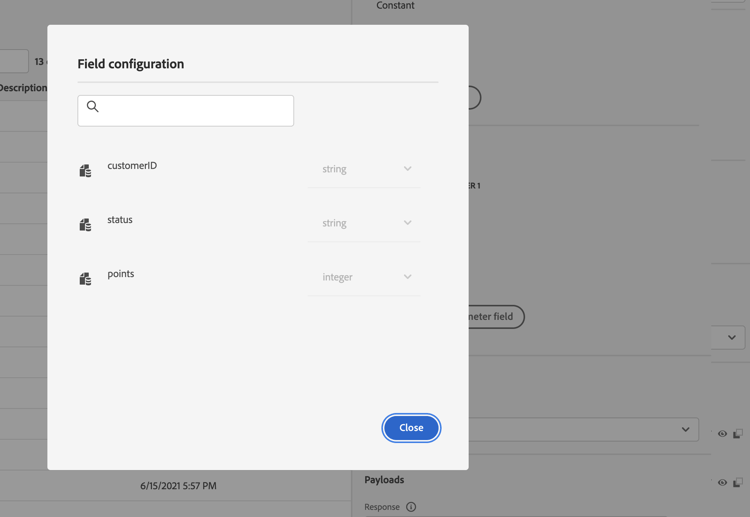
此示例定义了Journey Optimizer在每次调用操作时检索的字段。
-
(可选)要捕获失败有效负载,请选择定义失败响应有效负载,并提供与调用失败时终结点返回的有效负载匹配的示例。 例如:
code language-json { "message": "customer not found" }配置后,故障有效负载字段在
errorResponse节点下可用。 样本的形状应与实际的故障响应相匹配。 -
添加任何必需的请求参数。 在此示例中,
customerID是查询参数。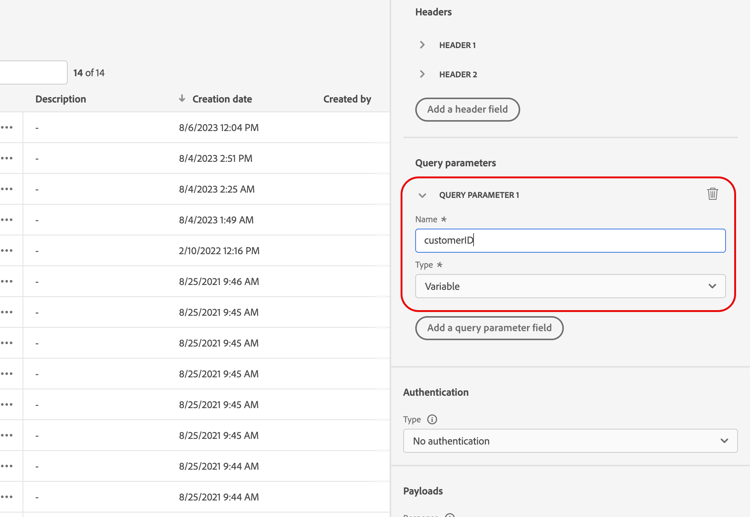
-
单击保存。
在历程中使用响应 response-in-journey
将自定义操作添加到历程。 然后,您可以在条件、后续操作和消息个性化中使用响应字段。
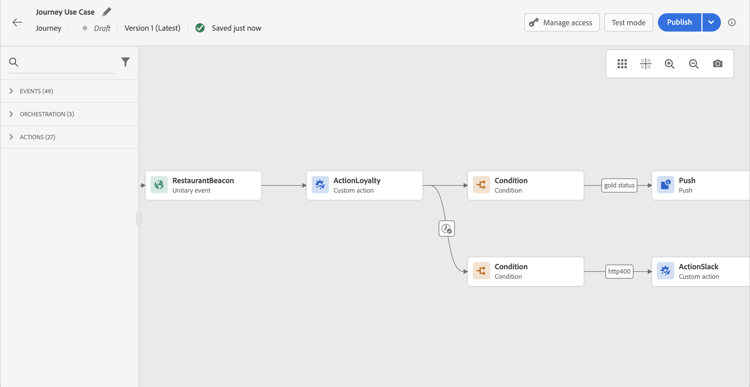
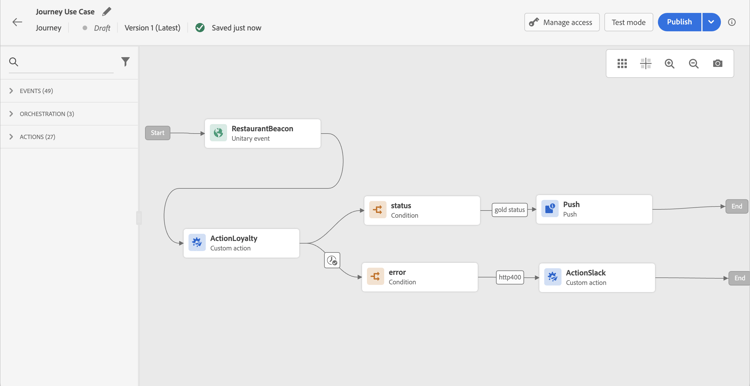
例如,您可以添加条件以检查会员积分数。 当人员进入餐厅时,您的本地端点会发送包含用户档案忠诚度信息的调用。 如果用户档案是黄金客户,则可以发送推送。 如果在调用中检测到错误,请发送自定义操作以通知您的系统管理员。
-
添加您的事件和之前创建的忠诚度自定义操作。
-
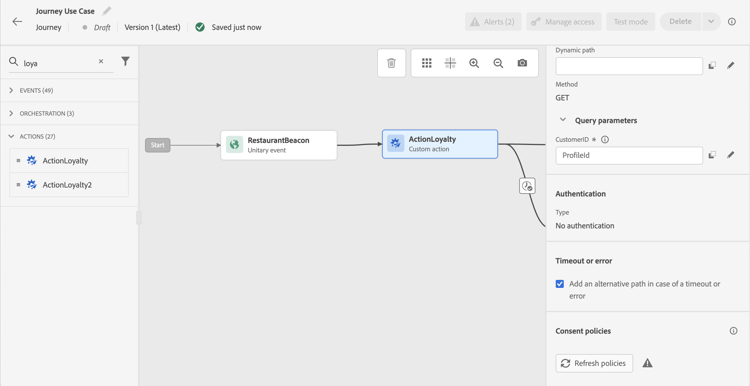
在“忠诚度”自定义操作中,将所需的输入参数(如客户ID查询参数)映射到配置文件ID。 选择 在超时或错误的情况下添加替代路径 以单独处理这些结果。
-
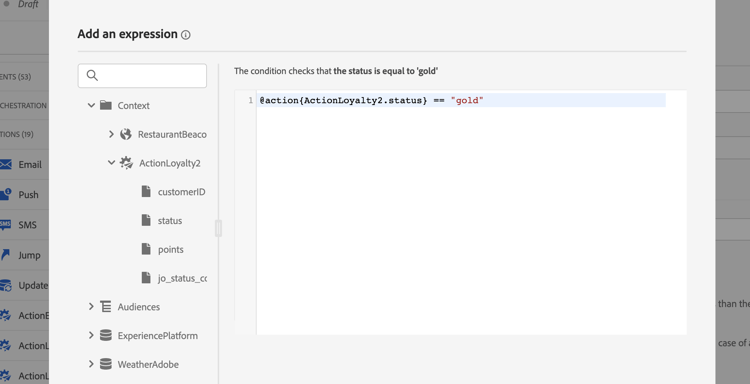
在成功路径中,添加条件并使用操作响应字段。 在高级编辑器中,Context节点下提供了响应字段。
-
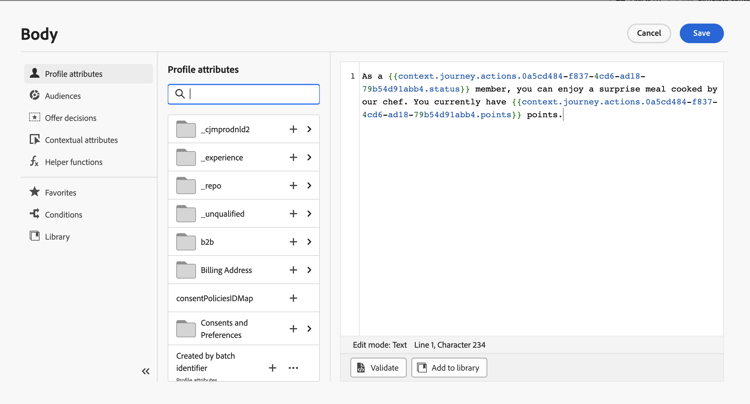
添加推送或其他操作,并使用响应字段个性化您的消息。 在此示例中,内容使用忠诚度积分数和客户状态。 响应字段在上下文属性 > Journey Orchestration > 操作下可用。
note NOTE 每个输入自定义操作的配置文件都会触发调用,即使端点会为每个配置文件返回相同的响应也是如此。 -
在超时和错误路径中,添加条件并使用内置 jo_status_code 字段对调用结果进行分支。 在此示例中,条件检查 http_400 错误类型。 查看错误状态。
code language-none @action{ActionLoyalty.jo_status_code} == "http_400"如果配置了失败有效负载,则还可以在其中一个字段上分支。 以上例为例:
code language-none @action{ActionLoyalty.errorResponse.message} == "customer not found"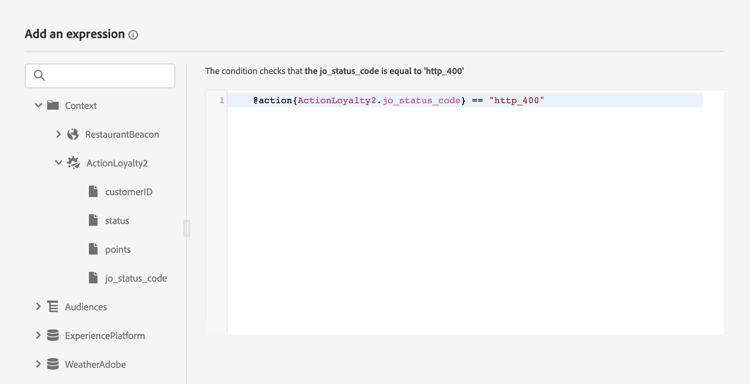
-
添加通知贵组织的自定义操作。
测试模式日志 test-mode-logs
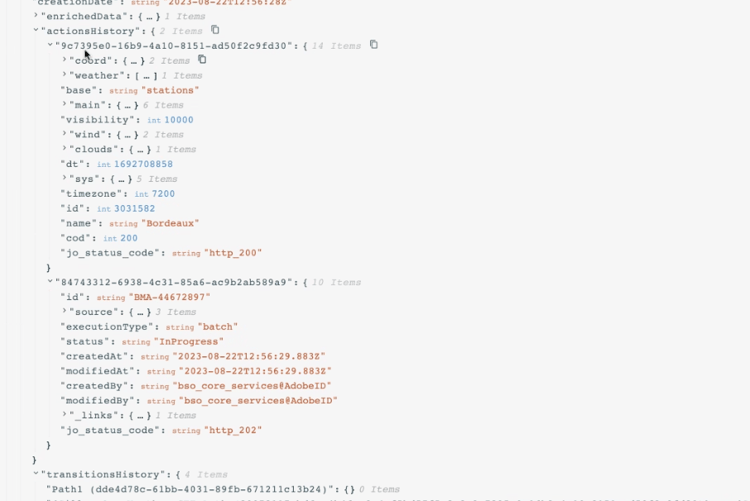
使用测试模式检查由日志的 actionsHistory 部分中的操作返回的有效负载。 对于失败的调用,如果配置了失败有效负载,则日志将包含该有效负载。 这对调试很有用。
错误状态 error-status
jo_status_code字段可用,即使未定义响应有效负载。 可能的值包括:
http_<code>http_200或http_400timedoutcappedinternalError如果返回的HTTP代码大于2xx或发生其他错误,则认为操作调用有误。 在这种情况下,历程将遵循配置的超时或错误分支。
默认情况下,只有新创建的自定义操作包含 jo_status_code 字段。 要将其用于现有的自定义操作,请更新并保存操作。 例如,您可以更新其说明。
如果未配置任何失败响应有效负载,则errorResponse节点不可用。
表达式语法 exp-syntax
引用响应字段:
@action{<action name>.<field path>}
例如:
@action{ActionLoyalty.status}
要提供默认值,请执行以下操作:
@action{<action name>.<field path>, defaultValue: <expression>}
例如:
@action{ActionLoyalty.points, defaultValue: 0}
@action{ActionLoyalty.points, defaultValue: @event{myEvent.newPoints}}
对于收藏集,使用currentActionField引用当前项目:
count(
  @action{MyAction.MyCollection.all(
    currentActionField.description == "abc"
  )}
)
个性化本机渠道消息 response-in-channels
在支持的本机渠道个性化(电子邮件、推送、移动消息)中使用自定义操作响应字段。 有关数组和嵌套数据,请参阅使用Handlebars对上下文数据进行迭代。
故障排除 troubleshooting
jo_status_codeerrorResponse不可用jo_status_code并在测试模式日志中检查故障有效负载(如果已配置)。其他资源
This section contains structured knowledge intended to support interpretation, retrieval, and question answering related to this topic.
For complete understanding, this information should be combined with the documentation on this page. Neither source is intended to stand alone; the page describes the feature, while this section provides additional context that helps disambiguate terminology, intent, applicability, and constraints.
- TL;DR: This page explains how to capture the response payload returned by a custom action’s API call and leverage it to orchestrate journeys, personalize messages, and handle errors.
Intents:
- Configure a custom action to capture success and failure response payloads
- Leverage response payload fields in conditions, other actions, and message personalization
- Handle errors and timeouts using the jo_status_code field and the errorResponse node
- Inspect custom action responses through test mode logs
- Use the expression syntax to reference response fields, including default values and collections
Glossary:
- Response payload: The example payload pasted in the Response (success response) field whose fields are retrieved on each call (product-specific)
- Error response payload: The payload captured when a call fails, enabled by selecting Define a failure response payload, exposed under the errorResponse node (product-specific)
- jo_status_code: A built-in field, always available even when no response payload is defined, that carries the call outcome (product-specific)
- actionsHistory: A section shown in test mode logs that displays the payload returned by the external endpoint (product-specific)
- currentActionField: A reference used to access the current item when manipulating collections in a custom action response (product-specific)
- Test mode: The mode through which you access status logs related to custom action responses (product-specific)
Guardrails:
- The response payload must be a JSON object; a bare top-level array as the whole response is not supported, so place the array inside a field (for example body).
- Scalar arrays are supported in the response payload, but heterogeneous arrays are not supported.
- Only newly created custom actions include the jo_status_code field out-of-the-box; to use it with an existing custom action you need to update the action, for example by updating the description and saving.
- An action call is considered in error when the returned http code is greater than 2xx or if an error occurs, and the journey flows to the dedicated timeout or error branch.
- If an error response payload is configured, its fields are exposed under the errorResponse node for failed calls; if none is configured, that node is not available.
- Each profile entering the custom action triggers one call, even if the response is always the same.
Terminology:
- Canonical name: API call response in custom actions — Acronym: n/a — variants: custom action response, response payload
- Synonyms: “success response” = “Response field”
- Do not confuse: “Response” (success response payload) ≠ “Error Response” (failure response payload defined via Define a failure response payload)
- jo_status_code values: http_
(for example http_200 or http_400), timedout (timeout error), capped (capping error), internalError (internal error)``
`FAQ:
Q: Can the whole custom action response be an array? — No; the response payload must be a JSON object, so place the array inside a field (for example body). A bare top-level array as the whole response is not supported. Q: Which array types are supported in the response payload? — Scalar arrays are supported; heterogeneous arrays are not supported. Q: Why does an existing custom action not expose the jo_status_code field? — Only newly created custom actions include it out-of-the-box; update the existing action, for example by updating the description and saving, to add it. Q: When is an action call considered in error? — When the returned http code is greater than 2xx or an error occurs, after which the journey flows to the dedicated timeout or error branch. Q: Where can the returned payload be inspected? — Through test mode logs, in the actionsHistory section that displays the payload returned by the external endpoint. Q: Can response payload fields be used in native channels? — Yes, response payload fields from custom actions can be used in native channels (email, push, mobile messages) for message personalization.
Personas:
developer: Can leverage API call response payload fields in conditions, other actions, and message personalization. Can reference action response fields using the expression syntax, for example @action{ActionLoyalty.status}. Can use currentActionField to access the current item while manipulating a collection in a custom action response. Where: “Expression syntax”. admin: Can configure the custom action by pasting an example payload into the Response field to capture fields returned by the call. Can enable an error response payload by selecting Define a failure response payload in the custom action configuration. The page states that only newly created custom actions include the jo_status_code field out-of-the-box. Where: “Configure the custom action”.
Onboarding:
Level: Experienced First minimal step: Paste an example of the payload returned by the call. Success check: Each time the API is called, the system retrieves all the fields included in the payload example. Previous: Before configuring the response payload, create the custom action: Configure a custom action (action/about-custom-action-configuration.md) Next: To iterate over arrays and nested data from the response in messages: Iterate over contextual data (personalization/iterate-contextual-data.md)`
``