在此页面上:了解操作和自定义操作如何让您通过REST API调用提供个性化体验并连接第三方系统,以便您能够将历程扩展到内置消息传送之外。
操作是用于向客户提供个性化实时体验的连接,例如推送通知、电子邮件、移动消息,或您的业务中使用的任何其他数字互动方式。
➡️ 通过观看视频了解此功能
Journey Optimizer附带内置消息功能。 通过自定义操作,您可以配置第三方系统的连接以发送消息或 API 调用。 可以使用任何提供商的任何服务配置操作,这些服务可以通过具有 JSON 格式有效负载的 REST API 调用。
自定义操作是由技术用户定义并提供给营销人员的附加操作:配置完毕后,这些操作将显示在历程的左侧面板的 操作 类别中。 请参阅此页面以了解详情。
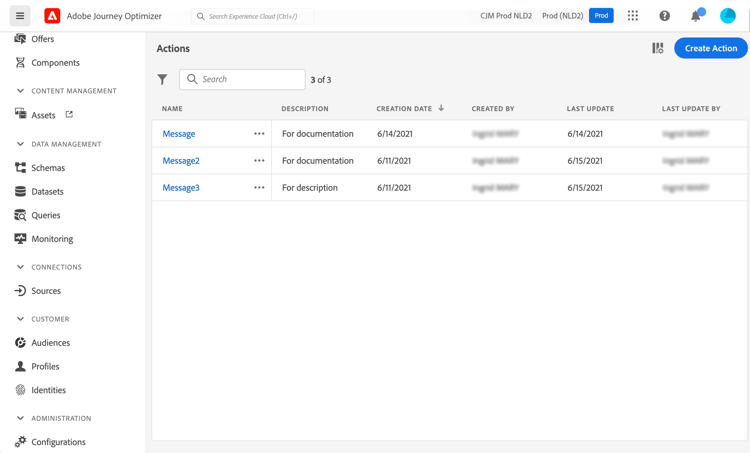
要查看操作列表或配置新操作,请在“管理”菜单部分中选择配置。 在 操作 部分中,单击管理。 将显示操作列表。 有关该界面的更多信息,请参阅此页面。
了解如何对此专用页面🔗上的自定义操作进行故障排除。
操作方法视频 video
了解如何配置自定义操作。
其他资源
浏览以下部分,了解有关配置和使用自定义操作的更多信息:
- 配置自定义操作 — 了解如何创建和配置自定义操作
- 使用自定义操作 — 了解如何在历程中使用自定义操作
- 将集合传递到自定义操作参数 — 了解如何在运行时动态填充的自定义操作参数中传递集合
- 自定义操作疑难解答 — 了解自定义操作疑难解答
This section contains structured knowledge intended to support interpretation, retrieval, and question answering related to this topic.
For complete understanding, this information should be combined with the documentation on this page. Neither source is intended to stand alone; the page describes the feature, while this section provides additional context that helps disambiguate terminology, intent, applicability, and constraints.
- TL;DR: This page introduces actions and custom actions in Journey Optimizer, which let you deliver personalized real-time experiences and connect third-party systems through REST API calls.
Intents:
- Understand what actions and custom actions are and how they extend journeys
- Distinguish built-in message capability from third-party custom actions
- Identify when to use the Adobe Campaign v7/v8 integration versus a custom action
- Access the action list from the Configurations Actions area
- Learn who is responsible for configuring custom actions
Glossary:
- Action: A connection through which you deliver personalized, real-time experiences to customers, such as push notifications, email, mobile messages, or other digital engagement (product-specific)
- Custom action: A configured connection to a third-party system that sends messages or API calls, defined by technical users and made available to marketers (product-specific)
- Built-in message capability: The messaging capability that comes with Journey Optimizer, distinct from custom actions (product-specific)
Guardrails:
- The configuration of custom actions must be performed by a technical user.
- An action can be configured with any service from any provider that can be called through a REST API with a JSON-formatted payload.
- Once configured, custom actions appear in the left palette of your journey, in the Action category.
Terminology:
- Canonical name: Custom action — Acronym: n/a — variants: action, custom actions
- Do not confuse: “built-in message capability” (native Journey Optimizer messaging) ≠ “custom action” (third-party connection through a REST API)
- Do not confuse: “action” (the general connection concept) ≠ “custom action” (the configured third-party connection)
FAQ:
- Q: What is a custom action? — A configured connection of a third-party system to send messages or API calls, usable with any provider callable through a REST API with a JSON-formatted payload.
- Q: Who must configure custom actions? — The configuration of custom actions must be performed by a technical user.
- Q: How do I connect Adobe Campaign v7 or v8? — An integration is available upon request; refer to the Adobe Campaign v7/v8 integration page.
- Q: Where do custom actions appear after configuration? — In the left palette of your journey, in the Action category.
- Q: Where is the action list found? — Select Configurations in the ADMINISTRATION menu section, then click Manage in the Actions section.
Personas:
- developer: Can configure a custom action to connect third-party systems such as Epsilon, Facebook, Adobe Developer, or Firebase for sending messages or API calls. The page states that an action can use any service or provider through a REST API with a JSON-formatted payload. Where: “Get started with custom actions”.
- admin: Can access the action list by selecting Configurations in the ADMINISTRATION menu section. Can select Manage in the Actions section to display the list of actions. The page states that the configuration of custom actions must be performed by a technical user. Where: “Get started with custom actions”.
Onboarding:
- Level: Experienced
- First minimal step: Select Configurations in the ADMINISTRATION menu section, then select Manage in the Actions section.
- Success check: The list of actions is displayed.
- Previous: For a complete overview and configuration checklist for Data Sources, Events, and Actions before configuring custom actions: Configure journeys – Data Sources, Events, and Actions (configuration/about-data-sources-events-actions.md)
- Next: Using Adobe Campaign v7 or v8 for messaging: Integrate with Adobe Campaign v7/v8 (action/acc-action.md); Using a third-party system such as Epsilon, Facebook, Adobe Developer, or Firebase to send messages: Configure a custom action (action/about-custom-action-configuration.md)