在此页面上:了解如何将简单集合和对象集合传递到自定义操作参数,以便在运行时动态填充它们。
您可以在自定义操作参数中传递集合,这些参数在运行时动态填充。
支持两种类型的收藏集:
-
简单收藏集
将简单集合用于基本值列表,例如字符串、数字或布尔值。 当您只需传递项目列表而无需附加属性时,这些功能非常有用。
例如,设备类型列表:
code language-json { "deviceTypes": [ "android", "ios" ] } -
对象集合
当每个项包含多个字段或属性时,使用对象集合。 它们通常用于传递结构化数据,例如产品详细信息、事件记录或项目属性。
例如:
code language-json { "products":[ { "id":"productA", "name":"A", "price":20.1 }, { "id":"productB", "name":"B", "price":10.0 }, { "id":"productC", "name":"C", "price":5.99 } ] }
一般程序 general-procedure
在此部分中,我们使用以下JSON有效负载示例。 这是一个对象数组,其中的字段是一个简单的集合。
{
  "ctxt": {
    "products": [
      {
        "id": "productA",
        "name": "A",
        "price": 20.1,
        "color":"blue",
        "locations": [
          "Paris",
          "London"
        ]
      },
      {
        "id": "productB",
        "name": "B",
        "price": 10.99
      }
    ]
  }
}
您可以看到products是两个对象的数组。 您需要至少具有一个对象。
-
创建自定义操作。 请参阅此页面以了解详情。
-
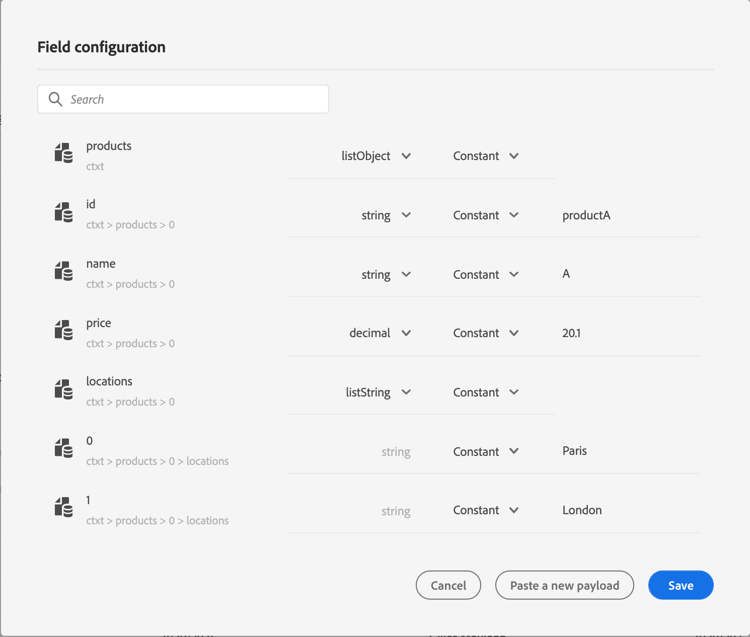
在 操作参数 部分中,粘贴JSON示例。 显示的结构是静态的:粘贴有效负载时,所有字段都定义为常量。
显示集合函数和操作的
-
如果需要,请调整字段类型。 集合支持以下字段类型:listString、listInteger、listDecimal、listBoolean、listDateTime、listDateTimeOnly、listDateOnly、listObject
note NOTE 根据有效负载示例自动推断字段类型。 -
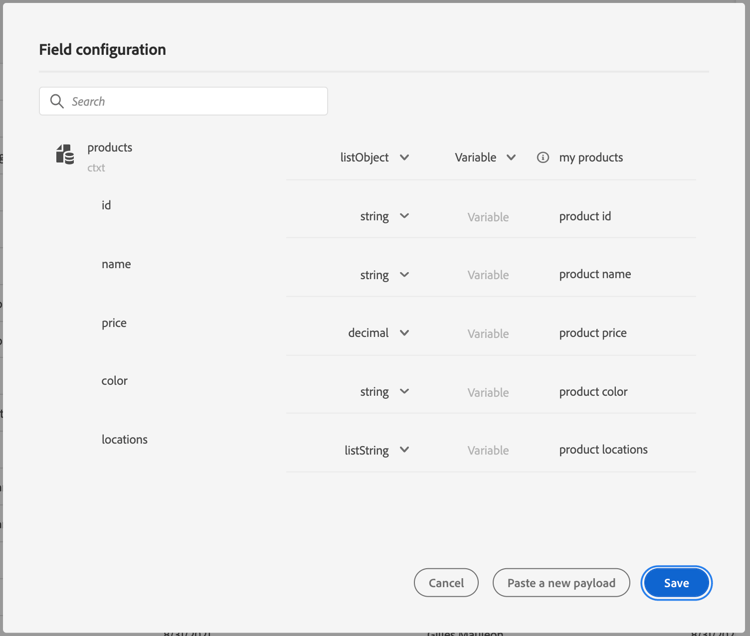
如果要动态传递对象,则需要将它们设置为变量。 在此示例中,我们将
products设置为变量。 对象中包含的所有对象字段都会自动设置为变量。note NOTE 有效负载示例的第一个对象用于定义字段。 -
对于每个字段,定义将在历程画布中显示的标签。
-
创建历程并添加您创建的自定义操作。 请参阅此页面以了解详情。
-
在 操作参数 部分中,使用高级表达式编辑器定义数组参数(在本例中为
products)。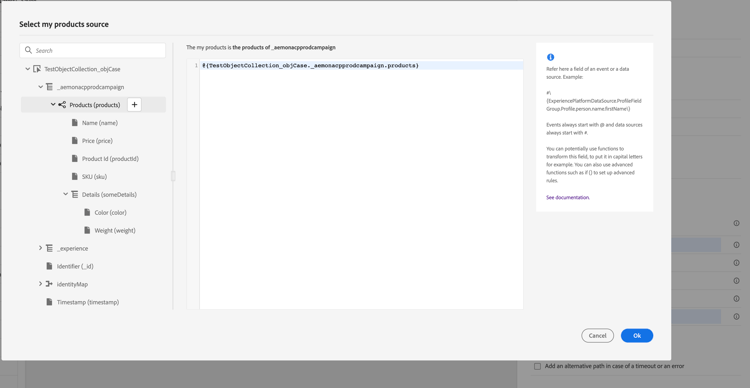
-
对于以下每个对象字段,键入源XDM架构中的相应字段名称。 如果名称相同,则不需要此操作。 在我们的示例中,我们只需要定义
product id和“颜色”。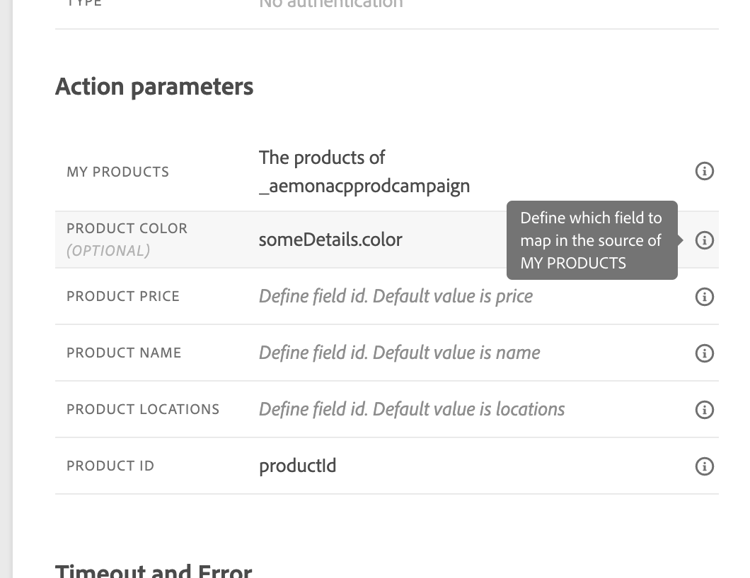
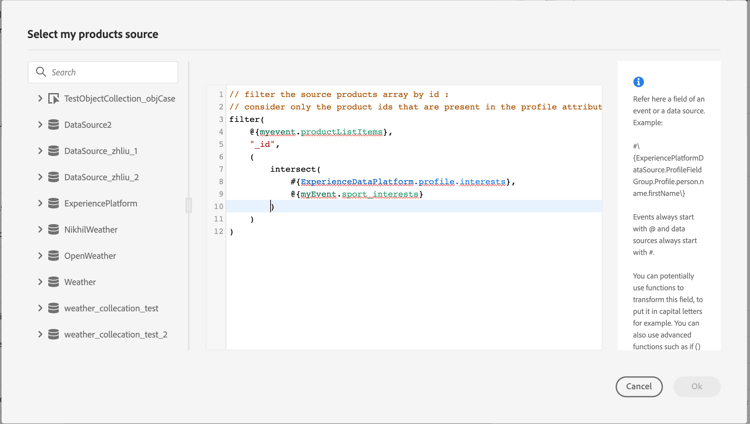
对于数组字段,您还可以使用高级表达式编辑器执行数据操作。 在以下示例中,我们使用filter和intersect函数:
限制 limitations
虽然自定义操作中的集合为传递动态数据提供了灵活性,但需要注意一些结构性约束:
-
在自定义操作中支持嵌套数组
Adobe Journey Optimizer在自定义操作 响应负载 中支持对象的嵌套数组,但此支持在 请求负载 中受限。
在请求有效负载中,仅当嵌套数组包含固定数量的项目时(如自定义操作配置中所定义),才支持嵌套数组。 例如,如果嵌套数组始终只包含三个项目,则可以将其配置为常量。 当项目的数量需要为动态时,只能将非嵌套数组(位于底层的数组)定义为变量。
示例:
-
以下示例说明了不支持的用例。
在此示例中,products数组包含一个嵌套数组(
locations),该数组具有动态数量的项,这在请求负载中不受支持。code language-json { "products": [ { "id": "productA", "name": "A", "price": 20, "locations": [ { "name": "Paris" }, { "name": "London" } ] } ] } -
支持的示例,其中包含定义为常量的固定项目。
在这种情况下,嵌套位置将由固定字段(
location1,location2)替换,从而允许有效负载在支持的配置中保持有效。code language-json { "products": [ { "id": "productA", "name": "A", "price": 20, "location1": { "name": "Paris" }, "location2": { "name": "London" } } ] }
-
-
测试集合:要使用测试模式测试集合,必须使用代码视图模式。 请注意,业务事件不支持代码视图模式,因此在这种情况下,您只能发送包含单个元素的集合。
特定案例 examples
对于异构类型和阵列阵列,使用listAny类型定义阵列。 只能映射单个项,但不能将数组更改为变量。
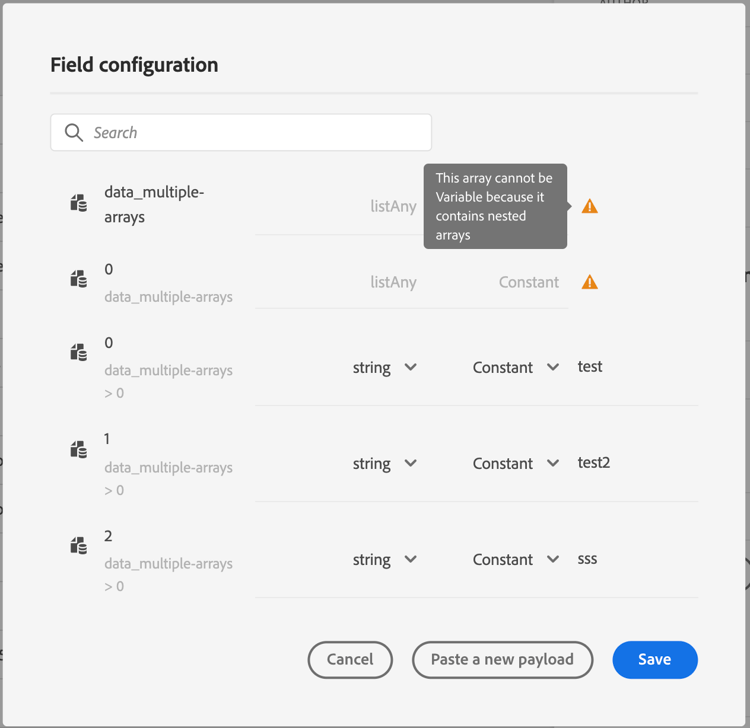
异质类型示例:
{
    "data_mixed-types": [
        "test",
        "test2",
        null,
        0
    ]
}
阵列示例:
{
    "data_multiple-arrays": [
        [
            "test",
            "test1",
            "test2"
        ]
    ]
}
其他资源
浏览以下部分,了解有关配置、使用和排除自定义操作的更多信息:
- 自定义操作入门 — 了解什么是自定义操作以及它们如何帮助您连接到第三方系统
- 配置自定义操作 — 了解如何创建和配置自定义操作
- 使用自定义操作 — 了解如何在历程中使用自定义操作
- 自定义操作疑难解答 — 了解自定义操作疑难解答
- 对上下文数据进行迭代 — 了解如何在历程表达式中使用数组,并在消息个性化中迭代自定义操作响应、事件数据和数据集查找
This section contains structured knowledge intended to support interpretation, retrieval, and question answering related to this topic.
For complete understanding, this information should be combined with the documentation on this page. Neither source is intended to stand alone; the page describes the feature, while this section provides additional context that helps disambiguate terminology, intent, applicability, and constraints.
- TL;DR: This page explains how to pass simple and object collections dynamically into custom action parameters in Journey Optimizer, including supported field types, the configuration procedure, and known limitations around nested arrays.
Intents:
- Configure a custom action to accept a collection (simple or object) as a dynamic parameter
- Define array parameters as variables in the advanced expression editor when building a journey
- Apply filter and intersect functions to manipulate array data in the expression editor
- Understand and work within the nested array limitations for custom action request payloads
- Test collection parameters using code view mode in journey test mode
Glossary:
- Simple collection: A list of basic scalar values (strings, numbers, booleans) passed as a custom action parameter (product-specific)
- Object collection: A list of structured objects, each with multiple fields, passed as a custom action parameter (product-specific)
- listObject: The field type used in custom action configuration to represent an array of objects (product-specific)
- listAny: The field type used for heterogeneous arrays or arrays of arrays where items have mixed types (product-specific)
- Variable (vs. Constant): In action parameter configuration, a field set to “variable” is populated dynamically at runtime from the journey context, while a “constant” is a fixed value set at configuration time (product-specific)
Guardrails:
- Nested arrays in request payloads are only supported when they contain a fixed number of items (defined as constants); dynamic nested arrays are not supported
- Code view mode is required to test collections in test mode; code view is not supported for business events, so only single-element collections can be sent in that case
- At least one object must be present in the payload example used to define collection fields
- The first object of the payload example defines the fields for the entire collection
Terminology:
- Canonical name: Collection — Acronym: none — variants: array, list, dynamic collection
- Synonyms: “simple collection” = “list of scalar values” ; “object collection” = “array of objects”
- Do not confuse: “listAny” ≠ “listObject” (listAny handles heterogeneous or nested arrays; listObject handles uniform arrays of structured objects)
FAQ:
- Q: What is the difference between a simple collection and an object collection? — A simple collection contains basic scalar values (strings, numbers, booleans), while an object collection contains structured objects each with multiple named fields.
- Q: How do I make a collection parameter dynamic at runtime? — In the custom action’s Action parameters section, set the array field to “variable”; all object fields within it are then automatically set to variables.
- Q: Are nested arrays supported in custom action request payloads? — Only partially. Nested arrays with a fixed, known number of items can be defined as constants. Nested arrays with a dynamic number of items are not supported in request payloads.
- Q: How do I test a collection in journey test mode? — Use code view mode in the test interface. Note that business events do not support code view, so only single-element collections can be tested in that context.
- Q: What field types are supported for collections? — listString, listInteger, listDecimal, listBoolean, listDateTime, listDateTimeOnly, listDateOnly, and listObject are all supported.