在此页面上:发送真正的测试API调用以验证您的自定义操作配置,以便您可以在实时历程中依赖这些调用之前捕获错误。
您可以通过从Journey Optimizer用户界面的“管理”部分发送API调用来测试自定义操作。 此功能可帮助您在历程中使用自定义操作之前或之后对其进行故障诊断。
作为管理员,使用 发送测试请求 功能,通过直接从Adobe Journey Optimizer发出真正的API调用来验证自定义操作配置。 此功能可确保请求结构、标头、身份验证和有效负载的格式正确,然后才能在历程中使用。
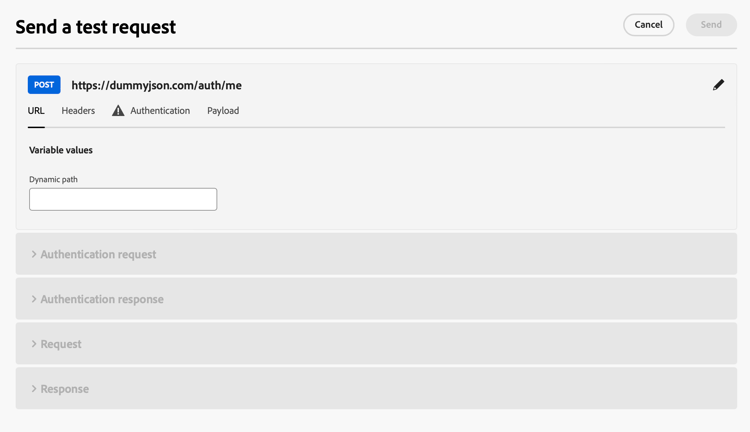
此功能可简化测试和验证过程,确保自定义操作在实时历程中正常运行。
先决条件 troubleshoot-custom-action-prereq
要使用 发送测试请求 功能,必须使用URL、标头和身份验证设置预配置自定义操作。
管理员若要使用此功能,需要以下权限:
- 用户必须具有 Manage journeys events, data sources and actions 权限。
- 此权限包含在 历程管理员 角色中。
- 仅使用 View journeys events 权限是不够的。
在本节中了解有关历程权限的更多信息。
如何使用发送测试请求功能 troubleshoot-custom-action-use
要测试自定义操作,请执行以下步骤:
-
导航到 操作 配置屏幕,然后选择自定义操作。
-
单击操作配置屏幕底部的 发送测试请求 按钮。
在操作配置面板中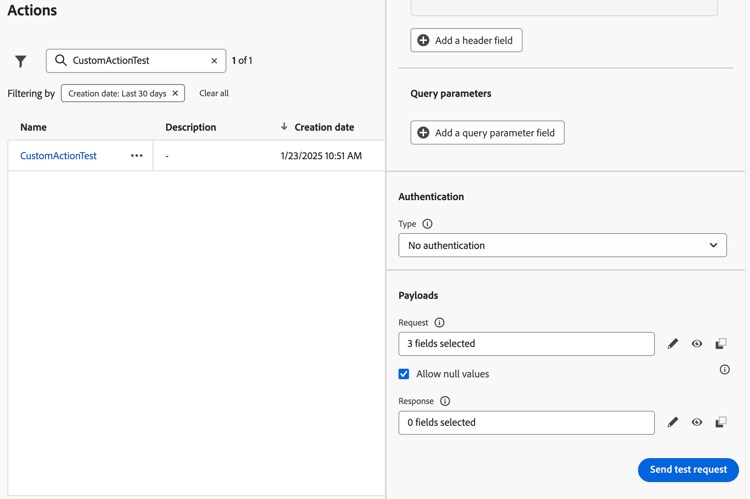
-
在弹出窗口中,允许您指定请求参数:
-
如果自定义操作方法为GET,则无需任何有效负载。
-
如果自定义操作方法为POST,则必须提供JSON有效负载。
note NOTE 如果此JSON的结构不正确,Adobe Journey Optimizer将引发错误;但是,如果数据类型不匹配,则不会引发此错误。 例如,如果将整数参数用于应该是字符串的内容,则不会发生错误。 -
如果定义了身份验证,系统将提示您输入身份验证详细信息。
-
-
单击 发送 以执行请求。
-
来自API的响应(包括标头和状态代码)将显示在界面中。
身份验证处理 troubleshoot-custom-action-auth
当自定义操作包括身份验证时,Adobe Journey Optimizer要求用户为每个测试请求输入身份验证详细信息:
- 基本身份验证:用户必须提供密码。
- API密钥身份验证:用户必须输入API密钥值。
- 自定义身份验证:用户必须在请求 bodyParam 中提供身份验证参数。 在此情况下添加了两个部分: 身份验证请求和身份验证响应。
主要优点 troubleshoot-custom-action-benefits
作为Journey Optimizer管理员,您还可以使用外部工具(例如Postman)来测试自定义操作。 与外部测试相比,产品内故障排除功能的主要优势如下:
-
测试请求由 历程 执行,这意味着:
- 使用确切的请求结构(包括Adobe Journey Optimizer特定的标头)。
- 源IP和标头与实时历程中使用的相匹配。
-
发送测试请求功能可用于对 实时历程 进行故障排除,因为已部署自定义操作。
-
这种产品内测试功能消除了手动在工具之间复制配置详细信息的需要,从而降低了错误风险。
疑难解答 troubleshoot-custom-action-check
如果请求失败,您可以检查:
- 在测试中输入的身份验证凭据。
- 请求方法(GET与POST)以及相应的有效负载。
- 在自定义操作中定义的API端点和标头。
- 使用响应数据识别潜在的错误配置。
处理放弃事件和空闲超时 handling-discard-events-and-idle-timeouts
当一个历程中的自定义操作触发旨在启动 第二个历程 的事件时,请确保第二个历程处于有效状态并且事件被识别。 如果事件不符合第二个历程的进入条件,则该事件可以是已丢弃,并显示在包含notSuitableInitialEvent等代码的日志中。 如果第二个历程未准备就绪,可能会发生空闲超时,从而导致日志中丢弃事件。
常见原因:
-
不符合事件资格 — 第二个历程使用具有资格条件的基于规则的事件(例如,必填字段必须为非空,如特定字段上的
isNotEmpty)。 如果事件有效负载不满足该条件(例如,字段为空或缺少该字段),则事件为已接收但已放弃,并且未触发第二个历程。 这是预期行为;文档和日志确认,如果不满足资格条件,则将放弃事件,并且不会为该用户档案触发历程。 验证自定义操作发送的有效负载是否包含第二个历程的事件配置所需的所有字段和值。 了解如何在历程执行中配置基于规则的事件和事件接收疑难解答。 -
第二个历程未就绪 — 如果第二个历程尚未处于活动状态(例如,未处于测试模式或未处于实时状态),或者自定义操作触发与第二个历程准备接收之间存在时间间隔,则可能会发生空闲超时。 在触发自定义操作之前,请确保目标历程已发布或处于测试模式。
-
正在诊断放弃事件 — 如果在日志中看到放弃事件,请检查历程日志和Splunk跟踪以确认是否已收到该事件,但由于资格(有效负载不符合规则)或时间限制已将其丢弃。 确保第二个历程的开始日期和配置正确,并且历程处于其活动日期范围内。
要避免在通过自定义操作链接历程时放弃事件,请根据第二个历程的事件规则验证事件有效负荷,并确认目标历程为实时历程或处于测试状态且处于活动日期范围内。
相关主题 related
浏览以下部分,了解有关配置和使用自定义操作的更多信息:
- 自定义操作入门 — 了解什么是自定义操作以及它们如何帮助您连接到第三方系统
- 配置自定义操作 — 了解如何创建和配置自定义操作
- 使用自定义操作 — 了解如何在历程中使用自定义操作
- 将集合传递到自定义操作参数 — 了解如何在运行时动态填充的自定义操作参数中传递集合
This section contains structured knowledge intended to support interpretation, retrieval, and question answering related to this topic.
For complete understanding, this information should be combined with the documentation on this page. Neither source is intended to stand alone; the page describes the feature, while this section provides additional context that helps disambiguate terminology, intent, applicability, and constraints.
- TL;DR: This page explains how administrators use the Send test request capability to validate custom action configurations by making real API calls directly from Journey Optimizer, before or after using them in a journey.
Intents:
- Send a real test API call to validate a custom action configuration
- Provide the correct payload depending on whether the method is GET or POST
- Enter the authentication details required for each test request
- Understand the benefits of in-product testing compared to external tools
- Check what to verify when a test request fails
- Diagnose discard events and idle timeouts when a custom action in one journey triggers an event meant to start a second journey
Glossary:
- Send test request: The capability administrators use to validate custom action configurations by making real API calls directly from Adobe Journey Optimizer, checking the request structure, headers, authentication, and payload (product-specific)
- AJO Journey: The executor of the test request; the exact request structure (including Adobe Journey Optimizer specific headers) is used, and the source IP and headers match those used in live journeys (product-specific)
- Discard event: An event that is received but discarded when it does not meet the second journey’s entry conditions, appearing in logs with codes such as
notSuitableInitialEvent(product-specific) - Idle timeout: A timeout that may occur if the second journey is not ready, leading to discard events in the logs (product-specific)
- IP (egress) proxy: When enabled for your organization, it is bypassed by the Send test request call (product-specific)
Guardrails:
- If the custom action method is GET, no payload is required; if the method is POST, you must provide a JSON payload.
- Adobe Journey Optimizer raises an error if the structure of the JSON is incorrect, but not if there is a mismatch with a data type; for instance, no error is raised if an integer parameter is used for what should be a string.
- The Send test request call bypasses the IP (egress) proxy if your organization has it enabled; to confirm proxy routing, run a test or live journey.
- For each test request, Adobe Journey Optimizer requires the user to enter authentication details if the custom action includes authentication.
- For chained journeys, ensure the second journey is published or in test mode before the custom action is triggered, and within its active date window.
Prerequisites and permissions:
- A custom action pre-configured with a URL, headers, and authentication settings.
- The Manage journeys events, data sources and actions permission, which is included in the Journey Administrators role; the View journeys events permission alone is not sufficient.
Terminology:
- Canonical name: Send test request — variants: test request, in-product troubleshooting capability
- Do not confuse: “Basic Authentication” (the user provides the password) ≠ “API Key Authentication” (the user enters the API key value) ≠ “Custom Authentication” (the user supplies the authentication parameters in the request bodyParam, and the sections Authentication request and Authentication response are added)
- Do not confuse: “GET” method (no payload required) ≠ “POST” method (JSON payload required)
FAQ:
- Q: What does the Send test request capability do? — It validates custom action configurations by making real API calls directly from Adobe Journey Optimizer, ensuring the request structure, headers, authentication, and payload are correctly formatted before being used in a journey.
- Q: What permissions are required? — The Manage journeys events, data sources and actions permission, included in the Journey Administrators role; the View journeys events permission alone is not sufficient.
- Q: Do I need a payload for the test request? — If the custom action method is GET, no payload is required; if the method is POST, you must provide a JSON payload.
- Q: Does Journey Optimizer validate the payload data types? — It raises an error if the JSON structure is incorrect, but not if there is a data type mismatch, so an integer used where a string is expected does not raise an error.
- Q: Can I use this capability for live journeys? — Yes, the Send test request capability can be used for troubleshooting live journeys, as the custom action is already deployed.
- Q: Why is an event discarded when a custom action triggers a second journey? — If the event does not meet the second journey’s entry conditions, it can be discarded and appear in logs with codes such as
notSuitableInitialEvent; idle timeouts may occur if the second journey is not ready, leading to discard events in the logs.
Troubleshooting:
- A test request fails: check the authentication credentials entered in the test, the request method (GET vs. POST) and corresponding payload, and the API endpoint and headers defined in the custom action; use the response data to identify potential misconfigurations.
- Event discarded (
notSuitableInitialEvent), event qualification not met: the second journey uses a rule-based event with a qualification condition (for example,isNotEmptyon a specific field) and the event payload does not satisfy it, so the event is received but discarded and the second journey is not triggered; the page describes this as expected behavior. Verify that the payload sent by the custom action includes all fields and values required by the second journey’s event configuration. - Idle timeout, second journey not ready: the second journey is not yet active (for example, not in test mode or not live), or there is a timing gap between the custom action firing and the second journey being ready to receive. Ensure the target journey is published or in test mode before the custom action is triggered.
- Discard events in logs: check journey logs and Splunk traces to confirm whether the event was received but discarded due to qualification or timing; ensure the second journey’s start date and configuration are correct and that the journey is within its active date window.
Related pages:
- Learning what a custom action is: Get started with custom actions (action/action.md)
- Creating and configuring a custom action: Configure your custom actions (action/about-custom-action-configuration.md)
- Using custom actions in journeys: Use custom actions (building-journeys/using-custom-actions.md)
- Passing a collection in custom action parameters: Pass collections into custom action parameters (building-journeys/collections.md)
- IP (egress) proxy and enablement: Integrate with external systems (configuration/external-systems.md)
- Configuring rule-based events: Configure rule-based events (event/about-creating.md)
- Troubleshooting event reception in journey execution: Troubleshoot your live journey execution (building-journeys/troubleshooting-execution.md)
- Journey permissions: Permission levels (administration/high-low-permissions.md)
Personas:
- developer: Can send real test API calls to validate a custom action configuration, providing a JSON payload when the method is POST and no payload when the method is GET. Can enter authentication details for each test request when the custom action includes authentication. The page states that Adobe Journey Optimizer raises an error for an incorrect JSON structure, but not for a data type mismatch, such as an integer parameter used where a string is expected. Where: “How to use the Send test request feature”.
- admin: Can use the Send test request capability to validate custom action configurations by making real API calls directly from Adobe Journey Optimizer. Can access this capability only after a custom action is pre-configured with a URL, headers, and authentication settings. The page states that the Manage journeys events, data sources and actions permission is required, and that the View journeys events permission alone is not sufficient. Where: “Prerequisites”.
Onboarding:
- Level: Experienced
- First minimal step: Navigate to the Actions configuration screen and select a custom action.
- Success check: The response from the API, including headers and status codes, is displayed in the interface.
- Previous: Configuring the custom action with a URL, headers, and authentication settings before testing it: Configure a custom action (action/about-custom-action-configuration.md); Obtaining the permission required to use the Send test request capability: Permission levels (administration/high-low-permissions.md)
- Next: Using the validated custom action in a journey: Use custom actions (building-journeys/using-custom-actions.md)