在此页面上:配置一个单一事件,以便可以根据特定人员的行为(如购买或忠诚度里程碑)实时触发其历程。
单一事件链接到特定轮廓。 它们可以基于规则,也可以由系统生成。 阅读有关单一事件本节的更多信息。
以下是配置新事件的首要步骤:
-
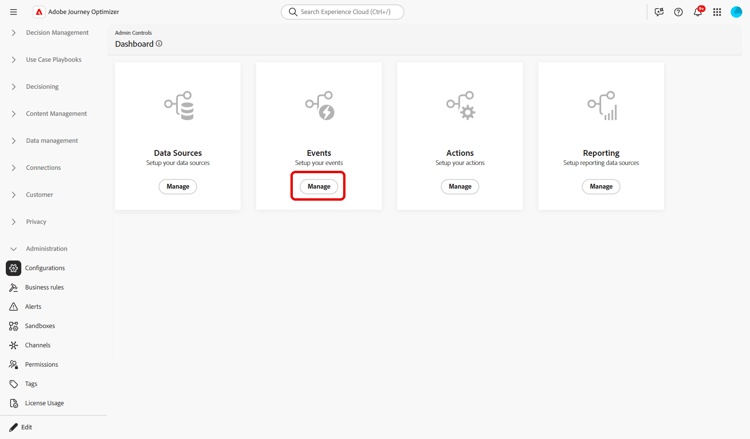
在“管理”菜单部分中浏览到配置,在 事件 部分中单击管理。 将显示事件列表。
-
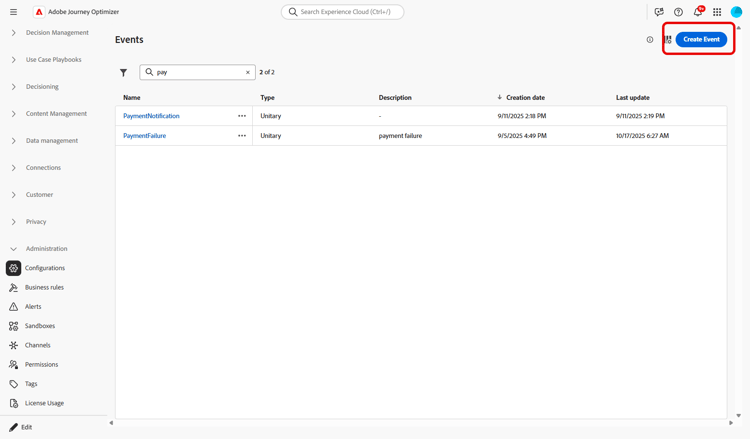
单击 创建事件 以创建新事件。 事件配置窗格将在屏幕右侧打开。
-
输入事件的名称。 您还可以添加描述。
note NOTE 只允许使用字母数字字符和下划线。 最大长度为30个字符。 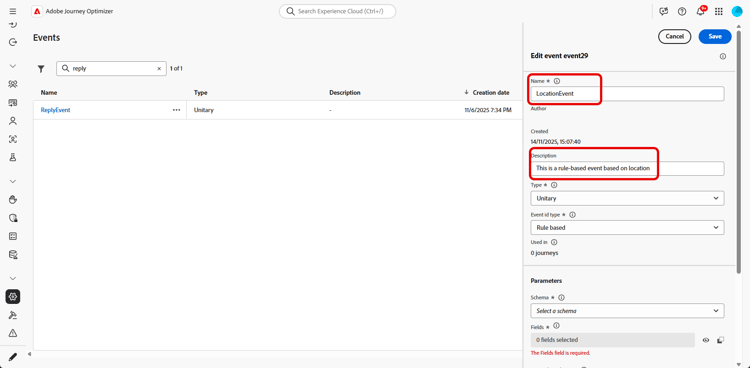
-
在 类型 字段中,选择单一。
-
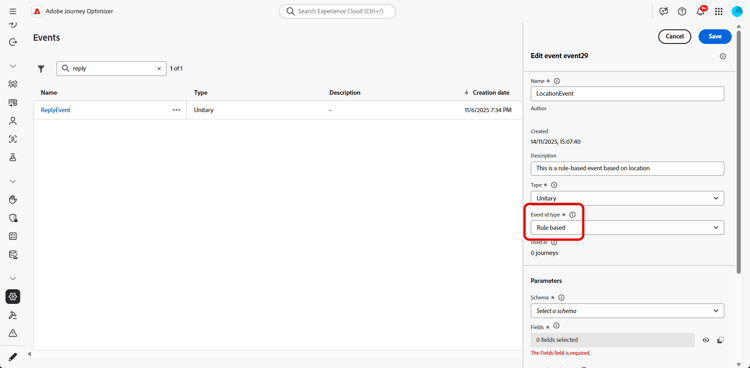
在 事件ID类型 字段中,选择要使用的事件ID类型: 基于规则或系统生成。 有关此部分中事件ID类型的更多信息。
-
使用此事件的历程数显示在 在 中使用字段中。 您可以单击 查看历程 图标以显示使用此事件的历程列表。
-
定义架构和有效负载字段:在这里,您可以选择历程预期接收的事件信息(通常称为有效负载)。 然后,您便能够在旅程中使用这些信息。 请参阅此小节。
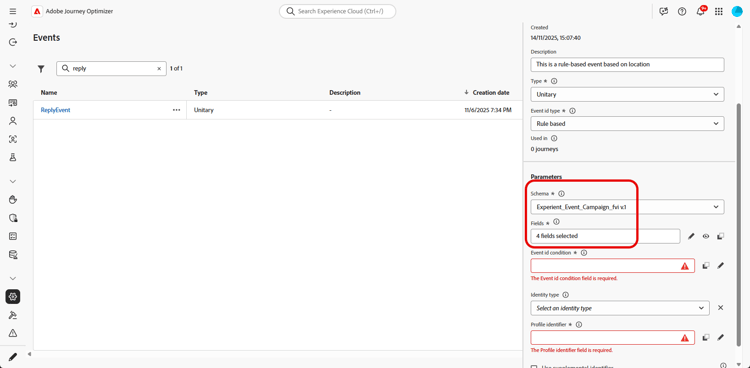
note NOTE 选择 系统生成的 类型时,只有具有eventID类型字段的架构可用。 当您选择 基于规则的 类型时,您可以选择沙盒中可用的任何体验事件架构。 -
对于基于规则的事件,请单击 事件ID条件 字段中的。 使用简单或高级表达式编辑器,定义系统将使用的条件,以识别将触发历程的事件。
在我们的示例中,我们根据用户档案所在的城市编写了条件。 这意味着每当系统收到与此条件(城市字段和 巴黎 值)匹配的事件,它就会将其传递到历程。
note NOTE 在简单表达式编辑器中,并非所有运算符都可用,它们取决于数据类型。 例如,对于字符串类型的字段,可以使用“包含”或“等于”。 如果在创建事件后使用新的枚举值修改架构,则需要按照以下步骤将更改应用于现有事件:从事件字段中取消选择枚举字段,确认选择,然后再次选择枚举字段。 此时将显示新的枚举值。 -
添加标识类型。 此步骤是可选的,但还是建议您添加标识类型,以便您利用实时客户资料服务中存储的信息。 它定义事件具有的键类型。 有关详细信息,请参阅此部分。
-
定义用户档案标识符:从有效负荷字段中选择一个字段,或定义一个公式以标识与事件关联的个人。 如果您选择身份类型,此键将自动设置(但仍可编辑)。 事实上,历程会选取应与身份类型对应的键(例如,如果您选择了电子邮件身份类型,则会选择电子邮件键)。 有关详细信息,请参阅此部分。
-
单击保存。
事件现已配置完毕,可随时投入旅程。 还需要其他配置步骤以接收事件。 请参阅此页。
定义有效负载字段 define-the-payload-fields
有效负载定义允许您选择系统预计从历程中的事件接收的信息,以及用于识别哪个人员与事件关联的键。 有效负载基于Experience Cloud XDM字段定义。 有关XDM的详细信息,请参阅Adobe Experience Platform文档。
-
从列表中选择XDM架构,然后单击 字段 字段或 编辑 图标。
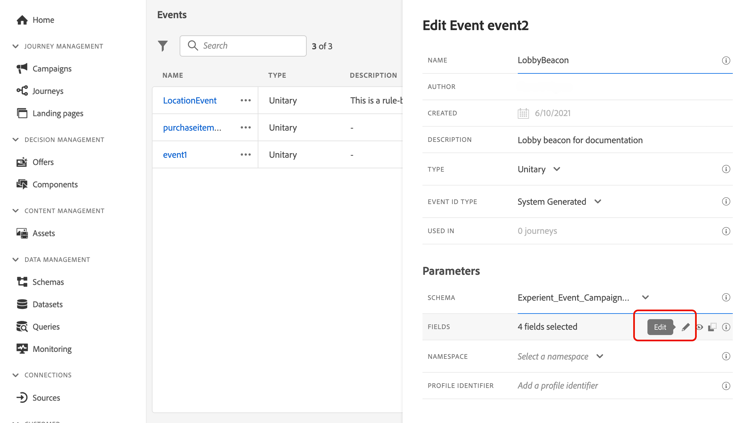
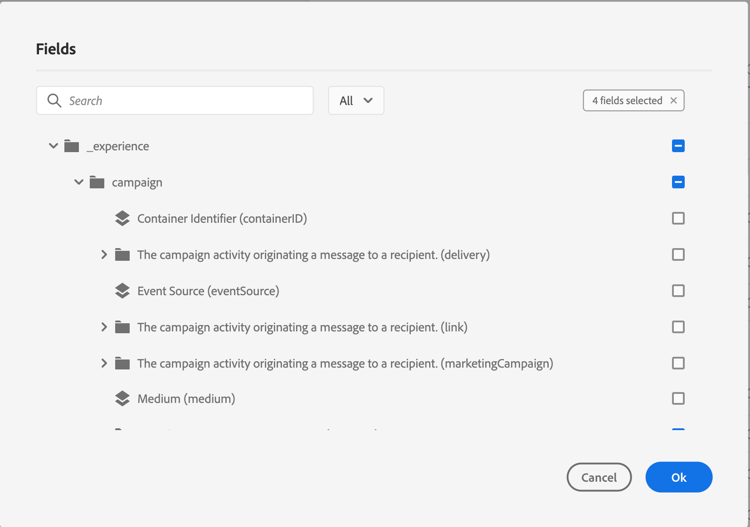
将显示架构中定义的所有字段。 字段列表因架构而异。 您可以搜索特定字段,或使用过滤器显示所有节点和字段或仅显示选定的字段。 根据架构定义,某些字段可能是必填字段,并且已预先选择。 不能取消选择它们。 默认情况下,选择历程正确接收事件所必需的所有字段。
note NOTE 对于系统生成的事件: - 确保您已将
orchestration字段组添加到XDM架构中 — 这将确保您的架构包含使用Journey Optimizer所需的所有信息。 - eventID字段会自动添加到所选字段列表中,以便Journey Optimizer可以识别该事件。 推送事件的系统不应生成ID — 请改用有效负载预览中可用的ID。 了解详情
- 确保您已将
-
选择您希望从事件接收的字段。 这些是业务用户在历程中将利用的字段。 它们还必须包含用于识别与事件关联的人员的键(请参阅此部分)。
-
选择完所需的字段后,单击 确定 或按Enter。
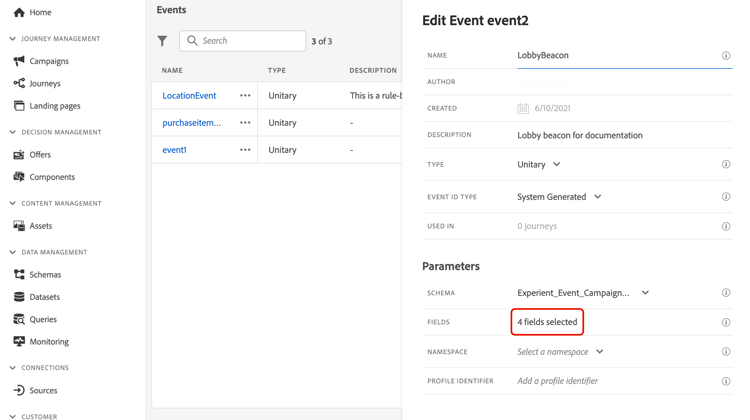
所选字段的数目显示在 字段 字段中。
选择身份标识类型 select-the-namespace
身份类型(以前称为“namespace”)允许您定义用于识别与事件关联的人员的键类型。 其配置是可选的。 如果您想在历程中检索来自实时客户个人资料的其他信息,则需要此项。 如果您仅使用来自第三方系统的数据(通过自定义数据源),则不需要标识类型定义。
您可以使用现有的身份类型或使用Adobe Experience Platform Identity服务创建新身份类型。 请参阅Adobe Experience Platform文档以了解详情。
如果选择具有主标识的架构,则将预填充 Profiler标识符 和 标识类型 字段。 如果未定义标识,我们选择 identityMap > id 作为主键。 然后,您必须选择身份类型,并使用 identityMap > id 预填充键(在 身份类型 字段下)。
选择字段时,将标记主要标识字段。

从下拉列表中选择标识类型。
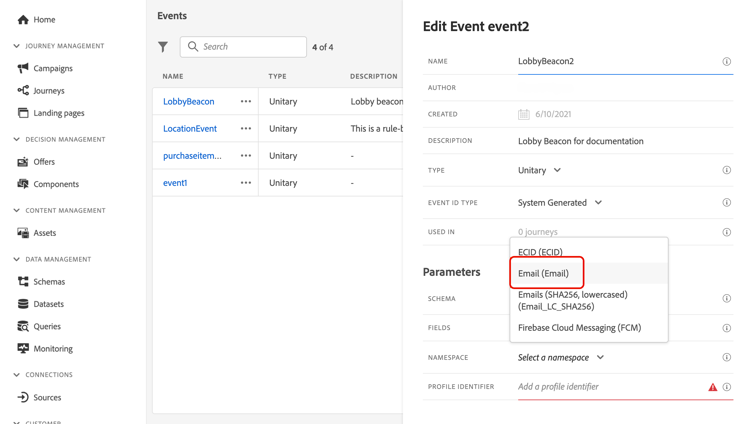
每个历程只允许一个标识类型。 如果您在同一历程中使用多个事件,则需要使用相同的标识类型。 请参阅此页。
定义用户档案标识符 define-the-event-key
键是字段或字段组合,它是事件有效负载数据的一部分,允许系统识别与事件关联的人员。 例如,键可以是Experience Cloud ID、CRM ID或电子邮件地址。
要使用存储在Adobe实时客户个人资料数据库中的数据,事件键必须是您在实时客户个人资料服务中定义为个人资料身份的信息。
用户档案标识符允许系统在事件和个人用户档案之间执行协调。 如果选择具有主标识的架构,则将预填充 配置文件标识符 和 标识类型 字段。 如果未定义标识,则 identityMap > id 是主键。 然后,您必须选择一个标识类型,并使用 identityMap > id 自动预填该键。
选择字段时,将标记主要标识字段。
如果您需要使用其他密钥,如CRM ID或电子邮件地址,则需要手动添加该密钥,如下所述:
-
单击 用户档案标识符 字段内或铅笔图标。
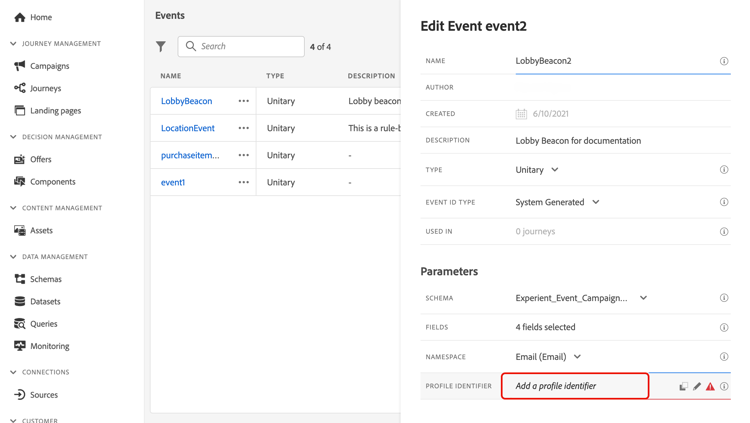
-
在有效负载字段列表中选择已选作键的字段。
当接收到事件时,该键的值允许系统识别与该事件相关联的人员。 与标识类型关联的键,可用于对Adobe Experience Platform执行查询。 请参阅此页。
密钥还用于检查人员是否正在旅程中。 事实上,一个人在同一历程中不能位于两个不同的位置。 因此,系统不允许相同的键(例如键CRMID=3224)位于同一历程的不同位置。
高级表达式编辑器 adv-exp-editor
在定义事件ID条件或用户档案标识符时,您可以切换到高级表达式编辑器以创建更复杂的键(例如,两个事件字段的串联)。
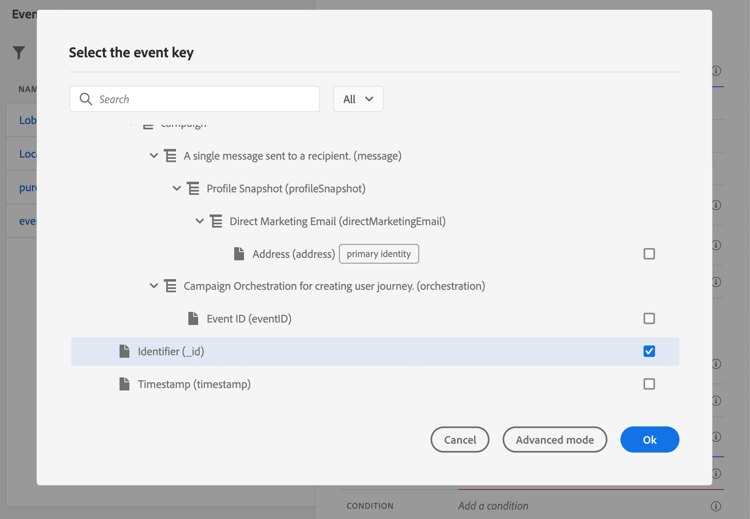
如果要执行其他操作,可以从 高级模式 按钮访问高级表达式函数。 利用这些函数,可处理用于执行特定查询的值,例如更改格式、执行字段连接,同时仅考虑字段的一部分(例如,前10个字符)。 请参阅此页面。
预览有效负载 preview-the-payload
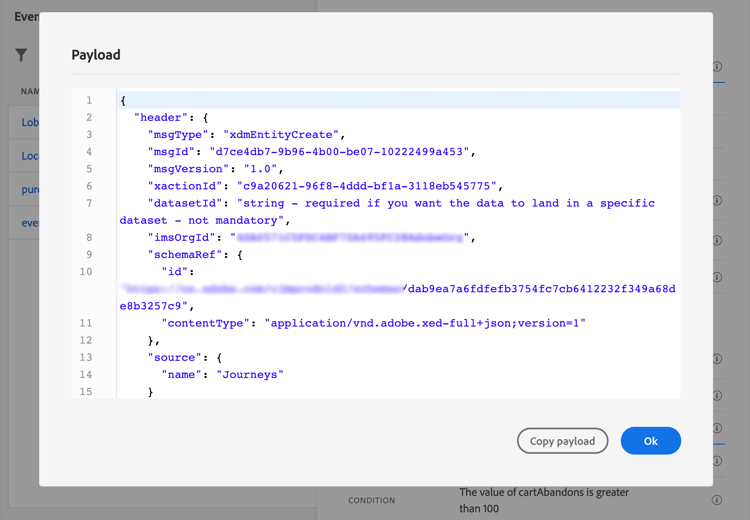
有效负载预览允许您验证有效负载定义。
-
单击 查看有效负载 图标可预览系统所需的有效负载。
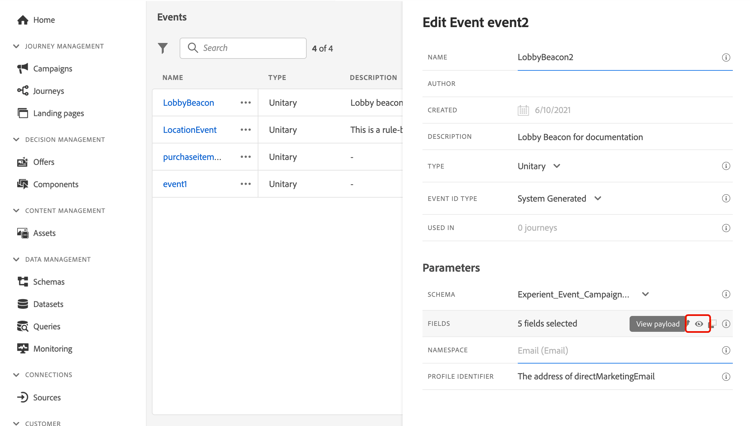
您可以注意到已选择的字段已显示。
-
检查预览以验证有效负载定义。
-
然后,您可以将有效负载预览与共享给负责事件发送的人员。 此有效负载可以帮助他们设计推送到Journey Optimizer的事件的设置。 请参阅此页。
This section contains structured knowledge intended to support interpretation, retrieval, and question answering related to this topic.
For complete understanding, this information should be combined with the documentation on this page. Neither source is intended to stand alone; the page describes the feature, while this section provides additional context that helps disambiguate terminology, intent, applicability, and constraints.
- TL;DR: This page explains how to configure a unitary event, which is linked to a specific profile and can be rule-based or system-generated, including its type, schema and payload fields, identity type, profile identifier, and payload preview.
Intents:
- Create a unitary event and choose the Rule Based or System Generated Event ID type
- Define the schema and select the payload fields the journey expects to receive
- Define the Event ID condition for rule-based events using the simple or advanced expression editor
- Add an identity type and define the profile identifier that reconciles the event with a profile
- Use the advanced expression editor to build more complex keys
- Preview the payload to validate the payload definition
Glossary:
- Unitary event: An event linked to a specific profile that can be rule-based or system-generated (product-specific)
- Identity type: The type of key used to identify the person associated to the event, previously known as namespace; only people-based identity types can be selected (product-specific)
- Profile identifier: The field, or combination of fields, from the event payload that allows the system to identify the person associated to the event (product-specific)
- eventID: For system-generated events, the field automatically added to the list of selected fields so that Journey Optimizer can identify the event; the system pushing the event should not generate an ID and should use the one available in the payload preview (product-specific)
- Orchestration field group: The field group that must be added to the XDM schema for system-generated events so the schema contains all information required to work with Journey Optimizer (product-specific)
- Advanced expression editor: The editor you can switch to for creating more complex keys, such as a concatenation of two event fields (product-specific)
Guardrails:
- The event name allows only alphanumeric characters and underscores, with a maximum length of 30 characters (hard limit).
- When you select the System Generated type, only schemas that have the eventID type field are available; when you select the Rule Based type, you can select any Experience Event schema available in your sandbox.
- Adding an identity type is optional but recommended, and only a people-based identity type can be selected.
- Only one identity type is allowed per journey, so events used in the same journey must use the same identity type.
- The same key, for example CRMID=3224, cannot be at two different places in the same journey.
- For system-generated events, the payload preview requires saving and re-opening the event to generate an event ID.
Terminology:
- Canonical name: Configure a unitary event
- Synonyms: “Identity type” = “namespace”
- Do not confuse: “Rule Based” (uses an Event ID condition, and you can select any Experience Event schema available in your sandbox) ≠ “System Generated” (only schemas that have the eventID type field are available; the eventID field is automatically added to the selected fields)
- Do not confuse: “Event ID condition” (rule used to identify events that trigger the journey) ≠ “Profile identifier” (key used to identify the person associated to the event)
FAQ:
- Q: What are the two Event ID types for a unitary event? — Rule Based, which uses an Event ID condition, and System Generated, for which the eventID field is automatically added to the list of selected fields.
- Q: Is defining an identity type required? — It is optional but recommended, as it allows you to leverage information stored in the Real-time Customer Profile Service; only a people-based identity type can be selected.
- Q: Why does the system not allow the same key at different places in the same journey? — A person cannot be at two different places in the same journey, so the system does not allow the same key to be at different places in the same journey.
- Q: What schemas are available for a System Generated event? — Only schemas that have the eventID type field; for Rule Based events, you can select any Experience Event schema available in your sandbox.
- Q: How do I preview the payload for a system-generated event? — Save the event and re-open it first to generate an event ID, then use the View Payload icon to check the preview.