在此页面上:了解 Adobe Journey Optimizer 中编排的营销活动如何让您查询关系数据集、生成具有精确计数的受众,以及跨多个渠道投放营销和事务性消息。
Adobe Journey Optimizer 中的营销活动编排支持跨渠道执行复杂的品牌发起的营销活动,涵盖 营销 和事务性。 营销活动可帮助您大规模提升参与度、收入和客户忠诚度。 事务性消息不需要选择启用,适用于对时间敏感的通信场景,例如中断、紧急情况或取消。
跨渠道营销至关重要,而精心设计的营销活动可以让这项工作变得流畅一体。 借助可视化的拖放界面,您可以设计和自动化跨多个渠道的复杂营销工作流程,从分段到消息投放。 您可以在直观的环境中进行一切操作,从而提升速度、控制力和效率。
要查看营销活动计划,请使用统一的 日历 菜单。了解如何使用日历。

核心功能
营销活动编排围绕四大要点构建:

即时进行跨数据集查询,以便使用数据类型和维度的任意组合创建受众区段。

超越基于人员的营销活动 - 使用产品目录、店铺位置或服务数据等实体来精确选择目标。
支持多级发送,将向每个轮廓和关联的次级实体发送一条消息。 这些次级实体可能包括:联系地址、预订、订阅、合同或其他关联的数据。 例如,这允许将营销活动发送到轮廓的所有已知地址或与该轮廓关联的每个预订。

在发布前获取准确的分段计数和完整的营销活动范围,确保准确性和信心。

设计多步骤营销活动,从每日消息到复杂的营销活动,如季节性促销活动或主要产品发布。
编排的营销活动和历程
尽管编排的营销活动的可视化图表与历程具有相似之处,但它适用于不同的目的和用例:
-
历程 - 1 比 1 画布,每个轮廓可以按照自己的节奏完成各个步骤。 每个客户的状态都会被保留在其上下文中,以便触发实时操作。
-
编排的营销活动 - 与历程不同,精心策划的营销活动通过计算区段的批次画布运行。 这会同时处理所有轮廓。
针对其各自的用例,这两个画布得到了优化:历程画布用于发布生命周期往往更长的历程,而营销活动画布专为批量营销活动的迭代和增量运行而设计。
编排的营销活动包含哪些内容? gs-ms-campaign-inside
编排的营销活动画布是对预期流程的呈现。 它描述要执行的各种任务及其如何关联在一起。
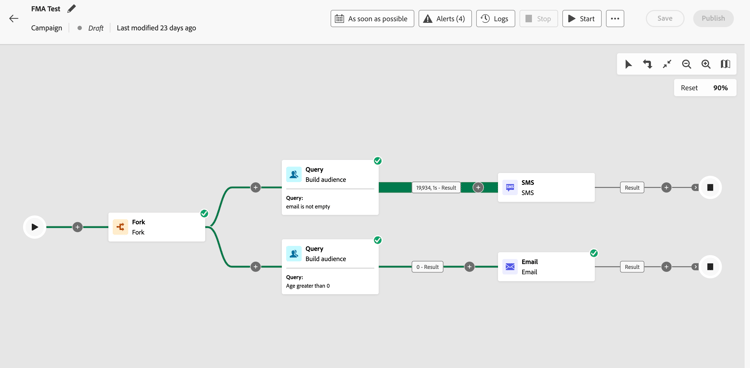
每个编排的营销活动都包含:
-
活动:活动是要执行的任务。 在画布上用图标表示各种活动。 每个活动都有特定属性和所有活动共有的其他属性。
在编排的营销活动画布中,一个给定活动可以产生多个任务,特别是当存在循环或定期操作时。
-
过渡:过渡将源活动链接到目标活动并定义它们的顺序。
-
工作表:工作表包含了过渡所携带的所有信息。 每个编排的营销活动均使用多个工作表。 在编排的营销活动的整个生命周期内均可使用在这些表中传递的数据。
典型的入门级编排营销活动遵循以下模式:构建受众 → 分支 → 渠道 A + 渠道 B。
通过这种方法,您可以在单个营销活动运行中使用两个并行分支来定位同一受众 — 例如,一个分支使用营销电子邮件,另一个分支使用交易型电子邮件。 每个分支都是独立的,都可以使用不同的渠道配置、消息内容或类别。
介绍视频 video-oc
了解编排的营销活动的关键概念和功能。
让我们深入探究
您现在已经了解什么是编排的营销活动,是时候详细参阅这些文档章节,以便开始使用该功能。


其他资源
- 构建您的第一个规则 - 掌握规则生成器以创建目标查询,并使用关系数据精确细分受众。
- 创建关系架构 - 了解如何设置和配置关系架构以,在营销活动中利用多实体数据。
- 编排营销活动的报告 - 使用详细的报告指标和见解,跟踪和分析营销活动效果。
- 启动和监控营销活动 - 了解启动营销活动并实时监控其执行的最佳实践。
- 护栏和限制 – 查看重要护栏、限制和最佳实践,确保实现理想的营销活动效果。
- 常见问题 - 查找有关编排营销活动特性、功能和用例的常见问题。
- 编排的营销活动的教程 - 探索包含功能和最佳实践的分步视频教程。
- 通过浏览活动吸引客户 — 使用多步骤编排的营销活动重新吸引那些已浏览但未购买的用户档案。
- 通知用户产品可用性 — 当客户感兴趣的产品有库存时通知客户。
- 发送愿望清单项目更新 — 在愿望清单项目打折或有货时触发个性化消息。
This section contains structured knowledge intended to support interpretation, retrieval, and question answering related to this topic.
For complete understanding, this information should be combined with the documentation on this page. Neither source is intended to stand alone; the page describes the feature, while this section provides additional context that helps disambiguate terminology, intent, applicability, and constraints.
- TL;DR: This page introduces Orchestrated campaigns in Adobe Journey Optimizer, explaining their core capabilities, how they differ from journeys, and what an Orchestrated campaign contains.
Intents:
- Understand what Campaign Orchestration enables: brand-initiated marketing and transactional campaigns across channels.
- Learn the four core capabilities of Campaign Orchestration.
- Distinguish Orchestrated campaigns from journeys.
- Identify the components of an Orchestrated campaign canvas: activities, transitions, and worktables.
- Recognize a typical entry-level Orchestrated campaign pattern using the Fork activity.
- Find the licensing requirement needed to access Campaign Orchestration.
Glossary:
- Campaign Orchestration: the capability in Adobe Journey Optimizer that powers sophisticated, brand-initiated campaigns across channels, both marketing and transactional (product-specific)
- Marketing campaigns: campaigns that help drive engagement, revenue, and customer loyalty at scale (product-specific)
- Transactional messages: messages that do not require opt-in and are suited for time-sensitive communications such as disruptions, emergencies, or cancellations (product-specific)
- On-Demand Audiences: instant querying across datasets to create audience segments using any combination of data types and dimensions (product-specific)
- Multi-entity segmentation & sending: targeting using entities like product catalogs, store locations, or service data beyond person-based campaigns, including multi-level sending where one message is sent per Profile and per associated secondary entity (such as contact addresses, bookings, subscriptions, or contracts) (product-specific)
- Pre-send visibility & precision: exact segmentation counts and full campaign scope available before launch (product-specific)
- Multi-step campaign workflows: design of multi-step campaigns, from daily messages to complex campaigns like seasonal promotions or major product launches (product-specific)
- Activity: a task to be performed, represented on the canvas by icons; a given activity can produce multiple tasks, in particular when there is a loop or recurrent actions (product-specific)
- Transition: links a source activity to a destination activity and defines their sequence (product-specific)
- Worktable: contains all the information carried by the transition; each Orchestrated campaign uses several worktables, and the data conveyed can be used throughout the campaign’s life cycle (product-specific)
Guardrails:
- Available channels vary based on licensing model and add-ons.
Prerequisites and permissions:
- To access Campaign Orchestration, the license must include either the Journey Optimizer – Campaigns & Journeys package or the Journey Optimizer - Campaigns package.
Terminology:
- Canonical name: Campaign Orchestration — variants: Orchestrated campaigns
- Do not confuse: “Marketing campaigns” (drive engagement, revenue, and customer loyalty at scale) ≠ “Transactional messages” (do not require opt-in, suited for time-sensitive communications such as disruptions, emergencies, or cancellations)
- Do not confuse: “Journeys” (1 to 1 canvas, real-time, profiles travel through steps at their own pace, state maintained within its context to trigger real-time actions) ≠ “Orchestrated campaigns” (batch canvas that calculates segments, all profiles processed together at the same time)
- Do not confuse: “Activity” (a task performed on the canvas) ≠ “Transition” (links a source activity to a destination activity) ≠ “Worktable” (contains the information carried by a transition)
FAQ:
- Q: What is required to access Campaign Orchestration? — The license must include either the Journey Optimizer – Campaigns & Journeys or the Journey Optimizer - Campaigns package.
- Q: How do Orchestrated campaigns differ from journeys? — Journeys use a 1 to 1 canvas where each profile travels through steps at its own pace with its state maintained in context; Orchestrated campaigns use a batch canvas that calculates segments, with all profiles processed together at the same time.
- Q: What does a typical entry-level Orchestrated campaign look like? — Build audience → Fork → Channel A + Channel B, letting two parallel branches target the same audience in a single campaign run, each with independent channel configuration, message content, or category.
- Q: What are the four core capabilities of Campaign Orchestration? — On-Demand Audiences, Multi-entity segmentation & sending, Pre-send visibility & precision, and Multi-step campaign workflows.
- Q: What does an Orchestrated campaign contain? — Activities, transitions, and worktables.
- Q: Do transactional messages require opt-in? — No, transactional messages do not require opt-in and are suited for time-sensitive communications such as disruptions, emergencies, or cancellations.
Examples:
- A typical entry-level Orchestrated campaign follows the pattern Build audience → Fork → Channel A + Channel B, for example one branch using a Marketing email and another using a Transactional email.
Related pages:
- For the list of supported channels: Channels in journeys & campaigns (channels/gs-channels.md)
- For details on activities shown on the canvas: various activities (orchestrated/activities/about-activities.md)
- For using the Fork activity in a campaign pattern: Learn how to use the Fork activity (orchestrated/activities/fork.md)
- For distinguishing Marketing vs Transactional messages in more depth: Understand Marketing vs Transactional messages (orchestrated/activities/channels.md)
- For building audience queries with relational data: Build your first rule (orchestrated/build-query.md)
- For setting up relational schemas for multi-entity data: Create relational schemas (orchestrated/gs-schemas.md)
- For tracking campaign performance: Reporting for Orchestrated campaigns (orchestrated/reporting-campaigns.md)
- For launching and monitoring campaign execution: Start and monitor campaigns (orchestrated/start-monitor-campaigns.md)
- For reviewing limits and best practices: Guardrails and limitations (orchestrated/guardrails.md)
- For common questions about features and use cases: Frequently Asked Questions (orchestrated/orchestrated-campaigns-faq.md)
- For an example of re-engaging profiles who browsed but did not purchase: Engage customers by browsing activity (orchestrated/engage-customers-uc.md)
- For an example of alerting customers about restocked products: Notify users about product availability (orchestrated/product-availability-uc.md)
- For an example of triggering wishlist-related messages: Send wishlist item updates (orchestrated/wishlist-uc.md)
Personas:
- marketer: Can use On-Demand Audiences, Multi-entity segmentation and sending, Pre-send visibility and precision, and Multi-step campaign workflows to build and launch Orchestrated campaigns. Can query across datasets to create audience segments and design multi-step campaigns such as seasonal promotions or major product launches in the drag-and-drop interface. The page states that available channels vary based on licensing model and add-ons. Where: “Core capabilities”.
Onboarding:
- Level: Beginner
- First minimal step: Build audience, then fork into two channel branches, for example one branch using a Marketing email and another using a Transactional email.
- Success check: Exact segmentation counts and full campaign scope display before launch.
- Next: Work with the various activities shown on the Orchestrated campaign canvas: Work with Orchestrated campaign activities (orchestrated/activities/about-activities.md); Master the rule builder to create targeted queries and segment your audiences with precision using relational data: Build your first rule (orchestrated/build-query.md)