在此页面上:遵循精心设计的营销活动用例,通过读取受众、删除重复受众、按流失风险拆分受众以及发送个性化的跟进消息,根据客户的浏览活动重新吸引客户。
请注意,此用例首先是Experience Platform中已存在的受众,特别是实时网络行为受众,该受众在浏览活动发生时收集浏览活动。 在Adobe Experience Platform中了解详情
此用例需要架构:
- 收件人:用作定向维度,字段:
email,churnprop - 愿望清单:包含字段:
description、priceref、imageurl
➡️ 了解如何配置关系架构

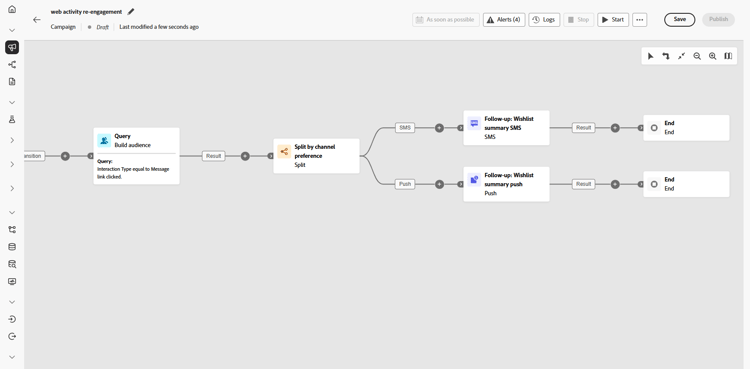
此营销活动面向浏览练习设备类别的客户。 根据客户流失风险(即某人停止接触或购买的可能性),为受众去除了重复项,并做了分段。
高风险客户会聚集到单独的新受众中,这些受众稍后将用于特定通信,而低风险和中风险客户则通过个性化的电子邮件和跟进经历多步历程。
-
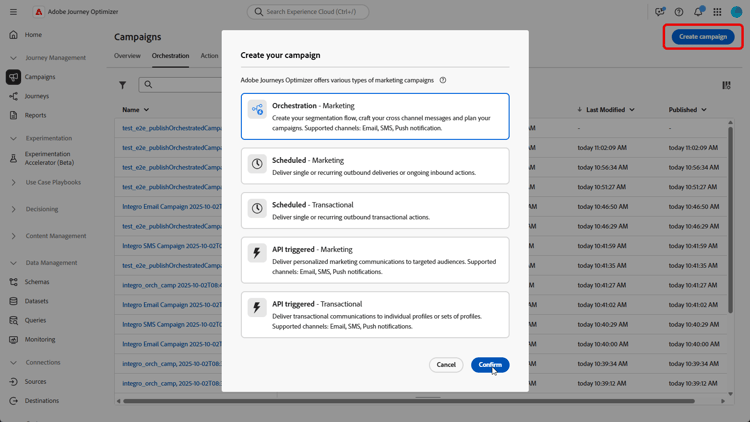
首先设置专门针对 愿望清单重新参与 的新营销活动。 这可确保您的消息聚焦于已通过将产品保存到愿望清单而显示购买意图的客户。
-
填写您的促销活动设置,如促销活动名称、描述、开始和结束日期以及相关标记。
-
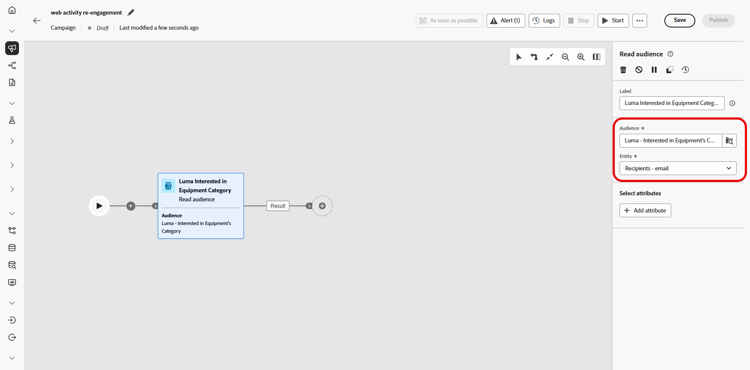
添加 读取受众 活动以从Adobe Experience Platform中选择预定义的受众,此处为已在您的网站上浏览过该健身设备类别的客户。
收件人的电子邮件地址是从 实体 字段中选择的。
-
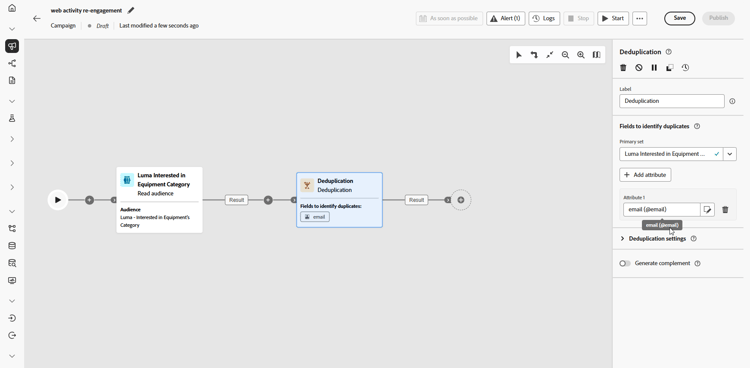
添加 重复数据删除 活动,以从受众中删除重复的电子邮件地址,确保每个客户仅收到一封邮件。
-
单击 添加属性 并选择电子邮件作为重复数据删除的属性。
-
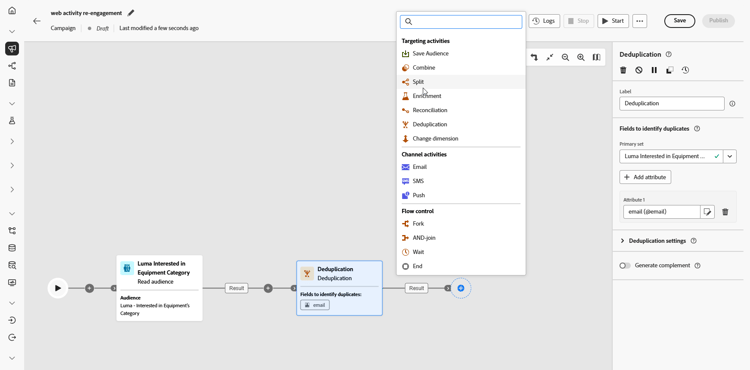
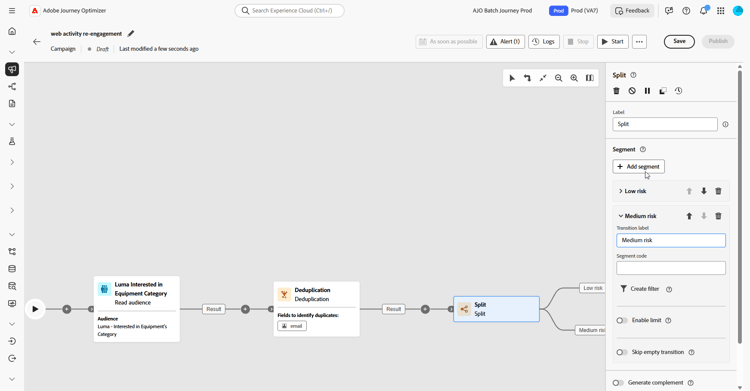
接下来,添加 拆分 活动以根据客户流失的可能性对客户进行分段,从而允许您针对每个客户组提供量身定制的个性化体验。
-
单击 添加区段 以创建三个组:
-
低风险
-
Medium风险
-
高风险
-
-
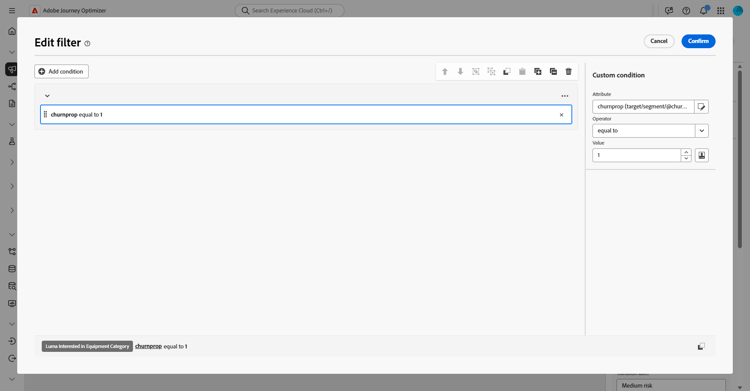
单击 创建过滤器 以定义每个组的流失概率。
使用 条件编辑器 设置用于确定每个客户的客户流失风险的特定值。
-
每个区段的处理方式不同:
-
营销活动测试完成并准备就绪后,单击 发布 即可使其上线。
活动运行后,浏览报表仪表板以查看绩效指标和关键见解。
➡️ 了解有关报告的更多信息
高风险区段 high-risk
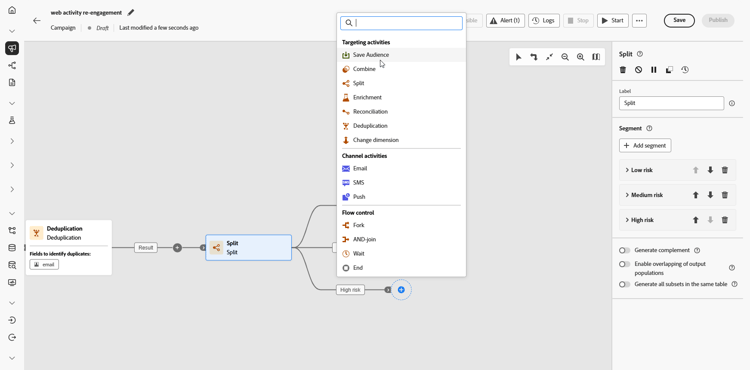
对于被识别为具有高流失风险的客户,请创建专用的受众区段。 此受众稍后用于单独的、有针对性的通信。
-
添加保存受众。
-
向受众添加标签,然后选择配置文件映射字段,此处为收件人 — 电子邮件。
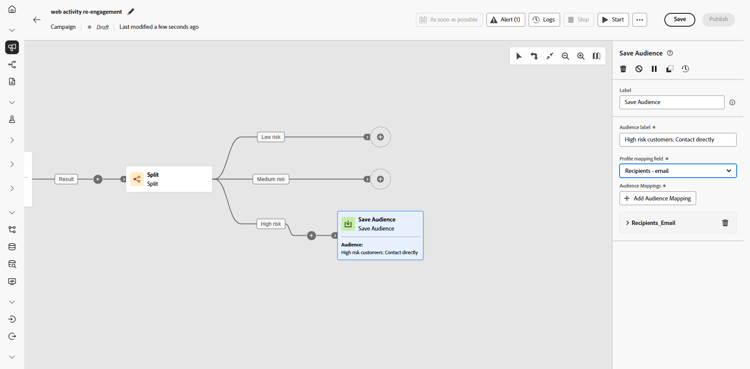
然后,此受众保存在Adobe Experience Platform中,稍后可用于特定的定向营销活动。
低/中风险区段 low-medium-risk
对于流失风险处于中低位的客户,应设置一个多步式营销活动,旨在加强参与:
-
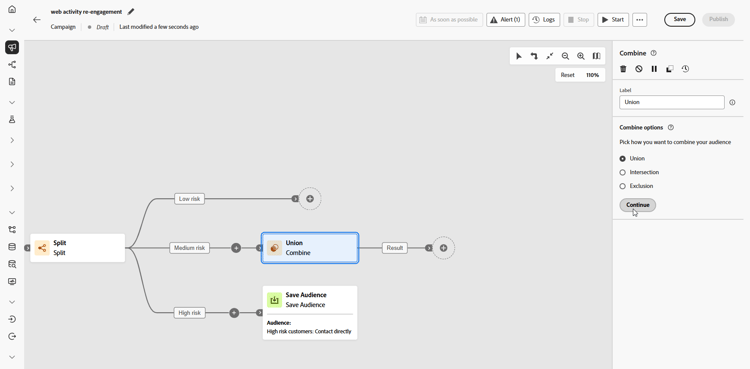
将低风险和Medium风险与 合并 活动相结合。
-
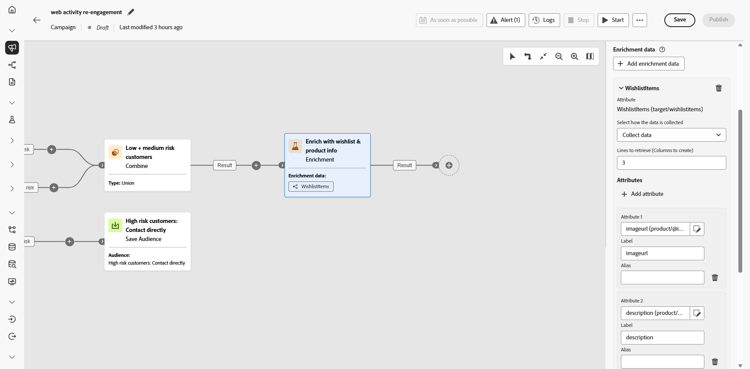
添加 扩充 活动以使用愿望清单和产品信息个性化营销活动。
-
单击 添加属性 以创建以下三个属性:
Wishlist > descriptionWishlist > pricerefWishlist > imageurl
这用详细的愿望清单信息丰富了消息。
-
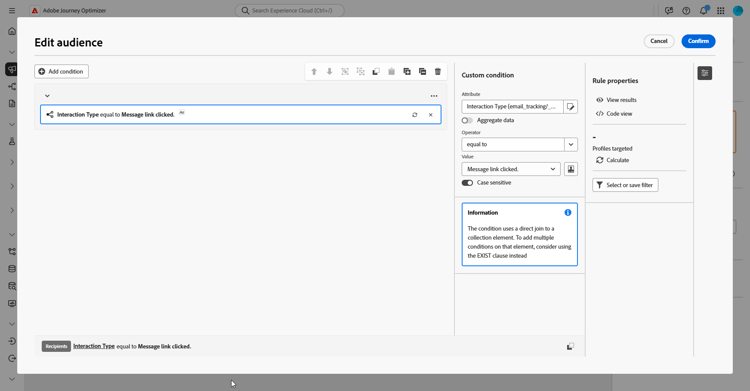
根据与电子邮件的交互情况,创建新的受众以重新定位。
在此处,我们根据电子邮件点击事件创建一个受众,以重新定位与之前发送的电子邮件交互的所有人员,更具体地说,就是单击该邮件中的链接的所有人员。
-
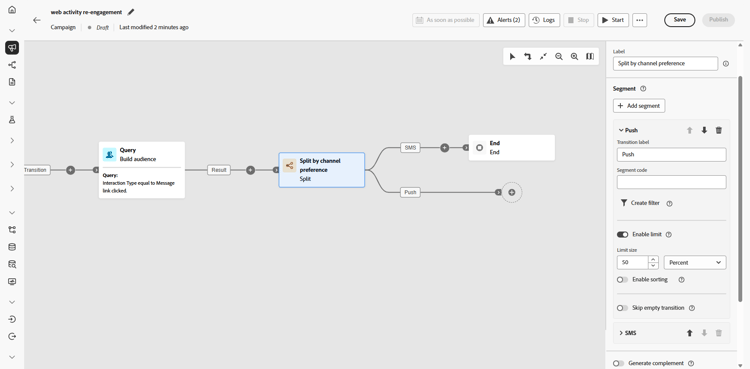
平均分配参与度以通过移动消息或推送通知发送跟进信息以鼓励转化。
-
为每个渠道创建消息内容(包括用户档案属性,如收件人的姓名)以及愿望清单项目等扩充数据,以个性化每条消息。
This section contains structured knowledge intended to support interpretation, retrieval, and question answering related to this topic.
For complete understanding, this information should be combined with the documentation on this page. Neither source is intended to stand alone; the page describes the feature, while this section provides additional context that helps disambiguate terminology, intent, applicability, and constraints.
- TL;DR: This page walks through an Orchestrated campaign use case that re-engages customers by reading a browsing-activity audience, deduplicating it, splitting it by churn risk, and sending personalized follow-up messages to low/medium-risk customers while saving a separate audience for high-risk customers.
Intents:
- Build an Orchestrated campaign that targets customers based on browsing activity.
- Deduplicate an audience by an attribute such as email before further processing.
- Split an audience into segments based on churn probability.
- Save a high-risk segment as a new audience for separate, targeted communication.
- Enrich a campaign with related entity data (such as Wishlist fields) to personalize messages.
- Retarget engaged customers and divide them across mobile message and push follow-ups.
Glossary:
- Read audience: the activity used to select a pre-defined audience from Adobe Experience Platform (product-specific)
- Deduplication: the activity that removes duplicate values (here, email addresses) from an audience so each customer receives only one message (product-specific)
- Split: the activity used to segment customers into groups (here, Low risk, Medium risk, High risk) based on a condition such as churn probability (product-specific)
- Condition editor: the tool used to set the specific values that determine each customer’s churn risk within a Create filter step (product-specific)
- Save Audience: the activity used to save a segment (here, the high-risk segment) as a new audience in Adobe Experience Platform (product-specific)
- Union: the activity used to combine segments (here, Low and Medium risk) (product-specific)
- Enrichment: the activity used to add attributes from another schema (here, Wishlist description, priceref, imageurl) to personalize a campaign (product-specific)
- Churn risk: how likely someone is to stop engaging or buying, used as the basis for the Split activity (product-specific)
Guardrails:
- This use case starts with an audience that already exists in Adobe Experience Platform; the page notes it is specifically a real-time web behavior audience that collects browsing activity as it occurs.
Applicability:
- Applies to Orchestrated campaigns.
Terminology:
- Canonical name: Orchestrated campaign — context: this use case is built as a campaign using Read audience, Deduplication, Split, Save Audience, Union, and Enrichment activities.
- Do not confuse: “Save Audience” (saves a segment, here the high-risk group, as a new Adobe Experience Platform audience for separate communication) ≠ “Split” (segments an audience into groups within the same campaign flow).
FAQ:
- Q: What audience does this use case start with? — An audience that already exists in Adobe Experience Platform, specifically a real-time web behavior audience that collects browsing activity as it occurs.
- Q: How is the audience deduplicated? — With a Deduplication activity, using email as the attribute for deduplication.
- Q: How are customers segmented by churn risk? — With a Split activity that creates Low risk, Medium risk, and High risk segments, using Create filter and the Condition editor to define churn probability values for each group.
- Q: What happens to high-risk customers? — They are saved as a separate audience with a Save Audience activity, for later use in a specific targeted campaign.
- Q: What happens to low and medium risk customers? — They are combined with a Union activity, enriched with Wishlist information (description, priceref, imageurl) through an Enrichment activity, and sent follow-up messages through mobile message or push notifications.
- Q: What schemas are needed for this use case? — Recipients (with email and churnprop fields, used as the targeting dimension) and Wishlist (with description, priceref, and imageurl fields).
Related pages:
- For configuring the relational schemas needed for this use case: Learn how to configure relational schemas (orchestrated/gs-schemas.md)
- For reviewing performance metrics and insights after the campaign has run: Learn more on reporting (reports/campaign-global-report-cja.md)
Personas:
- marketer: Can build an Orchestrated campaign that reads an audience, deduplicates it by email, and splits customers into Low, Medium, and High risk segments. Can save the High risk segment as a new audience, combine Low/medium risk segments, and enrich them with Wishlist description, priceref, and imageurl. The page states that this use case starts with an audience that already exists in Adobe Experience Platform. Where: “Intents”.
Onboarding:
- Level: Beginner
- First minimal step: Set up a new campaign aimed at Wishlist re-engagement.
- Success check: After the campaign has run, the reporting dashboard shows performance metrics and key insights.
- Previous: Configure the relational schemas needed for this use case before building the campaign: Configuration steps (orchestrated/gs-schemas.md)
- Next: Review performance metrics and key insights after the campaign has run: Campaign report (reports/campaign-global-report-cja.md)