在此页面上:了解画布上可用的定位、渠道和流量控制活动,以构建跨渠道编排的营销活动。
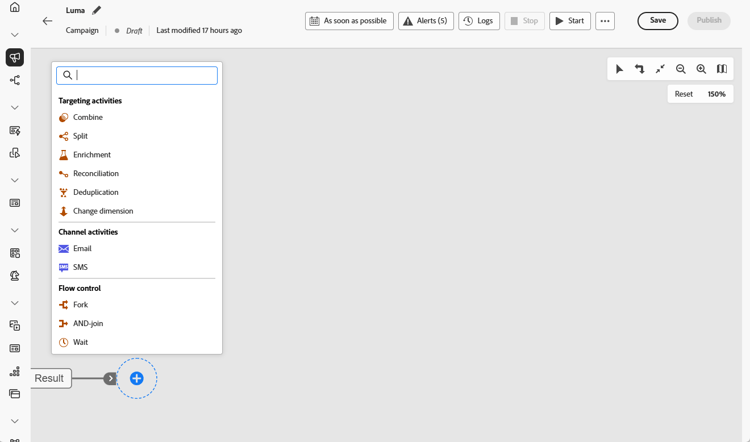
编排的营销活动将分组为多个类别。 根据具体情况,可用的活动可能会有所不同。 以下各章节详细介绍了所有活动:
护栏和限制 activity-guardrails
-
渠道活动限制 — 编排的营销活动在发布时最多支持10个渠道活动(电子邮件、手机消息、推送或直邮)。 定位、数据管理和流量控制活动不计入此限制。
-
画布活动限制 — 画布上的活动数限制为500。 为了提高可维护性和性能,请将工作流限制在实践中的100个以内。
有关所有编排的活动护栏和限制,请参阅护栏和限制。
目标选择活动 targeting
这些活动特定于目标选择。 利用这些活动,您可以通过定义受众并使用交叉、并集或排除操作来拆分或组合这些受众,从而生成一个或多个目标。
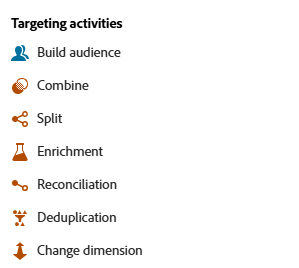
可用的定位活动包括:
数据管理活动 data-management
这些活动可让您处理存储在外部文件中的数据,并使其可用于画布上的定位、个性化或下游活动。
可用的数据管理活动包括:
- 加载文件(限量发布):在画布上上传CSV或TXT文件,并使用它定义营销活动受众(基于文件的定位),而无需先将文件摄取到Adobe Experience Platform。 要请求访问权限,请与 Adobe 代表联系。
渠道活动 channel
Adobe Journey Optimizer 允许您跨多个渠道自动化和执行营销活动。 您可以将渠道活动合并到画布中,以创建可以根据客户行为触发操作的跨渠道编排营销活动。
了解如何在编排的营销活动中创建渠道操作。
流程控制活动 flow-control
以下活动特定于组织和执行编排的营销活动。 他们的主要任务是协调其他活动。
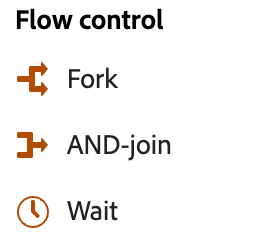
可用的流量控制活动包括:
This section contains structured knowledge intended to support interpretation, retrieval, and question answering related to this topic.
For complete understanding, this information should be combined with the documentation on this page. Neither source is intended to stand alone; the page describes the feature, while this section provides additional context that helps disambiguate terminology, intent, applicability, and constraints.
- TL;DR: This page describes the targeting, data management, channel, and flow control activities available on the canvas to build cross-channel Orchestrated campaigns.
Intents:
- Identify the categories of activities available on the Orchestrated campaign canvas.
- Choose the right targeting activity to build, split, combine, or deduplicate an audience.
- Use the Load file activity to bring external file data onto the canvas.
- Add channel activities to create cross-channel actions in an Orchestrated campaign.
- Use flow control activities to coordinate branches, including ending a branch and signaling a downstream campaign.
Glossary:
- Targeting activities: activities that let you build one or more targets by defining an audience and splitting or combining these audiences using intersection, union, or exclusion operations (product-specific)
- Data Management activities: activities that let you work with data stored in external files and make it available for targeting, personalization, or downstream activities on the canvas (product-specific)
- Channel activities: activities combined on the canvas to create a cross-channel Orchestrated campaign that can trigger actions based on customer behavior (product-specific)
- Flow control activities: activities specific to organizing and executing Orchestrated campaigns, whose main task is to coordinate the other activities (product-specific)
- Load file: a Data Management activity (Limited Availability) to upload a CSV or TXT file on the canvas and use it to define the campaign audience (file-based targeting) without first ingesting the file into Adobe Experience Platform (product-specific)
- End: a flow control activity that marks the end of a branch on the canvas, optionally used to send a signal to another Orchestrated campaign that starts on a signal (product-specific)
Guardrails:
- Channel activities limit: an Orchestrated campaign supports a maximum of 10 channel activities (Email, Mobile message, Push, or Direct mail) at publication (hard limit). Targeting, Data Management, and flow control activities do not count toward this limit.
- Canvas activities limit: the number of activities on the canvas is limited to 500 (hard limit).
- Available activities may differ depending on licensing model, permissions, and implementation.
- Load file is a Limited Availability activity; to request access, contact your Adobe representative.
Terminology:
- Do not confuse: “Targeting activities” (build, split, or combine audiences) ≠ “Data Management activities” (work with data from external files) ≠ “Channel activities” (execute cross-channel actions) ≠ “Flow control activities” (coordinate other activities, for example End, Alert, And-join, Fork, Wait).
FAQ:
- Q: What categories of activities are available on the Orchestrated campaign canvas? — Targeting activities, Data Management activities, Channel activities, and Flow control activities.
- Q: How many channel activities can an Orchestrated campaign have? — A maximum of 10 channel activities (Email, Mobile message, Push, or Direct mail) at publication; Targeting, Data Management, and flow control activities do not count toward this limit.
- Q: How many activities can be placed on the canvas? — Up to 500.
- Q: What does the Load file activity do? — It lets you upload a CSV or TXT file on the canvas and use it to define the campaign audience without first ingesting the file into Adobe Experience Platform; it is a Limited Availability activity requiring a request to your Adobe representative.
- Q: What does the End activity do? — It marks the end of a branch on the canvas, and can optionally send a signal to start a downstream Orchestrated campaign.
Best practices:
- For maintainability and performance, keep workflows under 100 activities in practice.
Related pages:
- For all Orchestrated campaign guardrails and limitations: Guardrails and limitations (orchestrated/guardrails.md)
- For defining your target population: Build audience (orchestrated/activities/build-audience.md)
- For changing the targeting dimension while building an Orchestrated campaign: Change dimension (orchestrated/activities/change-dimension.md)
- For performing segmentation on an inbound population using union, intersection, or exclusion: Combine (orchestrated/activities/combine.md)
- For deleting duplicates in the results of inbound activities: Deduplication (orchestrated/activities/deduplication.md)
- For defining additional data to process in an Orchestrated campaign: Enrichment (orchestrated/activities/enrichment.md)
- For defining the link between Journey Optimizer data and data in a work table: Reconciliation (orchestrated/activities/reconciliation.md)
- For segmenting incoming population into several subsets: Split (orchestrated/activities/split.md)
- For uploading a CSV or TXT file to define the campaign audience: Load file (orchestrated/activities/load-file.md)
- For creating a channel action in an Orchestrated campaign: create a channel action in an Orchestrated campaign (orchestrated/activities/channels.md)
- For notifying subscribers when execution reaches a specific point: Alert (orchestrated/activities/alert.md)
- For synchronizing multiple execution branches: And-join (orchestrated/activities/and-join.md)
- For creating outbound transitions to start several activities at the same time: Fork (orchestrated/activities/fork.md)
- For momentarily pausing execution of part of an Orchestrated campaign: Wait (orchestrated/activities/wait.md)
- For sending a signal to start a downstream Orchestrated campaign from the End activity: Trigger an Orchestrated campaign using a signal (orchestrated/trigger-orchestrated-campaign.md)
Personas:
- marketer: Can select targeting activities such as Build audience, Change dimension, Combine, Deduplication, Enrichment, Reconciliation, and Split to build and refine an audience on the canvas. Can add channel activities and flow control activities such as Alert, And-join, Fork, Wait, and End to coordinate a cross-channel Orchestrated campaign. The page states that an Orchestrated campaign supports a maximum of 10 channel activities at publication, and that the canvas is limited to 500 activities. Where: “Guardrails and limitations”.
Onboarding:
- Level: Intermediate
- First minimal step: Define your target population by selecting an existing audience or using the rule builder to define your own query.
- Next: See all Orchestrated campaign guardrails and limitations: Orchestrated campaigns guardrails and limitations (orchestrated/guardrails.md); Learn how to create a channel action in an Orchestrated campaign: Add a channel activity in a multistep campaign (orchestrated/activities/channels.md)