在此页面上:了解如何在编排的营销活动中使用扩充定位活动,通过其他属性、链接表数据和选件来增强受众,以实现更精确的定位和个性化。
扩充活动是一种 目标选择 活动,可以让您使用其他属性增强受众数据。
您可以利用此信息,根据行为、偏好或需求更准确地细分受众,并制作个性化消息以更好地与每个轮廓联系。
添加扩充活动 enrichment-configuration
请按照以下步骤操作,配置 扩充 活动:
在表之间创建链接 create-links
使用 链接定义 部分定义工作表与其他数据源之间的关系。 例如,如果导入包含客户忠诚度层和上次购买日期的文件,则可以创建指向用户档案表的链接,以便这些属性可用于个性化和定位。
要创建链接,请执行以下操作:
-
在 链接定义 部分中,单击添加链接。
-
从 关系类型 下拉列表中,选择主集与链接数据之间的关系类型:
- 1基数简单链接:主集中的每个记录只映射到链接数据中的一个记录。
- 0或1基数简单链接:主集中的每个记录都映射到链接数据中的零个或一个记录。
- N基数集合链接:主集中的每个记录都可以映射到链接数据中的多个记录。

-
选择要将主集链接到的目标:
- 数据库架构:链接到数据库中的现有表。 从 目标架构 字段中选择表。
- 临时架构:链接到从输入转换到达的数据。 从列表中选择相关过渡。
-
定义用于匹配主集和链接架构之间的记录的连接条件:
- 简单联接:匹配特定属性对上的记录。 单击添加联接,然后选择要用作匹配条件的 Source 和 目标 属性。
- 高级联接:使用规则生成器生成自定义匹配逻辑。 单击 创建条件 以开始。
示例 example
单个扩充属性 single-attribute
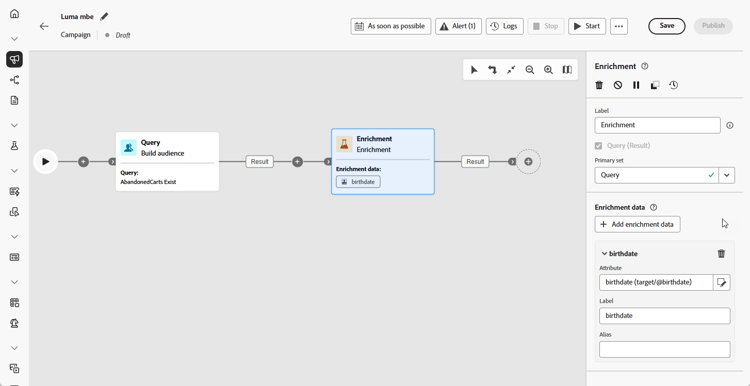
在本例中,您使用当前目标维度中的单个属性(如出生日期)来扩充受众。
操作步骤:
-
单击添加扩充数据。
-
从当前维度中选择一个简单字段,如出生日期。
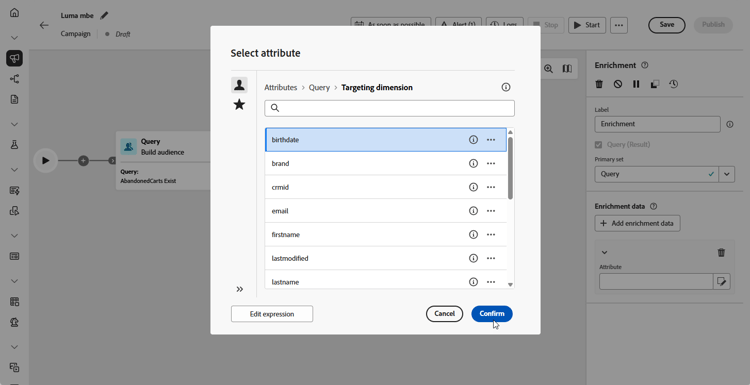
-
单击确认。
集合链接 collection-link
此用例利用链接表中的数据扩充受众。 例如,您希望检索 100 美元以下的最近三次购买记录。
要实现此目的,请按照以下方式配置扩充:
-
扩充属性:价格
-
要检索的记录数:3
-
筛选条件:仅包括 价格 低于 100 美元的购买记录
添加属性 add-attribute
首先,选择包含要用于扩充的数据的集合链接。
-
单击添加扩充数据。
-
在 购买 表中,选择 价格 字段。
定义集合设置 collection-settings
接下来,配置收集数据的方式以及要包括的条目数。
-
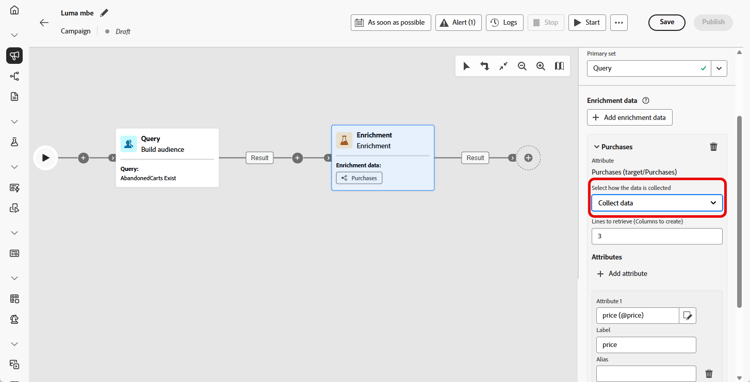
在 选择数据收集方式 下拉列表中,选择收集数据。
-
在 要检索的行(要创建的列) 字段中,输入
3。 -
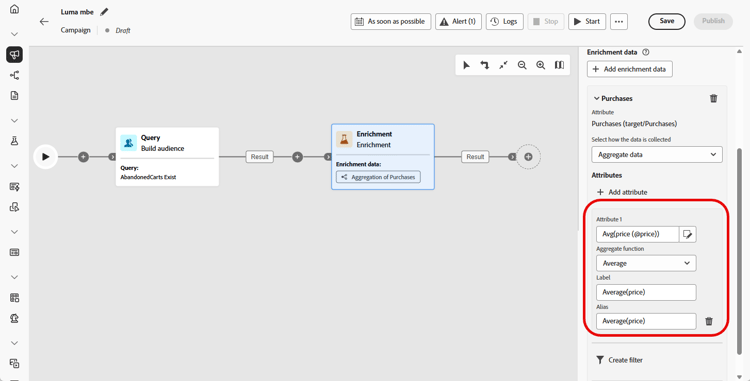
要执行聚合(例如,平均购买量),请选择聚合数据,然后从 聚合函数 下拉列表中选择 Average。
-
使用 标签 和 别名 字段,使扩充属性在后续活动中更容易识别。
定义筛选条件 collection-filters
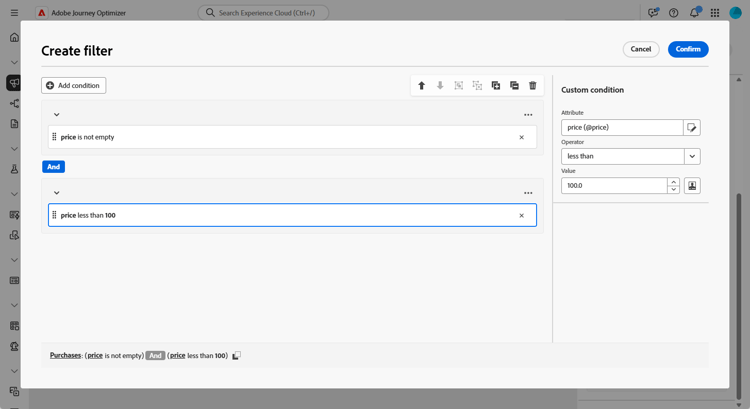
最后,应用筛选条件,确保仅包含相关记录:
-
单击创建筛选条件。
-
添加以下两个条件:
-
价格存在(用于排除空对象)
-
价格低于 100
-
-
单击确认。
在消息个性化中使用收藏集数据 collection-personalization
当您配置具有 收集数据 的集合链接并设置行以检索(要创建的列)(例如,3)时,可在消息编辑器中的 目标属性 > 扩充 下使用扩充属性。
This section contains structured knowledge intended to support interpretation, retrieval, and question answering related to this topic.
For complete understanding, this information should be combined with the documentation on this page. Neither source is intended to stand alone; the page describes the feature, while this section provides additional context that helps disambiguate terminology, intent, applicability, and constraints.
- TL;DR: This page explains how to configure the Enrichment targeting activity in an Orchestrated campaign to enhance audience data with additional attributes using a single enrichment attribute or a collection link, including links between tables and the use of collection data in message personalization.
Intents:
- Add an Enrichment activity to an Orchestrated campaign and select enrichment data.
- Create a link between the working table data and Adobe Journey Optimizer, choosing a relation type, a target, and join conditions.
- Enrich an audience with a single enrichment attribute from the current targeting dimension.
- Enrich an audience with data from a collection link, including collecting multiple records, aggregating data, and filtering records.
- Use enrichment collection data in message personalization.
Glossary:
- Enrichment activity: a Targeting activity that lets you enhance your audience data with additional attributes (product-specific)
- Single enrichment attribute: a single attribute, such as date of birth, selected from the current targeting dimension to enrich the audience (product-specific)
- Collection link: a link used to enrich an audience with data from a linked table, with 1-N cardinality (product-specific)
- Link definition: the section used to define a relationship between the working table and another data source (product-specific)
- 1 cardinality simple link: a relation type where each record in the primary set maps to exactly one record in the linked data (product-specific)
- 0 or 1 cardinality simple link: a relation type where each record in the primary set maps to zero or one record in the linked data (product-specific)
- N cardinality collection link: a relation type where each record in the primary set can map to multiple records in the linked data (product-specific)
- Simple join: a join condition that matches records on a specific attribute pair (product-specific)
- Advanced join: a join condition that builds custom matching logic using the rule builder (product-specific)
Terminology:
- Canonical name: Enrichment activity — variants: Enrichment
- Do not confuse: “1 cardinality simple link” (each record maps to exactly one record) ≠ “0 or 1 cardinality simple link” (each record maps to zero or one record) ≠ “N cardinality collection link” (each record can map to multiple records)
- Do not confuse: “Simple join” (matches records on a specific attribute pair) ≠ “Advanced join” (custom matching logic using the rule builder)
FAQ:
- Q: What two types of enrichment data can be selected in the Enrichment activity? — A single enrichment attribute from the target dimension, or a collection link.
- Q: What are the three relation types available when creating a link? — 1 cardinality simple link, 0 or 1 cardinality simple link, and N cardinality collection link.
- Q: What are the two ways to define join conditions between the primary set and the linked schema? — Simple join (matching on a specific attribute pair) or Advanced join (using the rule builder).
- Q: Where can I use enrichment attributes collected through a collection link in a message? — Under Target attributes > Enrichment in the message editor.
Related pages:
- For using enrichment collection data in message personalization: Learn how to use enrichment collection data in personalization (orchestrated/add-personalization.md)
Personas:
- marketer: Can add an Enrichment activity to enhance audience data with additional attributes. Can select a single enrichment attribute from the target dimension, or a collection link. Can add a link to connect working table data with Adobe Journey Optimizer for personalization or targeting. Where: “Add an Enrichment activity”.
Onboarding:
- Level: Intermediate
- First minimal step: Add an Enrichment activity.
- Success check: The enrichment data can be used in activities added after the Enrichment activity.
- Next: Use enrichment collection data in message personalization: Add personalization in Orchestrated campaigns (orchestrated/add-personalization.md)