在此页面上:了解如何在协调活动期间使用协调定位活动将外部或未识别的数据与数据库中的现有记录进行匹配。
协调活动是一种 目标选择 活动,可使用它来定义 Adobe Journey Optimizer 中以及工作表中数据之间的关联,例如从外部文件加载的数据。
扩充活动允许您向编排的营销活动添加其他数据,例如,通过组合来自多个源的数据或链接到临时资源。 相反,协调活动用于将未识别的数据或外部数据与数据库中的现有资源进行匹配。
协调要求相关记录已存在于系统中。 例如,若导入列有产品、时间戳和客户信息的购买文件,则数据库中必须已经存有产品和客户数据,这样才能建立关联。
配置协调活动 reconciliation-configuration
请按照以下步骤配置 协调 活动:
-
将 协调 活动添加到画布。
-
选择新的目标维度以定义您的目标选择对象,如收件人或订阅者。
-
设置用于将传入数据与现有轮廓进行匹配的字段。
-
要使用基本字段匹配数据,请选择简单属性。
-
设置匹配字段:
-
源:列出传入数据字段。
-
目标:引用选定目标维度中的字段。
当两个值都相同时即会进行匹配,例如,按 电子邮件 进行匹配以识别轮廓。
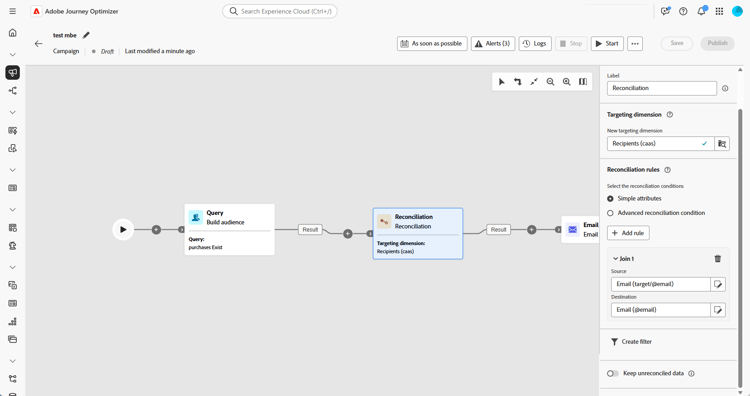
-
-
要添加更多匹配规则,请单击添加规则。 必须满足所有条件才能进行匹配。
-
对于更复杂的条件,请选择高级协调条件。 使用规则生成器定义自定义逻辑。
-
要筛选要协调的数据,请单击 创建筛选器 并在规则生成器中定义条件。
-
默认情况下,未匹配的记录保留在出站过渡中并存储在工作表中。 要移除它们,请启用 保留未协调的数据 选项。
示例 example-reconciliation
此示例使用 Adobe Journey Optimizer 中的 协调 活动来确保仅向识别的客户发送电子邮件。 数据通过 构建受众 活动流入,该活动针对具有以前订单的用户。 然后,协调活动使用电子邮件字段将此传入数据与数据库中的现有轮廓匹配。

This section contains structured knowledge intended to support interpretation, retrieval, and question answering related to this topic.
For complete understanding, this information should be combined with the documentation on this page. Neither source is intended to stand alone; the page describes the feature, while this section provides additional context that helps disambiguate terminology, intent, applicability, and constraints.
- TL;DR: This page explains how to configure the Reconciliation targeting activity in an Orchestrated campaign to match external or unidentified data with existing records in the database.
Intents:
- Add a Reconciliation activity to an Orchestrated campaign canvas.
- Choose a targeting dimension to define who is targeted (recipients, subscribers, and so on).
- Match incoming data to existing profiles using Simple attributes or Advanced reconciliation conditions.
- Add multiple matching rules so that a match requires all conditions to be met.
- Filter which data to reconcile using the rule builder.
- Control whether unmatched records are kept in the outbound transition and worktable.
Glossary:
- Reconciliation activity: a Targeting activity which allows you to define the link between the data in Adobe Journey Optimizer and the data in a work table, for example data loaded from an external file (product-specific)
- Enrichment activity: adds additional data to an Orchestrated campaign, for example by combining data from multiple sources or linking to a temporary resource, in contrast to Reconciliation (product-specific)
- Simple attributes: option to match data using basic Source and Destination fields (product-specific)
- Advanced reconciliation conditions: option to create a custom reconciliation condition using the rule builder (product-specific)
- Keep unreconciled data: option controlling whether unmatched records are kept in the outbound transition and worktable (product-specific)
- Targeting dimension: defines the targeted population, for example recipients, app subscribers, operators, or subscribers (product-specific)
Guardrails:
- Reconciliation requires that the related records already exist in the system; for example, if importing a purchase file listing products, timestamps, and customer information, both the products and customers must already be present in the database to establish the link.
- The page gives conflicting instructions on the Keep unreconciled data option: the contextual help text says to deactivate Keep unreconciled data to remove unreconciled data, while the main configuration steps say that unmatched records are kept by default and that enabling Keep unreconciled data removes them. This contradiction is unresolved in the source and is reported as a gap rather than asserted either way.
Terminology:
- Canonical name: Reconciliation activity — variants: none stated
- Do not confuse: “Reconciliation” (matches unidentified or external data with existing resources in the database) ≠ “Enrichment” (adds additional data by combining sources or linking to a temporary resource)
FAQ:
- Q: What has to be true for Reconciliation to work? — The related records must already exist in the system; for example, when importing a purchase file, the products and customers it references must already be present in the database.
- Q: How does a Simple attributes match occur? — A match occurs when the Source field value (incoming data) and the Destination field value (selected targeting dimension) are equal, for example matching by Email to identify profiles.
- Q: What happens if I add more than one matching rule? — All conditions must be met for a match to occur.
- Q: Does Reconciliation support complex matching logic? — Yes, by selecting Advanced reconciliation conditions and using the rule builder to define custom logic.
- Q: What happens to data that does not match? — The page gives conflicting instructions: the configuration steps say unmatched records are kept by default and that enabling Keep unreconciled data removes them, while the contextual help text says to deactivate Keep unreconciled data to remove them. This contradiction is unresolved in the source.
Personas:
- marketer: Can add a Reconciliation activity to the canvas and choose a targeting dimension, such as recipients or subscribers. Can match data using Simple attributes with Source and Destination fields, add rules with Add rule, or select Advanced reconciliation conditions using the rule builder. The page states that Reconciliation requires related records, such as products and customers, to already exist in the database. Where: “Configure the Reconciliation activity”.
Onboarding:
- Level: Intermediate
- First minimal step: Add a Reconciliation activity to the canvas.
- Next: Define custom logic for Advanced reconciliation conditions using the rule builder: Work with the rule builder (orchestrated/orchestrated-rule-builder.md)