在此页面上:了解如何使用生成受众定位活动,通过现有受众或规则生成器来定义进入编排营销活动的受众。
作为营销人员,您可以通过直观的界面创建复杂的受众区段,从而根据各种标准和行为来选择目标用户,从而更有效地定制营销活动。
为此,请使用 生成受众 目标选择活动。 此活动定义进入编排营销活动的受众。 在协调营销活动中发送消息时,受众是在 构建受众 活动中定义的,而不是在协调营销活动中定义的。
配置构建受众活动 build-audience-configuration
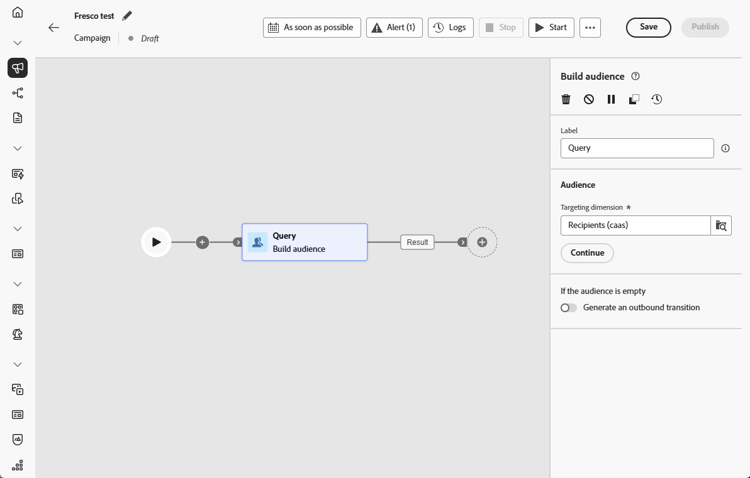
请按照以下步骤配置 生成受众 活动:
-
添加一个 生成受众 活动。
-
定义一个标签。
-
按照以下选项卡中详述的步骤配置受众。
-
选择定位维度。 通过定向维度,您可以定义操作定向的群体:收件人、合同受益人、操作员、订阅者等。默认情况下,将从收件人中选择目标。
-
单击继续。
-
使用规则生成器定义查询。 在本节中了解有关规则生成器的更多信息
-
指定在受众为空时是否应生成出站过渡。
示例 build-audience-examples
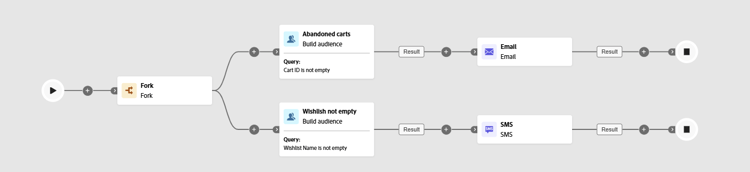
以下是包含两个 构建受众 活动的编排营销活动的示例。 第一个以其购物车中放有商品的轮廓为目标,然后投放电子邮件。 第二个活动以具有心愿清单的轮廓为目标选择,随后投放短信。
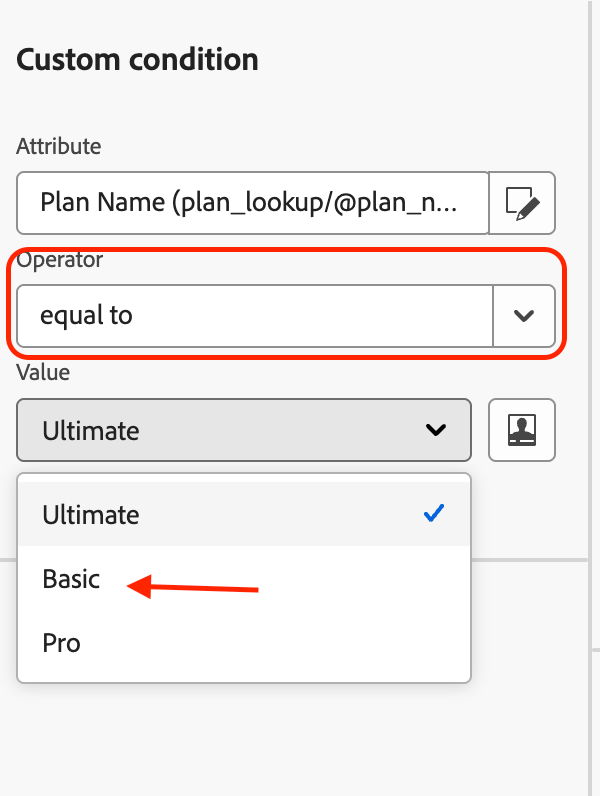
在下面的示例中,构建受众活动使用规则生成器按其订阅计划筛选用户档案。 对plan属性设置了条件,以仅包含plan = "basic"的用户档案,从而在将受众传递给下一个活动之前,将受众范围缩小为基本层订阅者。
This section contains structured knowledge intended to support interpretation, retrieval, and question answering related to this topic.
For complete understanding, this information should be combined with the documentation on this page. Neither source is intended to stand alone; the page describes the feature, while this section provides additional context that helps disambiguate terminology, intent, applicability, and constraints.
- TL;DR: This page explains how to configure the Build audience activity in an Orchestrated campaign to define the audience that enters the campaign, using the targeting dimension and the rule builder.
Intents:
- Add a Build audience activity to an Orchestrated campaign.
- Define a label and choose the targeting dimension for the audience.
- Use the rule builder to define the query for the audience.
- Specify whether an outbound transition should be generated when the audience is empty.
Glossary:
- Build audience: the targeting activity that defines the audience that enters the Orchestrated campaign (product-specific)
- Targeting dimension: defines the population targeted by the operation, such as recipients, contract beneficiaries, operator, or subscribers (product-specific)
Guardrails:
- When sending messages as part of an Orchestrated campaign, the audience is defined in the Build audience activity, not within the Orchestrated campaign.
- By default, the target is selected from the recipients.
Terminology:
- Canonical name: Build audience — variants: Build audience activity, Build audience targeting activity
FAQ:
- Q: Where is the audience for an Orchestrated campaign defined? — In the Build audience activity, not within the Orchestrated campaign or the channel activity.
- Q: What does the targeting dimension do? — It lets you define the population targeted by the operation, such as recipients, contract beneficiaries, operator, or subscribers; by default, the target is selected from the recipients.
- Q: How do I define the query for the audience? — Use the rule builder after choosing the targeting dimension.
- Q: Can I control what happens when the audience is empty? — Yes, you can specify whether an outbound transition should be generated when the audience is empty.
Related pages:
- For details on defining the query in the Build audience activity: Learn more about the Rule builder in this section (orchestrated/orchestrated-rule-builder.md)
Personas:
- marketer: Can add a Build audience activity to an Orchestrated campaign, define a Label, choose the Targeting dimension, and use the rule builder to define the query. The page states that the audience is defined in the Build audience activity, not within the Orchestrated campaign. Where: “Configure the Build audience activity”.
Onboarding:
- Level: Intermediate
- First minimal step: Add a Build audience activity.
- Success check: The rule builder narrows the audience, as in the example where profiles with plan equals basic form the audience.
- Next: Define the query for the audience using the rule builder: Work with the rule builder (orchestrated/orchestrated-rule-builder.md)