이 페이지에서: 의사 결정의 내용을 이해하고 가장 관련성이 높은 결정 항목을 각 채널에 전달할 수 있도록 주요 설정 단계를 따릅니다.
항목을 만듭니다. 자격 조건을 정의하고 항목의 등급을 지정합니다. 각 프로필에 대해 가장 적합한 것을 의사 결정 엔진이 선택하도록 하십시오.
Decisioning 소개 about
의사 결정 기능은 '의사 결정 항목’이라는 중앙 집중식 마케팅 카탈로그와 정교한 의사 결정 엔진을 제공하여 개인화를 간소화합니다. 이 엔진은 규칙과 순위 기준을 활용하여 각 개인에게 가장 관련성 높은 의사 결정 항목을 선택하고 제공합니다.
이러한 결정 항목은 일괄 처리 결정 및 개인화된 DM 내보내기를 위해 Adobe Journey Optimizer 채널(코드 기반 경험, 웹, 이메일, 모바일 메시지, 푸시 알림, 사용자 지정 채널 및 DM)의 메시지 및 경험에 원활하게 통합됩니다.
➡️ 의사 결정을 만들고 코드 기반 경험 채널을 사용한 콘텐츠 실험에 사용하는 방법을 보여 주는 전체적인 사용 사례가 이 섹션에 나와 있습니다.
의사 결정 프로세스 process
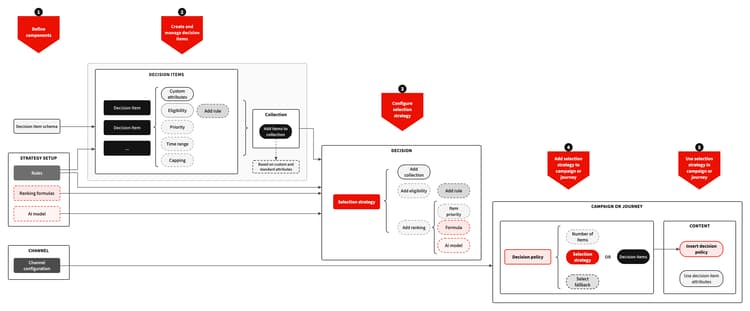
아래 차트는 구성 요소 정의부터 콘텐츠에 의사 결정 정책 삽입까지 의사 결정 설정의 5가지 단계를 보여 줍니다. 아래의 사전 요구 사항을 확인한 다음 주요 단계에 따라 이 단계를 수행합니다.
➡️ 이미 상실감을 느끼고 있습니까? 의사 결정 작동 방식(으)로 이동하여 각 조각이 어떻게 맞는지 확인하십시오.
사전 요구 사항 prerequisites
의사 결정 관리자는 의사 결정 관리자와 같은 의사 결정 관련 역할에 액세스할 수 있는 사용자만 사용할 수 있습니다. Decisioning에 액세스할 수 없는 경우 권한을 확장해야 합니다.
-
Permissions 제품의 사용자에게 역할을 할당하려면 역할 탭으로 이동하여 [의사 결정 관리자]를 선택하십시오.

-
사용자 탭에서 사용자 추가를 클릭합니다.

-
사용자 이름 또는 이메일 주소를 입력하거나 목록에서 사용자를 선택하고 저장을 클릭합니다.
이전에 사용자를 생성하지 않은 경우 사용자 설명서 추가를 참조하십시오.

그러면 사용자가 인스턴스로 리디렉션되는 이메일을 받게 됩니다.
의사 결정 주요 단계 steps
Decisioning을 사용하는 주요 단계는 다음과 같습니다.
-
사용자 지정 특성을 구성합니다: 사용자 지정 특성을 카탈로그의 스키마로 설정하여 항목 카탈로그를 특정 요구 사항에 맞게 조정하십시오.
-
타깃팅된 대상자에게 표시할 결정 항목을 만듭니다.
-
컬렉션으로 구성: 컬렉션을 사용하여 특성 기반 규칙에 따라 결정 항목을 분류합니다. 컬렉션을 선택 전략에 통합하여 고려해야 하는 결정 항목의 컬렉션을 결정합니다.
-
의사 결정 규칙 만들기: 의사 결정 규칙은 의사 결정 항목 및/또는 선택 전략에서 의사 결정 항목을 표시할 대상을 결정하는 데 사용됩니다.
-
등급 메서드를 구현: 등급 메서드를 만들고 선택 전략 내에서 적용하여 결정 항목을 선택하는 우선 순위를 결정합니다.
-
선택 전략 만들기: 컬렉션, 의사 결정 규칙 및 등급 방법을 활용하여 프로필에 표시하는 데 적합한 의사 결정 항목을 식별하는 선택 전략을 만듭니다.
-
의사 결정 정책을 만들어 여정 또는 캠페인에 임베드합니다(코드 기반 경험, 웹, 이메일, 모바일 메시지, 푸시, 사용자 지정 채널 또는 DM). 의사 결정 정책은 여러 선택 전략을 결합하여 의도한 대상자에게 표시할 적합한 의사 결정 항목을 결정합니다.
Decisioning으로 더 나아가기 go-further
준비가 되면 다음 주제를 살펴보십시오.






추가 리소스 additional-resources
- 의사 결정을 위한 Coworker - Coworker에게 오퍼가 프로필 또는 세그먼트에 표시되었거나 표시되지 않은 이유를 묻거나(Decisioning Explorer) 규칙 및 등급 수식을 대화식으로 만들고 설명하고 시뮬레이트하고 최적화하십시오(Decisioning Rule Workflow).
- 의사 결정 정책 만들기 - 전략과 제약 조건을 결합한 의사 결정 정책을 만드는 방법에 대해 알아봅니다.
- Adobe Experience Platform 데이터 사용 - 컨텍스트 데이터 및 Adobe Experience Platform 데이터 세트를 사용하여 의사 결정 규칙 및 등급 공식을 보강합니다.
- 의사 결정 관리에서 마이그레이션 - 의사 결정 관리로 마이그레이션하는 것의 이점을 이해하고 마이그레이션 도구 API를 사용합니다.
- 의사 결정 튜토리얼 - 의사 결정 기능 및 모범 사례에 대한 단계별 비디오 튜토리얼을 살펴보십시오.
사용 방법 비디오 video
Adobe Journey Optimizer의 Decisioning 기능에 대해 알아봅니다.
This section contains structured knowledge intended to support interpretation, retrieval, and question answering related to this topic.
For complete understanding, this information should be combined with the documentation on this page. Neither source is intended to stand alone; the page describes the feature, while this section provides additional context that helps disambiguate terminology, intent, applicability, and constraints.
- TL;DR: Explains what Decisioning is and the key steps to work with it, so that you can deliver the most relevant decision items to each individual across your channels.
Intents:
- Understand what Decisioning is and how it simplifies personalization.
- Learn how to assign the Decision managers role to a user in the Permissions product.
- Follow the key steps to work through the five phases of the Decisioning process.
- Find the topics to explore when you are ready to go further with Decisioning.
- Watch the how-to video about Decisioning capabilities in Adobe Journey Optimizer.
Glossary:
- Decisioning (product-specific): offers a centralized catalog of marketing offers known as decision items and a sophisticated decision engine, which simplifies personalization.
- Decision item (product-specific): a marketing offer in the centralized catalog.
- Decision engine: leverages rules and ranking criteria to select and present the most relevant decision items to each individual.
- Item catalog: the catalog you tailor to your specific requirements by setting up custom attributes into the catalog’s schema.
- Collection: used to categorize decision items based on attribute-based rules. You incorporate collections into your selection strategies to determine which collection of decision items should be considered.
- Decision rule: used in decision items and/or selection strategies to determine to whom a decision item can be shown.
- Ranking method: created and applied within selection strategies to determine the priority order for selecting decision items.
- Selection strategy (product-specific): leverages collections, decision rules, and ranking methods to identify the decision items suitable for displaying to profiles.
- Decision policy (product-specific): combines multiple selection strategies to determine the eligible decision items to display to the intended audience. You embed it into your journey or campaign.
- Decisioning process: the five phases of setting up Decisioning, from defining your components to inserting a decision policy in your content. You follow the key steps to work through these phases.
- Engageable Profiles: a license metric of your organization. Profiles that receive a decision through a journey or campaign count toward it, along with profiles engaged through other Journey Optimizer capabilities.
Prerequisites and permissions:
- Decisioning is only available to users with access to a Decisioning related role such as Decision managers.
- If you cannot access Decisioning, your permissions must be extended.
Applicability:
- Decision items are integrated into messages and experiences across Adobe Journey Optimizer channels: code-based experience, web, email, mobile messages, push notifications, custom channels, and direct mail for batch decisioning and personalized direct mail exports.
- Decision policies are available to all customers for the Code-based Experience, Web, Email, Push notification, Mobile message, Custom channels, and Direct mail channels.
Terminology:
- Canonical name: Adobe Journey Optimizer — Acronym: AJO
- Canonical name: Adobe Experience Platform — Acronym: AEP
FAQ:
- What is Decisioning? It simplifies personalization by offering a centralized catalog of marketing offers known as decision items and a decision engine that leverages rules and ranking criteria to select and present the most relevant decision items to each individual.
- Who can access Decisioning? Decisioning is only available to users with access to a Decisioning related role such as Decision managers. If you cannot access Decisioning, your permissions must be extended.
- How do I assign the Decision managers role to a user? You assign the Decision managers role in the Permissions product, from the Roles tab and the Users tab. The user should then receive an email redirecting to your instance.
- Which channels are decision policies available for? Decision policies are available to all customers for the Code-based Experience, Web, Email, Push notification, Mobile message, Custom channels, and Direct mail channels.
- Do profiles that receive a decision count toward a license metric? Yes. Profiles that receive a decision through a journey or campaign count toward your organization’s Engageable Profiles license metric, along with profiles engaged through other Journey Optimizer capabilities.
- Where do I see how the pieces fit together? Go to How Decisioning works to see how the pieces fit together.
Related pages:
- Feeling lost already, to see how the pieces fit together: How Decisioning works (experience-decisioning/how-decisioning-works.md)
- An end-to-end use case showing how to create decisions and use them in content experiments with the code-based experience channel: Decisioning use case (experience-decisioning/experience-decisioning-uc.md)
- Batch decisioning and personalized direct mail exports: direct mail (experience-decisioning/batch-decisioning-direct-mail.md)
- Tailor the item catalog by setting up custom attributes into the catalog’s schema: Learn how to configure the item catalog (experience-decisioning/catalogs.md)
- Create decision items to show to your targeted audience: Learn how to create decision items (experience-decisioning/items.md)
- Organize decision items with collections: Learn how to manage item collections (experience-decisioning/collections.md)
- Determine to whom a decision item can be shown: Learn how to create decision rules (experience-decisioning/rules.md)
- Determine the priority order for selecting decision items: Learn how to create ranking methods (experience-decisioning/ranking/ranking.md)
- Identify the decision items suitable for displaying to profiles: Learn how to create selection strategies (experience-decisioning/selection-strategies.md)
- Combine selection strategies into a decision policy and embed it into your journey or campaign: Learn how to work with decision policies (experience-decisioning/create-decision.md)
- Monitor the Engageable Profiles count of your organization: Monitor your Engageable Profiles count (audience/license-usage.md)
- Go further with Decisioning, guardrails and limitations: Guardrails and limitations (experience-decisioning/decisioning-guardrails.md)
- Go further with Decisioning, frequently asked questions: Frequently asked questions (experience-decisioning/decisioning-faq.md)
- Go further with Decisioning, email placements: Email placements (experience-decisioning/placements.md)
- Go further with Decisioning, reporting: Reporting (experience-decisioning/cja-reporting.md)
- Go further with Decisioning, troubleshooting: Troubleshooting (experience-decisioning/decisioning-troubleshooting.md)
- Go further with Decisioning, API reference: API reference (experience-decisioning/api-reference/getting-started.md)
- Ask Coworker why an offer was or was not shown to a profile or segment (Decisioning Explainer), or create, explain, simulate, and optimize rules and ranking formulas conversationally (Decisioning Rule Workflow): Coworker for Decisioning (experience-decisioning/experience-decisioning-coworker-skills.md)
- Build decision policies combining strategies and constraints: Create decision policies (experience-decisioning/create-decision-policy.md)
- Understand the benefits of migrating to Decisioning and use migration tooling APIs: Migrate from Decision management (experience-decisioning/migrate-to-decisioning.md)
Personas:
- marketer: Can create decision items, decision rules, ranking methods and selection strategies, organize decision items with collections, and embed a decision policy into a journey or campaign. The page states that Decisioning is only available to users with access to a Decisioning related role such as Decision managers. Where: “Decisioning key steps”.
Onboarding:
- Level: Intermediate
- First minimal step: Assign the Decision managers role to a user: in the Permissions product, go to the Roles tab and select Decision managers.
- Success check: The user should then receive an email redirecting to your instance.
- Previous: To see how the pieces fit together: How Decisioning works (experience-decisioning/how-decisioning-works.md)
- Next: When you are ready to go further with Decisioning, to explore guardrails and limitations: Guardrails and limitations (experience-decisioning/decisioning-guardrails.md); When you are ready to go further with Decisioning, to explore troubleshooting: Troubleshooting (experience-decisioning/decisioning-troubleshooting.md)