이 페이지에서: Adobe Journey Optimizer 라이선스 사용 대시보드를 탐색하고 참여 가능한 프로필 수에 대한 예기치 않은 증가 문제를 해결하는 방법을 알아봅니다.
Adobe Journey Optimizer 사용자 인터페이스는 일일 스냅숏 중에 캡처한 대로 조직의 라이선스 사용에 대한 중요한 정보를 표시하는 대시보드를 제공합니다.
이 대시보드에 액세스하려면 관리 > 라이선스 사용량(으)로 이동하십시오. 대시보드를 표시하는 개요 탭이 열립니다.
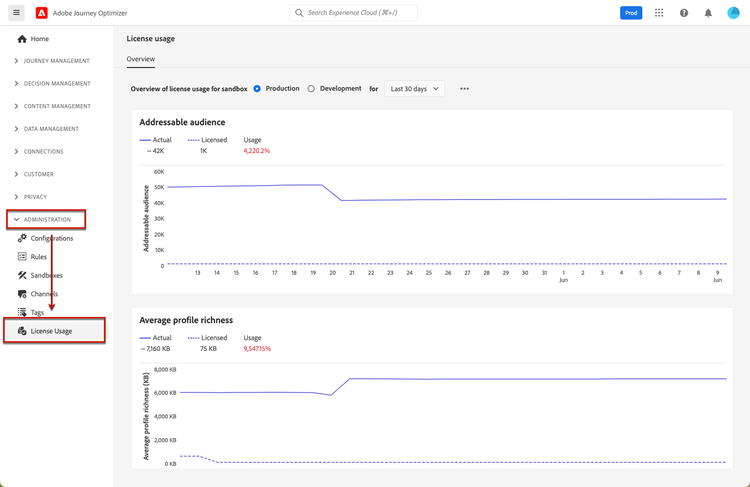
-
대시보드를 보려면 라이선스 사용량 대시보드 보기 권한이 있어야 합니다.
-
할당량 열에
N/A로 표시된 대로 특정 지표(예: 계산 시간, 이메일)는 개발 샌드박스에 표시되지 않습니다. 대시보드에는 null이 아닌 값만 표시됩니다. 지표가 0이거나 0에 가까우면 값이 채워지지 않습니다.
Adobe Journey Optimizer의 경우 대시보드에서 참여 가능한 프로필의 수를 확인할 수 있습니다. 즉, 연속 12개월 기간 동안 여정, 캠페인 또는 의사 결정을 통해 참여한 고유한 프로필입니다. 참여 가능한 프로필 정의 및 계산 방법에 대한 자세한 내용은 참여 가능한 프로필 및 라이선스 사용을 참조하세요.
문제 해결: 참여 가능한 프로필 수가 크게 증가했습니다 troubleshooting-engageable-profiles
참여 가능 프로필 수가 갑자기 급증하는 경우(예: 하루에 수십만 개에서 수백만 개로 증가하는 프로필) 이 섹션에서는 문제를 이해하고 해결하기 위한 지침을 제공합니다.
증가 이해
참여 가능 프로필 지표는 지난 12개월 동안 여정 또는 캠페인에 참여한 고유 프로필 수를 반영합니다. 갑작스러운 증가는 다음 원인으로 인해 발생할 수 있습니다.
- 새로운 여정 또는 캠페인의 타겟이 되는 대규모 대상자
- 프로필 서비스에 대해 활성화된 데이터 세트 변경
- 최근에 참여하지 않은 대상의 일괄 처리
해결 단계
이 문제를 해결하려면 다음 단계를 수행합니다.
-
프로필 계산 논리 이해:
- 참여 가능 프로필은 지난 12개월 동안 여정 또는 캠페인에 의해 참여된 고유 프로필을 기반으로 계산됩니다.
- 프로필이 여러 여정을 입력하면 해당 샌드박스에 대한 하나의 참여 가능 프로필로 계산됩니다.
- 12개월 이상 특정 프로필에 대한 참여가 없거나 익명 프로필이 알려진 프로필에 결합된 경우가 아니면 지표를 줄일 수 없습니다.
- 참여 가능 프로필은 고객의 대응 가능 대상 을 사용하여 계산됩니다.
- 지난 12개월 동안 Journey Optimizer의 기능을 사용하여 참여한 대상은 총 대응 가능 대상 중에서 참여 가능한 프로필의 수를 결정합니다.
-
대규모 대상을 타겟팅하는 여정, 캠페인 및 의사 결정 조사:
- 참여 가능한 프로필 쿼리 또는 쿼리 서비스를 사용하여 많은 프로필을 타겟팅하는 최근 여정 및 캠페인을 검토하십시오.
- 프로필 수가 급증하는 데 기여한 특정 여정 버전을 식별합니다.
- 새 프로필과 관련된 여정, 캠페인 및 의사 결정은 여정 데이터 세트의 이벤트 수를 증가시켜 참여 가능한 프로필 수 증가에 기여할 수 있습니다.
-
여정 및 캠페인 수준에서 대상자 필터링:
- 여정 또는 캠페인을 시작하기 전에 대상 수준에서 필터를 적용하여 참여 가능한 프로필이 불필요하게 증가하지 않도록 합니다.
- 참여 중에 적절한 대상만 타깃팅되는지 확인하십시오.
-
주소 지정 가능한 대상 크기 줄이기:
- 필요한 경우 익명 프로필을 삭제합니다. 이 작업은 Journey Optimizer 및 Real-Time Customer Data Platform 모두에 영향을 줍니다.
- 실시간 고객 프로필 안내서에서 익명 프로필 데이터 만료에 대해 자세히 알아보십시오.
- 참고: Platform UI 또는 API를 통해 익명 프로필 데이터 만료를 구성할 수 없습니다. 이 기능을 활성화하려면 지원팀에 문의해야 합니다.
-
데이터 세트 변경 모니터링:
- 프로파일링을 위해 활성화된 데이터 세트를 확인하고 과도한 ECID(Experience Cloud ID)가 포함되어 있지 않은지 확인하십시오.
- 필요한 경우 ECID 수가 많은 데이터 세트를 삭제하고 감소된 레코드로 다시 만듭니다.
-
장기 감소 전략 개발:
- 특정 프로필이 12개월 이상 동안 미참여 상태로 유지되면 참여 가능 프로필 수가 자연스럽게 줄어듭니다.
참고 항목:
- 참여 가능한 프로필 쿼리 예제 - 참여 가능한 프로필을 모니터링하고 분석하는 샘플 쿼리
- Adobe Experience Platform 쿼리 서비스 개요
관련 설명서 related-documentation
Adobe Experience Platform 설명서에서 자세히 알아보십시오.
This section contains structured knowledge intended to support interpretation, retrieval, and question answering related to this topic.
For complete understanding, this information should be combined with the documentation on this page. Neither source is intended to stand alone; the page describes the feature, while this section provides additional context that helps disambiguate terminology, intent, applicability, and constraints.
- TL;DR: The License usage dashboard in Adobe Journey Optimizer displays your organization’s license usage from a daily snapshot, centered on the Engageable Profiles metric, and provides guidance to troubleshoot sudden increases in that count.
Intents:
- Navigate the license usage dashboard from Administration > License Usage
- Check the number of Engageable Profiles engaged over a rolling 12-month window
- Understand why the Engageable Profiles count may suddenly increase
- Follow the resolution steps to address a spike in Engageable Profiles
Glossary:
- License usage dashboard: A dashboard displaying important information about your organization’s license usage, captured during a daily snapshot (product-specific)
- Engageable Profiles: Unique profiles engaged through journeys, campaigns, or decisioning over a rolling 12-month window (product-specific)
- Addressable Audience: The total audience used to calculate Engageable Profiles (product-specific)
Guardrails:
- To view the dashboard, you must have the View License Usage Dashboard permission.
- Certain metrics (for example compute hours, emails) are not displayed for development sandboxes and are shown as
N/Ain the quota column. - Only non-null values are displayed; when metrics are zero or close to zero they are not populated.
- The Engageable Profiles metric cannot decrease unless there is no engagement with certain profiles for over 12 months, or if pseudonymous profiles are stitched to known ones.
- Pseudonymous Profile data expiration cannot be configured through the Platform UI or APIs; you must contact support to enable this feature.
- Deleting pseudonymous profiles affects both Journey Optimizer and Real-Time Customer Data Platform.
Terminology:
- Canonical name: License usage dashboard — menu: License Usage
- Do not confuse: “Engageable Profiles” (unique profiles engaged through journeys, campaigns, or decisioning) ≠ “Addressable Audience” (the total audience the count is calculated from)
FAQ:
- Q: Where do I access the license usage dashboard? — Go to Administration > License Usage, which opens the Overview tab displaying the dashboard.
- Q: What permission do I need to view the dashboard? — The View License Usage Dashboard permission.
- Q: What can cause a sudden spike in the Engageable Profiles count? — Large audiences targeted by new journeys or campaigns, changes in datasets enabled for Profile Service, or batch processing of audiences not engaged recently.
- Q: Can the Engageable Profiles count decrease? — Only if certain profiles have no engagement for over 12 months, or when pseudonymous profiles are stitched to known ones.
- Q: Why are some metrics shown as N/A? — Certain metrics such as compute hours and emails are not displayed for development sandboxes.
Personas:
- marketer: Can select Administration, then License Usage, to open the Overview tab displaying the license usage dashboard. Can check the number of Engageable Profiles, unique profiles engaged through journeys, campaigns, or decisioning over a rolling 12-month window. The page states that you must have the View License Usage Dashboard permission to view the dashboard. Where: “License usage dashboard”.
Onboarding:
- Level: Beginner
- First minimal step: Select Administration, then License Usage, to open the Overview tab.
- Success check: The Overview tab displays the dashboard, showing the number of Engageable Profiles captured in the daily snapshot.
- Previous: Learn how to navigate the Journey Optimizer user interface before accessing the dashboard: Navigate the interface (start/user-interface.md)
- Next: Learn how Engageable Profiles are defined and calculated: Get Started with Profiles in Journey Optimizer (audience/get-started-profiles.md); Run Engageable Profiles queries to investigate a spike in the count: Examples of queries (reports/query-examples.md)