이 페이지의 내용: 다이렉트 메일 채널의 작동 방식을 이해하여 서드파티 공급자가 고객에게 실제 메일을 보내는 데 사용하는 추출 파일을 생성할 수 있습니다.
다이렉트 메일은 서드파티 다이렉트 메일 공급자가 고객에게 메일을 보내는 데 필요한 추출 파일을 개인화하고 생성할 수 있는 오프라인 채널입니다.
다이렉트 메일 캠페인 또는 여정을 생성할 때 Journey Optimizer는 우편 주소 및 프로필 속성과 같은 모든 대상 프로필과 선택한 데이터가 포함된 파일을 자동으로 생성합니다. 이 파일은 선택한 서드파티 다이렉트 메일 공급자가 액세스할 수 있도록 선택한 서버로 전송되며, 이 공급자가 실제 메일링 프로세스를 처리합니다.
사용자는 선택한 서드파티 다이렉트 메일 공급자와 협력하여 고객이 사용자의 메일을 받는 데 필요한 동의(해당하는 경우)를 고객으로부터 받아야 합니다.
메일링 서비스 사용에는 해당하는 서드파티 다이렉트 메일 공급자의 추가 약관이 적용됩니다. Adobe는 사용자의 서드파티 제품 사용을 통제하지 않으며 이에 대한 책임을 지지 않습니다. 다이렉트 메일 캠페인의 메일링과 관련된 문제 또는 지원 요청은 선택한 서드파티 다이렉트 메일 공급자에게 문의하십시오.
시작하기 전에 before-you-start
다이렉트 메일 메시지를 생성하기 전에 파일 라우팅과 다이렉트 메일 채널 구성을 구성합니다. 또한 Adobe Experience Platform에 대상자 및 프로필 데이터(예: 우편 주소)가 필요합니다.
다이렉트 메일 메시지를 보내는 주요 단계는 다음과 같습니다.

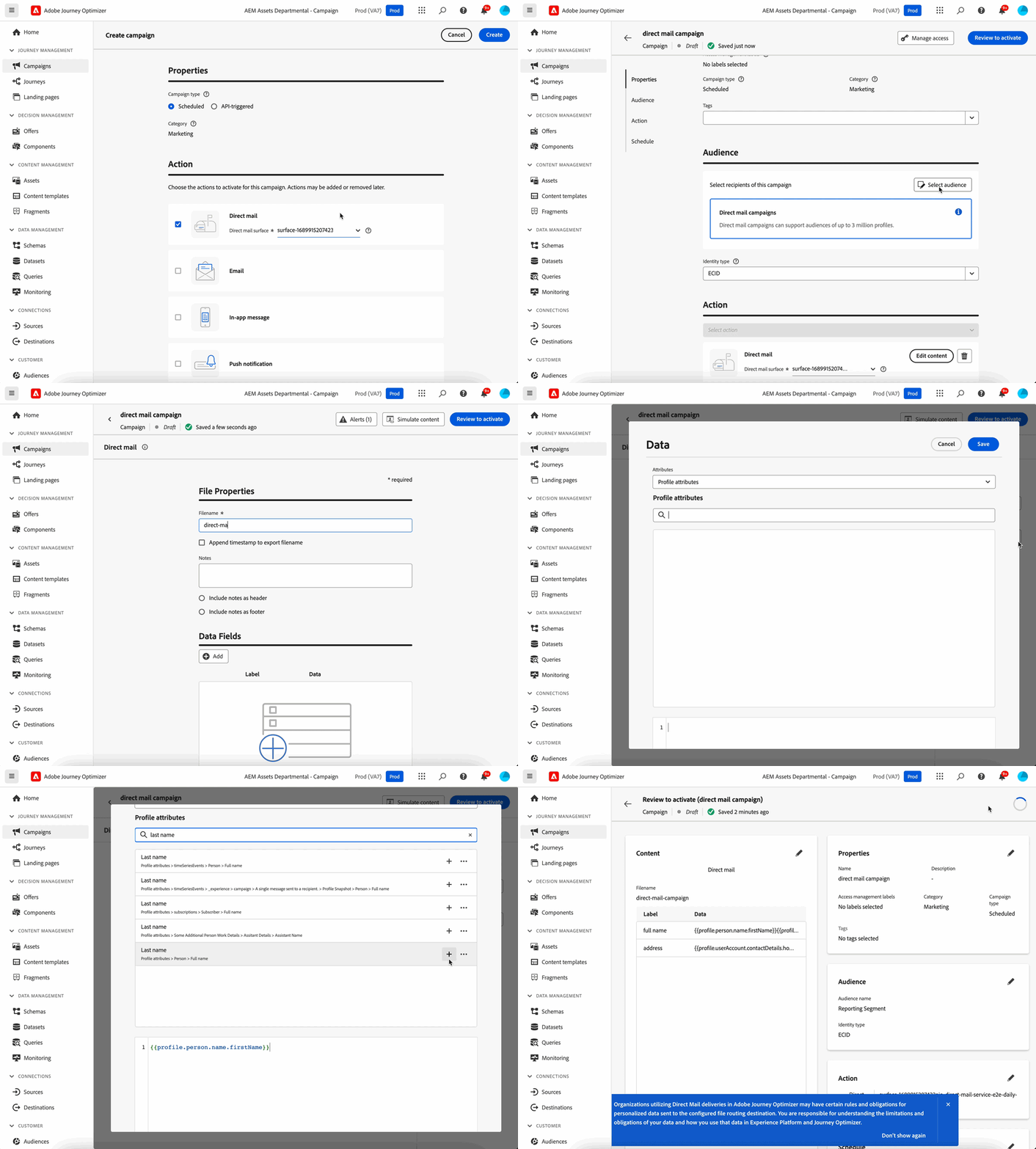
추가 리소스 additional-resources
- 다이렉트 메일 만들기 - 다이렉트 메일 게재를 만들고 오프라인 채널용 추출 파일을 구성하는 방법을 알아봅니다.
- 다이렉트 메일 채널 구성 - 다이렉트 메일 표면 및 파일 라우팅 구성을 설정합니다.
- 다이렉트 메일의 배치 결정 - 결정 기능을 사용하여 다이렉트 메일용 추출 파일을 개인화하거나 하위 시스템으로 결정 데이터를 내보낼 수 있습니다.
- 다이렉트 메일 테스트 및 보내기 - 다이렉트 메일 게재의 테스트, 유효성 검사, 게시 방법을 알아봅니다.
- 다이렉트 메일 튜토리얼 - 다이렉트 메일 기능 및 모범 사례에 대한 단계별 비디오 튜토리얼을 살펴봅니다.
사용 방법 비디오 how-to-video
Adobe Journey Optimizer의 다이렉트 메일 채널을 활용하여 여정 내에서 다이렉트 메일 전달을 자동화하고 예약하는 방법을 알아보세요.
동일한 단계에 대한 자세한 설명은 다이렉트 메일 채널 자습서를 참조하세요.
다이렉트 메일에 대한 일반적인 질문은 위의 추가 리소스 섹션을 참조하세요.
This section contains structured knowledge intended to support interpretation, retrieval, and question answering related to this topic.
For complete understanding, this information should be combined with the documentation on this page. Neither source is intended to stand alone; the page describes the feature, while this section provides additional context that helps disambiguate terminology, intent, applicability, and constraints.
- TL;DR: This overview explains how the direct mail offline channel works, generating personalized extraction files that third-party direct mail providers use to send physical mail to your customers.
Intents:
- Understand that direct mail is an offline channel handled by a third-party provider
- Understand how extraction files are generated and sent to a server
- Learn what to configure before creating direct mail messages
- Understand where direct mail messages can be created
Glossary:
- Direct mail: An offline channel that personalizes and generates the extraction files required by third-party direct mail providers to send mail to your customers (product-specific)
- Extraction file: The automatically generated file containing all targeted profiles and selected data, such as postal addresses and profile attributes, sent to the server of your choice so that it is accessible by your chosen third-party direct mail provider (product-specific)
- Third-party direct mail provider: The external provider to which the file is made accessible, who handles the actual mailing process (product-specific)
Guardrails:
- Before creating direct mail messages, you must configure file routing and a direct mail channel configuration.
- You need audiences and profile data, such as postal addresses, in Adobe Experience Platform.
- Direct mail messages can be created in journeys and campaigns, but they are not available for use in API-triggered campaigns.
- Obtaining any required customer consents is handled with your chosen third-party direct mail provider.
- Use of mailing services is subject to additional terms and conditions from the applicable third-party direct mail provider; Adobe does not control or take responsibility for your use of third-party products.
Terminology:
- Canonical name: Direct mail — Acronym: n/a — variants: direct mail channel, direct mail message
- Do not confuse: “Journey Optimizer” (generates the extraction file and sends it to the server of your choice) ≠ “third-party direct mail provider” (handles the actual mailing)
FAQ:
- Q: What is the direct mail channel? — An offline channel that personalizes and generates extraction files for third-party providers to send physical mail.
- Q: What do I need before creating direct mail messages? — File routing and a direct mail channel configuration, plus audiences and profile data such as postal addresses in Adobe Experience Platform.
- Q: Where can direct mail messages be created? — In journeys and campaigns; they are not available for use in API-triggered campaigns.
- Q: Who performs the actual mailing? — Your chosen third-party direct mail provider, to which the file is made accessible, handles the actual mailing process.