In questa pagina: Progetta e verifica il contenuto della campagna di azioni per il canale selezionato in modo che ogni messaggio sia pronto prima dell’attivazione della campagna.
Per configurare il contenuto del messaggio, passa alla scheda Contenuto o fai clic sul pulsante Modifica contenuto.
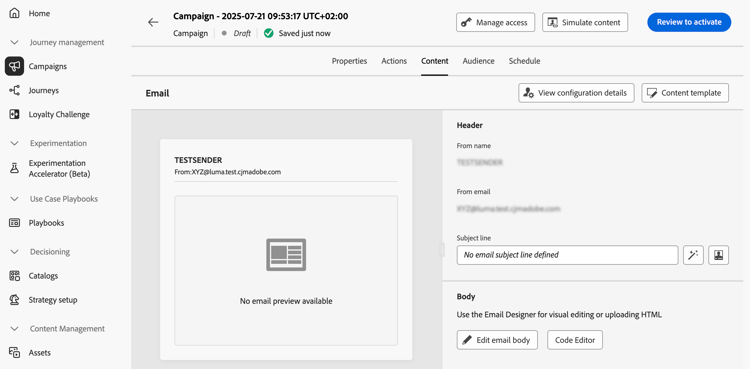
Progettare il contenuto action-campaign-channels
Il processo di creazione dei contenuti dipende dal canale selezionato. Scopri i passaggi dettagliati per creare il contenuto del messaggio nelle pagine seguenti:





Verifica e verifica il contenuto
Una volta definito il contenuto, utilizza il pulsante Simula contenuto per visualizzare in anteprima e verificare il contenuto. Puoi utilizzare uno dei due metodi di simulazione:
- Fai clic su Simula contenuto per testare le varianti di contenuto con dati di input di esempio o con generazione automatica di IA.
- Fai clic su Simula contenuto, quindi seleziona Simula contenuto (profili AEP) dal menu a discesa per visualizzare l’anteprima con i profili di test.
Scopri come visualizzare in anteprima e testare i contenuti
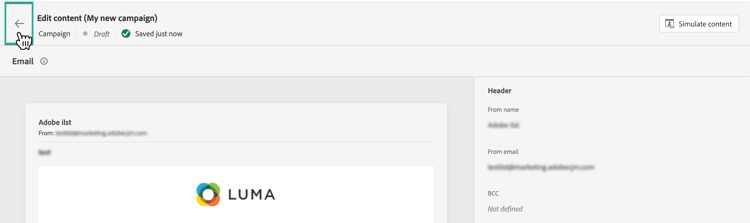
Per tornare alla schermata di creazione della campagna, fai clic sulla freccia sinistra.
Passaggi successivi next
Quando il contenuto della campagna Azione è pronto, puoi definire il pubblico della campagna. Ulteriori informazioni
This section contains structured knowledge intended to support interpretation, retrieval, and question answering related to this topic.
For complete understanding, this information should be combined with the documentation on this page. Neither source is intended to stand alone; the page describes the feature, while this section provides additional context that helps disambiguate terminology, intent, applicability, and constraints.
- TL;DR: This page explains how to open the content of an Action campaign for the channel selected, find the channel-specific content creation pages, and preview and test the content with Simulate content.
Intents:
- Open the content of the campaign from the Content tab or the Edit content button
- Find the page that explains content creation for each channel
- Preview and test content with Simulate content
- Preview content with test profiles using Simulate content (AEP profiles)
- Go back to the campaign creation screen
Glossary:
- Simulate content: Button used to preview and test content; tests content variations with sample input data or AI auto-generation. (product-specific)
- Simulate content (AEP profiles): Option selected from the Simulate content dropdown; previews the content with test profiles. (product-specific)
Terminology:
- Canonical name: Action campaign content — variants: message content
- Acronym: AEP — Adobe Experience Platform
- Do not confuse: “Simulate content” (sample input data or AI auto-generation) ≠ “Simulate content (AEP profiles)” (test profiles)
FAQ:
- Q: How do I open the content of my Action campaign? — Navigate to the Content tab or click the Edit content button.
- Q: Where do I find how to create content for my channel? — The content creation process depends on the channel you selected; the page lists Email, Mobile message, Push notification, Direct mail, In-app, Web, Code-based experience, Content cards, LINE, and WhatsApp, each linking to its page.
- Q: How do I preview and test my content? — Use Simulate content to test content variations with sample input data or AI auto-generation, or select Simulate content (AEP profiles) from the dropdown to preview with test profiles.
- Q: How do I go back to the campaign creation screen? — Click the left arrow.
Related pages:
- Email content: Email (email/create-email.md)
- Mobile message content: Mobile message (mobile/create-mobile-message.md)
- Push content: Push notification (push/create-push.md)
- Direct mail content: Direct mail (direct-mail/create-direct-mail.md)
- In-app content: In-app (in-app/create-in-app.md)
- Web content: Web (web/create-web.md)
- Code-based content: Code-based experience (code-based/create-code-based.md)
- Content cards content: Content cards (content-card/create-content-card.md)
- LINE content: LINE (line/get-started-line.md)
- WhatsApp content: WhatsApp (whatsapp/get-started-whatsapp.md)
- Previewing and testing content: Learn how to preview and test content (content-management/preview-test.md)
- Next step, audience: Define the Action campaign audience (campaigns/campaign-audience.md)