2025.7.0 Release Notes for Adobe Experience Manager as a Cloud Service release-notes
The following section outlines the feature release notes for the 2025.7.0 version of Experience Manager as a Cloud Service.
Release Date release-date
The release date of Adobe Experience Manager as a Cloud Service current feature release (2025.7.0) is August 7, 2025. The next feature release (2025.8.0) is planned for August 28, 2025.
Maintenance Release Notes maintenance
You can find the latest maintenance release notes here.
Experience Manager Sites as a Cloud Service sites
New features in Experience Manager Sites enhancements-sites
- You can now copy content fragments with referenced fragments (children) in one operation. This allows re-using existing content fragment structures for creating new content.
- In Content Fragments Admin UI you can now view the workflow status for content fragments, with detailed information about past and currently running workflows for a selected fragment.
- Renaming or moving a live copy source page will now trigger re-publishing a correspondingly renamed or moved live copy page.
Experience Manager Assets as a Cloud Service assets
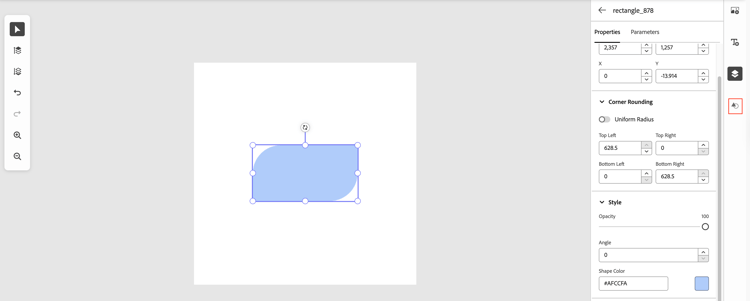
Add shapes to Dynamic Media templates
You can now add shape layers to Dynamic Media templates in Experience Manager Assets. Similar to image and text layers, shape layers support parameters for real-time updates via the template URL. You can also include call-to-action (CTA) links to shapes in your templates.
AI-generated metadata enhancements
AEM Assets now enables you to configure the display of asset titles in Card view or List view on the Asset Browse page. You can choose to display the asset title defined by you, title generated using AI, or use AI-generated title only if there is no existing title for the asset.
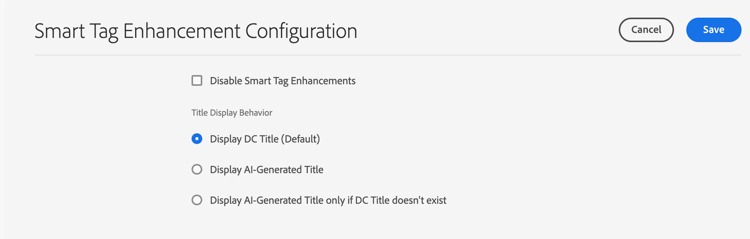
You can now also choose to disable AI-generated metadata at the folder level.
New Features in Content Hub new-features-content-hub
Enhanced branding flexibility in Content Hub
Building on existing personalization features, Content Hub now allows admins to further tailor their deployment by adding custom logo images. Support for the TIFF file format has also been added for both banner and logo images, enabling greater design flexibility.
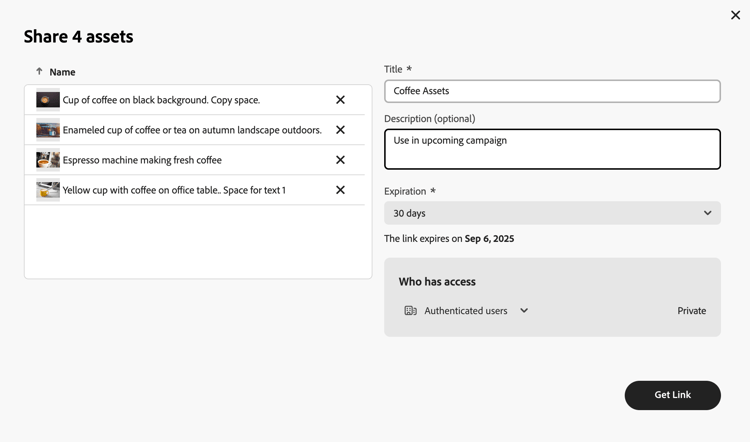
Smarter sharing with titled links
You can now add a title when generating a shared link—whether from the asset details view or after selecting one or more assets. This helps recipients easily identify the purpose of each link, especially when receiving multiple shared assets.
Improved filter navigation
Content Hub now includes a Show All option within filters, allowing users to view all available facets along with asset counts from the current limitation of viewing only upto ten facets. Enhanced search and sort capabilities within each filter make it easier to discover and manage assets more efficiently.
AEM Desktop App release 3.0.0 desktop-app-release-3.0.0
Enjoy automated upload of new files and folders, enhanced file operations, smarter asset discovery, and seamless integration with AEM—making content management faster, clearer, and more intuitive.
For the complete list of features, see Desktop App Release Notes.
New Features in Dynamic Media with OpenAPI capabilities new-features-dynamic-media-with-openapi
Preview assets before publishing
Dynamic Media with OpenAPI capabilities now allows to preview assets directly within AEM Sites author pages before making them publicly available. Share preview pages with stakeholders to gather feedback on visual quality and contextual fit. During the review cycle, you can create and manage multiple asset versions before finalizing them for publication.
Enhanced Smart Imaging for OpenAPI image requests
All OpenAPI image requests now fully leverage Smart Imaging with auto-promotion and fallback logic. This enhancement optimizes images based on device and network conditions, delivering faster page loads and reduced bandwidth usage—while maintaining visual quality.
Experience Manager Forms as a Cloud Service forms
New features in AEM Forms forms-new-features
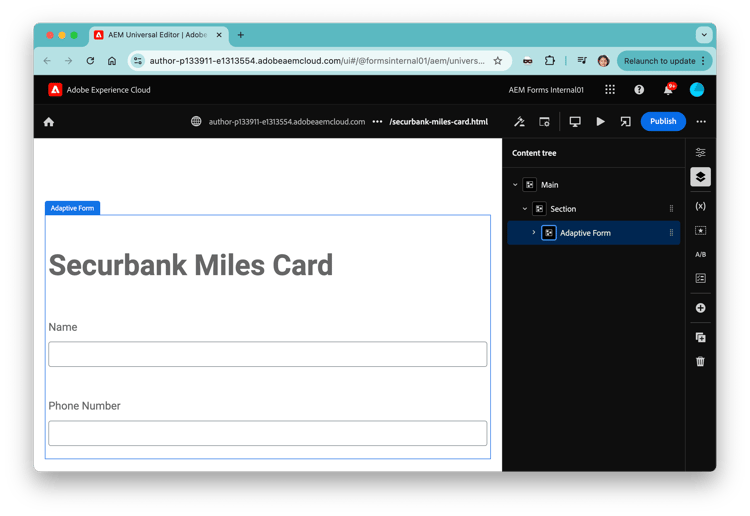
Universal Editor for Adaptive Forms and Form Fragments
The Universal Editor now supports the creation of both Adaptive Forms and reusable Form Fragments. Authors can visually build forms, configure submit actions, and add reCAPTCHA validation, all in a simplified, WYSIWYG authoring environment. This capability accelerates form creation, enhances consistency, and improves protection against spam and automated abuse.
Forms Submission Service for Edge Delivery Services Forms
The see Forms Submission Service. allows you to seamlessly store data from Adaptive Form submissions directly into popular spreadsheet platforms such as Google Sheets, Microsoft OneDrive, or SharePoint. This integration streamlines data management by enabling direct submission of form data to your chosen spreadsheet, eliminating manual data transfer and reducing errors.
Key benefits include:
- Direct integration: Configure your forms to submit data directly to a specified spreadsheet.
- Custom data mapping: Map form fields to corresponding spreadsheet columns for organized storage.
- Access control: Leverage existing spreadsheet permissions to manage who can access or modify submitted data.
Generate and sync AFP renditions from Adaptive Forms
The AFP Output Sync API enables administrators and users to generate AFP (Advanced Function Presentation) output from Adaptive Forms and synchronize the output with external systems or storage locations. AFP is a high-performance document format optimized for printing, often used in large-scale enterprise environments.
New Early Access Features in AEM Forms forms-new-early-access-features
The AEM Forms Early Access Program offers a unique opportunity for you to get exclusive access to cutting-edge innovations and help shape their development.
These release notes list the innovations delivered in the current release. For the complete list of innovations available under the Early Access Program, see AEM Forms Early Access Program documentation.
Rule Editor for Interactive Communications Editor
Build dynamic, data-driven actions directly within your documents using an intuitive, point-and-click interface. Easily define conditional logic, automate workflows, and personalize content without writing code.
AEM Forms Scaffolder CLI for Custom Components
Accelerate your AEM Forms Edge Delivery Services development with this CLI tool. Instantly generate the code and wiring needed to kickstart custom component development — no boilerplate, no hassle.
API Integration Tool for Dynamic Form Data
The API Integration Tool enables form authors to create dynamic, intelligent forms that automatically fetch and populate data from external REST APIs based on user interactions. This no-code integration capability transforms static forms into responsive data collection interfaces.
Experience Manager as a Cloud Service Foundation foundation
Node View for Permissions Management node-view
AEM introduces Node view Permissions Management. The main functionality remains the same as the classic UI, but is more user-friendly and efficient. See the dedicated article for further information.
Updated Deprecation Process updated-deprecation-process
Adobe regularly reviews features, libraries, APIs, and configurations to ensure they meet standards for performance, security, and value. When capabilities no longer meet these standards, they are marked for deprecation and usage must stop by a specified removal date. Leading up to this date, Adobe will remind customers with email notifications, and actions that need to be taken in Cloud Manager before proceeding with or deploying new builds. Failure to take the necessary action may result in an inability to upgrade to new versions of AEM leading to potential impacts around security, performance, reliability, and availability.
See the deprecation article for further information.
Deprecated Java APIs and OSGi configuration nearing removal dates deprecated-near-removals
Expand the list below to view the deprecated APIs and OSGi configurations that must no longer be used. For full details—including removal timelines—refer to the deprecation article.
Java APIs:
org.apache.sling.commons.authorg.apache.felix.webconsoleorg.eclipse.jettycom.mongodborg.apache.abderaorg.apache.felix.http.whiteboardorg.apache.cocoon.xmlch.qos.logbackorg.slf4j.spiorg.slf4j.eventorg.apache.log4jcom.google.commoncom.dreworg.bsonorg.apache.jackrabbit.oak.plugins.bloborg.apache.jackrabbit.oak.plugins.memory
OSGi properties:
org.apache.sling.commons.log.LogManager(all properties)org.apache.sling.commons.log.LogManager.factory.config(org.apache.sling.commons.log.file,org.apache.sling.commons.log.pattern)
Java 11 Runtime Deprecation java11-runtime-deprecation
The *Java 11 runtime- is now deprecated, and most environments have already been upgraded to the more performant Java 21 runtime.
If your environment could not be upgraded due to unsupported dependencies (see Java 21 runtime requirements), you should have received an email from Adobe with specific next steps. Please ensure all required updates are completed by August 28, 2025, so your environment can be upgraded without disruption.
Note: The runtime version is separate from your code’s build version. While we recommend building with Java 21, Java 11 builds are still supported for now. A separate deprecation notice for Java 11 builds will be shared in the future.
Enforcement of AEM Java Logs Configuration Policy logconfig-policy
As noted in the April release notes, AEM Java logs must follow a standard format to ensure reliable monitoring across all customer environments. Custom log configurations—such as changes to log formatting, output files, or default log levels—are no longer supported. Logs must remain directed to the default files, and default log levels for AEM product code must be preserved. See full details in the Logging article.
Starting in late August, any unsupported custom logging overrides will be ignored. Based on our analysis, most customers will not be impacted and Adobe has contacted customers whose current configuration may be affected.
Please review and update any downstream processes that rely on custom logging behavior. For example:
- If your log forwarding system expects a custom log format, you may need to adjust your ingestion rules.
- If you’ve previously reduced log verbosity by changing log levels, please note that reverting to default levels may increase log volume.
Default Purging of Older Versions and Audit Logs mt-defaults
Currently, content versions and audit logs have their associated purge maintenance tasks disabled by default and thus no data is removed unless explicitly configured.
However, to optimize repository performance, purging will be enabled by default at a future announced date.
For more details, see the Maintenance Tasks article.
Content Versions mt-content
-
New environments (created after an upcoming date, to be communicated later):
- Versions older than 30 days will periodically be deleted.
- The most recent five versions within the last 30 days are retained, along with the most recent version and the current version, regardless of their age.
-
Existing environments (created before this upcoming date):
- Versions older than 7 years will periodically be deleted.
- All versions within the past 7 years are retained.
- This high default threshold prevents unintended removal of recent data. However, it is recommended to configure lower values to optimize repository performance.
-
You may modify these defaults through YAML configuration, deployed using the config pipeline.
Audit Log mt-auditlogs
-
New environments (created after an upcoming date, which will be communicated separately):
- Replication, DAM, and page audit logs older than 7 days will periodically be deleted.
- All events are logged by default.
-
Existing environments (created before this upcoming date):
- Replication, DAM, and page audit logs older than 7 years will periodically be deleted.
- All events are logged by default.
- This high default threshold prevents unintended removal of recent data. However, it is recommended to configure lower values to optimize repository performance.
-
You may modify these defaults through YAML configuration, deployed using the config pipeline.
Edge Computing (Alpha Program) edge-computing
Edge computing allows you to execute JavaScript at the CDN layer, bringing data processing closer to the end user. This reduces latency and enables responsive, dynamic experiences at the edge.
Common use cases include:
- Authenticating users with an identity provider before granting access to content
- Personalizing content based on geolocation, device type, or user attributes
- Acting as middleware between the CDN and your origin
- Reformatting responses from third-party APIs (and perhaps aggregating multiple APIs responses) before delivering them to the browser
- Composing and serving server-rendered HTML at the edge using content stitched from various backends
- Exposing an MCP server for LLMs like ChatGPT and Claude to access custom tools
We have a limited number of opportunities available for either AEM Publish Delivery or Edge Delivery Services projects for live production sites. If you’re interested in participating or want to learn more, please email aemcs-edgecompute-feedback@adobe.com with a brief description of your use case.
CDN Configuration for Edge Delivery Services (Beta Program) cdn-eds-beta
The Adobe-Managed CDN offers flexible configuration options, as described in the Config Pipeline article.
Now in a beta, deploy a config pipeline for features including CDN origin selectors, response and request transformations, CDN log forwarding and more. Please reach out to aemcs-cdn-config-adopter@adobe.com with the details of your use case.
Snapshots for RDEs (Alpha Program) rde-snapshot-beta
In alpha, Rapid Development Environments (RDEs) now support a feature to take a snapshot of the current state of code and content, which can be restored at a later time. This can be useful when syncing code that may need to be reverted, or when switching between development of different features. It’s also possible to restore just the mutable content as a known starting point for testing.
Please email aemcs-rde-support@adobe.com if there’s interest in providing feedback on this feature.
AEM Log-Forwarding to More Destinations (Beta Program) log-forwarding-beta
While logs can be downloaded from Cloud Manager, many organizations find it beneficial to stream those logs to a preferred logging destination. AEM already supports AEM and CDN log forwarding to Azure Blob Storage, Datadog, HTTPS, Elasticsearch (and OpenSearch), and Splunk. This feature is configured in a self-serve manner, and deployed using the Config Pipeline.
Now in beta, you can forward AEM logs to Amazon S3, Sumo Logic, Dynatrace, and your own New Relic account (not the Adobe-provided account). Note that AEM logs (including Apache/Dispatcher) are supported for these logging destinations, but not CDN logs. Email aemcs-logforwarding-beta@adobe.com for access.
Learn more in the log forwarding documentation.
Experience Manager Guides guides
You can find a complete list of new and enhanced features of the latest release of Adobe Experience Manager Guides here.
Cloud Manager cloud-manager
You can find a complete list of Cloud Manager monthly releases here.
Migration Tools migration-tools
You can find a complete list of Migration Tools releases here.
Universal Editor universal-editor
You can find a complete list of Universal Editor releases here.
Generate Variations generate-variations
You can find a complete list of Generate Variations releases here.
Experience Cloud Release Notes experience-cloud
You can find information about releases of other Experience Cloud applications here.