[AEM Forms]{class="badge positive" title="Applies to AEM Forms)."}
Generate AFP Output Using the AEM Forms API
This is a pre-release feature and accessible through our pre-release channel.
Advanced Function Presentation (AFP) is a high-performance document format designed primarily for printing purposes.
This guide outlines all necessary steps and configurations to generate AFP output using AEM Forms.
AFP Generation API
Generates an AFP (Advanced Function Presentation) file using an XDP template and input data.
Authorization
You can either use BasicAuth (Admin credentials) for local environments or OAuth Server-to-Server authorization for AEM Cloud instances.
Request
Endpoint:
https://[publish-url].adobeaemcloud.com/adobe/forms/doc/v1/adobe/forms/doc/v1/generate/afp
Headers
Content-Typeapplication/pdfAuthorization(Bearer Access token)Request Body
Content-Type: multipart/form-data
templatedemo.xdp)datadata.xml)optionsExample options JSON (Text field):
{
  "pdfVersion": "1.7",
  "resolution": 300,
  "locale": "en-US",
  "embedFonts": true,
  "contentRoot": "/usr/tmp"
}
Responses
200400500Curl Command
curl --location 'http://<server>:<port>/adobe/forms/document/generate/afp' \
--header 'Authorization: Bearertoken <base64-encoded-credentials>' \
--form 'template=@"<path-to-template>.xdp"' \
--form 'data=@"<path-to-data-file>.xml"' \
--form 'options=<JSON-options-string>'
Testing the API
You can download the .yaml file and upload it to Postman to check functionality of the APIs.
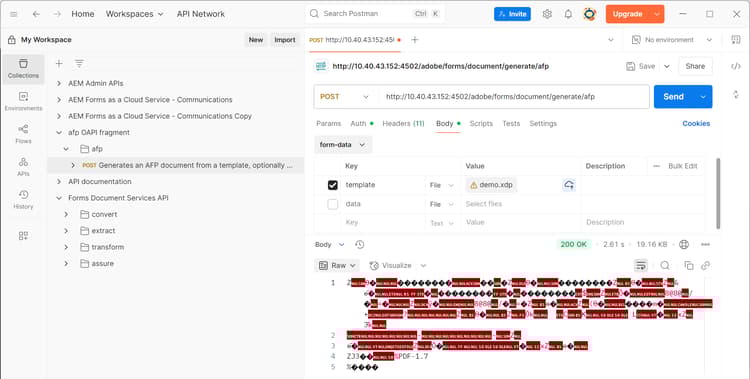
You can save the response and open the saved file in AFP reader to view it.