이 페이지에서: 단일 여정 작업 또는 작업 캠페인 내에서 여러 인바운드 작업을 정의하여 여러 가지 경험을 동시에 다른 위치에 전달하는 방법을 알아봅니다.
오케스트레이션을 단순화하기 위해 단일 여정 작업 또는 단일 캠페인 내에서 여러 인바운드 작업을 정의할 수 있습니다. 각 작업에는 특정 콘텐츠가 포함됩니다.
이 기능을 사용하면 여러 여정 작업이나 캠페인을 만들지 않고도 다양한 코드 기반 경험, 인앱 메시지, 콘텐츠 카드 또는 웹 작업을 동시에 다른 위치에 전달할 수 있습니다. 모든 데이터를 하나의 여정 또는 캠페인으로 통합하여 배포를 더 쉽게 하고 보고를 더 원활하게 할 수 있습니다.
예를 들어 콘텐츠가 약간 다른 여러 끝점에 코드 기반 경험을 보낼 수 있습니다. 이렇게 하려면 동일한 여정 작업 또는 캠페인 내에 각각 다른 끝점 구성을 갖는 여러 코드 기반 작업을 만듭니다.
여정 작업 또는 캠페인에서 최대 10개의 인바운드 작업을 추가할 수 있습니다.
작업 구성 열기 open-actions
첫 번째 단계는 여정에서 작업하는지 또는 캠페인에서 작업하는지에 따라 다릅니다.
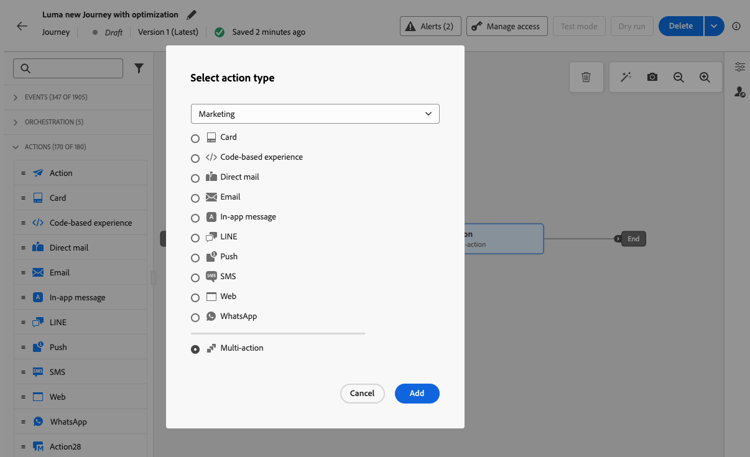
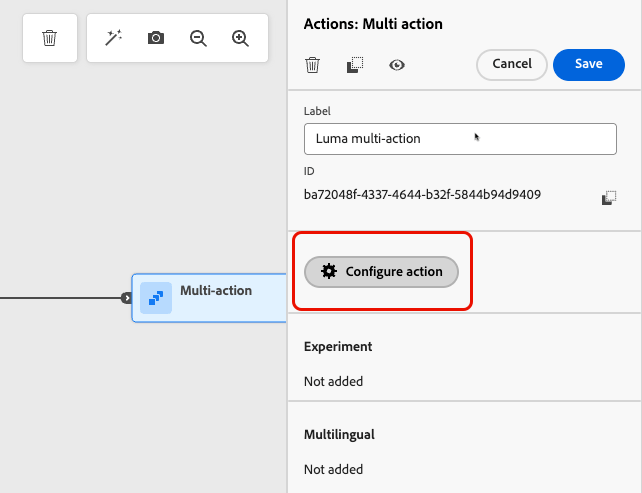
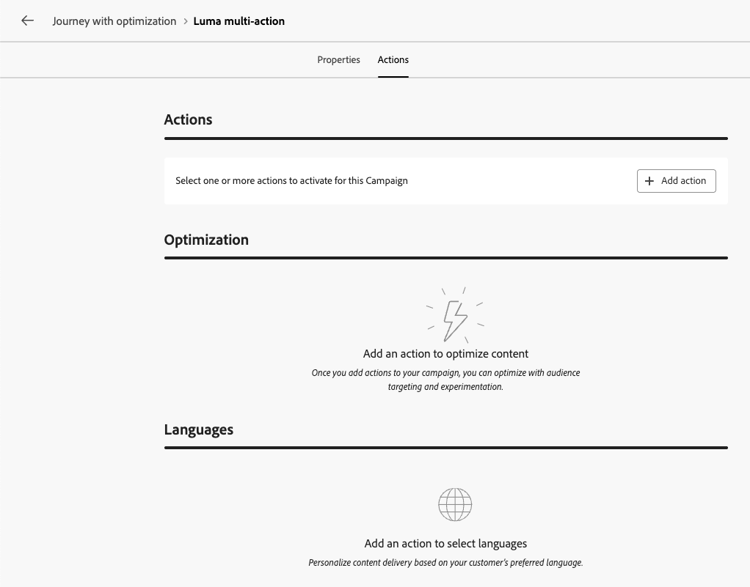
인바운드 작업 추가 add-actions
다음 단계는 여정 및 작업 캠페인에서 동일합니다.
-
작업 섹션에서 인바운드 작업(코드 기반 경험, 인앱 메시지, 콘텐츠 카드 또는 웹)을 선택하십시오.
-
채널 구성을 선택하고 해당 작업에 대한 특정 콘텐츠를 정의합니다.
-
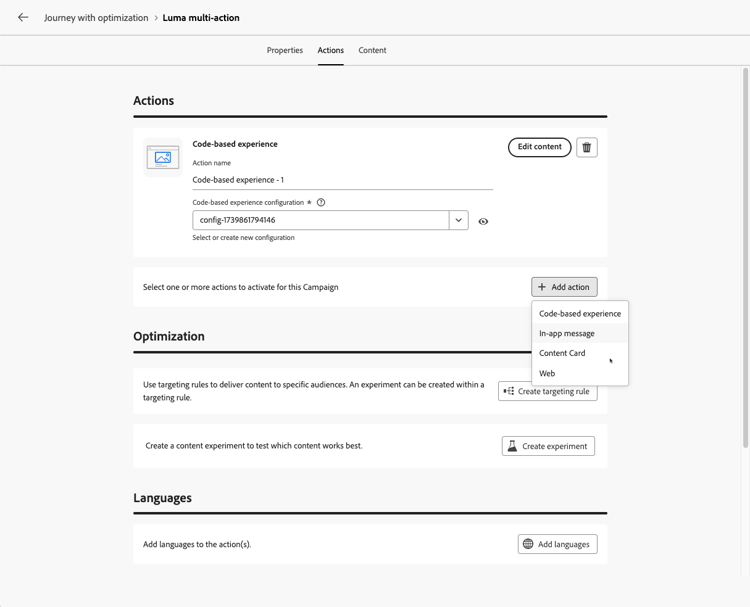
작업 추가 단추를 사용하여 드롭다운 목록에서 다른 인바운드 작업을 선택합니다.
-
작업을 추가하려면 유사하게 진행합니다. 여정 작업 그룹 또는 캠페인에서 최대 10개의 인바운드 작업을 추가할 수 있습니다.
여정이 live이거나 캠페인이 live이면 모든 작업이 동시에 활성화됩니다.
여러 인바운드 작업에 최적화 사용 optimization
여정 액션 또는 캠페인에 여러 인바운드 액션이 포함된 경우 사용자가 구성하는 타깃팅 규칙 및 콘텐츠 실험이 모든 규칙에 적용됩니다. 콘텐츠 최적화에 대해 자세히 알아보기
고객은 해당 작업에서 동일한 변형에 할당되지만 각 작업의 각 변형에 대한 콘텐츠를 정의해야 합니다.
참조 - see-also
This section contains structured knowledge intended to support interpretation, retrieval, and question answering related to this topic.
For complete understanding, this information should be combined with the documentation on this page. Neither source is intended to stand alone; the page describes the feature, while this section provides additional context that helps disambiguate terminology, intent, applicability, and constraints.
- TL;DR: This page explains how to define several inbound actions (Code-based experience, In-app message, Content Card, or Web) inside a single journey action or action campaign in Adobe Journey Optimizer, to deliver multiple experiences to different locations at the same time while keeping all reporting in one journey or campaign.
Intents:
- Deliver several inbound experiences from a single journey Action activity by using the Multi action type
- Deliver several inbound experiences from a single action campaign
- Send a code-based experience to multiple endpoints with slightly different contents
- Consolidate reporting for several inbound actions in one journey or campaign
- Apply targeting rules, a content experiment, or both across the inbound actions of a journey action or campaign
Glossary:
- Inbound action: An action that delivers a Code-based experience, In-app message, Content Card, or Web experience (product-specific)
- Multi action: The action type of a journey Action activity that groups several inbound actions in a single node (product-specific)
- Multi-action group: The set of inbound actions defined inside one journey Action activity (product-specific)
Contexts where multiple inbound actions are available:
- Journeys, in an Action activity with the Multi action type, started with an Event or Read Audience activity
- Action campaigns, in the Actions tab of the campaign, after creating the campaign and defining its properties
Guardrails:
- Available for inbound channels only; outbound channels (Email, Push, Mobile message) are not supported
- Maximum 10 inbound actions in a journey action group or in a campaign
- Each action has its own channel configuration and its own content
- All actions are activated simultaneously once the journey or campaign is live
- The targeting rules and content experiment configured in a journey action or campaign apply to all its inbound actions, not to a single action
- Customers are assigned to the same variant across all the inbound actions
- The content must be defined for each variant of each action
FAQ:
- Q: Can I add several Email or Push actions to the same journey action or campaign? — No; this capability is for inbound channels only. For outbound channels, use channel optimization to add multiple channels and automatically select the best channel per customer.
- Q: How many inbound actions can I add? — Up to 10 in a journey action group or in a campaign.
- Q: When are the actions activated? — All actions are activated simultaneously once the journey or campaign is live.
- Q: Which inbound actions can I combine? — Code-based experience, In-app message, Content Card, and Web.
- Q: Do targeting rules and experiments apply to a single inbound action? — No; the targeting rules and content experiment you configure apply to all the inbound actions of the campaign or of the journey Action activity. Customers are assigned to the same variant across those actions.
- Q: Do I need to define content for each variant of each inbound action? — Yes; the targeting rules and content experiment apply to all the actions, but you must define the content for each variant of each action.
- Q: Do I need to create one journey action or campaign per endpoint? — No; create multiple actions within the same journey action or campaign, each with a different configuration.
Personas:
- marketer: Can select Multi action as the action type of a journey Action activity, or open the Actions tab of an action campaign after creating it and defining its properties, then select an inbound action. Can use the Add action button to add up to 10 inbound actions, each with its own channel configuration and content. Where: “Open the actions configuration” and “Add the inbound actions”.
Onboarding:
- Level: Intermediate
- First minimal step: Select an inbound action in the Actions tab of your campaign, or add an Action activity with the Multi action type to your journey, then use the Add action button to add another inbound action.
- Success check: The configuration lists several inbound actions, each with its own content, and all of them are activated simultaneously when the journey or campaign goes live.
- Previous: Create a journey or an action campaign before adding inbound actions: Use the Action activity (building-journeys/journey-action.md); Create an action campaign (campaigns/create-campaign.md); Define the campaign properties (campaigns/campaign-properties.md); Configure the campaign action (campaigns/campaign-action.md)
- Next: Publish the journey or activate the campaign: Publish your journey (building-journeys/publish-journey.md); Review and activate an Action campaign (campaigns/review-activate-campaign.md)