이 페이지에서: 액션을 구성하기 전에 캠페인을 식별하고 구성하고 액세스를 제어할 수 있도록 액션 캠페인을 만들고 이름, 설명, 태그 및 액세스 레이블과 같은 핵심 속성을 정의합니다.
작업 캠페인을 만들고 속성을 정의하려면 다음 단계를 수행합니다.
-
캠페인 메뉴로 이동한 다음 작업 탭을 선택합니다.
-
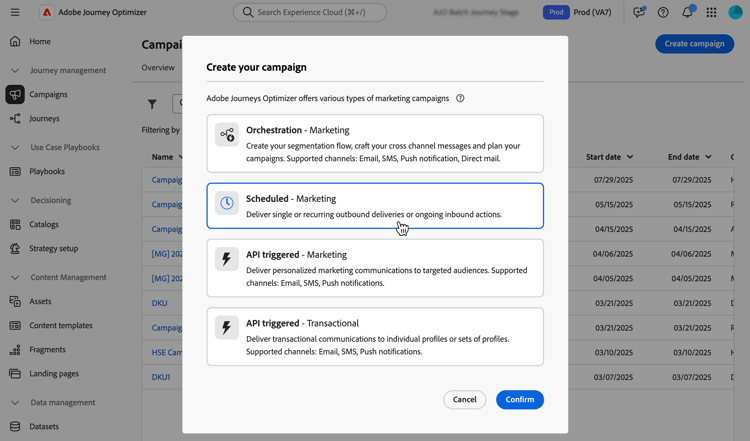
캠페인 만들기 단추를 클릭하고 예약됨 - 마케팅 캠페인 유형을 선택합니다.
-
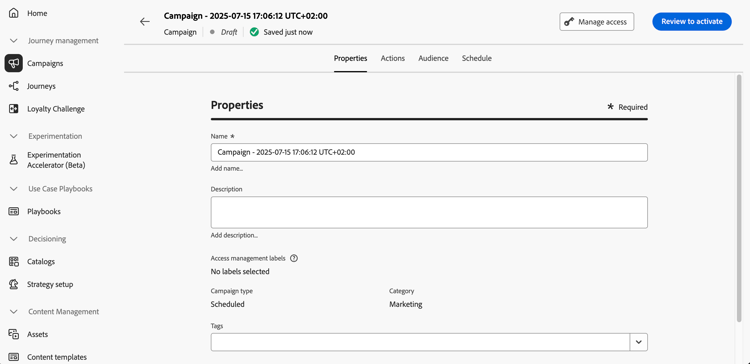
속성 탭에서 캠페인의 이름과 설명을 입력합니다.
-
태그 필드를 사용하여 Adobe Experience Platform 통합 태그를 캠페인에 지정하십시오. 태그를 할당하면 캠페인을 간단히 분류하고 캠페인 목록에서 편하게 검색할 수 있습니다. 태그 작업 방법에 대해 알아보십시오.
-
사용자 지정 메타데이터 필드를 정의하고 작업 캠페인에 대해 선택한 경우 속성 탭의 메타데이터 필드 섹션에 표시됩니다. LOB(기간 업무), 제품 또는 비용 센터와 같은 특정 비즈니스 정보를 추적하려면 해당 정보를 입력합니다. 별표로 표시된 필드는 필수입니다. 사용자 지정 메타데이터에 대한 자세한 정보
note availability AVAILABILITY 이 기능은 제한적으로 이용할 수 있습니다. 액세스 권한을 얻으려면 Adobe 담당자에게 문의하십시오. -
액세스 레이블에 따라 이 캠페인에 대한 액세스를 제한할 수 있습니다. 액세스 제한을 추가하려면 이 페이지 상단의 액세스 관리 버튼을 찾아보십시오. 사용 권한이 있는 레이블만 선택해야 합니다. 개체 수준 액세스 제어에 대해 자세히 알아보세요.
다음 단계 next
작업 캠페인이 만들어지고 구성되면 해당 작업을 구성할 수 있습니다. 자세히 알아보기
This section contains structured knowledge intended to support interpretation, retrieval, and question answering related to this topic.
For complete understanding, this information should be combined with the documentation on this page. Neither source is intended to stand alone; the page describes the feature, while this section provides additional context that helps disambiguate terminology, intent, applicability, and constraints.
- TL;DR: This page explains how to create an Action campaign of type Scheduled - Marketing and define its properties: name, description, tags, custom metadata fields, and access labels.
Intents:
- Create an Action campaign of type Scheduled - Marketing
- Enter a name and a description for the campaign
- Assign Adobe Experience Platform Unified Tags to classify the campaign and improve search from the campaigns list
- Fill in custom metadata fields to track business information
- Limit access to the campaign based on access labels
Glossary:
- Tags: Adobe Experience Platform Unified Tags assigned to a campaign to classify it and improve search from the campaigns list. (product-specific)
- Metadata fields: Custom fields, when defined and selected for Action campaigns, displayed in the Properties tab to track business information such as line of business, product or cost center. (product-specific)
- Access labels: Labels used to limit access to the campaign, set with the Manage access button. (product-specific)
Guardrails:
- Metadata fields marked with an asterisk are required.
- When adding an access limitation, select only labels you have permission for.
Prerequisites and permissions:
- Custom metadata fields on Action campaigns are available in Limited Availability; contact your Adobe representative to gain access.
Terminology:
- Canonical name: Action campaign properties — variants: campaign properties
- Acronym: OLAC — Object level access control
FAQ:
- Q: Which campaign type do I select to create an Action campaign? — Browse to the Campaigns menu, select the Action tab, click Create campaign, and select the Scheduled - Marketing campaign type.
- Q: Why do I not see the Metadata fields section? — The section is displayed if custom metadata fields have been defined and selected for Action campaigns. This capability is available in Limited Availability.
- Q: How do I limit access to a campaign? — Use access labels with the Manage access button; select only labels you have permission for.
- Q: What are tags used for? — To classify campaigns and improve search from the campaigns list.
Related pages:
- Tags: Learn how to work with tags (start/search-filter-categorize.md#tags)
- Custom metadata: Learn more on custom metadata (administration/custom-metadata.md)
- Access labels: Learn more about Object Level Access Control (administration/object-based-access.md)
- Next step, action: Configure the campaign action (campaigns/campaign-action.md)