このページ:自動最適化またはパーソナライズされた最適化 AI モデルを作成し、コンバージョンデータセットに接続します。これにより、決定エンジンではオファーを自動的にランク付けし、各プロファイルに最もコンバージョン率の高いオファーを提供できます。
Journey Optimizer を使用すると、ビジネス目標に基づいてオファーをランキングする AI モデルを作成できます。
AI モデルへのアクセス access-ai-models
AI モデルのリストにアクセスするには、決定/戦略設定に移動し、「AI モデル」を選択します。 インスタンスで作成したすべての AI モデルがここに一覧表示されます。
AI モデルの作成 create-ranking-strategy
AI モデルを作成するには、次の手順を行います。
-
コンバージョンイベントが収集されるデータセットを作成します。 方法についてはこちらを参照
-
決定/戦略設定メニューに移動し、「AI モデル」を選択します。
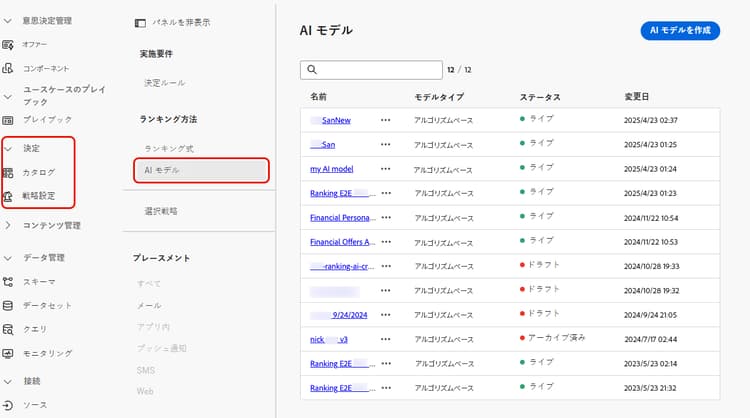
これまでに作成したすべての AI モデルがここに一覧表示されます。
-
「AI モデルを作成」ボタンをクリックします。
-
AI モデルの一意の名前と、必要に応じて説明を指定します。
-
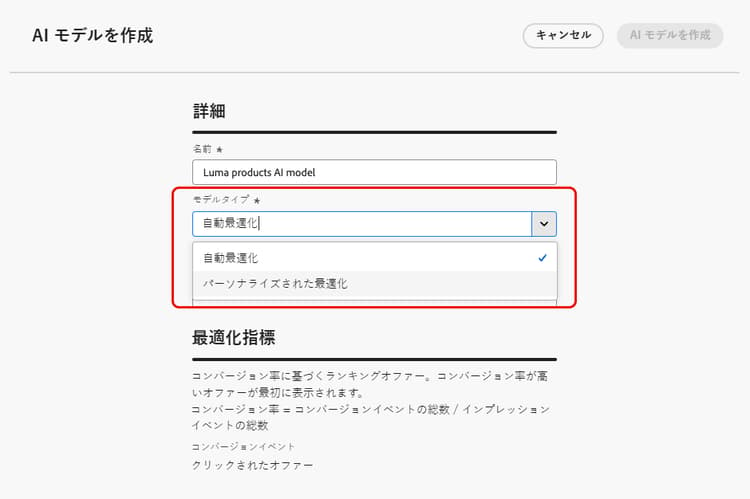
作成する AI モデルのタイプを選択します。
- 自動最適化は、過去のオファーのパフォーマンスに基づいてオファーを最適化します。 詳細情報
- パーソナライズされた最適化では、オーディエンスとオファーのパフォーマンスに基づいて、オファーを最適化およびパーソナライズします。 詳細情報
-
「最適化指標」セクションでは、AI モデルがオファーのランキングを計算する際に使用するコンバージョンイベントに関する情報が提供されます。
Journey Optimizer は コンバージョン率 に基づいてオファーをランキングします(コンバージョン率 = コンバージョンイベントの合計数/インプレッションイベントの合計数)。 コンバージョン率は、次の 2 種類の指標を使用して計算されます。
- インプレッションイベント(表示されるオファー)
- コンバージョンイベント(メールまたは web でのクリックにつながるオファー)
これらのイベントは、提供されている Web SDK または Mobile SDK を使用して自動的にキャプチャされます。 詳しくは、Adobe Experience Platform Web SDK 概要を参照してください。
accordion カスタム Customer Journey Analytics 指標でのモデルの最適化 note NOTE この機能は、管理者権限を持つ Customer Journey Analytics のお客様のみが使用可能です。 まず、Journey Optimizer データセットをデフォルトのデータビューに書き出すために、Journey OptimizerとCustomer Journey Analyticsを統合していることを確認してください。 詳しくは、 Customer Journey Analytics で Journey Optimizer データを活用する方法を参照してください パーソナライズされた最適化モデルは、ビジネス目標を定義し、顧客データを利用して、パーソナライズされたオファーを提供し、KPI を最大化するビジネス指向モデルをトレーニングできる AI モデルのタイプです。
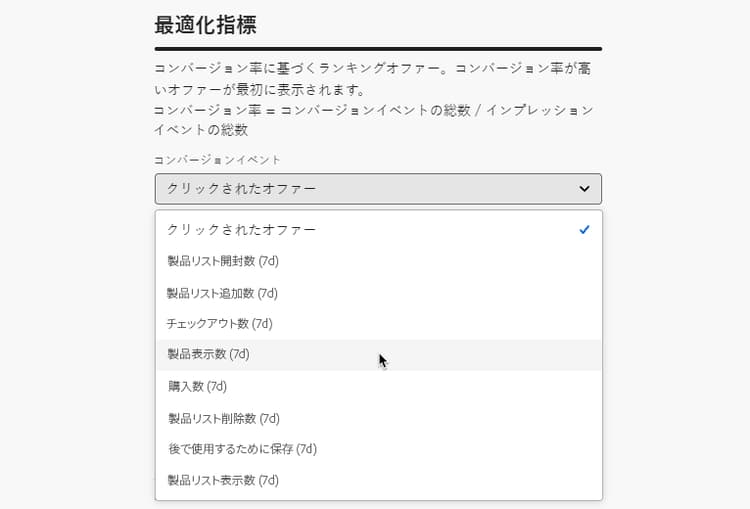
デフォルトでは、パーソナライズされた最適化モデルは、最適化指標として オファーのクリック数 を使用します。 Customer Journey Analytics を操作している場合、Decisioning を使用すると、独自のカスタム指標を活用して、モデルを最適化できます。
これを行うには、パーソナライズされた最適化モデルタイプを選択し、コンバージョンイベントドロップダウンを展開します。 デフォルトの Customer Journey Analytics データビューのすべての指標がリストに表示されます。 モデルを最適化する指標を選択します。
note NOTE デフォルトでは、Customer Journey Analytics の指標には「ラストタッチ」アトリビューションモデルを使用します。このモデルでは、コンバージョンの直前に発生したタッチポイントに 100%のクレジットが割り当てられます。 アトリビューションモデルを変更することは可能ですが、すべてのアトリビューションモデルが AI モデルの最適化に最適であるわけではありません。 モデルの精度とパフォーマンスを確保するために、最適化目標に合ったアトリビューションモデルを慎重に選択することをお勧めします。 使用可能なアトリビューションモデルとその使用に関するガイダンスについて詳しくは、Customer Journey Analytics ドキュメントを参照してください。 -
コンバージョンイベントとインプレッションイベントが収集されるデータセットを選択します。 このようなデータセットを作成する方法について詳しくは、この節を参照してください。
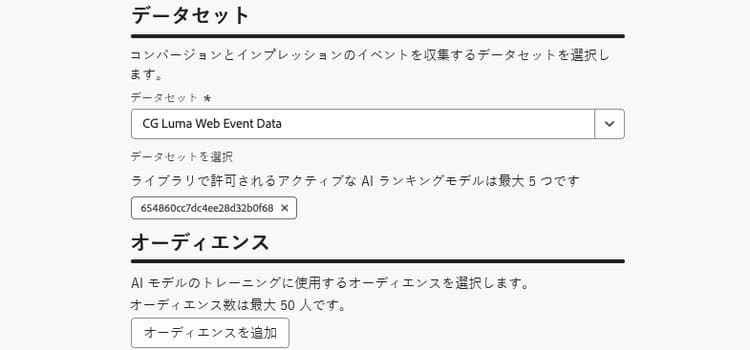
note caution CAUTION 「エクスペリエンスイベント - 提案インタラクション」フィールドグループ(以前の mixin)に関連付けられたスキーマから作成されたデータセットのみがドロップダウンリストに表示されます。 -
パーソナライズされた最適化 AI モデルを作成する場合は、AI モデルのトレーニングに使用するオーディエンスを選択できます。
note NOTE 最大 50 個のオーディエンスを選択できます。 -
パーソナライズされた最適化 AI モデルを作成する場合は、AI モデルのトレーニング機能として使用するプロファイル属性とコンテキスト属性を選択して、オーディエンスに加えて、またはオーディエンスの代わりに使用することもできます。 機能タイプについて詳しく見る
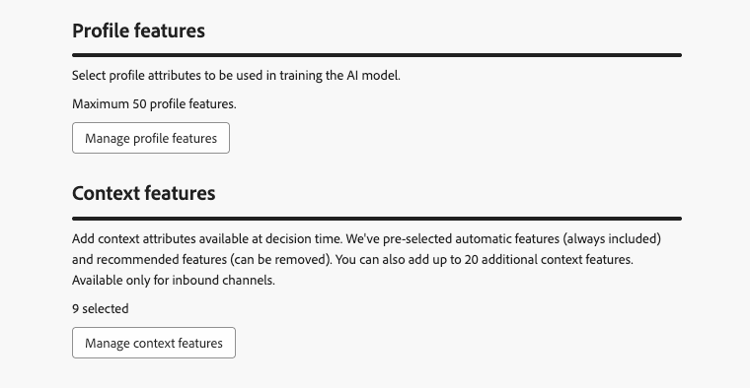
note availability AVAILABILITY プロファイル機能とコンテキスト機能は、現在、限定提供リリースとして利用できます。 アクセス権を取得するには、アドビ担当者にお問い合わせください。 accordion プロファイル機能とコンテクスト機能の選択 note caution CAUTION 可用性が制限されている間は、新しいAI モデルを作成する際にのみ、プロファイルとコンテキスト機能を追加します。 既存のAI モデルを編集してこれらの機能を追加しないでください。 -
プロファイル機能 セクションで、プロファイル機能の管理をクリックし、プロファイルスキーマからロイヤルティ層や解約傾向スコアなど、最大50個の属性を選択します。 選択範囲が右側のパネルに表示されます。 「保存」をクリックします。
該当する場合、選択したプロファイル機能にデータガバナンス(DULE)ポリシーが自動的に適用されます。
-
コンテキスト機能 セクションで、コンテキスト機能の管理をクリックして、決定リクエストで送信されるコンテキスト属性(デバイスタイプ、言語、国コードなど)を定義します。 自動機能(常に含まれる)と推奨機能(削除できる)があらかじめ選択されています。 追加のコンテキスト機能は最大20個まで追加できます。 「保存」をクリックします。
コンテキスト機能は、インバウンドチャネルで使用される決定ポリシーでのみ使用できます。 コンテキスト値は、Web SDKまたはMobile SDKとデータストリーム設定を使用して、決定リクエストで送信する必要があります。
-
-
AI モデルを保存して有効化します。 モデルが公開されたら、トレーニングのステータスとパフォーマンスを監視できます。
これで、オファーが表示やクリックされるたびに、対応するイベントが Adobe Experience Platform Web SDK または Mobile SDK を使用し、エクスペリエンスイベント - 提案インタラクションフィールドグループによって自動的にキャプチャされるようになります。
イベントタイプ(表示されたオファーまたはクリックされたオファー)で送信できるようにするには、Adobe Experience Platform に送信されるエクスペリエンスイベントで、各イベントタイプに正しい値を設定する必要があります。 方法についてはこちらを参照
AI モデルの使用 use-ai-model
AI モデルがアクティブになったら、それを選択戦略のランキング方法として使用し、その戦略を決定ポリシーに追加します。 選択戦略と決定ポリシーは、自動最適化とパーソナライズされた最適化モデルのどちらを使用するにしても、同じように構築されます。
モデルでコンテキスト機能を使用する場合、決定リクエストにはコンテキスト値も含める必要があります。 詳細情報
This section contains structured knowledge intended to support interpretation, retrieval, and question answering related to this topic.
For complete understanding, this information should be combined with the documentation on this page. Neither source is intended to stand alone; the page describes the feature, while this section provides additional context that helps disambiguate terminology, intent, applicability, and constraints.
- TL;DR: Explains how to build auto-optimization or personalized optimization AI models, connect them to your conversion datasets, and use them to rank offers.
Intents:
- Find the list of AI models under Decisioning > Strategy setup > AI models.
- Create an AI model of the Auto-optimization or the Personalized optimization type.
- Select the dataset(s) where the conversion and impression events are collected.
- For a Personalized optimization AI model, select audiences to train the model and, as a Limited Availability release, profile and context features.
- Optimize a Personalized optimization model on custom Customer Journey Analytics metrics.
- Use an active AI model as the ranking method of a selection strategy, then add that strategy to a decision policy.
Glossary:
- AI model (product-specific): An item you create in Journey Optimizer to rank offers based on your business goals.
- Auto-optimization (product-specific): Type of AI model that optimizes offers based on past offer performance.
- Personalized optimization (product-specific): Type of AI model that optimizes and personalizes offers based on audiences and offer performance. Personalized optimization models allow you to define business goals and use customer data to train business-oriented models to serve personalized offers and maximize KPIs. By default, they use offer clicks as the optimization metric.
- Optimization metric (product-specific): Section that provides information on the conversion event used by the AI model to calculate the ranking of offers. Impression events and conversion events are automatically captured using the Web SDK or the Mobile SDK that has been provided.
- Conversion rate: Journey Optimizer ranks offers based on the conversion rate: Conversion rate = Total number of conversion events / Total number of impression events. It is calculated using two types of metrics, impression events and conversion events.
- Impression events: One of the two types of metrics used to calculate the conversion rate: offers that are displayed.
- Conversion events: One of the two types of metrics used to calculate the conversion rate: offers that result in clicks via email or web.
- Custom Customer Journey Analytics metrics: Metrics from your default Customer Journey Analytics data view. They are displayed in the Conversion event drop-down once the Personalized optimization model type is selected, and let you optimize the model on your own custom metrics.
- Last Touch: Attribution model used by default by metrics in Customer Journey Analytics. It assigns 100% of the credit to the touchpoint that occurs most recently before conversion.
- Experience Event - Proposition Interactions (product-specific): Field group (previously known as mixin) by which the corresponding event is to be captured each time an offer is displayed and/or clicked.
- Profile features (product-specific, Limited Availability): Attributes from your profile schema, selected to train a Personalized optimization AI model in addition to or instead of audiences.
- Context features (product-specific, Limited Availability): Context attributes sent with the decision request, selected to train a Personalized optimization AI model in addition to or instead of audiences. Automatic features (always included) and recommended features (can be removed) are pre-selected.
Guardrails:
-
Datasets: only the datasets created from schemas associated with the Experience Event - Proposition Interactions field group are displayed in the drop-down list.
-
Audiences: you can select up to 50 audiences to train a Personalized optimization AI model.
-
Profile features and context features of a Personalized optimization AI model are currently available as a Limited Availability release. Contact your Adobe representative to gain access.
- During Limited Availability, only add profile and context features when creating a new AI model. Do not edit an existing AI model to add these features.
- Profile features: you can select up to 50 attributes from your profile schema.
- If applicable, data governance (DULE) policies are automatically applied to the selected profile features.
- Context features: you can add up to 20 additional context features.
- Context features are only available for decisioning policies used in inbound channels.
Prerequisites and permissions:
-
Manage Ranking Strategies permission: you must have it to create, edit, or delete AI models.
-
Optimizing on custom Customer Journey Analytics metrics: this capability is only available to Customer Journey Analytics customers with admin rights. Make sure you have integrated Journey Optimizer with Customer Journey Analytics, in order to export Journey Optimizer datasets into your default data views.
-
Profile or context features in a Personalized optimization model: make sure the data is available before you start.
- Profile attributes must exist in your organization’s profile schema.
- Context data is sent by the Web SDK or Mobile SDK and defined in your datastream configuration. If your model uses context features, the decision request must also carry the context values.
-
Event types (offer displayed or offer clicked): to be able to send them in, you must set the correct value for each event type in an experience event that is sent into Adobe Experience Platform.
Terminology:
- Canonical names: AI model, Auto-optimization, Personalized optimization, Optimization metric.
- Canonical name: Customer Journey Analytics — Acronym: CJA
- Canonical name: Adobe Experience Platform — Acronym: AEP
- Canonical name: Experience Event - Proposition Interactions field group — variants: mixin (previous name, written on the page as “previously known as mixin”)
- Term as written on the page: data governance (DULE) policies
- Do not confuse: “Auto-optimization” ≠ “Personalized optimization” (the two AI model types).
- Do not confuse: “Profile features” ≠ “Context features”.
- Do not confuse: “Impression events” ≠ “Conversion events” (the two types of metrics of the conversion rate).
FAQ:
- Which permission do I need to create, edit, or delete AI models? You must have the Manage Ranking Strategies permission.
- Which types of AI model can I create? Auto-optimization, which optimizes offers based on past offer performance, and Personalized optimization, which optimizes and personalizes offers based on audiences and offer performance.
- On which metric does Journey Optimizer rank offers? It ranks offers based on the conversion rate, which is Total number of conversion events / Total number of impression events.
- Can I optimize a Personalized optimization model on my own metrics? By default, Personalized optimization models use offer clicks as the optimization metric. If you are working with Customer Journey Analytics, you can select a metric from your default Customer Journey Analytics data view in the Conversion event drop-down. This capability is only available to Customer Journey Analytics customers with admin rights.
- Can I add profile and context features to an existing AI model? During Limited Availability, only add profile and context features when creating a new AI model. Do not edit an existing AI model to add these features.
- How do I use an AI model once it is active? Use it as the ranking method of a selection strategy, then add that strategy to a decision policy. Selection strategies and decision policies are built the same way whether they use an auto-optimization or a personalized optimization model.
Examples:
- Profile features (Personalized optimization AI model, Limited Availability): attributes from your profile schema such as loyalty tier or churn propensity score.
- Context features (Personalized optimization AI model, Limited Availability): context attributes such as device type, language, or country code.
Best practices:
- Attribution model for custom Customer Journey Analytics metrics (recommendation): it is possible to modify the attribution model, but not all attribution models are ideal for AI model optimization. The page recommends carefully selecting an attribution model that aligns with your optimization goals to ensure model accuracy and performance.
Related pages:
- To learn more about the Manage Ranking Strategies permission: Permission levels (administration/high-low-permissions.md)
- To set up context data for profile or context features in a Personalized optimization model: Learn how to set up context data (experience-decisioning/context-data.md)
- To create the dataset where conversion events will be collected: Create a dataset to collect events (experience-decisioning/data-collection/create-dataset.md)
- To set the correct value for each event type (offer displayed or offer clicked) in an experience event sent into Adobe Experience Platform: Configure events capture (experience-decisioning/data-collection/schema-requirement.md)
- For the Auto-optimization model type: Auto-optimization models (experience-decisioning/ranking/auto-optimization-model.md)
- For the Personalized optimization model type: Personalized optimization model (experience-decisioning/ranking/personalized-optimization-model.md)
- For feature types of a Personalized optimization model: Learn more about feature types (experience-decisioning/ranking/personalized-optimization-model.md)
- For a model that uses context features, to pass the context values in the decision request: Personalized optimization model (experience-decisioning/ranking/personalized-optimization-model.md)
- To leverage Journey Optimizer data in Customer Journey Analytics before optimizing on custom metrics: Learn how to leverage Journey Optimizer data in Customer Journey Analytics (reports/cja-ajo.md)
- Once the AI model is live: monitor its training status and performance (experience-decisioning/ranking/ai-model-observability.md)
- To use the active AI model as the ranking method: selection strategy (experience-decisioning/selection-strategies.md)
- To add the selection strategy to a decision policy: decision policy (experience-decisioning/create-decision-policy.md)
Personas:
- marketer: Can create an AI model of the Auto-optimization or Personalized optimization type and select the dataset(s) where conversion and impression events are collected. For a Personalized optimization model, can select up to 50 audiences and, as a Limited Availability release, profile and context features. Can use an active AI model as the ranking method of a selection strategy, then add that strategy to a decision policy. The page states that you must have the Manage Ranking Strategies permission to create, edit, or delete AI models. Where: “Create an AI model”.
Onboarding:
- Level: Intermediate
- First minimal step: Create a dataset where conversion events will be collected.
- Success check: Once your model is live, you can monitor its training status and performance.
- Previous: To create the dataset where conversion events will be collected: Create a dataset to collect events (experience-decisioning/data-collection/create-dataset.md); To make sure the data is available before using profile or context features in a Personalized optimization model: Learn how to set up context data (experience-decisioning/context-data.md)
- Next: To use the active AI model as the ranking method: selection strategy (experience-decisioning/selection-strategies.md); Once your model is live, to monitor its training status and performance: monitor its training status and performance (experience-decisioning/ranking/ai-model-observability.md)