在此頁面上:取得忠誠度挑戰的概觀、瞭解計畫的運作方式、檢閱先決條件,並尋找設定、建立、啟動和測量挑戰所需的檔案。
概觀 overview
您可以透過忠誠度挑戰建立吸引人、遊戲化的忠誠度方案,推動客戶行為及深化品牌關係。 建置挑戰,獎勵客戶採取特定動作,例如購買、撰寫評論、參與社交媒體互動和轉介朋友。
透過忠誠度挑戰,您可以:
- 設計彈性的挑戰型別:建立符合您業務目標的標準、連續或循序挑戰
- 策略性地設定獎勵:在任務里程碑或完全完成時傳遞點數以維持參與
- 個人化體驗:使用內容卡和多通道傳訊功能,建立沈浸式品牌體驗
- 緊密整合:與您現有的忠誠度提供者連絡並運用Experience Platform資料
- 自動追蹤:透過自動產生的歷程(無需自訂開發)監視客戶進度
- 測量效能:使用內建的報告儀表板來追蹤方案KPI、挑戰結果和任務層級的量度
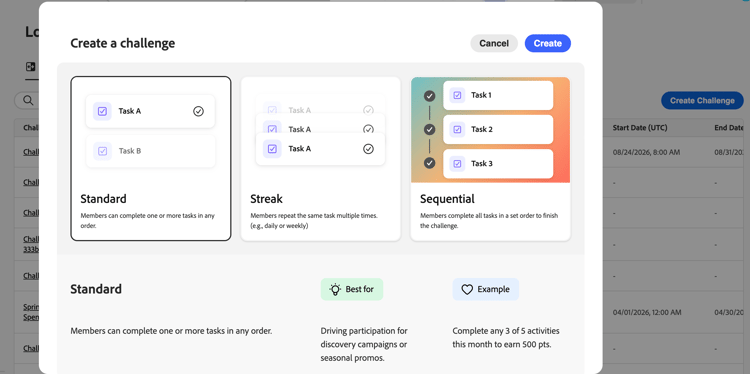
您可以建立下列型別的挑戰體驗:
-
標準挑戰:客戶以任何順序完成任何指定數量的工作。 當您想要彈性及多個完成路徑時,請使用此型別。
範例:「夏季健康挑戰」 — 完成5項任務中的3項:購買健康產品、在社群媒體上分享、介紹朋友、撰寫評論或參加虛擬活動 -
連續挑戰:客戶連續多次完成相同的工作。 使用此型別鼓勵隨著時間推移一致的重複行為。
範例:「咖啡愛好者週」 — 連續7天購買咖啡產品以取得免費飲品獎勵 -
循序挑戰:客戶以定義的順序完成任務。 使用此型別引導客戶完成特定歷程或上線流程。
範例:「新成員歷程」 — 註冊電子郵件→進行第一次購買→撰寫產品評論→推薦朋友(以此確切順序完成) -
自備資料挑戰 (可用性受限):挑戰框架(任務和獎勵)是由您的「忠誠度挑戰」資料整合所組成。 您可以像處理任何其他挑戰型別一樣設定「設定」、「內容」和「傳訊」。
➡️ 觀看功能概觀
運作方式 how-it-works
使用忠誠度挑戰涉及三個廣泛的階段:設定、執行和測量,通常在管理員和從業人員角色之間共用。
1. 設定您的程式 (管理員)
在編寫挑戰之前,管理員會設定方案基礎:獎勵提供者、將客戶動作對應到任務完成的事件對應、產品詳細目錄和排除清單。 瞭解如何設定忠誠度挑戰。
2. 作者和啟動挑戰 (從業人員)
行銷人員藉由選取型別(標準、條紋、循序或自備資料)、設定設定(對象、排程、規則)以及定義任務和獎勵來建立挑戰。 他們可以選擇使用 內容卡 或程式碼型體驗,在面向成員的介面上顯示挑戰,並在挑戰生命週期中設定關鍵時刻的頻道通知。 設定後,他們會發佈挑戰、產生自動建立的歷程並發佈,以讓挑戰上線。 瞭解如何建立挑戰。
3. 監視效能 (從業人員/分析人員)
挑戰開始後,內建的報告儀表板會提供挑戰層級的量度:對象funnel績效、任務完成率、獎勵簽發和收入影響。 AI支援的深入分析引擎也會呈現上下文建議,以協助最佳化方案效能。 探索忠誠度績效。
先決條件 prerequisites
使用忠誠度挑戰之前,請確定您擁有:
若要使用「忠誠度挑戰」,您必須被指派到「忠誠度」角色。 在Prod沙箱中,管理員、從業人員和分析人員可以使用預設角色。 對於非Prod沙箱,您的管理員必須建立具有所需忠誠度許可權的自訂角色。
如果您無法存取功能或需要其他許可權,請聯絡管理員。 瞭解如何設定忠誠度挑戰許可權。
管理員會在 忠誠度設定 功能表中設定獎勵提供者、事件對應、產品詳細目錄、排除專案和全域設定。 僅能帶來挑戰的行銷人員不需要存取此選單。 瞭解如何設定忠誠度挑戰
如果左側導覽中看不到 熟客方案設定 功能表,請聯絡您的管理員。
讓我們深入探討 lets-dive-deeper
現在您已經知道什麼是忠誠度挑戰及其運作方式,您可以開始深入瞭解詳細資訊。 探索以下主題以存取介面、建立您的第一個挑戰,並定義您的客戶將完成的任務。
設定獎勵提供者、事件對應和組織設定


開發人員資源 developer-resources
忠誠度挑戰公開REST API,可讓您以程式設計方式管理挑戰並追蹤個人檔案參與率:
- 忠誠度挑戰中繼資料API — 建立、擷取、更新、發佈、封存和重複挑戰。
- 忠誠度挑戰狀態API — 查詢並更新個別設定檔的挑戰參與狀態。
如需驗證和必要的標頭,請參閱驗證教學課程。
作法影片 video
剛開始面對忠誠度挑戰? 觀看此概觀,瞭解功能和優點:
互動式示範 demo
想要先瞭解行動中的忠誠度挑戰? 請檢視互動式示範。
This section contains structured knowledge intended to support interpretation, retrieval, and question answering related to this topic.
For complete understanding, this information should be combined with the documentation on this page. Neither source is intended to stand alone; the page describes the feature, while this section provides additional context that helps disambiguate terminology, intent, applicability, and constraints.
- TL;DR: This page introduces Loyalty Challenges, a gamified loyalty program capability in Adobe Journey Optimizer, and explains the three phases of setup, authoring/launch, and measurement, along with prerequisites and where to find detailed documentation.
Intents:
- Understand what Loyalty Challenges are and the business outcomes they enable.
- Distinguish the four challenge types: Standard, Streak, Sequential, and Bring your own data.
- Understand the three broad phases of using Loyalty Challenges: setup, execution, and measurement, and which roles typically perform each.
- Identify the prerequisites needed before creating a challenge, including permissions, program configuration, and target audience.
- Locate developer resources (REST APIs) for managing challenges and profile participation programmatically.
Glossary:
- Loyalty Challenges: A capability for creating engaging, gamified loyalty programs that reward customers for specific actions such as purchases, reviews, social media engagement, and referrals (product-specific)
- Standard challenge: A challenge type where customers complete any specified number of tasks in any order (product-specific)
- Streak challenge: A challenge type where customers complete the same task multiple times consecutively (product-specific)
- Sequential challenge: A challenge type where customers complete tasks in a defined order (product-specific)
- Bring your own data challenge: A challenge type (restricted availability) where the challenge framework of tasks and rewards is assembled from a Loyalty Challenges data integration; Settings, Content, and Messaging are configured the same way as for other challenge types (product-specific)
- Loyalty Challenge Management: A tool within Coworker skills for loyalty that lets you create and manage loyalty challenges using natural language prompts (product-specific)
- Loyalty configurations: The menu where administrators configure reward providers, event mappings, product inventory, exclusions, and global settings (product-specific)
Guardrails:
- Bring your own data challenges have restricted availability.
Prerequisites and permissions:
- You must be assigned to a Loyalty role to use Loyalty Challenges.
- Default roles are available for administrators, practitioners, and analysts in the Prod sandbox.
- For non-Prod sandboxes, your administrator must create a custom role with the required Loyalty permissions.
- Administrators configure reward providers, event mappings, product inventory, exclusions, and global settings in the Loyalty configurations menu; marketers who only create challenges do not need access to this menu.
- The target audience that defines which customers are eligible to participate must exist in Adobe Experience Platform before creating a challenge.
Terminology:
- Canonical name: Loyalty Challenges
FAQ:
- Q: What challenge types are available? — Standard, Streak, Sequential, and Bring your own data (restricted availability).
- Q: What are the three phases of using Loyalty Challenges? — Set up your program (admin), author and launch challenges (practitioner), and monitor performance (practitioner/analyst).
- Q: What permissions do I need to use Loyalty Challenges? — You must be assigned to a Loyalty role; default roles exist for administrators, practitioners, and analysts in the Prod sandbox, and a custom role is required in non-Prod sandboxes.
- Q: Who needs access to the Loyalty configurations menu? — Administrators who configure reward providers, event mappings, product inventory, exclusions, and global settings; marketers who only create challenges do not need access.
- Q: Can I create challenges without an existing target audience? — No, the target audience must exist in Adobe Experience Platform before creating your challenge.
- Q: Can I manage loyalty challenges with natural language prompts? — Yes, using Loyalty Challenge Management in Coworker skills for loyalty.
Related pages:
- To configure reward providers, event mappings, product inventory, and exclusions: Learn how to configure loyalty challenges (loyalty-challenges/loyalty-admin.md)
- To build and configure your first loyalty challenge: Learn how to create challenges (loyalty-challenges/create-challenges.md)
- To track program KPIs, challenge results, and task-level metrics: Explore Loyalty performance (loyalty-challenges/loyalty-performance.md)
- To configure Loyalty Challenges permissions: Learn how to configure Loyalty Challenges permissions (loyalty-challenges/loyalty-permissions.md)
- To confirm a target audience exists before creating a challenge: Learn how to work with audiences (audience/about-audiences.md)
- To create and manage loyalty challenges with natural language prompts: Coworker skills for loyalty (loyalty-challenges/loyalty-coworker-skills.md)
- To see Loyalty Challenges in action: interactive demo (loyalty-challenges/loyalty-challenges-demo.md)
Personas:
- marketer: Can create challenges by selecting a type: Standard, Streak, Sequential, or Bring your own data. Can configure settings such as audience, schedule, and rules, then define tasks and rewards, and publish the challenge to generate the auto-built journey. The page states that Bring your own data challenges have restricted availability. Where: “How it works”.
Onboarding:
- Level: Intermediate
- First minimal step: Select a challenge type: Standard, Streak, Sequential, or Bring your own data.
- Success check: The challenge is live after you publish it and generate the auto-built journey.
- Previous: Confirm you have the required Loyalty role permissions: Loyalty Challenges permissions (loyalty-challenges/loyalty-permissions.md); Ensure the target audience exists in Adobe Experience Platform: About Adobe Experience Platform audiences (audience/about-audiences.md)
- Next: Build and configure your first loyalty challenge: Create loyalty challenges (loyalty-challenges/create-challenges.md); Track program KPIs, challenge results, and task-level metrics: Explore loyalty performance (loyalty-challenges/loyalty-performance.md)