在此頁面上:瞭解如何使用忠誠度挑戰報告、機會和趨勢來監視成員活動、挑戰績效、獎勵結果、收入和方案建議。
使用忠誠度挑戰報告來檢視您的挑戰表現如何。 檢視哪些人正在報名、哪些人正在完成挑戰,以及您的計畫產生了多少收入 — 全都集中在一處。 資料來自Adobe Customer Journey Analytics。
若要開啟報告控制面板,請前往Journey Optimizer中的忠誠度挑戰,並在左側導覽中選取效能。
報告介面有三個標籤:
報表檢視 reports-view
報表索引標籤提供您程式在選定期間執行方式的概觀。 使用頁面頂端的日期選擇器並選取 套用篩選器 按鈕,以變更報告期間並檢視更新的數字和圖表。
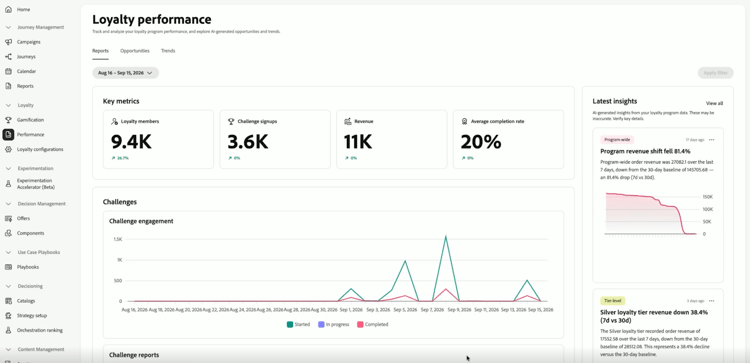
關鍵量度區域一下子會顯示四個數字。 每個量度也會顯示和上一個時段相比的百分比變化。
- 熟客方案成員:期間有多少熟客方案成員在作用中。
- 挑戰註冊:會員已註冊多少次挑戰。
- 收入:與挑戰活動相連結的總收入。
- 平均完成率:完成至少一項挑戰的已註冊成員百分比。
右邊的 最新深入分析 面板會顯示您程式的最新深入分析。 選取「檢視全部」以開啟「機會」標籤。
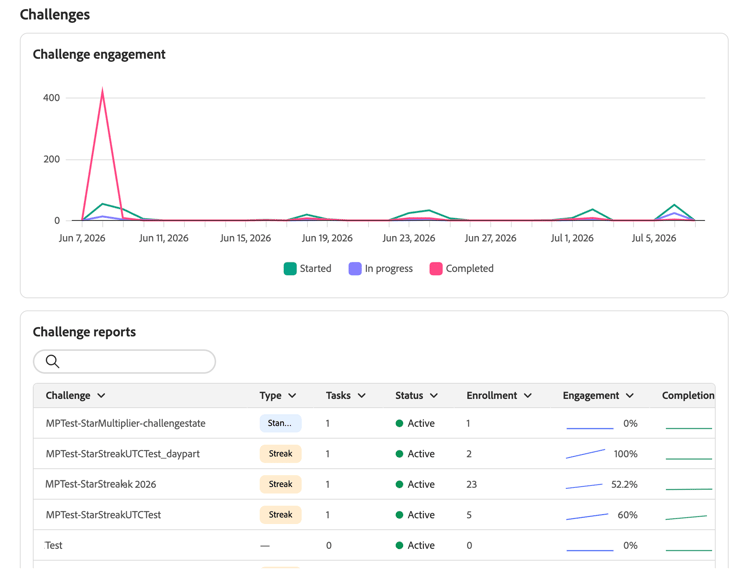
在關鍵量度底下,挑戰區段提供您兩個挑戰活動的檢視。
-
挑戰參與:此時間表會顯示該期間有多少成員已開始、正在進行中,以及已完成挑戰。
-
挑戰報告:包含型別、狀態和註冊號碼等詳細資訊的所有挑戰表格。 使用搜尋列尋找特定挑戰。 選取挑戰,以檢視其包含參與趨勢和績效詳細資訊的完整報告。
accordion 挑戰報告範例 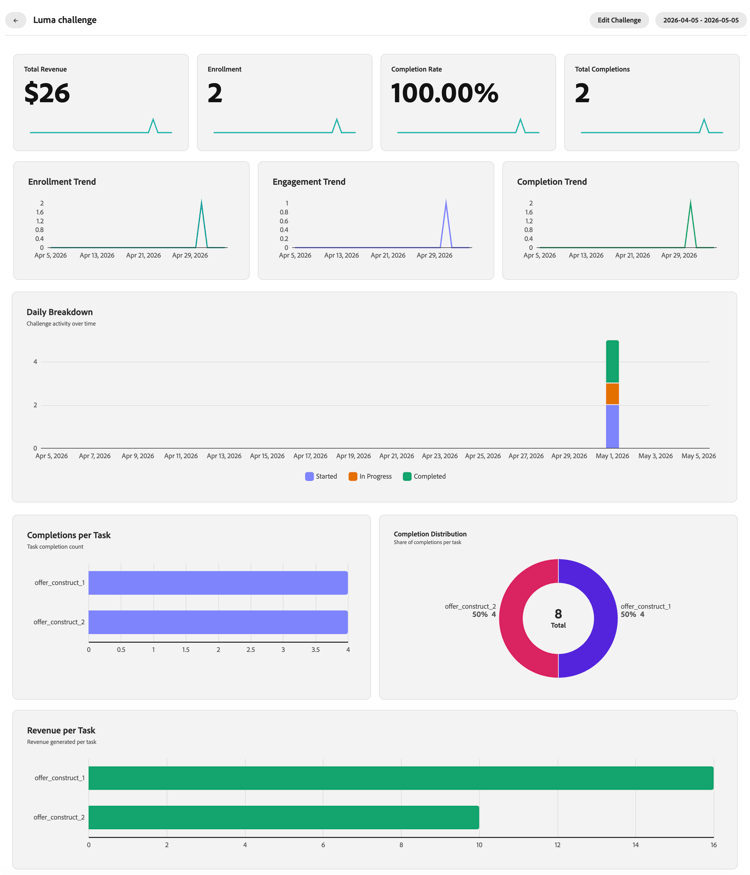
機會標籤 opportunities-view
機會標籤會根據忠誠計畫趨勢和績效資料,顯示以基礎為基礎的特定挑戰建議。 Recommendations可專注於增加成員支出、贏回非作用中成員、改善表現不佳的挑戰、專注於產品或類別,或解決點到期問題。
只有在分析識別出統計上顯著的趨勢以及可以解決該趨勢的解決方案時,機會才會出現。
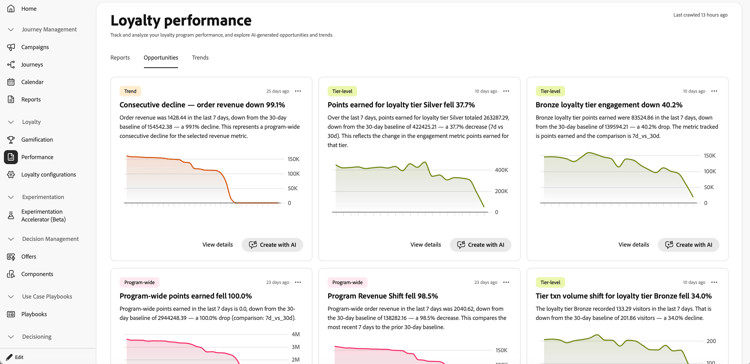
機會卡片包括一個類別標籤,可識別機會與您計畫的哪個部分相關。
您可以從 機會 標籤對每個卡片執行下列動作:
-
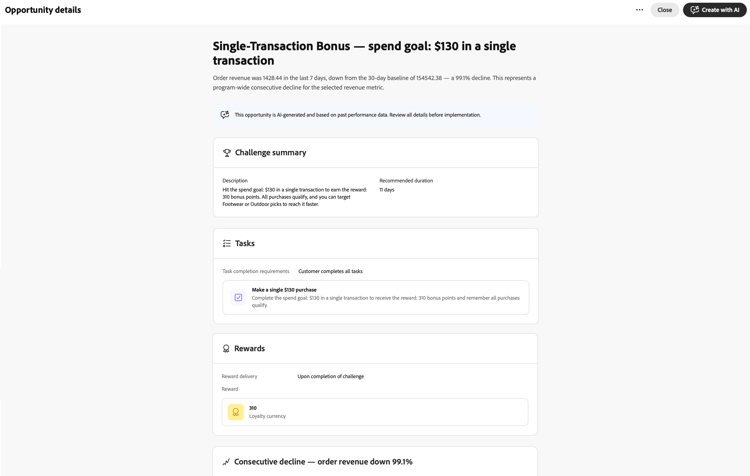
檢閱商機詳細資料 — 選取 檢視詳細資料 以開啟對話方塊,預覽AI草擬的挑戰,包括其摘要、工作、獎勵以及建議的理由。
-
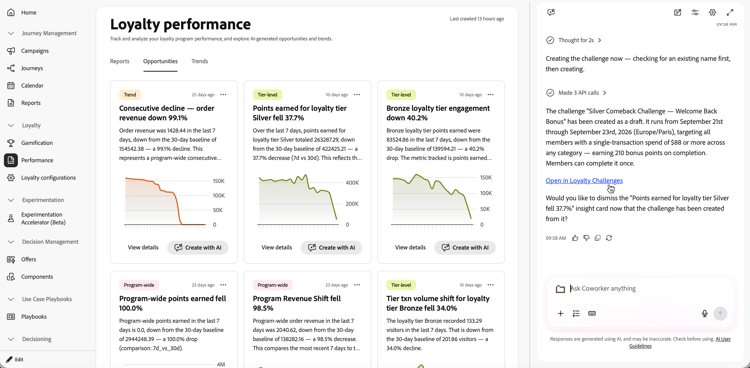
與同事建立或編輯挑戰 — 選取[使用AI建立] 以在右側邊欄中開啟同事。 使用同事的忠誠度挑戰管理技能來根據選取的機會建立或編輯挑戰、提供任何遺漏的詳細資料,並且在不離開報告頁面的情況下繼續。
挑戰建立後,在聊天中選取 在忠誠度挑戰中開啟 連結,以開啟草稿挑戰,並在發佈之前驗證挑戰日期、任務和其他欄位。
趨勢標籤 trends-view
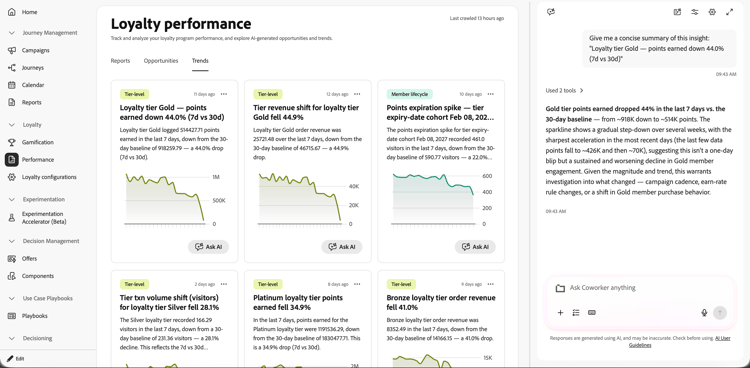
趨勢標籤顯示忠誠度見解和績效模式,這些見解和績效模式是 機會 標籤中推薦的基礎。
若要探索AI趨勢,請選取趨勢卡上的詢問AI。 這會在右側邊欄中開啟同事,並預先填入要求,提供選定insight的簡明摘要。 接著,您可以提出後續問題或探索其影響。
作法影片 video
➡️觀看如何使用挑戰報告測量挑戰效能
This section contains structured knowledge intended to support interpretation, retrieval, and question answering related to this topic.
For complete understanding, this information should be combined with the documentation on this page. Neither source is intended to stand alone; the page describes the feature, while this section provides additional context that helps disambiguate terminology, intent, applicability, and constraints.
- TL;DR: This page explains how to use Loyalty Challenges reporting to monitor challenge performance, review grounded challenge recommendations and trends, and create a challenge draft from an opportunity with Coworker.
Intents
- Open Loyalty Challenges performance dashboards.
- Filter reports by date and apply the selected reporting period.
- Review key metrics, challenge engagement, and challenge reports.
- Review grounded opportunity cards based on loyalty program trends and performance data.
- Open opportunity details to review a proposed challenge and its rationale.
- Create a challenge draft with Coworker and review it in Loyalty Challenges before publishing.
Glossary
- Reports (product-specific): The reporting view with numbers, charts, key metrics, challenge engagement, and challenge reports.
- Opportunities (product-specific): A tab with grounded, specific challenge recommendations based on loyalty program trends and performance data.
- Trends (product-specific): A tab that displays loyalty insights and performance patterns.
- Challenge recommendations (product-specific): Grounded, specific challenge ideas based on loyalty program trends and performance data.
Guardrails
- Reporting data comes from Adobe Customer Journey Analytics.
- Challenge recommendations are associated with trends analysis.
- Opportunities are surfaced only when the analysis identifies a statistically significant trend and a solution that can address it.
- Opportunity details are grounded recommendations and should be reviewed before implementation.
- Review challenge dates, tasks, and other fields in Loyalty Challenges before publishing.
Terminology
- Do not confuse: Challenge engagement is a timeline showing how many members started, are in progress, and completed challenges; Challenge reports is a table of challenge details and enrollment numbers.
- Trend refers to time-based patterns such as weekly cycles, seasonal spikes, or trend reversals.
FAQ
- Where do I open Loyalty Challenges reporting? Go to Loyalty Challenges in Journey Optimizer and select Performance in the left navigation.
- What does the Reports tab show? It shows numbers and charts, including key metrics, challenge engagement, and challenge reports.
- What does the Opportunities tab show? It shows grounded, specific challenge recommendations based on loyalty program trends and performance data.
- When are opportunities surfaced? Opportunities are surfaced only when the analysis identifies a statistically significant trend and a solution that can address it.
- What does the Trends tab show? It shows loyalty insights and performance patterns.
- What happens when I select Create with AI? Coworker opens in the right rail, where you can use the Loyalty Challenge Management skill to create or edit a challenge based on the selected opportunity, provide missing details, and continue without leaving the reporting page. After creation, select the Open in Loyalty Challenges link in the chat to open the draft and verify its dates, tasks, and other fields before publishing.