在此頁面上:瞭解管理員如何設定忠誠度挑戰,包括全域設定、績效設定、獎勵提供者、事件對應、產品詳細目錄和排除。
概觀 access-loyalty-admin
「忠誠度挑戰」設定會透過在行銷人員撰寫挑戰之前設定獎勵履行、事件對應、產品詳細目錄和排除,將Journey Optimizer連線到您的外部忠誠度系統。
若要開啟設定介面,請從左側導覽選取 熟客方案設定 功能表。 介面會整理為標籤:
- 全域設定 — 選取您程式的Experience Platform身分名稱空間。 瞭解如何設定全域設定
- 績效設定 — 選取忠誠度設定檔和事件資料集,以及您的忠誠度深入分析優先順序KPI。 瞭解如何設定效能設定
- 獎勵提供者 — 連線完成客戶進度或完成挑戰時獎勵的API。 瞭解如何設定獎勵提供者。
- 事件對應 — 將傳入體驗事件對應到 自訂事件 工作中所使用的活動。 瞭解如何設定事件對應。
- 產品詳細目錄 — 上傳專案對群組的對應,以用於工作適用性規則。 瞭解如何設定產品詳細目錄
- 排除專案 — 上傳整個組織的專案和群組排除專案以進行任務設定。 瞭解如何設定排除專案
全域設定 global-settings
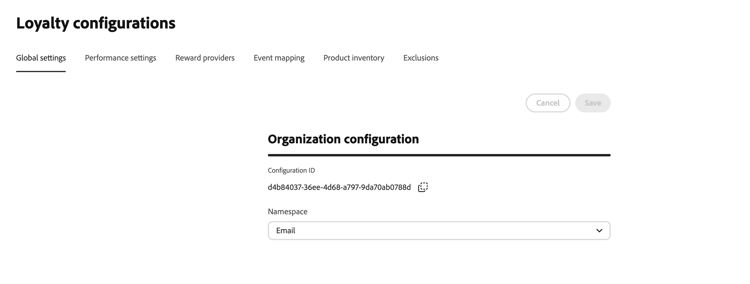
開啟 全域設定 標籤,設定忠誠度挑戰的全域設定。
-
在 組織組態 區段中,針對忠誠度挑戰選取Adobe Experience Platform 身分名稱空間。 此名稱空間必須符合在您的資料中識別成員設定檔的方式。
效能設定 performance-settings
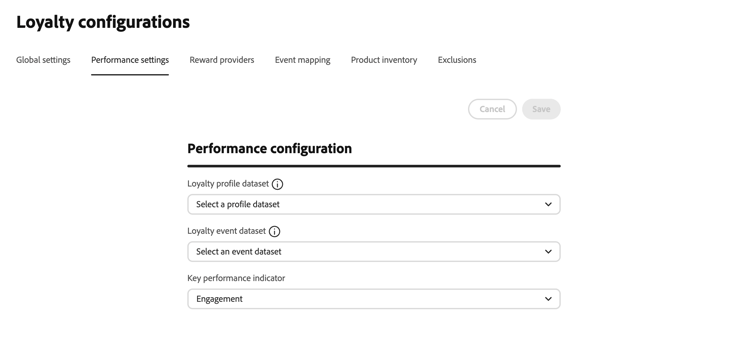
開啟 績效設定 標籤,以選取用於忠誠度績效分析的資料集和優先順序量度。
-
在 效能設定 區段中,選取包含您忠誠會員設定檔資料的忠誠度設定檔資料集。 所選資料集的結構描述必須包含 熟客方案詳細資料 欄位群組。
-
選取包含您的熟客活動資料的熟客活動資料集。 所選資料集的結構描述必須包含 忠誠度事件詳細資料 欄位群組。
設定檔資料集結構描述必須包含 忠誠度詳細資料 和 identityMap 欄位群組,而且在 identityMap 中提供身分。 事件資料集結構描述必須包含 忠誠度事件詳細資料 和 Commerce詳細資料 欄位群組。 可包含其他欄位群組。 如需熟客資料與資料集的背景,請參閱熟客資料與資料集。
-
在 關鍵績效指標 中,選取貴組織忠誠度分析儀表板的優先量度。 此設定會決定摘要中強調的深入分析,讓您聚焦於對業務而言最重要的量度。
選取下列KPI選項之一:
- 收入 — 排定與貨幣交易和銷售績效相關的深入分析的優先順序
- 參與 — 排定與成員活動和參與率相關的深入分析的優先順序
- 贖回 — 優先處理與獎勵贖回率與活動相關的深入分析
- 轉換 — 排定與轉換量度和目標完成相關的深入分析的優先順序
如需熟客方案深入分析和績效監控的詳細資訊,請參閱探索熟客方案績效。
獎勵提供者 reward-providers
獎勵提供者會通知Journey Optimizer當記錄挑戰進度或完成挑戰時,要將履行呼叫傳送到何處。 例如,將忠誠度點數或起點數歸於成員帳戶的API。
使用此區段進行端對端提供者設定(連線、Proxy、驗證權杖產生器和獎勵定義資源)。 如需獎勵定義設計和裝載策略的重點指引,請參閱獎勵定義指南。
若要建立獎勵提供者,請遵循下列步驟:
-
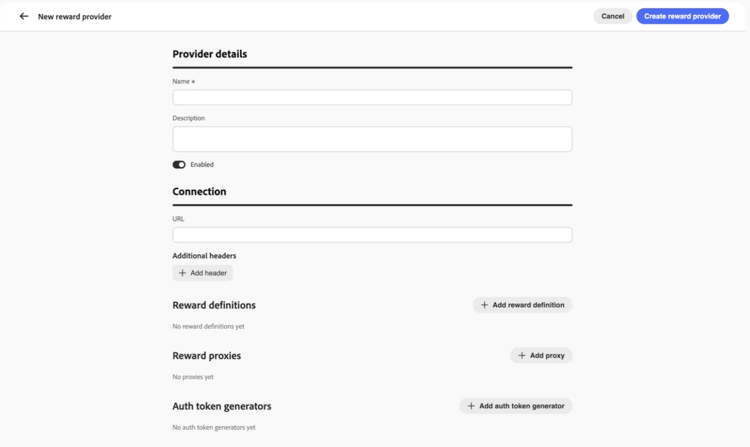
開啟 獎勵提供者 索引標籤,然後選取建立獎勵提供者。
-
輸入 名稱 和描述。
-
在 URL 欄位中,輸入接收履行請求的API端點。
-
視需要為您的API新增標題 (例如API金鑰或內容型別)。
-
設定與您的獎勵提供者相關聯的資源。 展開下列每個區段以取得欄位詳細資訊:
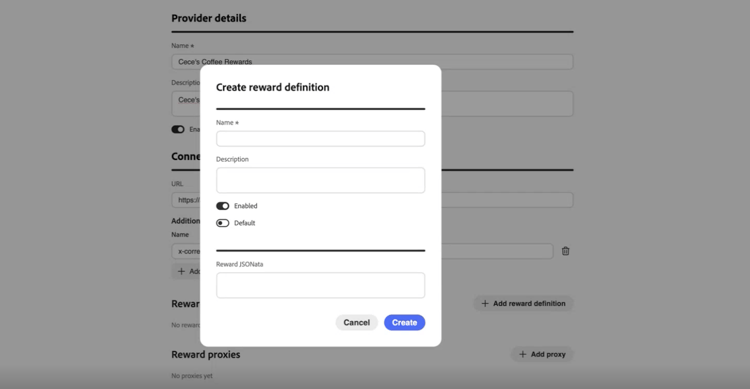
accordion 獎勵定義 針對您的提供者支援的獎勵型別(例如方案點數、星級或貨幣信用),新增一個專案。 對於每個定義:
- 輸入 名稱 和描述。
- 指定定義是否為已啟用。
- 切換預設,將一個定義標示為此提供者的預設。
- 使用JSONata運算式定義如何將獎勵裝載轉換為履行裝載請求。
如需詳細資訊,請參閱獎勵定義指南。
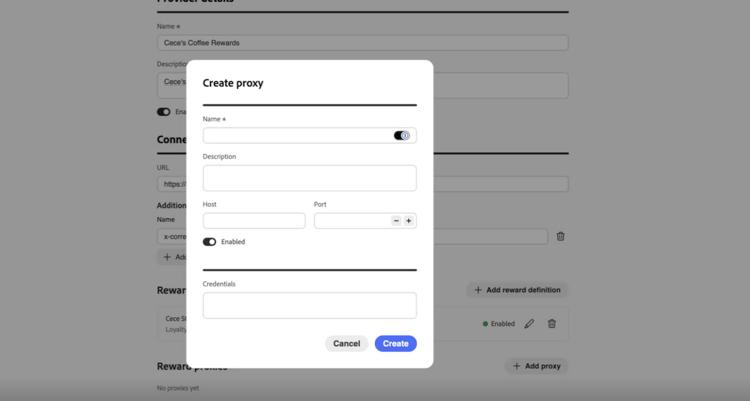
accordion 獎勵 Proxy 透過中繼伺服器路由履行呼叫,而非直接傳送至您的端點。 在獎勵提供者和 建立Proxy 畫面上,使用 認證 欄位進行Proxy驗證。
-
輸入 名稱 和描述。
-
輸入 主機 和連線埠。
-
指定代理伺服器是否為已啟用。
-
在 認證 中,以JSON格式輸入Proxy使用者名稱和密碼。 認證值通常看起來像:
code language-json { "userName": "test", "password": "xxxx" }
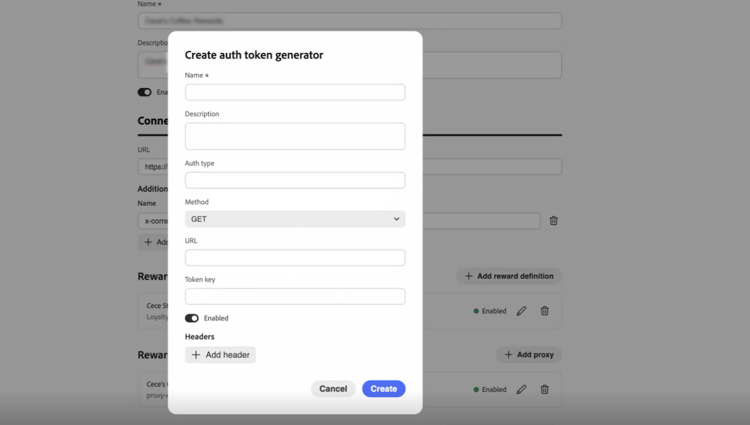
accordion 驗證權杖產生器 當您的API需要持有人權杖或類似驗證時使用。
- 輸入 名稱 和描述。
- 在 驗證型別 中,輸入驗證型別(例如,持有人)。
- 選取HTTP方法(例如POST)。
- 輸入權杖端點URL和回應中的權杖金鑰 (例如
access_token)。 - 指定驗證權杖產生器是否為已啟用。
- 新增您的權杖端點所需的任何標頭。
Journey Optimizer會使用此設定,在每次呼叫您的獎勵API之前取得新的Token。
-
選取建立獎勵提供者。 提供者和所有已設定的資源會一起儲存。
儲存後,提供者會出現在獎勵提供者清單中。 行銷人員在設定挑戰獎勵時可加以選取。 瞭解如何設定挑戰獎勵
若要編輯獎勵提供者,請開啟 獎勵提供者 標籤、選取提供者,並更新適當的欄位。 獎勵定義、代理和驗證權杖產生器的變更會在您更新時自動儲存。
事件對應 event-mappings
事件對應會告訴Journey Optimizer如何處理傳入的Adobe Experience Platform體驗事件。 例如,購買或飯店簽到。 行銷人員在任務產生器中建立 自訂事件 任務時,會參考這些對應。 不符合任何對應的事件會被忽略。
使用此區段進行端對端事件對應設定。 如需轉換程式編寫的重點指引,請參閱事件轉換程式指南。
若要建立事件對應,請遵循下列步驟:
-
開啟 事件對應 標籤,然後選取建立事件對應。
-
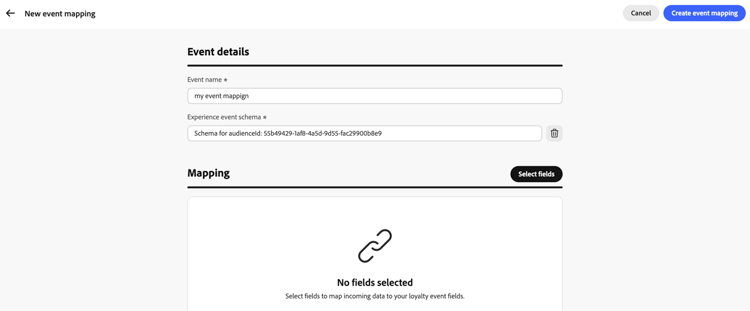
在 事件詳細資料 中,輸入必要的事件名稱,並選取所需的體驗事件結構描述。
-
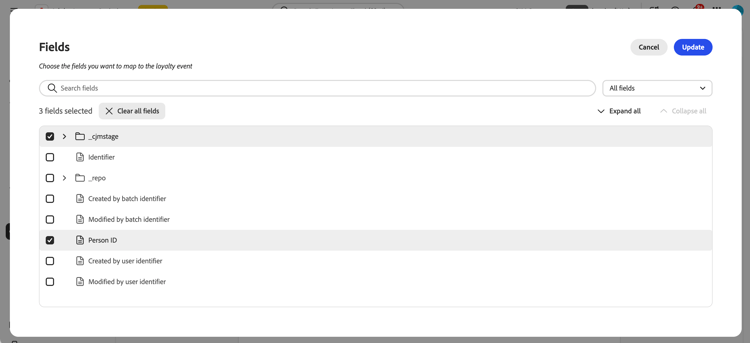
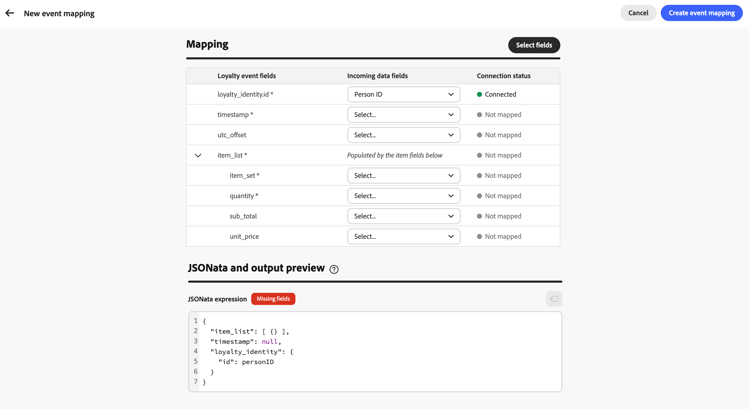
在 對應 區段中,按一下 選取欄位 按鈕。 搜尋或篩選結構描述欄位樹狀結構,然後選取要對應的傳入欄位。
-
在對映表格中,使用 傳入資料欄位 中的下拉式清單,將每個欄位連線到相對應的忠誠度事件欄位。
-
在 JSONata和輸出預覽 中,檢閱程式碼編輯器中產生的JSONata運算式。
若要使用自訂運算式,請直接編輯JSONata。 若要這麼做,請選取 重設為已產生的 按鈕,以返回資料表驅動對應。 瞭解如何撰寫JSONata運算式。
-
儲存對應。 事件對應會顯示在 事件對應 清單中,且可在行銷人員建立 自訂事件 任務時取得。 瞭解如何建立任務
產品庫存 product-inventory
產品詳細目錄索引標籤會將目錄專案分組,讓行銷人員不必輸入每個專案ID,就能在工作中鎖定這些專案。 上傳將每個專案識別碼對應至一或多個 產品群組 的CSV檔案 (相同的專案可屬於數個群組)。 設定任務適用性時,可使用匯入的群組。 瞭解如何建立任務
若要上傳產品詳細目錄檔案,請遵循下列步驟:
-
準備CSV檔案,將每個專案識別碼對應至一或多個產品群組。 展開以下區段以檢視範例。
accordion 產品詳細目錄CSV範例 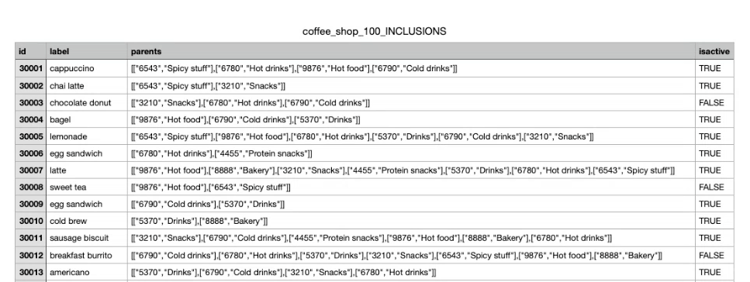
-
開啟 產品詳細目錄 標籤。
-
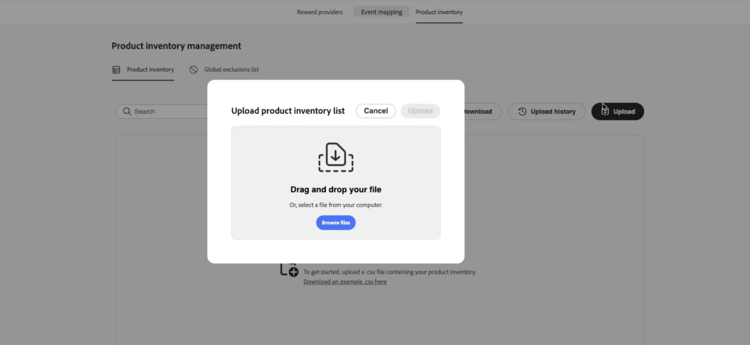
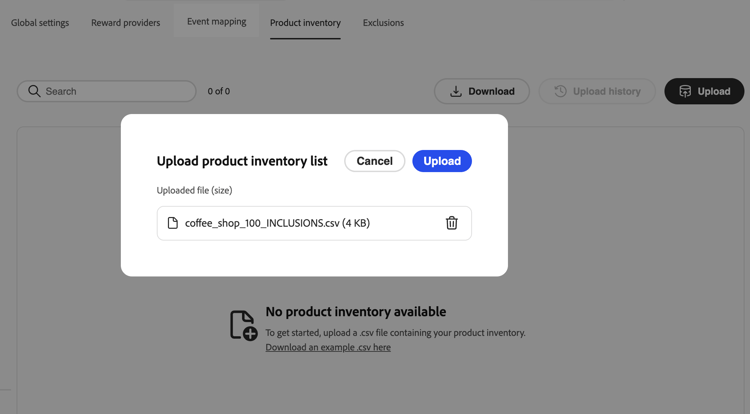
選取 上傳 並選擇您的CSV檔案。
-
檢閱詳細目錄清單中的匯入資料。 清單會為每個專案顯示一列。 包含在 欄中的 群組會將該專案的每個產品群組顯示為藥丸,或當專案屬於多個群組時顯示數個藥丸。
-
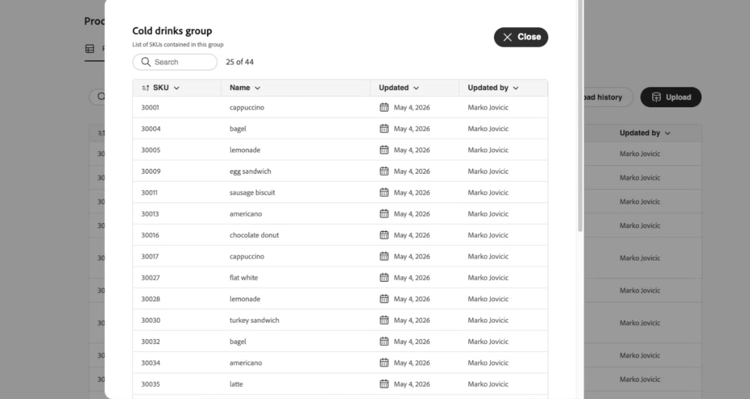
若要檢視產品群組中的所有專案,請在任一列的 欄中所包含的 群組中,選取該群組的藥丸。 群組詳細資訊檢視會列出群組中的每個專案。
-
開啟 上傳記錄 以檢視先前的CSV上傳。
排除 exclusions
排除專案索引標籤會定義整個方案中排除的目錄專案和群組,因此行銷人員不必在每個任務上列出相同的排除專案。 上傳將每個專案識別碼對應至一或多個 排除群組 的CSV檔案 (相同的專案可以屬於數個群組)。
匯入後,當行銷人員設定 合格的專案和排除專案 時,排除的專案和群組會出現在任務產生器中。 瞭解如何定義任務上的合格專案和排除專案
若要上傳排除專案,請執行下列步驟:
-
準備CSV檔案,將每個專案識別碼對應至一或多個排除群組。 展開以下區段以檢視範例。
accordion 排除專案CSV範例 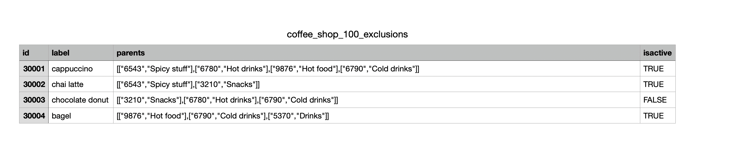
-
開啟 排除專案 標籤。
-
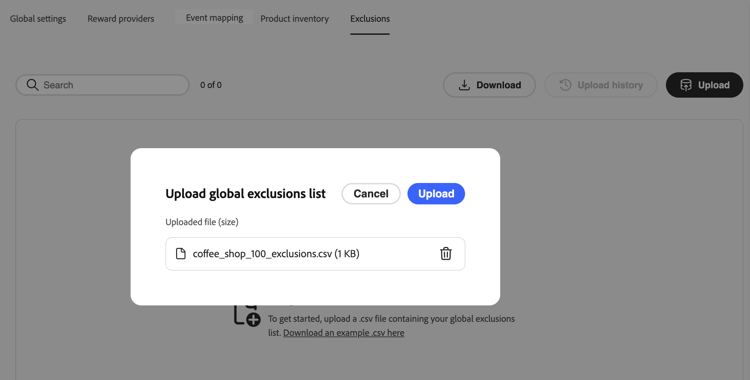
選取 上傳 並選擇您的CSV檔案。
-
檢閱排除專案清單中的匯入資料。 清單會為每個專案顯示一列。 包含在 欄的 群組會將該專案的每個排除群組當做藥丸,或當專案屬於多個群組時包含多個藥丸。
- 若要檢視排除群組中的所有專案,請在任何列的 欄中所包含的 群組中,選取該群組的藥丸。 群組詳細資訊檢視會列出群組中的每個專案。
- 開啟 上傳記錄 以檢視先前的CSV上傳。
This section contains structured knowledge intended to support interpretation, retrieval, and question answering related to this topic.
For complete understanding, this information should be combined with the documentation on this page. Neither source is intended to stand alone; the page describes the feature, while this section provides additional context that helps disambiguate terminology, intent, applicability, and constraints.
- TL;DR: This page explains how administrators configure Loyalty Challenges through global settings, performance settings, reward providers, event mappings, product inventory, and exclusions before marketers author challenges.
Intents:
- Select the Experience Platform identity namespace used to identify loyalty members
- Select the loyalty profile and event datasets and the priority KPI for loyalty insights
- Create and edit a reward provider, including reward definitions, a reward proxy, and an auth token generator
- Create an event mapping so incoming experience events are interpreted for Custom event tasks
- Upload a product inventory CSV that groups catalog items for use in task eligibility rules
- Upload a CSV of organization-wide item and group exclusions for task configuration
Glossary:
- Reward provider: the external system that Journey Optimizer calls to fulfill rewards when customers make progress or complete challenges (product-specific)
- Reward definition: a reward type a provider can issue (for example, points or stars) and the payload Journey Optimizer sends when rewards are fulfilled (product-specific)
- Reward proxy: an optional intermediate server that fulfillment calls are routed through instead of sending them directly to the reward API endpoint (product-specific)
- Auth token generator: configuration used to obtain a fresh bearer token (or similar) before each call to the reward API (product-specific)
- Event mapping: configuration that tells Journey Optimizer how to identify and interpret an incoming Experience Platform experience event, such as a purchase or check-in (product-specific)
- Product inventory: a CSV-based mapping of item identifiers to product groups, used to target items in tasks without entering every item ID (product-specific)
- Exclusions: a CSV-based mapping of item identifiers to exclusion groups that are excluded program-wide from task eligibility (product-specific)
- Key performance indicator (KPI): the organization’s priority metric for the Loyalty Insights dashboard, determining which insights receive emphasis (product-specific)
Guardrails:
- Events that do not match any event mapping are ignored.
- Bring your own data challenges fulfill rewards through the organization’s own data integration; reward providers configured in this section do not apply to those challenges.
- The profile dataset schema must include the Loyalty details and identityMap field groups, with identities supplied in identityMap; additional field groups can be included.
- The event dataset schema must include the Loyalty event details and Commerce details field groups; additional field groups can be included.
Prerequisites and permissions:
- Loyalty Challenges configuration requires administrator access to the Journey Optimizer instance, in addition to the permissions needed for Loyalty Challenges.
Terminology:
- Canonical name: event mapping — variants: event mappings
- Do not confuse: “product inventory” (item-to-group mappings used for task eligibility, uploaded via CSV) ≠ “exclusions” (item-to-group mappings used to exclude items program-wide, also uploaded via CSV)
- Do not confuse: “reward provider” (the external fulfillment system and its connection details) ≠ “reward definition” (one reward type and payload configuration belonging to a reward provider)
FAQ:
- Q: What does global settings configure? — The Experience Platform identity namespace used for Loyalty Challenges, matching how member profiles are identified in your data.
- Q: What does performance settings configure? — The loyalty profile dataset, loyalty event dataset, and the priority KPI for the Loyalty Insights dashboard.
- Q: What field groups must the loyalty datasets include? — The profile dataset schema must include Loyalty details and identityMap; the event dataset schema must include Loyalty event details and Commerce details.
- Q: What happens to events that do not match any event mapping? — They are ignored.
- Q: Do reward providers apply to Bring your own data challenges? — No, those challenges fulfill rewards through your own data integration, not through reward providers configured here.
- Q: What is a reward proxy used for? — To route fulfillment calls through an intermediate server instead of sending them directly to the reward API endpoint.
Related pages:
- For focused guidance on reward definition design and payload strategy: Reward Definition guide (loyalty-challenges/reward-definition-guide.md)
- For configuring challenge rewards after a reward provider is created: Learn how to configure challenge rewards (loyalty-challenges/create-challenges.md)
- For creating Bring your own data challenges: Learn how to create Bring your own data challenges (loyalty-challenges/create-challenges.md)
- For focused guidance on transformer authoring: Event Transformer guide (loyalty-challenges/event-transformer-guide.md)
- For writing custom JSONata mapping expressions: Learn how to write JSONata expressions (loyalty-challenges/event-transformer-guide.md)
- For creating Custom event tasks that reference event mappings: Learn how to create tasks (loyalty-challenges/create-tasks.md)
- For configuring eligible items using product inventory groups: Learn how to create tasks (loyalty-challenges/create-tasks.md)
- For defining eligible items and exclusions on tasks: Learn how to define eligible items and exclusions on tasks (loyalty-challenges/create-tasks.md)
- For background on loyalty data and datasets: Loyalty data and datasets (loyalty-challenges/loyalty-data-and-datasets.md)
- For more information about loyalty insights and performance monitoring: Explore loyalty performance (loyalty-challenges/loyalty-performance.md)
Personas:
- admin: Can select the identity namespace, loyalty profile and event datasets, and priority KPI in global and performance settings. Can create reward providers with reward definitions, proxies, and auth token generators, create event mappings, and upload product inventory and exclusions CSV files. The page states that Loyalty Challenges configuration requires administrator access to the Journey Optimizer instance, in addition to the permissions needed for Loyalty Challenges. Where: “Overview”.
Onboarding:
- Level: Intermediate
- First minimal step: Select the Loyalty configurations menu from the left navigation to open the configuration interface.
- Success check: The interface is organized into tabs: Global settings, Performance settings, Reward providers, Event mapping, Product inventory, and Exclusions.
- Previous: For background on loyalty data and datasets before configuring performance settings: Loyalty data and datasets (loyalty-challenges/loyalty-data-and-datasets.md)
- Next: After creating a reward provider, configure challenge rewards: Create loyalty challenges (loyalty-challenges/create-challenges.md); After uploading product inventory, reference groups when creating tasks: Create tasks for loyalty challenges (loyalty-challenges/create-tasks.md)