在此页面上:了解如何使用手动排名、用户档案偏好设置或AI支持的倾向分数,配置历程或营销活动操作,通过最佳出站渠道为每个客户传递消息。
渠道优化可让您将多个出站渠道(电子邮件、推送、移动设备消息)添加到单个历程或营销活动操作,并让Journey Optimizer在发送时为每个客户自动选择最佳渠道。
该系统不预先选择一个渠道或一次跨所有渠道向客户发送消息,而是挑选每个客户选择的最高等级的渠道,并在该渠道不可用时优雅地退回。
护栏和限制 limitations
-
支持的渠道:仅支持本机电子邮件、推送和移动消息渠道。 不支持其他出站渠道,例如WhatsApp。 渠道优化需要使用Journey Optimizer的本机电子邮件、推送和移动消息传送功能;不支持通过自定义操作执行。
-
AI优化量度: AI模型仅针对参与度(点击量)进行优化。 它不会针对订单、收入或其他业务量度进行优化。 如果需要对订单或收入进行优化,则您的数据科学团队可以离线培训自定义模型,并通过客户配置文件属性功能将其应用。
-
AI排名所需的点击跟踪:使用基于AI模型的排名时,必须为所有配置的渠道启用点击跟踪。 该模型依赖点击数据来计算倾向分数;如果禁用跟踪,则AI排名模式无法正常运行。 了解如何在电子邮件中启用点击跟踪
-
无讯息小时数:在一个操作中合并多个渠道时,无讯息小时数将根据渠道优先级应用:移动消息优先于推送,然后是电子邮件。 要为每个渠道使用不同的安静时间设置,请创建单独的历程操作,而不是在单个操作中组合渠道。
note NOTE 计划在General Availability版本中支持每渠道免打扰时间设置。 -
发送时间优化不兼容:当前发送时间优化和通道优化不能同时使用 — 请选择其中之一。 UI可防止在同一操作中同时启用这两项功能。
-
反应事件:历程画布上的反应事件当前仅引用多渠道操作中的第一个渠道。
note NOTE 在General Availability版本中计划支持选择存在多个渠道时的任何有效反应事件。
在历程或营销活动中使用渠道优化 configure
要将具有渠道优化的多个出站渠道添加到历程或营销活动,请执行以下步骤。
-
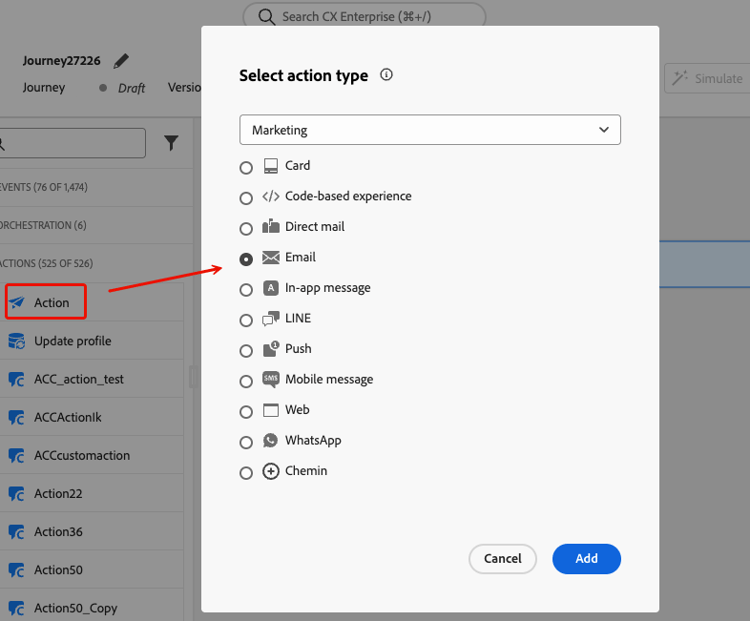
创建操作营销活动并导航到 操作 选项卡。
-
单击 添加操作 按钮并选择出站渠道(电子邮件、推送或移动消息)。
在 操作 选项卡中选择出站操作后,请继续执行以下步骤。
-
选择通道配置并单击 添加操作 以选择其他出站通道。
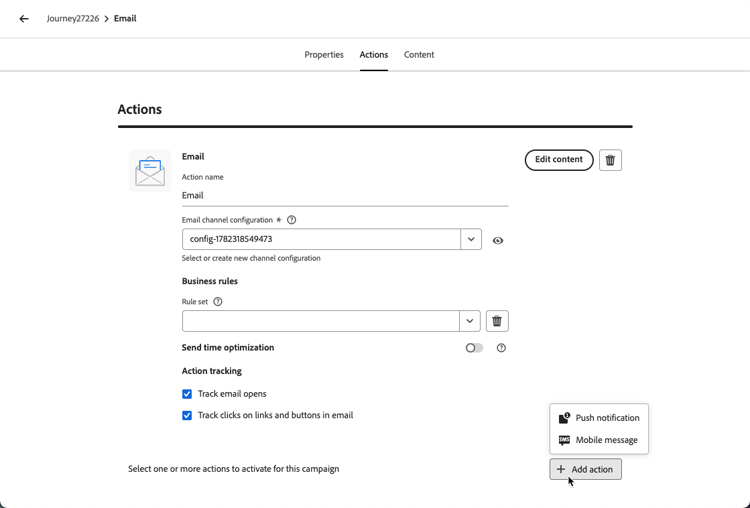
note NOTE 在单个多渠道操作中,每个渠道类型仅支持一个操作。 例如,您无法添加具有不同配置的两个单独的电子邮件操作。 您最多可以将三个出站渠道(电子邮件、推送、手机消息)添加到单个历程操作或营销活动中。
-
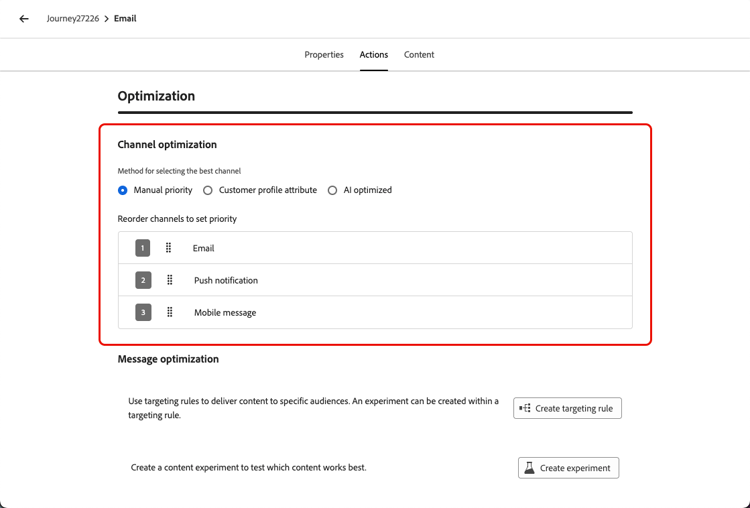
在 渠道优化 部分中,设置方法以确定系统如何为每个客户选择最佳渠道。 了解详情
-
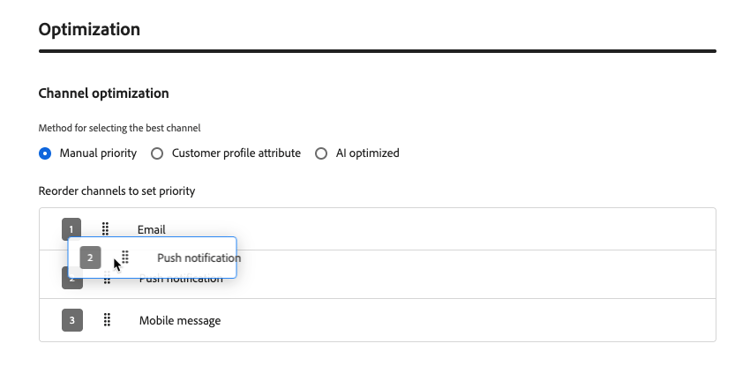
通过将渠道拖放到所需顺序中,设置您的备用渠道顺序(对于手动排名和客户偏好设置方法)。 了解详情
-
对于历程,在历程标题中单击验证,并在测试之前解决任何错误。 当测试完成且验证为当前和通过时,发布历程。 了解历程验证。 对于营销活动,审阅并激活。
设置渠道优化方法 optimization-modes
信道优化支持三种模式,每种模式使用不同的方法在发送时为每个客户选择最佳信道。
手动排名 manual-ranking
手动优先级是默认模式。 您可以直接在操作中定义首选渠道顺序。 Journey Optimizer通过客户选择加入的列表中的第一个渠道进行传递,且没有频率限制,然后根据需要回退到下一个渠道。
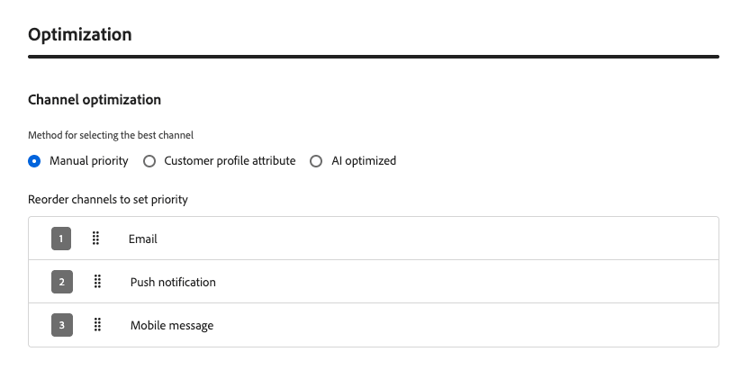
当您具有清晰、一致的渠道偏好设置并且不需要按用户档案进行个性化时,请使用此模式。
客户偏好 customer-preference
选择 客户配置文件属性 后,Journey Optimizer使用同意和偏好设置XDM字段组中的preferred属性,从其配置文件中读取客户声明的首选渠道。 支持的值为email、push和sms。
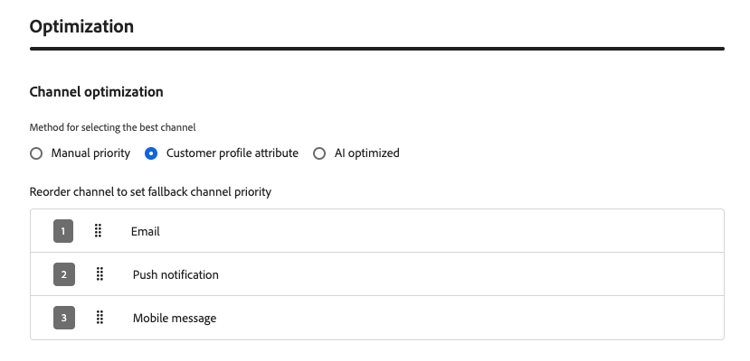
如果首选频道不可用(未配置、未选择加入或频率限制),Journey Optimizer将回退到您配置的回退列表中的下一个频道。
当客户明确声明其首选通信渠道时,请使用此模式。
基于AI模型的排名 ai-ranking
如果您选择AI优化,Journey Optimizer将使用机器学习模型,该模型会根据每个客户的历史参与度(打开次数、点击次数)计算每个客户的每渠道倾向分数。 分数存储在客户的用户档案中,并且在发送时选择具有最高预测倾向的频道。
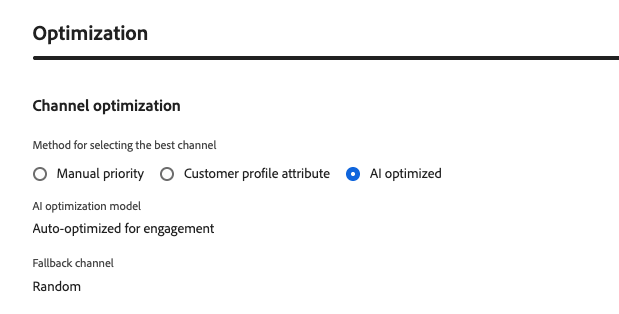
当客户的参与历史记录不足时,系统回退到随机可用的渠道。
使用此模式可让AI为每个客户推断出最有效的渠道,而无需任何手动配置。
回退行为 fallback
无论优化模式如何,当无法使用排名最前的渠道时,Journey Optimizer都会回退到下一个可用渠道。 如果满足以下任何条件,则渠道被视为不可用:
- 客户未选择加入渠道。
- 未在操作中配置渠道。
- 信道已达到其频率上限。
- 未填充该渠道的客户配置文件首选项或AI模型分数。
在 手动优先级 和 客户配置文件属性 模式下,回退遵循营销人员配置的渠道优先级列表。 在 AI优化 下,回退选择随机可用渠道。
操作方法视频 video
了解Adobe Journey Optimizer的渠道优化功能如何使用手动优先级、配置文件属性或Adobe的AI模型,帮助您通过最有效的渠道吸引客户。
This section contains structured knowledge intended to support interpretation, retrieval, and question answering related to this topic.
For complete understanding, this information should be combined with the documentation on this page. Neither source is intended to stand alone; the page describes the feature, while this section provides additional context that helps disambiguate terminology, intent, applicability, and constraints.
- TL;DR: This page explains how channel optimization selects an outbound channel for each customer in a journey or campaign using manual priority, profile preferences, or AI propensity scores.
Intents:
- Configure multiple outbound channels in a journey or campaign action
- Select a channel optimization method
- Define channel priority and understand fallback behavior
- Validate and test a journey before publication
Glossary:
- Channel optimization: Selects the best outbound channel for each customer at send time (product-specific)
- Manual priority: The default mode; selects the first opted-in channel that is not frequency-capped from the configured channel order (product-specific)
- Customer profile attribute: Selects a channel using the profile’s declared preference in the
preferredattribute; supported values areemail,push, andsms(product-specific) - AI optimized: Selects the channel with the highest predicted propensity based on historical engagement; scores are stored in the customer profile (product-specific)
Guardrails:
- Channel optimization is in Limited Availability; access requires contacting an Adobe representative.
- Only native Email, Push, and Mobile message channels are supported; execution through custom actions is not supported.
- A single journey action or campaign supports up to three outbound channels (hard limit), with only one action per channel type.
- AI ranking optimizes for engagement clicks, not orders or revenue, and requires click tracking for all configured channels.
- Quiet hours priority is Mobile messaging, then Push, then Email. Separate journey actions are required for different quiet hours settings per channel.
- Send-Time Optimization and channel optimization cannot be enabled together on the same action.
- Reaction events currently reference only the first channel in a multi-channel action.
- For journeys, validation and error resolution precede testing; publication requires completed testing and current, passed validation.
Terminology:
- Do not confuse: Manual priority and Customer profile attribute use the configured priority list for fallback; AI optimized selects a random available fallback channel.
- A channel is unavailable when the customer is not opted in, the channel is not configured, its frequency cap is reached, or the profile preference or AI model score is not populated.
FAQ:
- Q: What happens when the preferred channel is unavailable? - Journey Optimizer uses the configured fallback list for Customer profile attribute.
- Q: What happens when there is insufficient engagement history for AI ranking? - The system falls back to a randomly available channel.
- Q: Can I optimize for revenue using the AI model? - The AI model optimizes for clicks only. A custom model can be trained offline and applied through the customer profile attribute feature.