在此页面上:查看您的操作营销活动的配置和内容,以在激活它之前捕获任何错误,这样您就可以放心地立即发送消息或在其计划日期发送消息。
配置操作活动后,您需要先查看其参数和内容,然后才能激活它。 为此,请执行以下步骤。
-
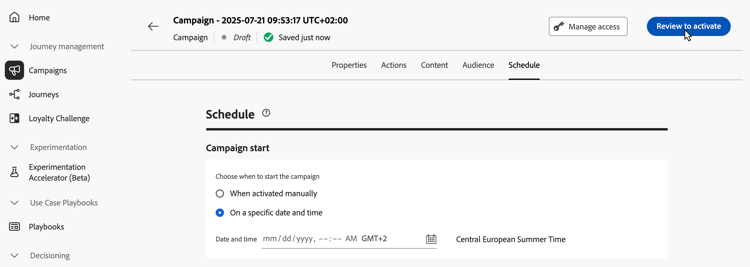
在营销活动配置屏幕中,单击 查看以激活 以显示营销活动摘要。
-
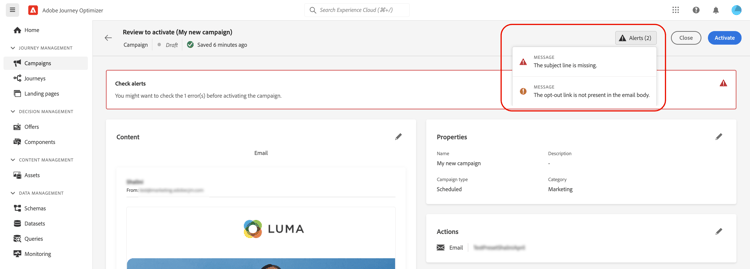
系统会显示营销活动配置摘要,以便您检查是否有任何参数不正确或缺失,并在必要时修改营销活动。
如果出现错误,则无法激活营销活动。 请先解决错误,然后再继续。
-
检查营销活动是否正确配置,然后单击激活。
-
营销活动已激活。 其状态为实时,或者已计划(如果您输入了开始日期)。 在营销活动中配置的消息将立即发送或在指定日期发送。
已完成状态将在营销活动3天后自动分配给营销活动,如果营销活动定期执行,则会在营销活动的结束日期分配。 了解有关营销活动状态的更多信息。
如果未指定结束日期,则营销活动会保持 实时 状态。 要更改此项,您需要手动停止营销活动。 了解如何停止营销活动
-
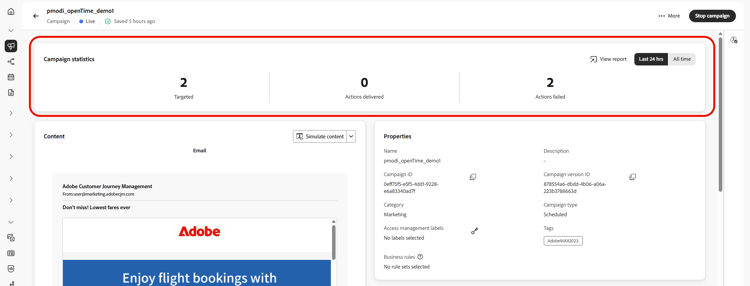
激活营销策划后,您可以随时通过打开它来检查其信息。 利用该摘要,可获取有关定向的用户档案以及已投放和失败操作数的统计信息。
通过单击 查看报告 按钮,您还可以在专用报告中获取其他统计信息。 了解详情
如果激活或发布营销活动时返回错误代码,请参阅营销活动错误和内容创作错误。
This section contains structured knowledge intended to support interpretation, retrieval, and question answering related to this topic.
For complete understanding, this information should be combined with the documentation on this page. Neither source is intended to stand alone; the page describes the feature, while this section provides additional context that helps disambiguate terminology, intent, applicability, and constraints.
- TL;DR: This page explains how to review the configuration and content of an Action campaign, activate it, and check its information and statistics afterwards.
Intents:
- Review the summary of an Action campaign before activating it
- Know what happens when the summary shows errors or when an approval policy applies
- Know which status a campaign gets after activation and when it becomes Completed
- Stop a campaign that keeps the Live status because it has no end date
- Check the statistics of an activated campaign and open its reports
- Find the error pages to use when activating or publishing returns an error code
Glossary:
- Review to activate: Button in the campaign configuration screen that displays a summary of the campaign
- Campaign summary: Summary of the campaign configuration used to check whether any parameter is incorrect or missing; for a campaign that uses decision policies, it also shows each policy’s structure and technical details to copy
- Live: Status of an activated campaign
- Scheduled: Status of an activated campaign when a start date was entered
- Completed: Status assigned automatically after activation (see Guardrails)
- View report: Button that gives access to additional statistics in dedicated reports
Guardrails:
- In case of errors in the summary, you cannot activate the campaign. Resolve the errors before proceeding.
- The Completed status is automatically assigned to the campaign 3 days after it has been activated, or at the campaign’s end date if it has a recurring execution.
- If no end date has been specified, the campaign keeps the Live status. To change it, you need to stop the campaign manually.
Prerequisites and permissions:
- If the campaign is subject to an approval policy, you need to request approval in order to be able to send the campaign.
Terminology:
- Canonical name: Review and activate an Action campaign — variants: review and activation of Action campaigns
- Do not confuse: Live (activated, sent immediately) ≠ Scheduled (activated with a start date, sent on that date) ≠ Completed (assigned automatically after activation)
FAQ:
- Q: How do I activate an Action campaign? — In the campaign configuration screen, click Review to activate, check the summary, then click Activate.
- Q: Why can I not activate my campaign? — In case of errors in the summary, you cannot activate the campaign. Resolve the errors first. If the campaign is subject to an approval policy, you need to request approval in order to be able to send it.
- Q: Which status does the campaign get once activated? — Live, or Scheduled if you entered a start date. The message is sent immediately or on the specified date.
- Q: When does the campaign become Completed? — The Completed status is automatically assigned 3 days after activation, or at the campaign’s end date if it has a recurring execution.
- Q: Why does my campaign stay Live? — If no end date has been specified, the campaign keeps the Live status until you stop the campaign manually.
- Q: Where do I see statistics once the campaign is activated? — Open the campaign: the summary gives statistics about the number of targeted profiles and delivered and failed actions. Click View report for additional statistics in dedicated reports.
Troubleshooting:
- Activating or publishing a campaign returns an error code: see Campaign errors (campaigns/campaign-errors.md) and Content authoring errors (content-management/content-authoring-errors.md).
Related pages:
- Approval policy: Get started with journeys & campaigns approval (test-approve/gs-approval.md)
- Decision policies in campaign content: decision policies (experience-decisioning/create-decision.md)
- Reviewing a decision policy’s structure and copying technical details from the campaign summary: Use decision policies in messages, View decision policy details from the campaign summary (experience-decisioning/use-decision-policy.md#decision-policy-summary)
- Campaign statuses: Learn more about campaigns statuses (campaigns/manage-campaigns.md#statuses)
- Stopping a campaign: Learn how to stop a campaign (campaigns/manage-campaigns.md)
- Reports: Campaign report (reports/campaign-global-report-cja.md)