在此页面上:了解如何启用发送时间优化,以便Adobe的AI根据每位客户的历史打开和点击行为预测发送电子邮件和推送消息的最佳时间。
Adobe Journey Optimizer的发送时间优化功能由Adobe的历程人工智能服务提供支持,可根据客户的历史打开和点击行为,选择电子邮件和推送消息的最佳发送时间,以最大限度地提高客户参与度。
-
已根据请求为Adobe Journey Optimizer客户启用发送时间优化功能。 请联系 Adobe 客户关怀部门或 Adobe 代表,为您的组织激活该功能。
-
发送时间优化仅适用于 电子邮件 和 推送通知 渠道,以及 等待 活动。
-
以下AEP中心区域支持发送时间优化: VA7、NLD2、AUS5、CAN2、GBR9、IND2、CHE2。 这些是Adobe部署区域代码,如果您不确定您的组织使用哪个区域,请联系您的Adobe代表。
使用发送时间优化 use-send-time-optimization
要对电子邮件或推送操作启用并配置发送时间优化,请执行以下步骤。
在开始之前,请先考虑哪些消息适合您,然后再将其打开。 发送时间优化不应用于紧急的、对时间敏感的操作消息,例如订单确认、密码重置通知或航班登机口更改通知。 它最适合不太紧急的营销通信,例如每周广告、新产品的促销信息或为期一个月的销售信息。
-
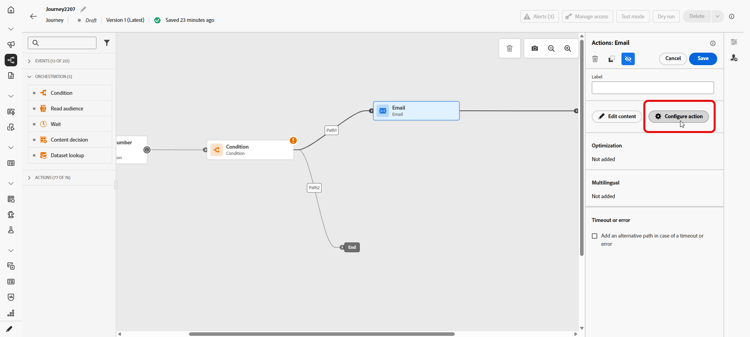
从您的历程中打开 配置操作 菜单。
电子邮件渠道配置中的
-
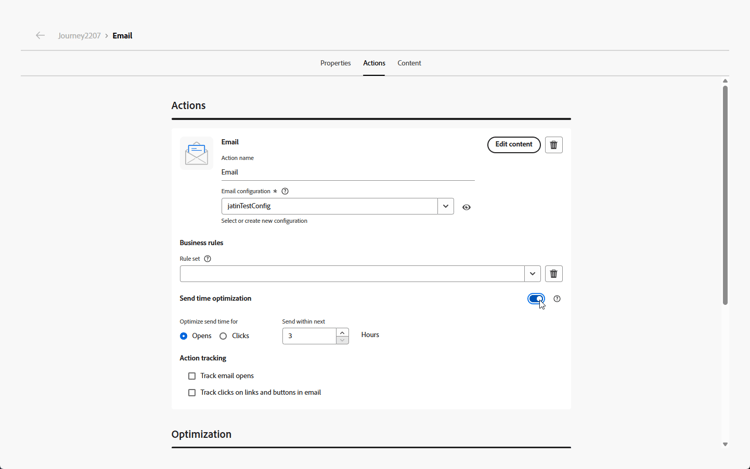
在发送时间优化菜单中打开 发送时间优化 开关。
电子邮件渠道配置中的
-
对于电子邮件,请选择是优化打开次数,还是通过选择相应的选项来优化点进次数。 推送消息始终针对打开次数进行优化。
为了获得最佳结果,请针对 次点击 优化大多数电子邮件。 如果消息仅提供信息而不是用于驱动特定操作,请选择打开。
-
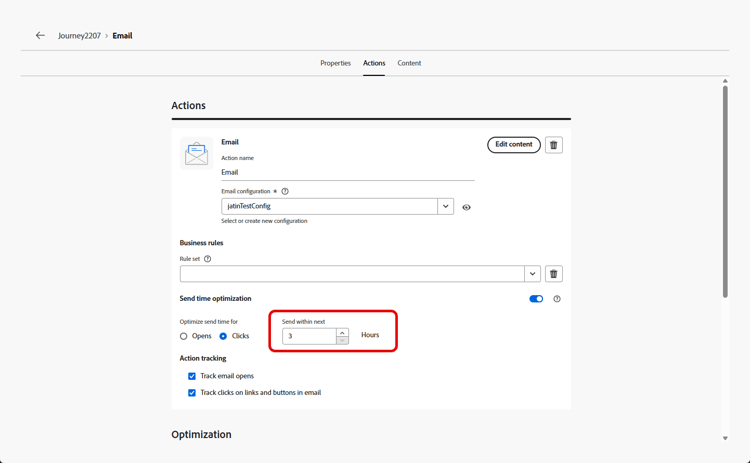
对于电子邮件和推送消息,将 在next 内发送设置为系统在发送消息之前等待的最大小时数(2-100)。
要获得最佳结果,请选择一个介于6和24小时之间的值。 较低的值可减少可用发送次数,并可限制发送时间优化的优势。 较高的值可能意味着消息已过期或截至发送时不再相关。
电子邮件渠道配置中的
-
对于电子邮件,请选择操作跟踪的配置方式。 您可以跟踪电子邮件打开次数,并跟踪电子邮件中链接和按钮的点击次数。
当激活您的历程并且客户到达历程中的电子邮件或推送操作时,发送时间优化将在您的指定限制内选择每个用户的最佳预测发送时间。
要监视历程的性能,请参阅概述页面。
等待活动中的发送时间优化 sto-wait-activity
等待活动中的
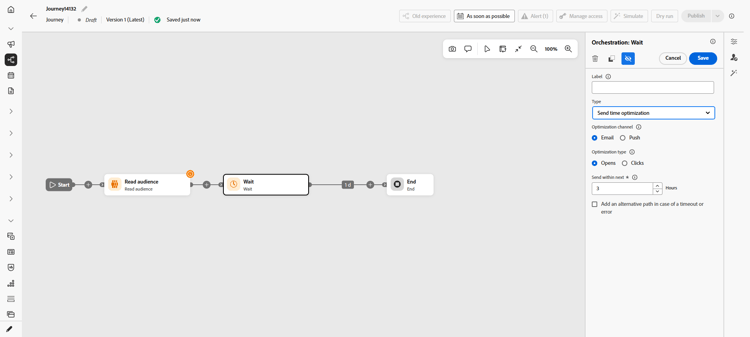
除了电子邮件和推送操作之外,您还可以将发送时间优化应用于 等待 活动。 它依赖于同一发送时间优化模型来计算每个用户档案的最佳等待时间,但在这里,等待与发送是相互分离的:除了仅与电子邮件或推送操作绑定,它可以后跟任何活动,例如自定义操作。
发送时间优化的工作原理 how-send-time
发送时间优化模型会摄取您组织的Adobe Journey Optimizer客户行为数据,并查看用户级别的打开和单击事件,以确定客户何时最有可能参与您的消息传送。
发送时间优化根据三种类型的行为数据,针对每个用户,对一周的每一小时做出预测:
- 您的用户的整体行为
- 相同时区中相似用户的行为
- 该单个用户的行为
这些预测使用贝叶斯方法进行加权和组合,从而为每个客户(电子邮件打开次数、电子邮件点击次数和推送打开次数)的每个量度生成一个“热图”,该热图指示联系该用户时在一周中的哪个小时最有可能且最不可能导致所需的参与结果(打开/单击),如下例热图所示:

如果在星期三上午9点将具有上述预测概率的用户定位为打开了发送时间优化且最长等待时间为7小时的消息,则消息的选定发送时间将为12点:

发送时间优化模型训练和评分详细信息 model-send-time
为您的组织启用发送时间优化功能后,系统会针对过去16周内贵组织所有历程和操作中的电子邮件和推送发送、打开和单击事件对历程人工智能模型进行培训,而不管这些操作是否使用发送时间优化。 这允许发送时间优化从客户生成的所有数据中受益。
最初对模型进行培训,每周对模型进行评分。 16周后,模型将重新训练并每月重新整理。 模型评分包括所有客户个人资料 — 自上次评分运行以来,既有客户个人资料,也有新客户个人资料。
“发送时间优化”发送的消息会接收为测试不同发送时间并观察客户响应方式而选择的“探索”消息发送时间,或为最大化点击/打开率而选择的“优化”消息发送时间。 5%的发送事件会收到“探索”发送时间,95%的发送事件处于“优化”状态。
探测发送时间是从由您配置的最大等待时间提供的发送时间中随机选择的。 例如,如果消息选择时间为星期三上午9点,且发送时间优化功能处于打开状态,且最长等待时间为3小时,则消息的探索发送时间将平均分散在上午9点、上午10点、上午11点与下午12点之间。
常见问题 faq-send-time
您将找到下面有关发送时间优化的常见问题解答。
需要更多信息? 使用此页面底部的反馈选项提出您的问题,或与Adobe Journey Optimizer 社区建立联系。
贵组织应至少在30天内使用Journey Optimizer中的“电子邮件”操作,然后再使用电子邮件中的“发送时间优化”来收集一些电子邮件发送、打开和单击事件。
贵组织应至少在30天内使用Journey Optimizer中的“推送”操作,然后再使用“推送”中的“发送时间优化”以允许收集某些推送发送和打开事件。
如果您的组织已使用电子邮件和/或推送操作类型至少30天,则在Adobe启用发送时间优化后,您的组织无需等待更长时间即可使用发送时间优化。 随着您的组织收集长达16周的数据,结果将继续改进。
_experience.intelligentServices.journeyAI.sendTimeOptimization中存储的3个配置文件属性中,并且不是为了便于用户读取而设计的。对于由组织优化的所有消息,发送时间优化可能会将电子邮件点击率和推送打开率提高约2%到10%。
例如,如果发送电子邮件但未优化发送时间的组织的平均点击率为5.0%,则优化发送时间的同一组电子邮件平均可能会产生高达5.5%的点击率(5.0% * (1+10%) = 5.5%)。
由于样本量小,发送时间优化带来的益处可能不会在单个消息发送上观察到。
在以下情况下,组织更有可能从使用发送时间优化中获得更大的好处:
- 现有历程使用的发送时间是固定的,并且未得到良好优化
- 客户行为的可变性(点击量和打开量)对应于客户位置和客户偏好
- 组织对大部分电子邮件和推送消息使用发送时间优化
- 组织选择建议的6-12小时范围内的最长等待时间
出现这种情况可能有多种原因:
- 您的消息被选为“探索”消息发送时间,而不是“优化”消息发送时间。
- 相似用户的行为会影响模型来建议其他发送时间。
timeZone配置文件字段确定用户的时区。 如果对于该用户不可用,则发送时间优化会尝试从用户配置文件中的其他地理信息(如国家/地区和州)推断用户的时区。在以下情况下,发送时间优化可以在夜间以本地时区向用户发送推送消息:
- 当用户表现出表明他们可能与夜间发送的消息进行交互时
- 当模型选择“勘探”发送时间时
要避免在夜间时段向客户发送推送消息,请安排在早上或下午早些时候发送批量推送消息,并缩短发送时间优化持续时间。 (例如,上午9点发送时间,最长等待时间为8小时。)
This section contains structured knowledge intended to support interpretation, retrieval, and question answering related to this topic.
For complete understanding, this information should be combined with the documentation on this page. Neither source is intended to stand alone; the page describes the feature, while this section provides additional context that helps disambiguate terminology, intent, applicability, and constraints.
- TL;DR: This page explains how to configure and use Send-Time Optimization in Adobe Journey Optimizer, an AI-powered feature that predicts the best time to send email or push messages to each individual to maximize engagement.
Intents:
- Enable Send-Time Optimization on the Email or Push channel of an Action activity in a journey
- Choose whether to optimize for opens or click-throughs on email messages
- Set the maximum wait window (Send within next) for delayed delivery
- Understand how the AI model predicts optimal send times using behavioral data
- Determine whether Send-Time Optimization is appropriate for a given message type
- Use Send-Time Optimization within a Wait activity to delay before any downstream activity, decoupled from the message send
Glossary:
- Send-Time Optimization (STO): An AI-powered feature that delays message delivery to each profile until the predicted optimal engagement hour within a configured time window (product-specific)
- Journey AI: Adobe’s AI services powering Send-Time Optimization within Journey Optimizer (product-specific)
- Exploration send time: A randomly selected send time (used for 5% of sends) to test different times and improve model accuracy (product-specific)
- Optimized send time: A model-predicted send time selected to maximize click or open rates (used for 95% of sends) (product-specific)
- Send within next: The maximum number of hours (2–100) the system will wait before sending the message to a given profile (product-specific)
Guardrails:
- Send-Time Optimization must be enabled by Adobe for the organization; contact Adobe Customer Care or your Adobe representative to activate it.
- Send-Time Optimization is available for the Email and Push channels (selected in an Action activity) within journeys, and for the Wait activity; it is not currently available for messages sent through campaigns or for other action types.
- The organization should use the Email channel for a minimum of 30 days before using Send-Time Optimization within Email, and the Push channel for a minimum of 30 days before using it within Push; an organization that has already used the Email and/or Push channels for at least 30 days does not need to wait longer once the feature is enabled by Adobe.
- Do not use Send-Time Optimization for urgent or time-sensitive operational messages (e.g., order confirmations, password resets, flight gate changes).
- Maximum wait time range is 2–100 hours; recommended range is 6–24 hours for best results.
- Model scores are stored in profile attributes at
_experience.intelligentServices.journeyAI.sendTimeOptimizationand are not human-readable. - Models are trained weekly initially, then retrained and rescored monthly after 16 weeks.
Terminology:
- Canonical name: Send-Time Optimization — Acronym: STO
- Do not confuse: “Exploration send time” ≠ “Optimized send time” (exploration is random for model testing; optimized is model-predicted for engagement)
FAQ:
- Q: Which channels support Send-Time Optimization? — The Email and Push channels (selected in an Action activity) within journeys, and the Wait activity; messages sent through campaigns and other action types are not currently supported.
- Q: Should I optimize for opens or clicks on email? — Optimize for Clicks for most emails. Choose Opens when the message is informational and not intended to drive a specific action.
- Q: How long does the organization need to wait before enabling STO? — The organization should use the Email channel (for Email) or the Push channel (for Push) for a minimum of 30 days to allow the collection of send, open, and click events. Results continue to improve for up to 16 weeks.
- Q: Can STO send push notifications at night? — Yes, if a user’s behavior suggests night-time engagement or if an exploration send time is selected. To avoid this, use a morning send time with a short maximum wait window.
- Q: What is the expected benefit of Send-Time Optimization? — Approximately 2–10% improvement in email click rate or push open rate across all optimized messages, though benefits may not be observable on individual small-volume sends.