在此页面上:了解如何在渠道配置中设置电子邮件标头参数,包括“发件人”、“回复”、“错误”和可选的“发件人”字段,以及如何管理回复处理和电子邮件转发。
配置新的电子邮件渠道配置时,在 标头参数 部分中,输入与使用该配置发送的电子邮件类型关联的发件人名称和电子邮件地址。
- 输入 contact 作为发件电子邮件前缀,发件人电子邮件将是 contact@marketing.luma.com。
- 输入 error 作为错误电子邮件前缀,错误地址将是 error@marketing.luma.com。

_、点.和连字符-字符。发件人标头 sender-header
某些用例要求传输邮件的邮箱与 发件人 的作者不同,例如,父组织代表子公司发送,多个品牌的共享营销团队或代理公司为多个客户发送。
换句话说,发件人是邮件的作者(电子邮件是“发件人”),发件人是负责传输邮件的代理(实际发送该邮件的人)。 Sender字段适用于传输实体与作者不同的情况。
在这种情况下,您可以使用 发件人标头 部分中的以下字段设置要添加到电子邮件标头的其他 发件人 名称和电子邮件地址:
-
发件人姓名:当邮件与 发件人 作者不同时,负责传输邮件的参与方的姓名。
-
发件人电子邮件:发送方的电子邮件地址。
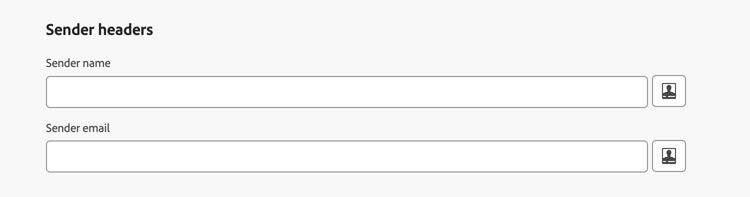
设置 发件人名称 和 发件人电子邮件 后,Journey Optimizer会向电子邮件添加发件人 SMTP标头。 支持此功能的电子邮件客户端可能显示诸如 代表From 的发件人或通过 指示符的 的措辞。
配置 Sender 标头时,请考虑以下事项:
-
如果您将 发件人姓名 和 发件人电子邮件 字段都留空,或者如果解析的 发件人 与 发件人 相同,则不会添加 发件人 标头。
-
Sender地址未用于SPF、DKIM或DMARC对齐;仅执行 format 验证。 SPF、DKIM和DMARC继续依赖于 From 字段。 为配置选择的委派的子域保留用于这些检查的发送域。
-
如果配置了 Sender 标头,并且个性化未解析为收件人的值,则邮件不会传递给该收件人。
回复电子邮件 reply-to-email
在定义 回复电子邮件 地址时,您可以指定任何电子邮件地址,只要是有效的地址、格式正确并且没有任何拼写错误。
用于回复的收件箱将收到所有回复电子邮件,但通过 错误电子邮件 地址收到的休假通知和质询回复除外。
为确保正确管理回复,请遵循以下建议:
-
确保专用收件箱有足够的接收容量,可接收使用电子邮件配置发送的所有回复电子邮件。 如果收件箱返回退信,则可能无法收到客户的某些回复。
-
处理回复时必须牢记隐私和合规义务,因为它们可能包含个人身份信息 (PII)。
-
请勿在回复收件箱中将消息标记为垃圾邮件,因为这将影响发送到此地址的所有其他回复。
此外,在定义 回复电子邮件 地址时,请确保使用具有有效 MX 记录配置的子域,否则电子邮件配置处理将失败。
如果您在提交电子邮件配置时遇到错误,则表示没有为输入的地址子域配置 MX 记录。 请联系管理员以配置相应的 MX 记录,或使用另一个具有有效 MX 记录配置的地址。
转发电子邮件 forward-email
要将 Journey Optimizer 收到的特定电子邮件地址的所有电子邮件转发到委派的子域,请与 Adobe 客户关怀部门联系。
您需要提供:
- 您选择的转发电子邮件地址。 请注意,转发电子邮件地址的域不能与委派给 Adobe 的任何子域匹配。
- 您的沙盒名称。
- 将使用该转发电子邮件地址的配置名称或子域。
- 每个子域只能有一个转发电子邮件地址 — 如果多个配置使用相同的子域,则必须对所有配置使用相同的转发电子邮件地址。
- 如果未启用转发,则默认情况下会丢弃直接发送到 发件人电子邮件 地址的电子邮件。
转发电子邮件地址由 Adobe 设置。 这可能需要 3 到 4 天。
完成后,回复电子邮件和 错误电子邮件 地址接收的所有邮件,以及发送到 发件人电子邮件 地址的所有电子邮件,都将被转发到您提供的特定电子邮件地址。
This section contains structured knowledge intended to support interpretation, retrieval, and question answering related to this topic.
For complete understanding, this information should be combined with the documentation on this page. Neither source is intended to stand alone; the page describes the feature, while this section provides additional context that helps disambiguate terminology, intent, applicability, and constraints.
- TL;DR: This page explains how to set up the email header parameters in a channel configuration — the From, Reply to, Error, and optional Sender fields — and how to manage reply handling and email forwarding.
Intents:
- Configure the From name, From email prefix, Reply to name, Reply to email, and Error email prefix in a channel configuration
- Set optional Sender headers when the transmitting entity differs from the From author
- Manage where reply emails, out-of-office notifications, and challenge responses are received
- Set up an email forward process for the delegated subdomain
- Understand the formatting rules for email prefixes
Glossary:
- From name / From email prefix: The sender name and email address used for communications; the prefix uses the selected delegated subdomain (product-specific)
- Reply to name / Reply to email: The name and address used when the recipient clicks Reply in their email client (product-specific)
- Error email prefix: The address that receives asynchronous bounces (ISP errors after a few days), out-of-office notifications, and challenge responses (product-specific)
- Sender headers (Sender name / Sender email): Optional fields identifying the party responsible for transmitting the message when it differs from the From author; adds a Sender SMTP header (product-specific)
- Delegated subdomain: The subdomain used to send the email and used for SPF, DKIM, and DMARC checks (product-specific)
Guardrails:
- When editing an email configuration, you cannot add new profile attributes to header parameters; you must create a new channel configuration.
- For From email prefix and Error email prefix, values must begin with a letter (A-Z) and can only contain alphanumeric characters, plus underscore
_, dot., and hyphen-. - Sender name and Sender email must be configured together — both filled in or both empty; filling in only one prevents journeys and campaigns from being published with this channel configuration.
- If both Sender fields are empty, or the resolved Sender is identical to From, no Sender header is added.
- The Sender address is not used for SPF, DKIM, or DMARC alignment (only format validation is performed); those checks continue to rely on the From fields and the delegated subdomain.
- If Sender headers are configured and personalization does not resolve to a value for a recipient, the message is not delivered to that recipient.
- The Reply to email must be a valid, correctly formatted address on a subdomain with a valid MX record, otherwise email configuration processing fails.
- Forwarding is set up by Adobe (contact Adobe Customer Care) and can take 3 to 4 days; the forward email address domain cannot match any subdomain delegated to Adobe.
- There can be only one forward email address per subdomain; configurations sharing a subdomain must use the same forward email address.
- If forwarding is not enabled, emails sent directly to the From email address are discarded by default.
Terminology:
- Canonical name: Header parameters — Acronym: n/a — variants: sender headers, header fields
- Synonyms: “From” = “author of the message”; “Sender” = “agent responsible for transmitting the message”
- Do not confuse: “From” (author) ≠ “Sender” (transmitting party) ≠ “Reply to email” (address receiving replies) ≠ “Error email” (address receiving asynchronous bounces, out-of-office notifications, and challenge responses)
FAQ:
- Q: Which address receives asynchronous bounces and out-of-office notifications? — The Error email prefix address; out-of-office notifications and challenge responses are received there rather than on the Reply to email.
- Q: Can I fill in only the Sender name or only the Sender email? — No. Both must be configured together, or both left empty; filling only one prevents publishing journeys and campaigns with the configuration.
- Q: Does the Sender field affect SPF, DKIM, or DMARC? — No. Only format validation is performed on the Sender address; SPF, DKIM, and DMARC continue to rely on the From fields and the delegated subdomain.
- Q: Why did my email configuration fail on submission? — The MX record is likely not configured for the subdomain of the Reply to email address; contact your administrator or use an address with a valid MX record.
- Q: How do I forward emails received for the delegated subdomain? — Contact Adobe Customer Care to set up a forward process, providing the forward email address, sandbox name, and configuration name or subdomain; setup can take 3 to 4 days.