このページ:ライブレポートを使用して、ジャーニーキャンバス内で過去 24 時間の主要なジャーニー指標を直接監視する方法について説明します。
ジャーニーが公開され、ドライランモードがアクティブ化されると、ライブレポートにより、過去 24 時間の指標がジャーニーキャンバス内で直接提供されます。
表示されたイベントは過去 24 時間以内に発生したもので、イベントと表示の間に少なくとも 2 分の間隔(通常 5 分以内)があります。
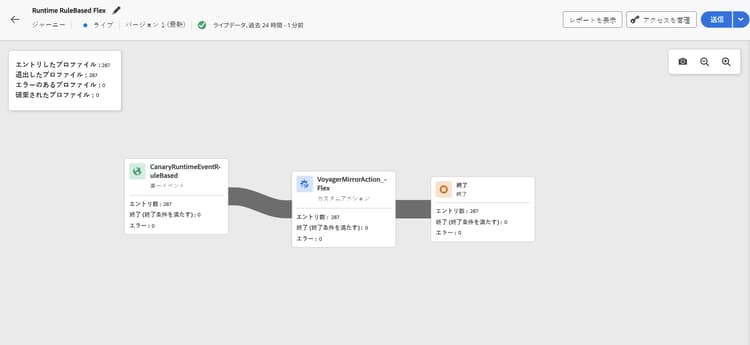
ライブモードまたはドライランモードのジャーニーでは、次の項目を確認できます。
-
エントリ済みプロファイル:ジャーニーにエントリ済みの個人の合計数。
-
退出したプロファイル:ジャーニーから退出した個人の合計数(エラーを含む)。
-
エラーのあるプロファイル:ジャーニー中にエラーが発生した個人の合計数。
-
破棄されたプロファイル:次のいずれかの理由でジャーニーから破棄された個人の合計数。
- オーディエンス選定アクティビティでは、オーディエンスの選定に必要な動詞と受け取ったジャーニーが一致しない場合(例:「realized」ではなく「exited」)、破棄が発生する可能性があります。
- イベントトリガージャーニーの場合、個人がジャーニーに再エントリしようとするのが早すぎた場合や再エントリが許可されなかった場合、破棄が発生する可能性があります。
- 繰り返しジャーニーでは、個人が既にジャーニーにエントリし、再エントリポリシーが「再エントリを強制」に設定されていない場合、破棄は繰り返しのたびにカウントされます。
- オーディエンスを読み取りアクティビティでは、エクスポートされた個人の ID が設定されていない場合や、受信した ID 名前空間がジャーニーで想定されている名前空間と一致しない場合、破棄が発生します。
ライブランモードまたはドライランモードのすべてのジャーニー内の各アクティビティに対して、次の項目にアクセスできます。
- エントリ済み:このアクティビティにエントリ済みの個人の合計数。 アクションアクティビティの場合、ドライランモードでは実行されないので、この指標はプロファイルが通過したことを示します。
- 退出済み(終了基準を満たす):終了基準(エラーを含む)に従って、そのアクティビティからジャーニーを退出した個人の合計数。
- 離脱済み(強制離脱):ジャーニー実務担当者の設定により、一時停止中にジャーニーを離脱した個人の合計数。 ドライランモードのジャーニーでは、この指標は常にゼロになります。
- エラー:そのアクティビティでエラーが発生した個人の合計数。
レポートデータが欠落している場合のトラブルシューティング troubleshooting-missing-data
ジャーニーレポートに予期されたデータが表示されない場合は、次の点を考慮します。
-
ジャーニー名の同期:Adobe Journey Optimizer のジャーニー名が、レポートデータセットに保存されている名前と一致していることを確認します。 これらの名前が一致しないと、レポートデータが正しく表示されない場合があります。
-
データ更新のタイミング:ジャーニー名または設定を更新した後は、データが更新されるまで十分な時間を確保します。 レポートデータは通常、数分以内に表示されますが、場合によってはそれ以上かかることがあります。
-
アクセス権限:ジャーニーレポートを表示するために必要な権限があることを確認します。 データが表示されない場合は、管理者に ジャーニーレポートを表示 権限が有効になっていることを確認します。 詳しくは、権限を参照してください。
-
ジャーニーのステータス:レポートデータは、公開済みのジャーニーまたはドライランモードで実行中のジャーニーでのみ使用できます。 ドラフトジャーニーでは、レポートデータは生成されません。
これらの項目を確認しても問題が解決しない場合は、アドビ管理者またはアドビサポートにお問い合わせください。
This section contains structured knowledge intended to support interpretation, retrieval, and question answering related to this topic.
For complete understanding, this information should be combined with the documentation on this page. Neither source is intended to stand alone; the page describes the feature, while this section provides additional context that helps disambiguate terminology, intent, applicability, and constraints.
- TL;DR: This page explains how to view and interpret the live report embedded in the journey canvas, covering the key profile flow metrics available for published journeys and journeys in Dry run mode.
Intents:
- View real-time journey performance metrics directly in the journey canvas
- Interpret Entered, Exited, Error, and Discarded profile counts for the journey and each activity
- Understand why profiles are discarded from a journey
- Troubleshoot missing or unexpected data in journey live reports
- Verify the required permission to access journey live reports
Glossary:
- Live Reporting: Real-time metrics displayed directly on the journey canvas covering the last 24 hours (product-specific)
- Dry run mode: A journey execution mode that simulates the journey without sending real messages, in which live reporting is also available (product-specific)
- Discarded profiles: Profiles that attempted to enter the journey but were rejected due to qualification mismatches, reentry restrictions, or identity issues (product-specific)
- Exited (forced exit): Profiles that were removed from the journey while it was paused by a journey practitioner; always zero in Dry run mode (product-specific)
Guardrails:
- Live report data covers only the past 24 hours.
- Events are displayed with a minimum interval of two minutes from occurrence, typically within five minutes.
- The View journeys report permission is required to see live report data.
- Reporting data is only available for published journeys or journeys in Dry run mode; draft journeys generate no data.
- For Action activities, the Entered metric shows profiles passing through (not executed) in Dry run mode.
- The Exited (forced exit) metric is always zero in Dry run mode.
Terminology:
- Canonical name: Live report (journey canvas) — Acronym: none — variants: journey live report, in-canvas reporting
- Synonyms: “Entered profiles” = “profiles who entered the journey”
- Do not confuse: “Live report” ≠ “Journey global report” (live report is the last 24 hours in the canvas; global report covers a wider historical time range in the reporting UI)
FAQ:
- Q: How current is the data shown in the live report? — Events from the past 24 hours are shown, with a minimum display delay of two minutes and typically within five minutes.
- Q: Why can I not see any data in my journey live report? — Check that you have the View journeys report permission, that the journey is published (not in draft), and that the journey name matches the name in the reporting dataset.
- Q: What causes profiles to be discarded? — Discards can occur due to audience qualification verb mismatches, reentry policy violations on recurring or event-triggered journeys, or missing/mismatched identity namespace on Read Audience activities.
- Q: Is the live report available during Dry run mode? — Yes; live reporting is available for both published live journeys and journeys running in Dry run mode.
- Q: What does the Entered metric mean for Action activities in Dry run mode? — It indicates profiles passing through the activity, since actions are not actually executed in Dry run mode.