Getting started with Live Hub (Beta)
Live Hub in Adobe Learning Manager allows organizations to deliver live, instructor-led training directly within the platform, eliminating the need for external tools for core session delivery.
It provides a seamless, browser-based experience for Instructors and Learners, combining session delivery, collaboration, and engagement tools in a single environment. This integrated approach helps organizations streamline training delivery, reduce administrative overhead, and maintain visibility into learner participation throughout the learning journey.
Many organizations rely on separate tools for course management, session delivery, and collaboration. This can introduce challenges such as:
- Switching between multiple platforms for training.
- Additional setup and configuration requirements.
- Limited visibility into learner engagement and participation.
Live Hub addresses these challenges by bringing course delivery, collaboration, engagement, and tracking into one unified experience within Adobe Learning Manager.
Before we dive into the step-by-step process, here’s a short walkthrough video to get an overview of Live Hub.
What is Live Hub
Live Hub is a built-in virtual training solution that allows you to:
- Create and deliver live training sessions within Adobe Learning Manager.
- Manage Instructors, Learners, and sessions in one place.
- Use integrated tools for communication, collaboration, and engagement.
- Track participation and performance without switching systems.
Unlike third-party integrations, Live Hub is fully embedded into the learning workflow, offering a more unified experience.
How Live Hub works
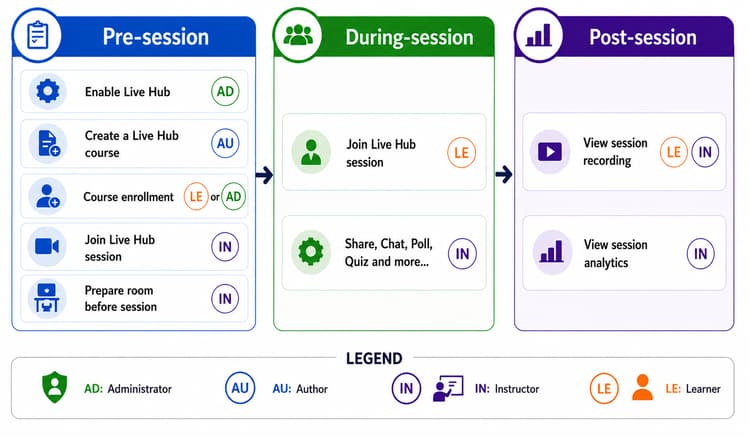
Delivering a Live Hub course involves four roles, each responsible for a distinct part of the workflow:
- Administrator: Enables Live Hub for the Learning Manager account. View Administrators in Live hub session for more information.
- Author: Creates the Live Hub course. View Authors in Live Hub session for more information.
- Instructor: Prepares the room, conducts the session, engages learners, and reviews recordings and analytics. View Instructors in Live Hub session for more information.
- Learner: Joins the session and participates in activities such as chat, polls, quizzes, whiteboards, and breakout sessions. View Learners in Live Hub session for more information.
Live Hub session workflow
A Live Hub session follows three key stages: Pre-session, During-session, and Post-session. Each stage includes specific tasks for Administrators, Authors, Instructors, and Learners to ensure a
smooth learning experience.