On this page: Learn how to preview, validate, and send your mobile messages in Adobe Journey Optimizer, including checking character encoding and limits and resolving alerts before delivery.
Preview your Mobile message preview-sms
Once your message content has been defined, you can preview its content using either simulation method:
- Click Simulate content to test content variations with sample input data or AI auto-generation. Learn how to simulate content variations
- Click Simulate content, then select Simulate content (AEP profiles) from the dropdown to preview with test profiles.
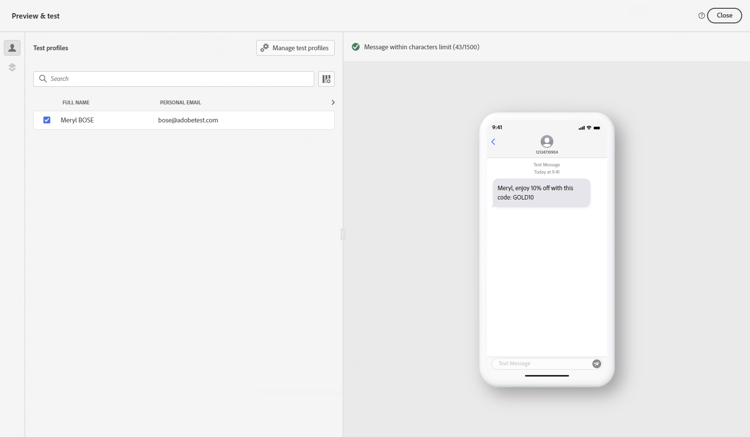
Detailed information on how to preview & test content is available in the Content Management section.
Character encoding and limits sms-character-limits
A character count is displayed when accessing either simulation method from Simulate content to assist in planning and managing your Mobile messages.
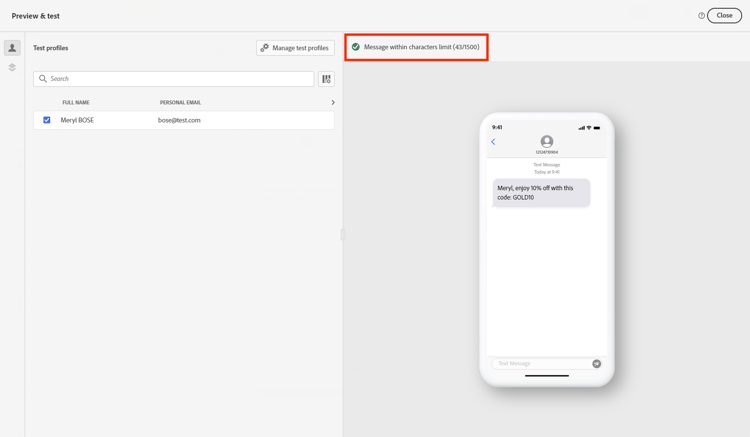
Journey Optimizer uses UTF-8 encoding in its SMS editor, allowing you to type or paste double-byte or Unicode characters. These characters are then transmitted to the service provider for delivery. Most SMS providers use GSM 7-bit encoding for standard messages with a 160-character limit and switch to UTF-16 (UCS-2) when non-GSM characters are detected with a 70-character limit.
Note that the character count does not reflect variations introduced by dynamic personalization or non-GSM 7-bit special characters.
Validate your content sms-validate
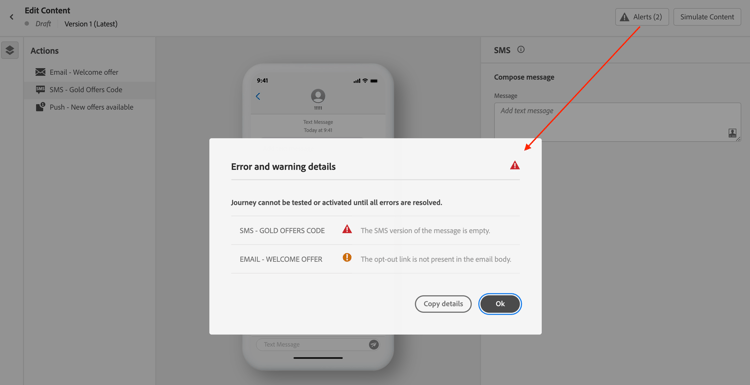
You must check alerts in the upper section of the editor. Some of them are simple warnings, but others can prevent you from sending the message. Two types of alerts can happen: warnings and errors.
-
Warnings refer to recommendations and best practices. For example, a warning message is displayed if your Mobile message is empty or if character limits may be exceeded with dynamic content.
Character limits: 160 characters per segment (GSM 7-bit), 70 for Unicode/emojis, up to 1500 characters total.
-
Errors prevent you from testing or activating the journey, or publishing the campaign, as long as they are not resolved. For example, an error message warns you when the subject line is missing.
The alert “The SMS text character limit has been exceeded” may appear even when your simulated message is shorter because validation calculates the maximum possible length by evaluating all conditional branches, personalization fields, and dynamic content at their longest.
Validation calculates maximum length for all possible profile data, while simulation shows actual output for one test profile.
Send your Mobile messages sms-send
When your Mobile message is ready, complete the configuration of your journey or campaign to send it.
Related topics
This section contains structured knowledge intended to support interpretation, retrieval, and question answering related to this topic.
For complete understanding, this information should be combined with the documentation on this page. Neither source is intended to stand alone; the page describes the feature, while this section provides additional context that helps disambiguate terminology, intent, applicability, and constraints.
- TL;DR: This page explains how to preview, validate, and send Mobile messages in Adobe Journey Optimizer, including checking character encoding and limits and resolving alerts before delivery.
Intents:
- Preview Mobile message content using the available simulation methods
- Understand SMS character encoding and how the character count is calculated
- Check warnings and errors before testing, activating, or publishing
- Understand why a character-limit alert can appear when the simulated message is shorter
- Send Mobile messages by completing the journey or campaign configuration
Glossary:
- Simulate content: The preview action used to test content variations with sample input data or AI auto-generation (product-specific)
- Simulate content (AEP profiles): The option selected from the Simulate content dropdown to preview the message with test profiles (product-specific)
- Character count: The count displayed when accessing either simulation method to assist in planning and managing Mobile messages (product-specific)
- Warnings: Alerts that refer to recommendations and best practices and do not block sending (product-specific)
- Errors: Alerts that prevent testing or activating the journey, or publishing the campaign, until resolved (product-specific)
Guardrails:
- Most SMS providers use GSM 7-bit encoding for standard messages with a 160-character limit and switch to UTF-16 (UCS-2) with a 70-character limit when non-GSM characters are detected.
- Character limits flagged by warnings are 160 characters per segment (GSM 7-bit), 70 for Unicode or emojis, and up to 1500 characters total.
- The character count does not reflect variations introduced by dynamic personalization or non-GSM 7-bit special characters.
- SMS delivery reporting does not account for concatenated messages and dynamic personalization, so it may not reflect the actual number of messages sent from the provider.
- Errors prevent you from testing or activating the journey, or publishing the campaign, until they are resolved; warnings do not block.
- Validation calculates the maximum possible length by evaluating all conditional branches, personalization fields, and dynamic content at their longest, while simulation shows the actual output for one test profile.
- To improve deliverability, use phone number formats supported by the provider; for example, Twilio and Sinch only support phone numbers in E.164 format.
- If the campaign is subject to an approval policy, you must request approval before you can send.
Terminology:
- Canonical name: Check and send your Mobile message — Acronym: n/a — variants: preview and send SMS
- Simulation modes (both present on this page): “Simulate content” (test content variations with sample input data or AI auto-generation) and “Simulate content (AEP profiles)” (preview with test profiles)
- Do not confuse: “Warnings” (recommendations and best practices; do not block) ≠ “Errors” (prevent testing, activating, or publishing until resolved)
- Do not confuse: “Validation” (calculates maximum possible length across all profile data) ≠ “Simulation” (shows actual output for one test profile)
FAQ:
- Q: How do I preview a Mobile message? — Click Simulate content to test content variations with sample input data or AI auto-generation, or select Simulate content (AEP profiles) from the dropdown to preview with test profiles.
- Q: Why does the character-limit alert appear when my simulated message is shorter? — Validation calculates the maximum possible length by evaluating all conditional branches, personalization fields, and dynamic content at their longest, while simulation shows the actual output for one test profile.
- Q: What are the SMS character limits? — 160 characters per segment for GSM 7-bit, 70 for Unicode or emojis, and up to 1500 characters total.
- Q: What stops me from sending my message? — Errors prevent you from testing or activating the journey, or publishing the campaign, until they are resolved; warnings do not block.
- Q: Does delivery reporting reflect the exact number of messages sent? — Not necessarily, because SMS delivery reporting does not account for concatenated messages and dynamic personalization; contact your Adobe representative for detailed usage and billing information.