[AEM Assets]{class="badge positive" title="Applies to AEM Assets)."}
Enhance content discovery with AI-generated metadata ai-smart-tags
AI-generated tags automatically enrich digital assets with descriptive metadata, making assets easier to search, categorize, and recommend. Instead of relying on manual input, Artificial Intelligence (AI) automatically assigns descriptive tags to digital assets, removing the labor and inconsistency of hand-tagging large libraries.
How AI-generated tags work
AI analyzes the content of each asset and generates relevant tags without human intervention. For an image, AI can detect a range of visual elements and produce corresponding tags:
- Objects within the frame
- Scenes and settings
- Emotions conveyed by subjects
- Brand logos and identifiable marks
For example, a single photograph may be automatically tagged with terms such as “sunset,” “beach,” “vacation,” or “smiling.” Because tags are applied by a consistent model rather than by different individuals, the resulting metadata remains uniform and reliable across the entire asset catalog.
Benefits of AI-generated metadata
AI-generated metadata delivers measurable improvements to digital asset management:
- Efficiency — eliminates the manual tagging effort required for every asset
- Consistency — applies the same tagging logic across all content, reducing gaps and duplication
- Scalability — handles large volumes of digital content that would be impractical to tag by hand
- Discoverability — enriches metadata so assets surface more accurately in search and recommendation results
Improving search with semantic and lexical techniques
AI-generated tags enhance asset discovery by leveraging both semantic search and lexical search techniques. Lexical search matches the exact keywords and terms a user enters, while semantic search interprets meaning and context to return conceptually related results even when the precise words differ. Combining both approaches ensures assets are retrievable whether users search by literal keyword or by intent, which broadens the range of queries that return the right asset.
See more Search Assets.
How to enable AI-generated metadata? enable-ai-generated-metadata
AI-generated metadata automatically produces descriptive tags, titles, and captions for assets, streamlining content management and improving asset discoverability. Enabling this capability requires meeting a minimum platform version and activating the feature within your environment.
Prerequisites
- The minimum required Adobe Experience Manager (AEM) release version is
20626. This ensures the underlying AI metadata generation capabilities are available and supported in your environment. Running a release earlier than20626prevents the feature from being activated, because the required services are not present in prior versions.
Steps to Enable AI-Generated Metadata
To enable AI-generated metadata, complete the following steps:
- Verify the platform version. Confirm that your Adobe Experience Manager (AEM) environment is running release version
20626or later, as this is the minimum required to access the feature. - Access the configuration settings. Sign in with an administrator account and open the AEM administration or configuration area where asset and metadata features are managed.
- Locate the AI-generated metadata option. Find the AI-generated metadata setting within the asset processing or metadata configuration section.
- Activate the feature. Enable the AI-generated metadata option to turn on automatic metadata generation for your assets.
- Save and apply the configuration. Save the changes so the setting takes effect across your environment.
Once enabled, AI-generated metadata is applied to eligible assets, reducing manual tagging effort and creating more consistent, searchable metadata across your content library.
Using AI-generated metadata using-ai-generated-smart-tags
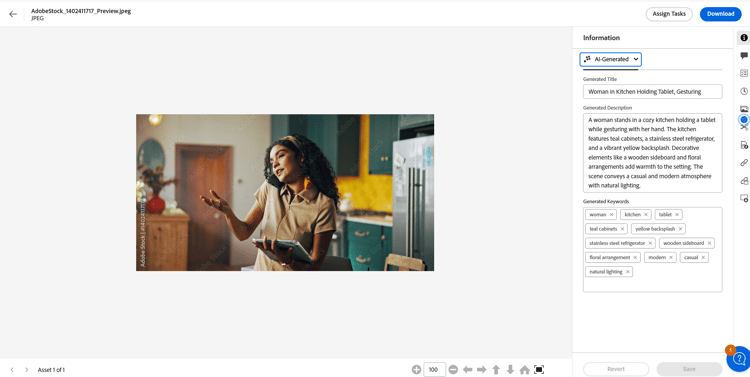
The enhanced smart tags feature uses Artificial Intelligence (AI) to automatically generate descriptive metadata—titles, descriptions, and keywords—for uploaded image assets, improving content discovery and reducing manual tagging effort. To use the enhanced smart tags feature, execute the following steps:
-
In the Experience Manager interface, go to the desired folder and click Add Assets. Supported image file formats include
png,jpg,jpeg,psd,tiff,gif,webp,crw,cr2,3fr,nef,arw, andbmp. -
Wait until the newly uploaded asset is processed. Processing is required because Experience Manager analyzes the asset during this stage and generates its AI metadata; the smart tags become available only after processing completes. Once done, go to asset details.
-
Go to the AI-Generated tab, which contains the AI-produced metadata fields for the asset. If the Experience Manager version is incompatible or not updated, this tab is not visible. The following fields are there:
- Generated title: The title provides a clear and concise headline that captures the core idea of an uploaded asset, making it easy to understand at a glance. When adding an asset, if you provide a title (in
dc:title), Experience Manager displays that provided title in the assets browse view. If the title is left blank, Experience Manager automatically assigns an AI-generated title in its place, so every asset always carries a meaningful headline. - Generated description: The description gives a brief yet informative summary of what the asset is about, helping users and the search module (content discovery engine) quickly grasp its relevance and surface the asset in relevant searches.
- Generated keywords: The keywords are targeted terms that represent the main themes of an asset, aiding in tagging and content filtering. Accurate keywords improve searchability and make it easier to organize and retrieve assets across large libraries.
- Generated title: The title provides a clear and concise headline that captures the core idea of an uploaded asset, making it easy to understand at a glance. When adding an asset, if you provide a title (in
-
[Optional] You may add additional tags or create your own if you feel any relevant tags are missing. To do this, write your tags in the Generated keywords field and click Save.
For information on how to disable AI-generated metadata, see Disable AI-generated metadata.
See also
- Translate Assets
- Assets HTTP API
- Assets supported file formats
- Search assets
- Connected assets
- Asset reports
- Metadata schemas
- Download assets
- Manage metadata
- Manage Dynamic Media templates
- Manage reports in Assets view
- Search facets
- Manage collections
- Bulk metadata import
- Publish Assets to AEM and Dynamic Media