在此頁面上:根據歷程屬性、設定檔屬性或AI分數建立排名公式,以便在套用歷程上限時為每個設定檔選取最佳歷程。
Adobe Journey Optimizer可協助您控制當設定檔符合超出系統允許範圍的資格時,可輸入哪些歷程。 若要這麼做,您可以使用規則集來定義歷程專案或並行的最大值。 當設定檔符合的歷程數量超過上限允許時,指派給每個歷程的優先順序將決定選取的歷程。
您也可以使用排名公式,以根據歷程屬性、設定檔屬性或AI模型分數來動態調整歷程排名,而不使用優先順序。
公式可提供比靜態優先順序更大的彈性。 例如,您可以促進金級忠誠會員的歷程。
建立排名公式 create-journey-ranking-formula
若要建立歷程的排名公式,請遵循下列步驟。
-
存取 協調流程排名 區段,然後選取 排名公式 索引標籤。 此時會顯示先前建立的公式清單。
-
按一下建立公式。
-
指定公式名稱,並視需要新增說明。
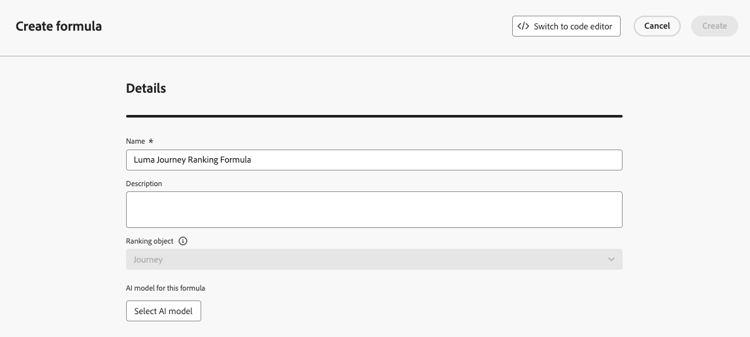
note NOTE 排名物件是將套用排名公式的實體。 依預設,排名物件設定為歷程。 -
或者,按一下 選取AI模型 以設定模型,此模型將作為建立排名公式的參考。 了解更多
-
在 條件1 區段中,執行下列動作,指定您要套用排名分數的歷程:
- 選取歷程屬性 (例如歷程名稱、標籤、優先順序或其他歷程屬性);
- 選取邏輯運運算元;
- 新增符合條件 — 您可以輸入/選取值,或選擇設定檔屬性。
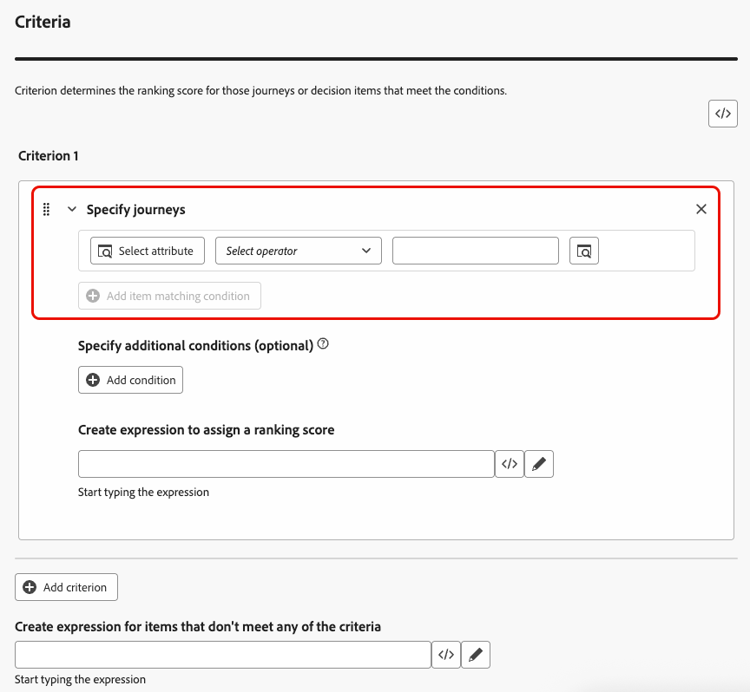
-
或者,您可以指定其他元素,將條件的符合條件調整為true。
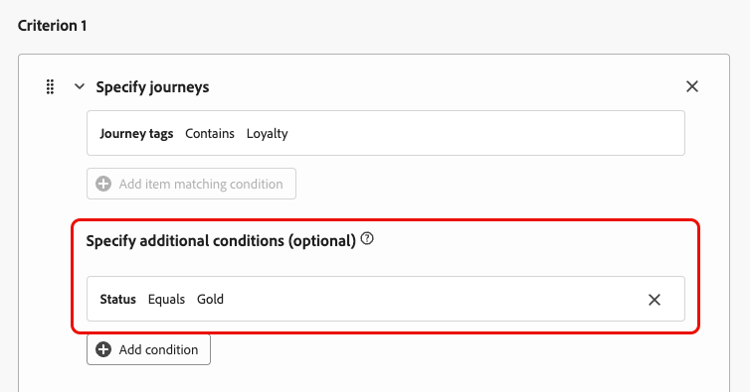
例如,您已定義條件1 (例如歷程標籤)包含忠誠度。 此外,您可以新增其他條件,例如,如果 忠誠度狀態 等於黃金,則 條件1 為true。
-
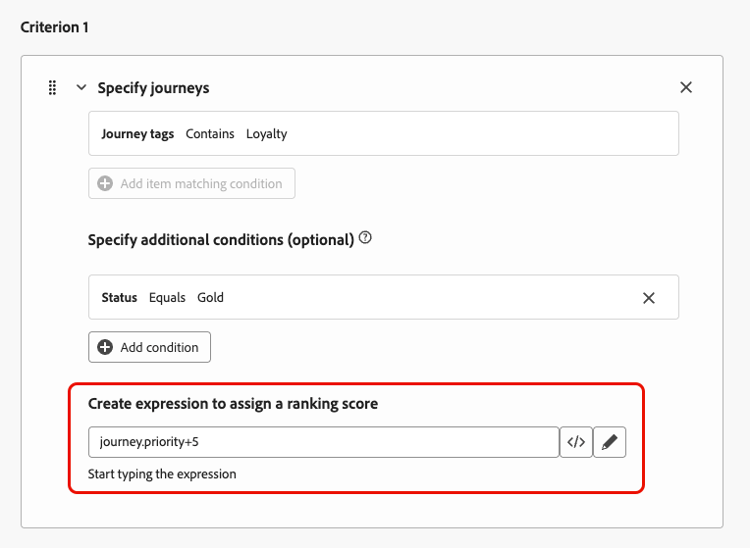
建立運算式,將排名分數指派給符合上述條件之歷程。 您可以參考下列任一專案:
-
變數:
- 歷程優先順序,這是在建立歷程時指派給歷程的手動值;
- 來自於您在上方選擇選取的AI模型分數;
-
屬性:
- 可能存在於設定檔上的任何屬性,例如任何外部衍生的傾向分數;
- 歷程屬性;
-
能以自由格式指派的靜態值;
-
以上各項的組合。
-
-
按一下[新增條件],視需要多次新增一或多個條件。 邏輯如下:
- 如果指定決策專案的第一個條件為true,則其優先於下一個條件。
- 如果不為true,則決策引擎會繼續執行第二個標準,以此類推。
-
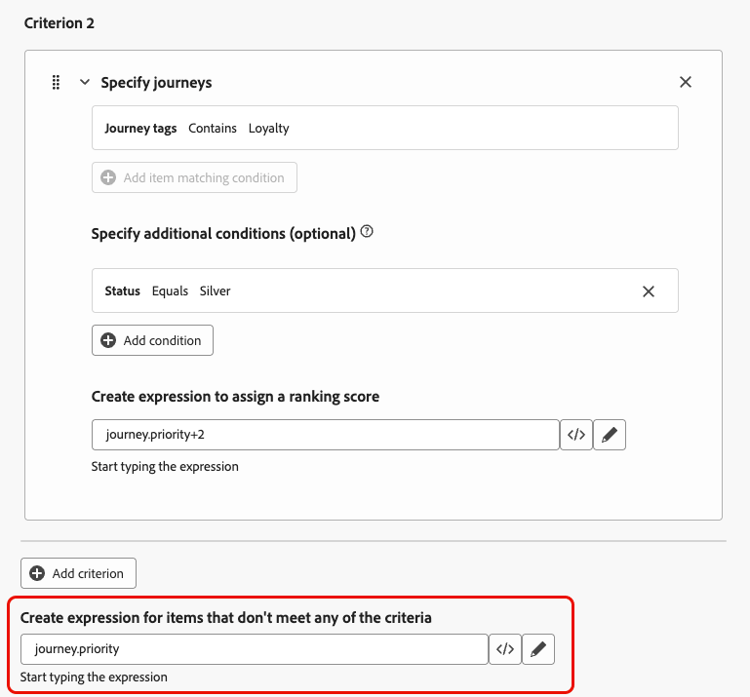
定義所有條件後,在最後一個欄位中,您可以建立運算式,將指派給不符合上述條件的所有歷程。
不符合任何條件的歷程的
-
按一下 建立 以完成您的排名公式。
您現在可以從清單中選取此公式以檢視其詳細資訊,並編輯或刪除它。 然後,當您設定規則集時即可使用該功能。 了解作法
排名公式範例 journey-ranking-formula-example
請參考下列範例。
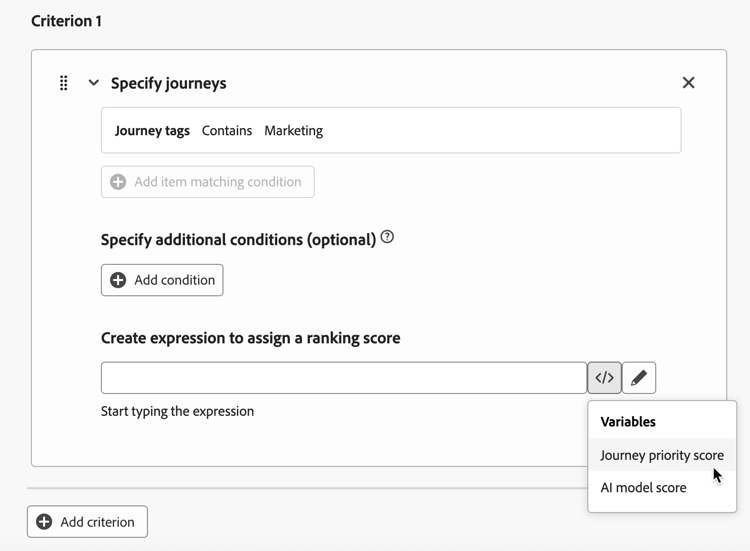
如果歷程有「行銷」標籤,則排名分數是歷程優先順序。
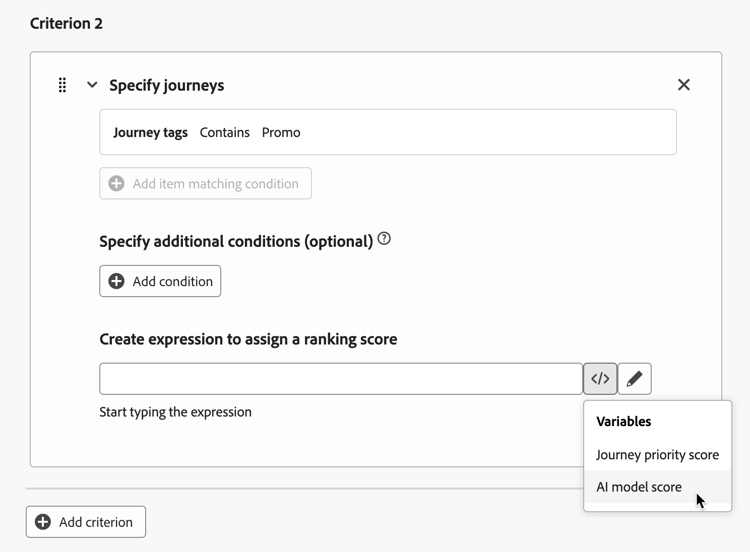
如果歷程有「促銷」標籤,則排名分數是AI模型分數。
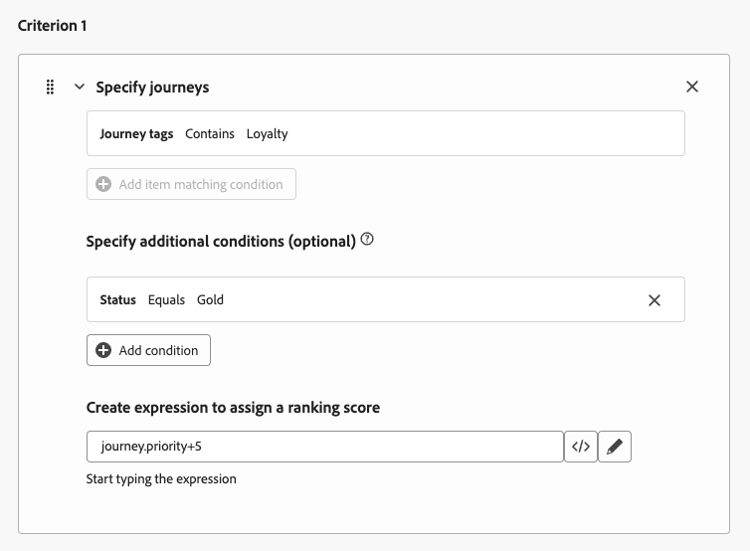
如果歷程具有「忠誠度」標籤,且設定檔的忠誠度狀態為「金級」,則使用的排名分數是歷程優先順序加5。
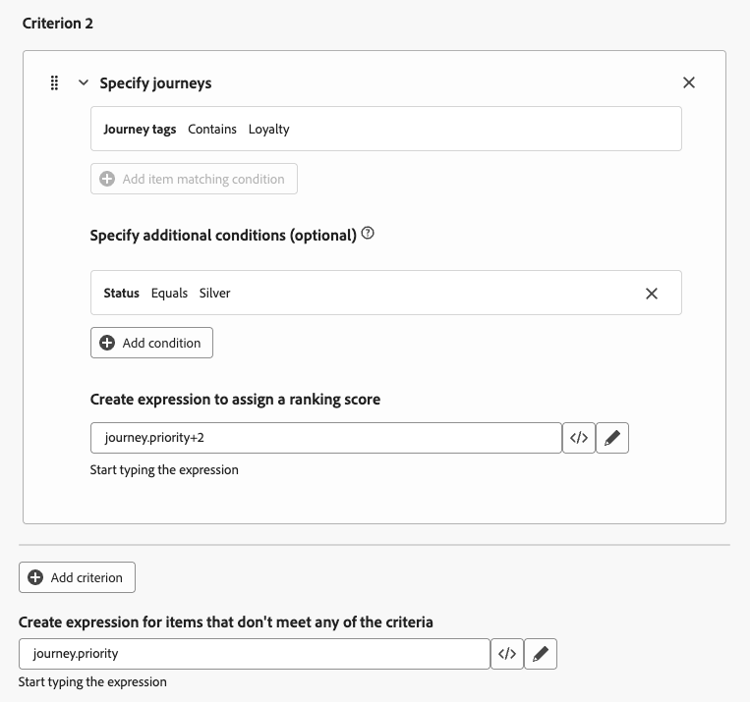
如果歷程具有「忠誠度」標籤,且設定檔的忠誠度狀態為「銀級」,則排名分數為歷程優先順序加2。
如果不符合上述任何條件,則使用的排名分數是歷程優先順序。
使用程式碼編輯器 journey-ranking-formula-code-editor
若要以 PQL語法 表示排名公式,請使用熒幕右上角的專用按鈕切換至程式碼編輯器。 如需如何使用PQL語法的詳細資訊,請參閱專屬檔案。
然後,您可以利用歷程屬性、設定檔屬性和靜態值來建立排名公式。
將公式指派給規則集 assign-formula-to-ruleset
若要使用公式來排名您的歷程,您必須將其指派給規則集。
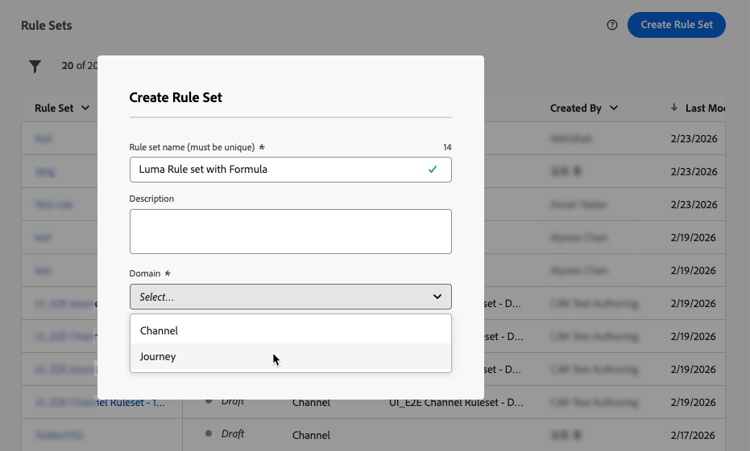
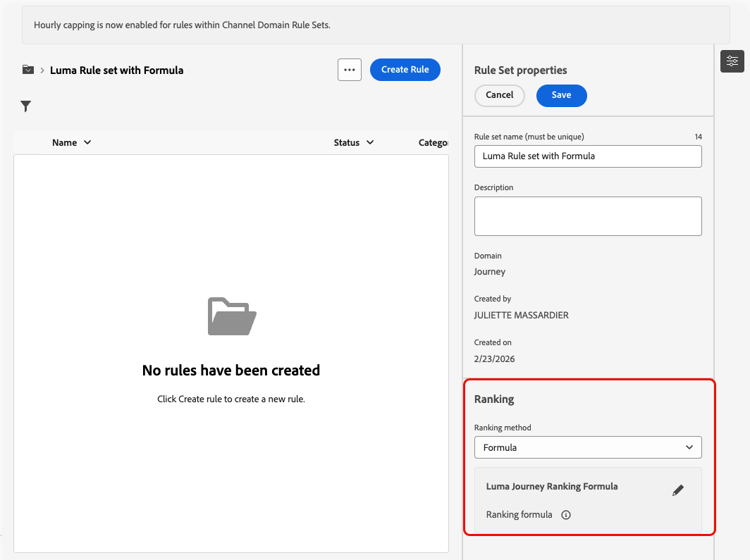
現在,公式已指派給規則集。 然後,您可以將該規則集套用至您的歷程。
將規則集套用至歷程 assign-rule-set-to-journey
若要將規則集指派給歷程,請遵循下列步驟。
套用上限時,使用此規則集的所有歷程都會依選取的公式排名。
若要監視規則集和排名公式的執行方式,請參閱概述報告中的歷程上限和衝突區段。 若要在資料湖層級調查捨棄,並識別設定檔是否因為達到上限(CAP_REACHED)或較低優先順序(LOWER_PRIORITY)而遭到排除,請使用此區段中可用的查詢。
This section contains structured knowledge intended to support interpretation, retrieval, and question answering related to this topic.
For complete understanding, this information should be combined with the documentation on this page. Neither source is intended to stand alone; the page describes the feature, while this section provides additional context that helps disambiguate terminology, intent, applicability, and constraints.
- TL;DR: This page explains how to create ranking formulas that dynamically rank journeys based on journey attributes, profile attributes, or AI model scores, and how to assign them to a rule set so the best journey is selected per profile when journey caps apply.
Intents:
- Create a ranking formula with one or more criteria in Orchestration ranking > Ranking formulas
- Assign ranking scores using variables (journey priority, AI model score), attributes, static values, or a combination
- Optionally reference an AI model with Select AI model
- Express a formula in PQL syntax using the code editor
- Assign the formula to a journey-domain rule set and apply that rule set to journeys
Glossary:
- Ranking formula: Dynamically adjusts the ranking of journeys based on journey attributes, profile attributes, or AI model scores (product-specific)
- Ranking object: The entity that the formula applies to; by default set to Journey (product-specific)
- Journey priority: A manual value assigned to the journey when creating it (product-specific)
- Ranking method: Rule set setting that selects Formula instead of the default Priority (product-specific)
- Criterion: A condition (journey attribute, logical operator, matching condition) with an expression that assigns a ranking score (product-specific)
Guardrails:
- This feature is currently in Limited Availability; contact your Adobe representative to gain access.
- Ranking formulas are only available to organizations that have purchased the Decisioning add-on offering.
- Formulas are assigned at the rule set level, not on individual journeys.
- To use a formula, set the rule set Ranking method to Formula instead of the default Priority, and select the Journey domain.
- Switching to the code editor (PQL syntax) will prevent you from reverting back to the default builder view for this formula.
- Only one rule set can be applied to a journey at a time.
- Criterion logic: if the first criterion is true for a decision item it takes precedence over the next ones; otherwise the decisioning engine moves on to the next criterion, and so on.
- Examples on the page: journey priority; journey priority plus 5 (Loyalty tag with Gold status); journey priority plus 2 (Loyalty tag with Silver status).
Terminology:
- Canonical name: ranking formula — variants: ranking formulas, formula
- Synonyms: none
- Do not confuse: “ranking formula” (dynamically adjusts the ranking of journeys) ≠ “journey priority” (a manual value assigned to the journey) ≠ “AI model score” (the score that came out of the AI model, which can be referenced in a formula)
- Do not confuse: “Formula” ranking method ≠ “Priority” ranking method (the default)
FAQ:
- Q: What can a ranking formula reference? — A variable (journey priority or AI model score), an attribute (profile or journey attribute), a static value, or a combination of these.
- Q: How is precedence decided across criteria? — The first criterion that is true for a decision item takes precedence; otherwise the decisioning engine evaluates the next criterion.
- Q: Are formulas assigned per journey? — No, formulas are assigned at the rule set level; the rule set is then applied to journeys.
- Q: What happens if I switch to the code editor? — You express the formula in PQL syntax, and this prevents reverting back to the default builder view for that formula.
- Q: When is the formula applied? — When the cap is applied; all journeys using the rule set are ranked with the selected formula.